CHECK constraints and NULL do not get along the way you expect. A CHECK rejects a row only when the test is false. When the value is missing, the test is unknown, and unknown passes.

The row nobody expected
Picture a junior DBA asking, “I added CHECK (Quantity > 0). Why is there a row with no quantity?” It is a fair question. The word “check” sounds strict. The rule is narrower than it sounds.
SQL has three outcomes for a test: true, false and unknown. Comparing NULL with anything gives unknown. A CHECK constraint says no only to false. So NULL slips through.
Let me show it with a temporary table. Row 1 has a NULL quantity, row 2 has a good one. The demo uses temp tables only, so nothing stays behind.
DROP TABLE IF EXISTS #QuantityDemo;

CREATE TABLE #QuantityDemo (
    Id       int PRIMARY KEY,
    Quantity int NULL CHECK (Quantity > 0));

INSERT #QuantityDemo VALUES (1, NULL), (2, 1);

BEGIN TRY
    INSERT #QuantityDemo VALUES (3, -1);
END TRY
BEGIN CATCH
    SELECT ERROR_NUMBER() AS CheckErrorNumber;
END CATCH;

SELECT Id, Quantity FROM #QuantityDemo ORDER BY Id;
Both good inserts worked, the NULL row included. The negative one failed with error 547, the CHECK violation. The table holds exactly two rows, the NULL row and the quantity 1 row.

Count the three kinds of rows
Now count the rows in three different ways. This is where reports quietly go wrong. A row can be positive, not positive, or missing, and the last group is easy to lose.
SELECT COUNT(*) AS AllRows,
       COUNT(Quantity) AS KnownQuantities,
       SUM(CASE WHEN Quantity > 0 THEN 1 ELSE 0 END) AS PositiveRows,
       SUM(CASE WHEN NOT (Quantity > 0) THEN 1 ELSE 0 END) AS NotPositiveRows,
       SUM(CASE WHEN Quantity IS NULL THEN 1 ELSE 0 END) AS MissingRows
FROM #QuantityDemo;
The counts are 2 rows, 1 known quantity, 1 positive, 0 not positive and 1 missing. Look at NotPositiveRows. You might expect the NULL row to be “not positive.” It is not. NOT of unknown is still unknown, so the row lands in neither bucket.
The same thing happens in a WHERE clause. WHERE Quantity > 0 keeps only true rows, and WHERE NOT (Quantity > 0) also keeps only true rows. The NULL row is in neither list, so a report built from those two filters will not add up to the total.
Say that the value is required
If a quantity is required, say so with NOT NULL. The CHECK handles the range, and NOT NULL handles presence. Two rules, two jobs.
CREATE TABLE #RequiredDemo (Quantity int NOT NULL CHECK (Quantity > 0));

BEGIN TRY
    INSERT #RequiredDemo VALUES (NULL);
END TRY
BEGIN CATCH
    SELECT ERROR_NUMBER() AS RequiredErrorNumber;
END CATCH;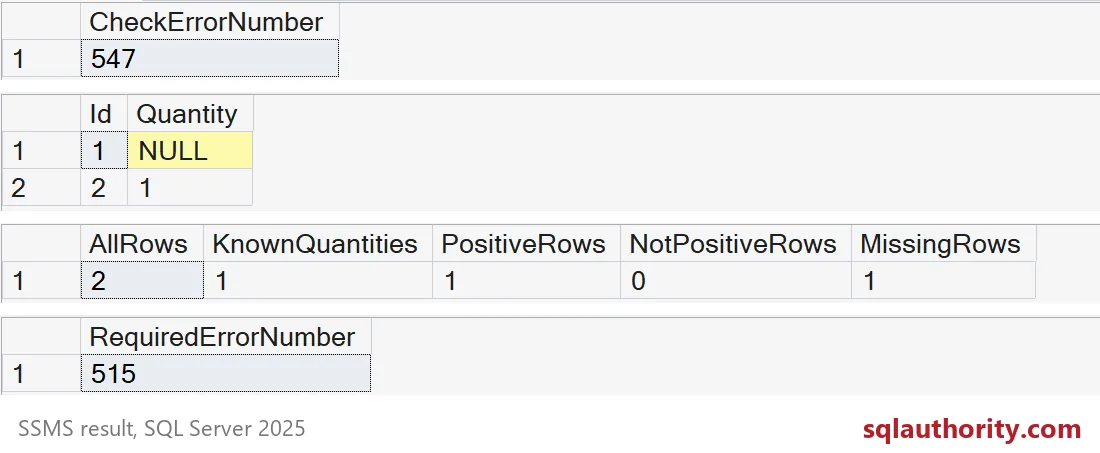
The last grid shows error 515, the NULL violation. Now a missing quantity cannot get in at all.
A default does not rescue an explicit NULL
One more trap. People add DEFAULT 1 and assume NULL is gone. A default fills in a column you leave out. It does nothing when you type NULL on purpose.
CREATE TABLE #DefaultDemo (Id int PRIMARY KEY, Quantity int NULL DEFAULT 1);

INSERT #DefaultDemo (Id) VALUES (1);
INSERT #DefaultDemo (Id, Quantity) VALUES (2, NULL);

SELECT Id, Quantity FROM #DefaultDemo ORDER BY Id;
Row 1 got quantity 1 from the default. Row 2 kept its NULL.
Tightening an old table
Before you add NOT NULL to a table that already has data, look for the missing values first. Run a query with IS NULL and decide what each row should become. Please do not invent a fake zero. Zero means “none,” and NULL means “we do not know.” Those are different facts.
SELECT Id FROM #QuantityDemo WHERE Quantity IS NULL ORDER BY Id;

DROP TABLE IF EXISTS #DefaultDemo;
DROP TABLE IF EXISTS #RequiredDemo;
DROP TABLE IF EXISTS #QuantityDemo;
Next time you write a CHECK, ask what it does with NULL.
A CHECK constraint is not a required-value rule, it is a test that rejects only false.
Published by Pinal Dave on SQLAuthority. More of my work at pinaldave.com.
Discover more from SQL Authority with Pinal Dave
Subscribe to get the latest posts sent to your email.