LIKE character ranges such as [a-f] do not mean what they look like, because the collation decides which characters sit between a and f. The same pattern can accept or reject the same letter on two servers. Let me show you.

The product code that let the wrong things in
Imagine a junior developer who needs product codes to start with a letter from A to F. They write LIKE '[A-F]%', test it with Apple, and ship it. A week later, an accented code and a lowercase code are both sitting in the table. Nobody did anything silly. The pattern just never meant “ASCII letters A to F”.
A range inside brackets means “everything that sorts between these two characters”. Sorting is the job of the collation. So I name the collation in every demo below, which means your database default cannot change the answers.
Two collations, two answers
Here are five codes, tested with the same pattern under a linguistic collation and a binary one. The accented capital E in Éclair is built with NCHAR(201), so the script behaves the same whatever file encoding your editor uses.
DECLARE @codes table(Id int NOT NULL PRIMARY KEY, Code nvarchar(20));
INSERT @codes VALUES
    (1, N'Apple'), (2, N'apple'), (3, NCHAR(201) + N'clair'), (4, N'123X'), (5, N'X123Y');
SELECT Code,
       CASE WHEN Code COLLATE Latin1_General_100_CI_AI LIKE N'[A-F]%'
            THEN 1 ELSE 0 END AS LinguisticMatch,
       CASE WHEN Code COLLATE Latin1_General_100_BIN2 LIKE N'[A-F]%'
            THEN 1 ELSE 0 END AS BinaryMatch
FROM @codes ORDER BY Id;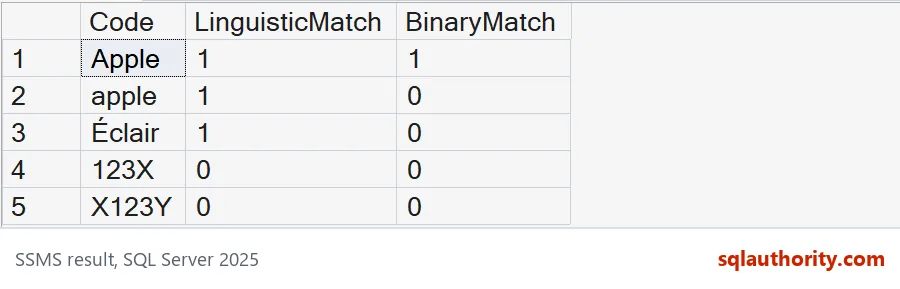
The linguistic collation ignores case and accents, so it matches Apple, apple and Éclair. The binary one compares raw character codes, so it matches only Apple. The digit-leading and X-leading codes fail both. Neither answer is a bug. They answer different questions.
The surprise inside a case-sensitive collation
This one catches experienced people. Try a lowercase range under a case-sensitive collation and look at F.
SELECT v.Letter,
       CASE WHEN v.Letter COLLATE Latin1_General_100_CS_AS LIKE N'[a-f]'
            THEN 1 ELSE 0 END AS CaseSensitive,
       CASE WHEN v.Letter COLLATE Latin1_General_100_BIN2 LIKE N'[a-f]'
            THEN 1 ELSE 0 END AS Binary
FROM (VALUES (1, N'a'), (2, N'B'), (3, N'f'), (4, N'F'), (5, N'g')) AS v(Id, Letter)
ORDER BY v.Id;
Under the case-sensitive collation, lowercase a and f match, and so does capital B. Capital F does not. In that sort order each lowercase letter comes just before its capital, so the range a to f ends at lowercase f and stops. The binary column behaves the way most people expect: only a and f match.

Finding digits is not validating a value
A percent sign allows any text around the pattern. A caret inside brackets means “any character except these”. Neither one anchors a pattern to the whole value, so these two queries answer very different questions.
SELECT Code
FROM (VALUES (1,N'X123Y'), (2,N'123'), (3,N'A12')) AS c(Id,Code)
WHERE Code COLLATE Latin1_General_100_BIN2 LIKE N'%[0-9][0-9][0-9]%'
ORDER BY Id;

SELECT Code
FROM (VALUES (1,N'A1'), (2,N'12'), (3,N'')) AS c(Id,Code)
WHERE Code COLLATE Latin1_General_100_BIN2 LIKE N'[^0-9]%'
ORDER BY Id;
The first query returns X123Y and 123, because both contain three digits in a row. The second returns only A1, the one value that starts with a non-digit. The empty string has no first character, so it matches nothing. Finding a run of digits does not prove the value is a clean number.
Write an exact three-digit rule
To accept only three digits, reject anything that is not a digit, and check the length. NULL needs its own branch, otherwise it quietly falls into the invalid pile. Row 6 holds the full-width digits 1, 2 and 3, built with NCHAR(65297) to NCHAR(65299). They look like numbers but they are different characters.
SELECT Code,
       CASE WHEN Code IS NULL THEN 'missing'
            WHEN LEN(Code) = 3
             AND Code COLLATE Latin1_General_100_BIN2 NOT LIKE N'%[^0-9]%'
            THEN 'valid' ELSE 'invalid' END AS Validation
FROM (VALUES
    (1, CONVERT(nvarchar(20), N'123')),
    (2, N'123X'), (3, N''), (4, N'12 '), (5, NULL), (6, NCHAR(65297) + NCHAR(65298) + NCHAR(65299)), (7, N'1234')
) AS c(Id,Code)
ORDER BY Id;
Only 123 is valid. The value with a trailing space, the empty one, 123X, 1234 and the full-width digits are all invalid, and the NULL row is labeled missing. Decide whether NULL is allowed before you turn a rule like this into a constraint.
When REGEXP_LIKE says it more clearly
SQL Server 2025 also has REGEXP_LIKE, which needs compatibility level 170. The first query shows the level of the test database. The pattern below is anchored at both ends, so it checks the whole value.
SELECT compatibility_level AS TestedCompatibility
FROM sys.databases WHERE database_id = DB_ID();

SELECT Code
FROM (VALUES (1,N'123'), (2,N'123X'), (3,N''), (4,NCHAR(65297) + NCHAR(65298) + NCHAR(65299))) AS c(Id,Code)
WHERE REGEXP_LIKE(Code, N'^[0-9]{3}$')
ORDER BY Id;
The database reports 170, and the query returns only 123. The explicit digit class keeps the full-width digits out, even though they look like 123. Whichever style you use, keep a few accepted and rejected examples next to the rule. Then a later collation change cannot slip past you.
Pick the alphabet first, then test the pattern with values that are not on the happy path.
A character range is not a universal alphabet, it is a pattern interpreted under a collation.
Published by Pinal Dave on SQLAuthority. More of my work at pinaldave.com.
Discover more from SQL Authority with Pinal Dave
Subscribe to get the latest posts sent to your email.