To validate a date with regex in SQL Server 2025, you need two checks, because a pattern only tests shape. A simple pattern can recognize four digits, a hyphen, two digits, another hyphen and two digits. It can’t tell whether that day exists.

Take 2026-02-30. It has the same shape as 2026-02-28, but February doesn’t have thirty days. I use REGEXP_LIKE for the shape and TRY_CONVERT for the calendar. When the input must be YYYY-MM-DD, I require both.
Ask Two Different Questions
A strict YYYY-MM-DD rule asks two things. Does the text have the required shape? Can SQL Server convert it to a real calendar date? Neither check answers the other question.
REGEXP_LIKE is new in SQL Server 2025 and needs database compatibility level 170. At level 160 the same query failed with Msg 195, 'REGEXP_LIKE' is not a recognized built-in function name. I tested everything here on build 17.0.5015.4.
Run the Comparison
The sample uses only literal strings, so it creates nothing and changes no data.
SET NOCOUNT ON;
SELECT v.DateText,
       CASE WHEN REGEXP_LIKE(v.DateText,
           '^[0-9]{4}-[0-9]{2}-[0-9]{2}$')
           THEN 1 ELSE 0 END AS MatchesFormat,
       TRY_CONVERT(date, v.DateText, 23) AS ActualDate,
       CASE WHEN REGEXP_LIKE(v.DateText,
           '^[0-9]{4}-[0-9]{2}-[0-9]{2}$')
           AND TRY_CONVERT(date, v.DateText, 23) IS NOT NULL
           THEN 1 ELSE 0 END AS ValidISODate
FROM (VALUES ('2026-02-28'), ('2026-02-30'),
('2026-2-8'), ('not-a-date')) AS v(DateText);| DateText | MatchesFormat | ActualDate | ValidISODate |
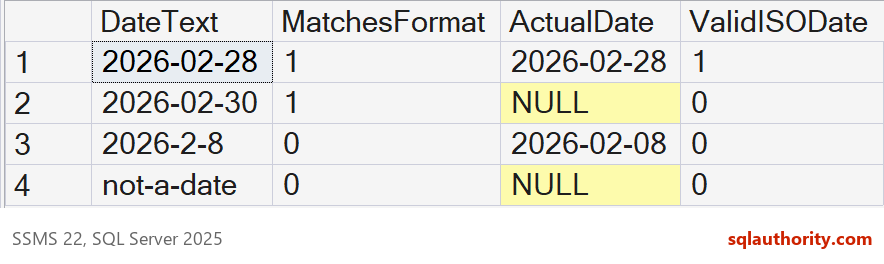
|---|---|---|---|
| 2026-02-28 | 1 | 2026-02-28 | 1 |
| 2026-02-30 | 1 | NULL | 0 |
| 2026-2-8 | 0 | 2026-02-08 | 0 |
| not-a-date | 0 | NULL | 0 |
The Two Surprising Rows
2026-02-30 passes the pattern, because the pattern checks digits and separators. It doesn’t know how many days February has. TRY_CONVERT returns NULL, so the combined check rejects the value.
2026-2-8 is the opposite problem. SQL Server converts it to February 8, but the text lacks the two-digit month and day. If the contract says YYYY-MM-DD, conversion alone is too permissive.
A Stricter Pattern Still Isn’t Enough
It’s tempting to fix the pattern instead. I limited the month to 01 through 12 and the day to 01 through 31. That rejects month 13 and day 00, and it still accepts impossible days.
SELECT v.DateText,
       CASE WHEN REGEXP_LIKE(v.DateText,
           '^[0-9]{4}-(0[1-9]|1[0-2])-(0[1-9]|[12][0-9]|3[01])$')
           THEN 1 ELSE 0 END AS StrictShape,
       TRY_CONVERT(date, v.DateText, 23) AS ActualDate
FROM (VALUES ('2026-02-30'), ('2026-04-31'), ('2026-13-01'),
             ('2026-00-10'), ('2024-02-29'), ('2023-02-29'),
             ('0000-01-01')) AS v(DateText);
April 31, February 29 in a non-leap year and year 0000 all passed the stricter shape. Only 2024-02-29, a real leap day, converted. A pattern that knew every month length and leap year would be long and hard to read. I leave the calendar to the engine.
What TRY_CONVERT Accepts on Its Own
Conversion is forgiving. With style 23, TRY_CONVERT accepted 20260228 and 2026/02/28. It also accepted a value with a time, a T separator and a leading space. Only 28-02-2026 returned NULL. All of those fail the strict shape, which is why the shape check stays.
SELECT v.DateText,
       CASE WHEN REGEXP_LIKE(v.DateText, '^[0-9]{4}-[0-9]{2}-[0-9]{2}$') THEN 1 ELSE 0 END AS MatchesFormat,
       TRY_CONVERT(date, v.DateText, 23) AS Style23
FROM (VALUES ('20260228'), ('2026/02/28'), ('2026-02-28 10:30'),
             ('2026-02-28T10:30:00'), (' 2026-02-28'), ('28-02-2026')) AS v(DateText);
The language setting didn’t change the answer. After SET LANGUAGE British and SET LANGUAGE French, style 23 still read 2026-02-08 as February 8. That is why I pass the style every time.
Anchors and Odd Characters
The ^ and $ anchors matter. A trailing line feed failed both the [0-9] and \d versions of the pattern. Conversion returned NULL too. A trailing space also failed the shape, although conversion accepted it. Arabic-Indic digits failed both patterns.
SELECT x.Label,
       CASE WHEN REGEXP_LIKE(x.DateText, '^[0-9]{4}-[0-9]{2}-[0-9]{2}$') THEN 1 ELSE 0 END AS ShapeDigitsClass,
       CASE WHEN REGEXP_LIKE(x.DateText, '^\d{4}-\d{2}-\d{2}$') THEN 1 ELSE 0 END AS ShapeBackslashD,
       TRY_CONVERT(date, x.DateText, 23) AS Converted
FROM (VALUES ('plain', CAST('2026-02-28' AS nvarchar(30))),
             ('trailing LF', '2026-02-28' + NCHAR(10)),
             ('trailing space', '2026-02-28 '),
             ('arabic-indic digits', N'٢٠٢٦-٠٢-٢٨')) AS x(Label, DateText);
Enforce Both Checks With a Constraint
A CHECK constraint can hold both conditions. The constraint accepted 2026-02-28 and rejected the other two rows with Msg 547.
CREATE TABLE dbo.ImportRows
(
    RowId int IDENTITY(1,1) PRIMARY KEY,
    ShipDateText varchar(10) NOT NULL,
    CONSTRAINT CK_ImportRows_ShipDate CHECK
        (REGEXP_LIKE(ShipDateText, '^[0-9]{4}-[0-9]{2}-[0-9]{2}$')
         AND TRY_CONVERT(date, ShipDateText, 23) IS NOT NULL)
);
INSERT INTO dbo.ImportRows (ShipDateText) VALUES ('2026-02-28');
INSERT INTO dbo.ImportRows (ShipDateText) VALUES ('2026-02-30');
INSERT INTO dbo.ImportRows (ShipDateText) VALUES ('2026-2-8');
SELECT RowId, ShipDateText FROM dbo.ImportRows;
Find the Bad Rows Before Loading
For an existing staging table, I label each row instead of rejecting it. The order of the CASE branches gives each bad row one reason. Missing values get their own label, because NULL fails both checks silently.
CREATE TABLE dbo.Staging (RowId int IDENTITY(1,1) PRIMARY KEY, ShipDateText varchar(20) NULL);
INSERT INTO dbo.Staging (ShipDateText)
VALUES ('2026-03-01'), ('2026-02-30'), ('2026-2-8'), (NULL), ('2025-12-31'), ('');
SELECT RowId, ShipDateText,
       CASE WHEN ShipDateText IS NULL THEN 'missing'
            WHEN NOT REGEXP_LIKE(ShipDateText, '^[0-9]{4}-[0-9]{2}-[0-9]{2}$') THEN 'wrong shape'
            WHEN TRY_CONVERT(date, ShipDateText, 23) IS NULL THEN 'not a real date'
            ELSE 'ok' END AS Problem
FROM dbo.Staging ORDER BY RowId;
DROP TABLE dbo.Staging;
DROP TABLE dbo.ImportRows;
The empty string came back as a wrong shape, and the two good rows as ok. I fix the source file first and the pattern last, because a looser pattern only hides bad data.
Choose the Check That Matches Your Input Contract
If your application accepts several date spellings, a successful conversion is enough. If an import specification fixes the spelling, require both checks. Decide separately what a missing value means. A NULL isn’t a bad date, it is no date, and your rules should say whether it is allowed.
Keeping the two checks apart also keeps the code readable. The next person can see that one condition tests the text and the other tests the calendar. A single giant pattern hides that difference.
For a related file-processing example, see Parsing File Name Dates to Find the Newest Backup With REGEXP_SUBSTR.
A matching shape is not a real date, it is only the first of two checks.
Published by Pinal Dave on SQLAuthority. More of my work at pinaldave.com.
Discover more from SQL Authority with Pinal Dave
Subscribe to get the latest posts sent to your email.