
Finding un-matching records, like products that never sold, is a very common task. Answer simple quiz at the end of the blog post and –
Every day one winner from India will get Joes 2 Pros Volume 1.
Every day one winner from United States will get Joes 2 Pros Volume 1.
Finding un-matching Records
Often time we want to find records in one table that have no matching key in another table. This is common for things like finding products that have never sold, or students who did not re-enroll. Something we were expecting is missing. Records in one table were expecting some related activity in another table and did not find them. There are many ways to find these records.
Basic Subquery
We have probably all heard that subqueries should be avoided if there is a better solution. Often times basic subqueries are used where a simple “Unmatched Records Query” could have been used.
Let’s start off with the subquery example. Looking at the Location table in the figure below we see all the data. In fact, this table does not allow nulls for the LocationID field. Looking further, there are no nulls anywhere in the Location table. So does this mean that all locations have at least one employee? It’s possible that some of these locations might be new and have not employees working there yet.
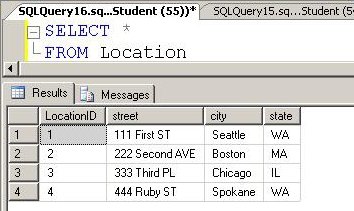
How can we find the location with no employees. We can use a subquery. For example we can use the following query to find all locations of the JProCo database that have now employee working there.
SELECT *
FROM Location
WHERE LocationID
NOT IN (SELECT DISTINCT LocationID
FROM Employee
WHERE LocationID IS NOT NULL)
Unmatched Records Queries
If you wanted to find all locations with no employees, you could run an “Unmatched Records Query”. Let’s build this piece by piece. In this case, we have to join the Location table with the Employee table to determine the location that has no employees. What type of join will tell us this? Since nulls don’t map through a join, the INNER JOIN drops the record from the result set and we won’t see Chicago. The outer join will show both the matches and the unmatched records, so we see every location. In the figure below we get all location even if there are no employees.
Notice Seattle is listed many times but Chicago is listed once with no employees found. A NULL appears in the fields from the Employee table for Chicago. With the Location table on the left and the NULL on the right, we have part of an unmatched records query. To find just the records that don’t match, we look for null records on the table that the outer join does not favor. In this case, it’s the Employee table.
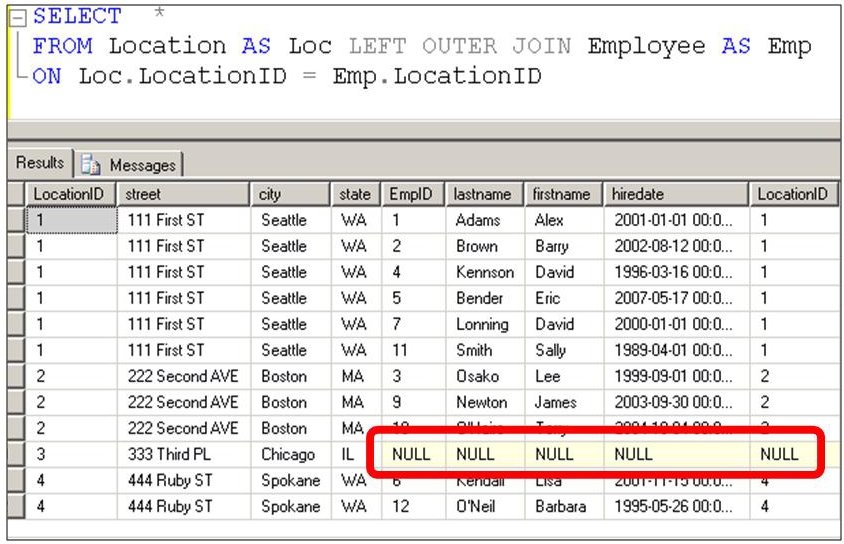
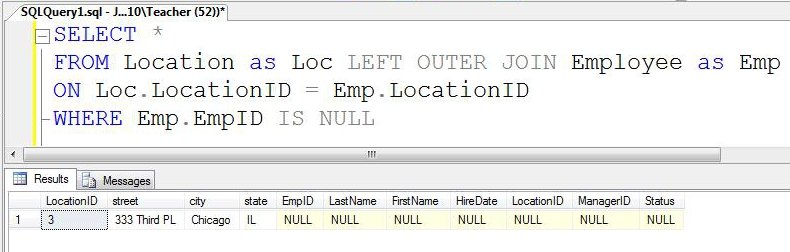
The outer join will show us the unmatched records with null location details if you set the WHERE clause to look for nulls on a field in the non-dominant table. Unmatched record queries use SQL to return a result set displaying only the unmatched records between the two tables.
When our query criterion specifies NULL, only Chicago shows up in our result set. By doing a LEFT OUTER JOIN and using a NULL value from the Employee table (or “RIGHT” table) as our search condition criteria, our unmatched records query shows us one record.
Note: If you want to setup the sample JProCo database on your system you can watch this video.
Question 5
Q 5) Which of the following queries will show all location that have no employees?
- SELECT P.EmployeeID, T.[Name]
FROM Employee P LEFT OUTER JOIN Location T
ON T.TerritoryID = P.TerritoryID
WHERE T.TerritoryID IS NULL - SELECT P.EmployeeID, T.[Name]
FROM Employee P LEFT OUTER JOIN Location T
ON T.TerritoryID = P.TerritoryID
WHERE P.TerritoryID IS NULL - SELECT P.EmployeeID, T.[Name]
FROM Employee P RIGHT OUTER JOIN Location T
ON T.TerritoryID = P.TerritoryID
WHERE T.TerritoryID IS NULL - SELECT P.EmployeeID, T.[Name]
FROM Employee P RIGHT OUTER JOIN Location T
ON T.TerritoryID = P.TerritoryID
WHERE P.TerritoryID IS NULL
Please post your answer in comment section to win Joes 2 Pros books.
Rules:
Please leave your answer in comment section below with correct option, explanation and your country of resident.
Every day one winner will be announced from United States.
Every day one winner will be announced from India.
A valid answer must contain country of residence of answerer.
Please check my facebook page for winners name and correct answer.
Winner from United States will get Joes 2 Pros Volume 1.
Winner from India will get Joes 2 Pros Volume 1.
The contest is open till next blog post shows up at which is next day GTM+2.5.
Published by Pinal Dave on SQLAuthority. More of my work at pinaldave.com.



135 Comments. Leave new
Hi Pinal,
Correct Answer is Option 4
SELECT P.EmployeeID, T.[Name]
FROM Employee P RIGHT OUTER JOIN Location T
ON T.TerritoryID = P.TerritoryID
WHERE P.TerritoryID IS NULL
Thanks,
Fazal(India)
Correct answer is option 4
Correct Answer is Option 4
SELECT P.EmployeeID, T.[Name]
FROM Employee P RIGHT OUTER JOIN Location T
ON T.TerritoryID = P.TerritoryID
WHERE P.TerritoryID IS NULL
Jankhana
India
Answer :
4.SELECT P.EmployeeID, T.[Name]
FROM Employee P RIGHT OUTER JOIN Location T
ON T.TerritoryID = P.TerritoryID
WHERE P.TerritoryID IS NULL
Thanks
Pawan
Country: India
Correct answer:(4)
SELECT P.EmployeeID, T.[Name]
FROM Employee P RIGHT OUTER JOIN Location T
ON T.TerritoryID = P.TerritoryID
WHERE P.TerritoryID IS NULL
by kkmishra
Answer is (4)
SELECT P.EmployeeID, T.[Name]
FROM Employee P RIGHT OUTER JOIN Location T
ON T.TerritoryID = P.TerritoryID
WHERE P.TerritoryID IS NULL
by kkmjssate
unnao(India)
The Correct Answer is
4.SELECT P.EmployeeID, T.[Name]
FROM Employee P RIGHT OUTER JOIN Location T
ON T.TerritoryID = P.TerritoryID
WHERE P.TerritoryID IS NULL
As Right Outer Join considers all the records from Right table which is Location and Matching Records from Left Table which is employees.
Where condition will filter out data of employee table and
Query retireves Locations which is not associated with Employee Table.
Location: India
The Correct answer is Option 4
4.SELECT P.EmployeeID, T.[Name]
FROM Employee P RIGHT OUTER JOIN Location T
ON T.TerritoryID = P.TerritoryID
WHERE P.TerritoryID IS NULL
cheers,
Prasad Yangamuni
INDIA (Pune)
he correct option is 4.
SELECT P.EmployeeID, T.[Name]
FROM Employee P RIGHT OUTER JOIN Location T
ON T.TerritoryID = P.TerritoryID
WHERE P.TerritoryID IS NULL
From
Vishal India
The Correct answer is 4.
4.SELECT P.EmployeeID, T.[Name]
FROM Employee P RIGHT OUTER JOIN Location T
ON T.TerritoryID = P.TerritoryID
WHERE P.TerritoryID IS NULL
Somnath Desai
India
Hi ,
I think this 4th option willl work fine only when there TerritoryId column is found in both tables we are joining,
SELECT P.EmployeeID, T.[Name]
FROM Employee P RIGHT OUTER JOIN Location T
ON T.TerritoryID = P.TerritoryID
WHERE P.TerritoryID IS NULL
Correct Answer is Option 4 as we are looking for records where there are no employee in territory hence p.TerritoryID should be NULL and all the records are brought from Location table.
Krunal K. Doshi
INDIA
Correct Answer is 4 i.e
4. SELECT P.EmployeeID, T.[Name]
FROM Employee P RIGHT OUTER JOIN Location T
ON T.TerritoryID = P.TerritoryID
WHERE P.TerritoryID IS NULL
I’m from india
Answer : 4
City: Mumbai
Country: India
The answer is No.4
SELECT P.EmployeeID, T.[Name]
FROM Employee P RIGHT OUTER JOIN Location T
ON T.TerritoryID = P.TerritoryID
WHERE P.TerritoryID IS NULL
we are using right join here, that means all the records from Location table will come into output (whether they have matching record in employee or not), finally we check the employee table’s territory id for null to retrieve only those record which are not having the employee in that location.
India
Correct answer – 4
SELECT P.EmployeeID, T.[Name]
FROM Employee P RIGHT OUTER JOIN Location T
ON T.TerritoryID = P.TerritoryID
WHERE P.TerritoryID IS NULL
Shekhar Gurav.
Country – INDIA
Correct Answer is Option 4
SELECT P.EmployeeID, T.[Name]
FROM Employee P RIGHT OUTER JOIN Location T
ON T.TerritoryID = P.TerritoryID
WHERE P.TerritoryID IS NULL
Explanation : As in this query we have right outer join between Employee and Location Tables which will take all rows from location table irrespective of matching ‘TerritoryID’ rows from Employee Table. When the rows from Employee table doesn’t match with the ‘TerritoryID’ of Location Table then that row will be shown as NULL. And such rows are filtered by condition ‘P.TerritoryID IS NULL’. So this query will list all locations with no employees.
Country – INDIA (Gujarat)
Correct Answer: #4
Country of residence: India
Correct Answer is # 4
City: Ahmedabad
Country: India
Good One …
Correct Answer:
4. SELECT P.EmployeeID, T.[Name]
FROM Employee P RIGHT OUTER JOIN Location T
ON T.TerritoryID = P.TerritoryID
WHERE P.TerritoryID IS NULL
India (Bangalore).
Answer : 4
Country : India