COUNT OVER can show a filtered total beside each page row. I use COUNT(*) OVER () before the page limit. The returned rows and their shared count answer different questions.

Separate the page from its total
Imagine a work queue with five items. Four are open, but only three meet the minimum priority. A page of two items should still report three matching items.
I’d name that count MatchingRows rather than PageRows. The count describes the filtered input. It doesn’t describe how many rows the application receives on this page.
COUNT(*) OVER () counts that input without collapsing it into one aggregate row. The empty parentheses define one window across the qualifying rows. OFFSET and FETCH then select the requested page.
Read each page result
Copy the following batch to compare four page requests and a separate scalar count. Each statement has its own literal input. The statements read data without creating objects or changing session options.
;WITH Input AS
(
    SELECT ItemId, State, Priority
    FROM (VALUES
        (CAST(1 AS int), CAST('Open' AS varchar(10)), CAST(5 AS int)),
        (2, 'Open', 4),
        (3, 'Closed', 3),
        (4, 'Open', 2),
        (5, 'Open', 1)
    ) AS v(ItemId, State, Priority)
)
SELECT ItemId, Priority, COUNT(*) OVER () AS MatchingRows
FROM Input
WHERE State = 'Open' AND Priority >= 2
ORDER BY Priority DESC, ItemId
OFFSET 0 ROWS FETCH NEXT 2 ROWS ONLY;

;WITH Input AS
(
    SELECT ItemId, State, Priority
    FROM (VALUES
        (CAST(1 AS int), CAST('Open' AS varchar(10)), CAST(5 AS int)),
        (2, 'Open', 4),
        (3, 'Closed', 3),
        (4, 'Open', 2),
        (5, 'Open', 1)
    ) AS v(ItemId, State, Priority)
)
SELECT ItemId, Priority, COUNT(*) OVER () AS MatchingRows
FROM Input
WHERE State = 'Open' AND Priority >= 2
ORDER BY Priority DESC, ItemId
OFFSET 2 ROWS FETCH NEXT 2 ROWS ONLY;

;WITH Input AS
(
    SELECT ItemId, State, Priority
    FROM (VALUES
        (CAST(1 AS int), CAST('Open' AS varchar(10)), CAST(5 AS int)),
        (2, 'Open', 4),
        (3, 'Closed', 3),
        (4, 'Open', 2),
        (5, 'Open', 1)
    ) AS v(ItemId, State, Priority)
)
SELECT ItemId, Priority, COUNT(*) OVER () AS MatchingRows
FROM Input
WHERE State = 'Open' AND Priority >= 2
ORDER BY Priority DESC, ItemId
OFFSET 6 ROWS FETCH NEXT 2 ROWS ONLY;

;WITH Input AS
(
    SELECT ItemId, State, Priority
    FROM (VALUES
        (CAST(1 AS int), CAST('Open' AS varchar(10)), CAST(5 AS int)),
        (2, 'Open', 4),
        (3, 'Closed', 3),
        (4, 'Open', 2),
        (5, 'Open', 1)
    ) AS v(ItemId, State, Priority)
)
SELECT ItemId, Priority, COUNT(*) OVER () AS MatchingRows
FROM Input
WHERE State = 'Open' AND Priority >= 9
ORDER BY Priority DESC, ItemId
OFFSET 0 ROWS FETCH NEXT 2 ROWS ONLY;

;WITH Input AS
(
    SELECT ItemId, State, Priority
    FROM (VALUES
        (CAST(1 AS int), CAST('Open' AS varchar(10)), CAST(5 AS int)),
        (2, 'Open', 4),
        (3, 'Closed', 3),
        (4, 'Open', 2),
        (5, 'Open', 1)
    ) AS v(ItemId, State, Priority)
)
SELECT COUNT(*) AS MatchingRows
FROM Input
WHERE State = 'Open' AND Priority >= 2;
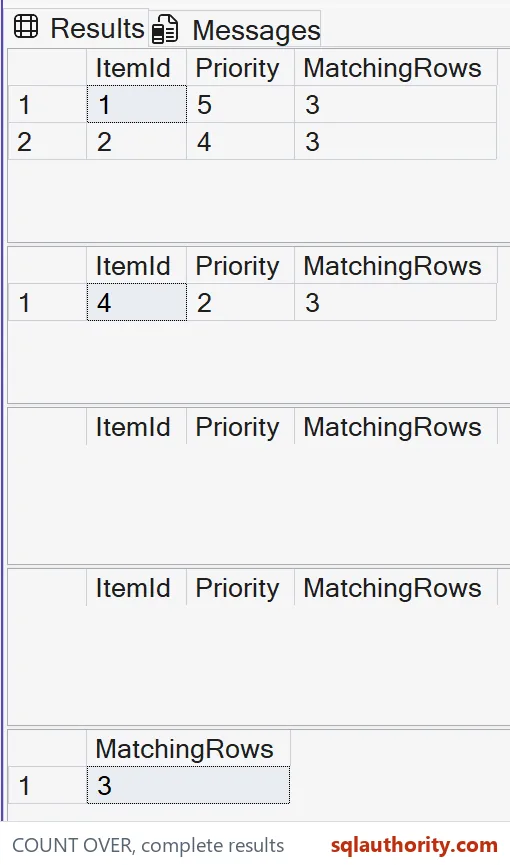
The first result contains ItemId 1 and 2. Both rows show MatchingRows equal to three. The closed item and the open item below priority two don’t contribute.
The second request skips those first two qualifying rows. It returns ItemId 4 with the same count of three. That last page contains one row, without changing the meaning of MatchingRows.
The third request skips six rows and returns none. There are still three matching items in its input. An absent page row gives the application no place to receive the window count.
Handle an empty page explicitly
The fourth query sets the minimum priority to nine. No item qualifies, so it also returns no rows. Its empty result looks like the out-of-range page even though the underlying counts differ.
The final scalar COUNT returns a row containing three for the original filter. Use a separate count when an empty page must still report a total. Keep its filter consistent with the page query.
I wouldn’t promise every page request returns a total merely because the SELECT contains a window count. That promise fails on empty pages. Decide how the application distinguishes no matches from a page beyond the end.

Keep ordering and filtering clear
Priority controls the page order, and ItemId resolves equal priorities. A unique ordering rule prevents tied items from moving unpredictably within a fixed input. Repeated requests still need a plan for concurrent data changes.
The ORDER BY belongs to the page selection. Adding ORDER BY inside OVER would change the window definition. This example needs the entire filtered total, rather than a count that grows through ordered rows.
WHERE determines eligibility before the window count. Filtering rows later in an outer query would define a different counting point. I’d place the business filter where the intended total is formed.
Check the limits of the contract
COUNT returns int, including this window form. A total beyond the positive int range needs COUNT_BIG and a compatible destination. These small inputs deliberately stay within the int range.
OFFSET and FETCH require SQL Server 2012 or later. Their skip count must be nonnegative, and the requested fetch count must be positive. The literal requests here meet those requirements.
A small page doesn’t establish a cheap total-count query. The window count still concerns all qualifying rows. I’d inspect the relevant execution plan before making any claim about its cost.
Run the four page requests once and the empty page will make sense.
A page total is not the page size, it is the count at the chosen filtering point.
Published by Pinal Dave on SQLAuthority. More of my work at pinaldave.com.
Discover more from SQL Authority with Pinal Dave
Subscribe to get the latest posts sent to your email.