
I had previously penned down two popular snippets regarding deleting duplicate rows and counting duplicate rows. Today, we will examine another very quick code snippet where we will delete duplicate rows using CTE and ROW_NUMBER() feature of SQL Server 2005 and SQL Server 2008.
This method is improved over the earlier method as it not only uses CTE and ROW_NUMBER, but also demonstrates the power of CTE with DELETE statement. We will have a comprehensive discussion about it later in this article. For now, let us first create a sample table from which we will delete records.
/*Create Table with 7 entries - 3 are duplicate entries */
CREATE TABLE DuplicateRcordTable (Col1 INT, Col2 INT)
INSERT INTO DuplicateRcordTable
SELECT 1, 1
UNION ALL
SELECT 1, 1 --duplicate
UNION ALL
SELECT 1, 1 --duplicate
UNION ALL
SELECT 1, 2
UNION ALL
SELECT 1, 2 --duplicate
UNION ALL
SELECT 1, 3
UNION ALL
SELECT 1, 4
GO
The above table has total 7 records, out of which 3 are duplicate records. Once the duplicates are removed we will have only 4 records left.
/* It should give you 7 rows */
SELECT *
FROM DuplicateRcordTable
GO

The most interesting part of this is yet to come. We will use CTE that will re-generate the same table with additional column, which is row number. In our case, we have Col1 and Col2 and both the columns qualify as duplicate rows. It may be a different set of rows for each different query like this. Another point to note here is that once CTE is created DELETE statement can be run on it. We will put a condition here – when we receive more than one rows of record, we will remove the row which is not the first one. When DELETE command is executed over CTE it in fact deletes from the base table used in CTE.
/* Delete Duplicate records */
WITH CTE (COl1,Col2, DuplicateCount)
AS
(
SELECT COl1,Col2,
ROW_NUMBER() OVER(PARTITION BY COl1,Col2 ORDER BY Col1) AS DuplicateCount
FROM DuplicateRcordTable
)
DELETE
FROM CTE
WHERE DuplicateCount > 1
GO
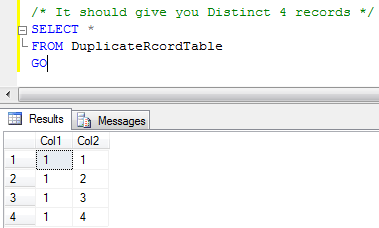
It is apparent that after delete command has been run, we will have only 4 records, which is almost the same result which we would have got with DISTINCT, with this resultset. If we had more than 2 columns and we had to run unique on only two columns, our distinct might have not worked here . In this case, we would have to use above the mentioned method.
/* It should give you Distinct 4 records */
SELECT *
FROM DuplicateRcordTable
GO
This method is a breeze and we can use this for SQL Server version 2005 and the later versions.
Watch the view to see the above concept in action:
Reference : Pinal Dave (https://blog.sqlauthority.com)




146 Comments. Leave new
Hey Pinal very very very nice postings… really helpful
I dont know how to remove rows from excel using sql server query… please post about this…
Thanx in advance :)
You can’t remove rows from EXCEL using sql
However you can do it via VB6, .NET etc
One option is to import data to a table from EXCEL
Delete duplicate rows and move data to new EXCEL file
See this thread for more informations on how to interact with EXCEL from SQL Server query
Nice article! Thanks!
Hey Pinal,
Superb Blog yar !!!! I really loved u r blog. Its wonderful and huge collections…
I am new one.. now onwards i will share my knowledge through u r blog….
Keep it up…
This blog spot cleared majority of my SQL clarification. CTE is used in the above query to delete duplicate rows in such a cute way.
Great Job….
NIce Blog..Subscribing it..
greate job!
i was trying each and every query from 20-30 web pages for doing the same thing but none of them worked.
this is really awesome.
thanks. :)
It is really a great job.
thanks
dear,sir
if we create a table with primary key and we use it as a foreign key then how we delete data and TRUNCAT.plz suggest me.
thank’s
@ajit kumar
It must be DELETEd from the child TABLE first.
Or, the FK should be CASCADE DELETE.
Superb, you rocks dave
I have Question
how can I update/delete row from tables which has a composite primary key by using with CTE().
when I try to update the tble which has the composite primary key but it won’t allow me
it shows error message like
Msg 2627, Level 14, State 1, Procedure T_UPD_Membership_Question, Line 14
Violation of PRIMARY KEY constraint ‘PK_Membership_Question’. Cannot insert duplicate key in object ‘dbo.Membership_Question’.
The statement has been terminated
could u please help me regarding this.
Hello
I have a question
I have a table named membership_question
I want to delete the dups from this table
i write the code like follows
it is working but it is deleting all the dup’s
but I want to keep one row in the table and i want to delete all the dups regarding that
————————————————————————–
WITH CTE1 ( PersonID,QuestionID,duplicateCount)AS
(
SELECT PersonID,QuestionID,
ROW_NUMBER() OVER(PARTITION BY PersonID,QuestionID ORDER BY PersonID) AS duplicateCount
From Membership_Question
)
select PersonID,QuestionID into #TempDupedeleteMembership_Question from
CTE1 Where duplicateCount>1
select * from #TempDupedeleteMembership_Question
DELETE Membership_Question
FROM Membership_Question
INNER JOIN #TempDupedeleteMembership_Question
ON Membership_Question.PersonID = #TempDupedeleteMembership_Question.PersonID AND
Membership_Question.QuestionID = #TempDupedeleteMembership_Question.QuestionID
could any can help regarding this
Is first() function can work with CTE
Thank you
I have a question
I have a view with 4 fields: PersonId, TracKID,CurriculumID,Totaltime
I can group the person ID And display the data like below
PersonID CurricuID TotalTIME TrackID
10053 2 90 2
10053 2 90 3
10053 2 90 1
But I want to add the totaltime and dispaly in minutes respetive to the group of personId’s without rounding
Could any one can help regarding this
Thank you
Hello Usha,
If you can provide the example of expected output then we would be able to provide the better resolution.
Regards,
Pinal Dave
hi if i Join three tables and if i use this code its not working for me
And my code is as follows
;WITH CTE(PartnerProfileId,FieldName, DuplicateCount)
AS
(
select P.PartnerProfileId ,F.FieldName,
ROW_NUMBER() OVER(PARTITION BY P.PartnerProfileId,F.FieldName ORDER BY P.PartnerProfileId) AS DuplicateCount
from tblPartnerProfile P
JOIN tblPartnerLanguage L ON P.PartnerProfileId = L.PartnerProfileId
JOIN tblPartnerFields F ON P.PartnerProfileId = F.ParentProfileId
JOIN tblParnerClients C ON P.PartnerProfileId = C.PartnerProfileId
— JOIN tblPartnerRegionofExperience R ON P.PartnerProfileId = R.PartnerProfileId
— JOIN tblPartnerOrgStatus S ON P.PartnerProfileId = S.PartnerProfileId
)
DELETE
FROM CTE
WHERE DuplicateCount > 1
And i got this error while i run a particular script
“View or function ‘CTE’ is not updatable because the modification affects multiple base tables.
“
Hello Mr.Dev
thank u for the response
here I am giving example input and output
Input:
PersonID CurricuID TotalTIME TrackID
10053 2 90 2
10053 2 90 3
10053 2 90 1
10133 2 270 2
10133 2 270 3
10133 2 270 1
output
PersonID CurricuID TotalTIME TrackID
10053 2 4.5 2
10053 2 4.5 3
10053 2 4.5 1
10133 2 13.5 2
10133 2 13.5 3
10133 2 13.5 1
Thank you
I apprciate your help
Hello Usha,
Use the PARTITIONED BY caluse as below:
SELECT PersonID, CurriculID, SUM(TotalTime) OVER (PARTITIONED BY PersonID)/60 AS TotalTime, TrackID
FROM table
Regards,
Pinal Dave
Thank you much Mr.Dev
It works for me
but
here the total time is rounding
like below
10053 4 2
I want Like without rounding off like below
10053 4.5 2
Could u help me like What I need to do getting output like that.
Use
SELECT PersonID, CurriculID, SUM(TotalTime) OVER (PARTITIONED BY PersonID)/60.0 AS TotalTime, TrackID
FROM table
Also see the reason here
Madhivanan
super , this saved me lot of time :)
Thank u so much
it works for me
how to delete 2 same records in table in sqlserver2005/2008
EX:
empid ename sal
101 sai 1000
102 ramya 2500
102 ramya 2500
103 suresh 1500
103 suresh 1500
plese help me……….
Please use the ROW_NUMBER method described in this article.
Regards,
Pinal Dave
Thank you much Mr.Dev
It works for me
but
here the total time is rounding
like below
10053 4 2
I want Like without rounding off like below
10053 4.5 2
Could u help me like What I