
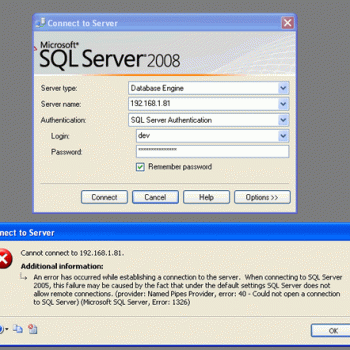
Regular readers of my blog are aware of the fact that I have written about this subject umpteen times earlier, and every time I have spoken about a new issue related to it. Few days ago, I had redone my local home network. I have LAN setup with wireless router connected with my four computers, two mobile devices, one printer and one VOIP solution. I had also formatted my primary computer and clean installed SQL Server 2008 into it. Yesterday, incidentally, I was sitting in my yard trying to connect SQL Server located in home office and suddenly I stumbled upon the following error. Finding the solution was the most infuriating part as it consumed my precious 10 minutes.
Let us look at few of the common errors received:
An error has occurred while establishing a connection to the server.
(provider: Named Pipes Provider, error: 40 – Could not open a connection to SQL Server) (Microsoft SQL Server, Error: 5)
An error has occurred while establishing a connection to the server. When connecting to SQL Server 2005, this failure may be caused by the fact that under the default settings SQL Server does not allow remote connections. (provider: Named Pipes Provider, error: 40 – Could not open a connection to SQL Server) (Microsoft SQL Server, Error: 1326)
I eventually found the resolution to this error on this blog itself; so I was saved from hunting for the solution. I am sure there are a number of developers who had previously fixed this error while installing SQL Server 2008 or SQL Server 2005 but in due course forgot the right solution to this error. This is just a quick refresher. Make sure to bookmark this as you never know when you would need this solution.
Let us check into the steps to resolve this error.
1) SQL Server should be up and running.
Go to All Programs >> Microsoft SQL Server 2008 >> Configuration Tools >> SQL Server Configuration Manager >> SQL Server Services, and check if SQL Server service status is “Running”.
In addition, ensure that your remote server is in the same network. Run “sqlcmd -L” in your command prompt to ascertain if your server is included in your network list. You can even find tutorial for the same here SQL SERVER – Find All Servers From Local Network – Using sqlcmd – Detect Installed SQL Server on Network.
I have confronted numerous situations when these nerve-wracking errors crop up, and most of the time when I try to troubleshoot I notice that SQL Server services are neither running nor installed. If SQL Server is not installed as default instance SQL Server Browser should be running together with it; we will explore this further in Topic 5.

2) Enable TCP/IP in SQL Server Configuration
When two or more SQL Servers are connected across network they do all communication using TCP/IP. The default port of SQL Server installation is 1433. This port can be changed through SQL Server Configuration Manager. TCP/IP should be enabled for SQL Server to be connected.
Go to All Programs >> Microsoft SQL Server 2008 >> Configuration Tools >> SQL Server Configuration Manager >> Select TCP/IP

Right Click on TCP/IP >> Click on Enable
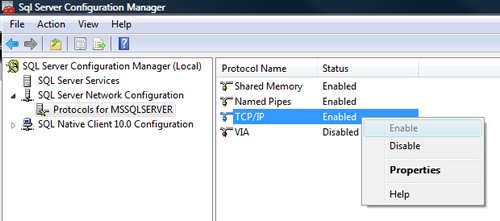
You must restart SQL Server Services for all the changes to take effect. Right click and go to menu properties to select location where default port of SQL Server can be changed.
3) Open Port in Windows Firewall
Windows Firewall is very efficacious in protecting the Operating system from all sorts of malicious attacks. By default, many of the ports and services are refrained from running by firewall. Time and again, SQL Server ports are not open in firewall as well. All the ports on which SQL Server is running should be added to exception and firewall should filter all the traffic from those ports. As described, by default SQL Server runs on port 1433, but if default port is changed then the new port should be added to exception. If SQL Server has named instance (another instance besides default instance) is installed, SQL Server browser should also be added to the exception, as described in Step 7.
Go to Control Panel >> Windows Firewall >> Change Settings >> Exceptions >> Add Port


Make the following entries in popup “Add a Port” and click OK.
Name : SQL
Port Number: 1433
Protocol: Select TCP


4) Enable Remote Connection
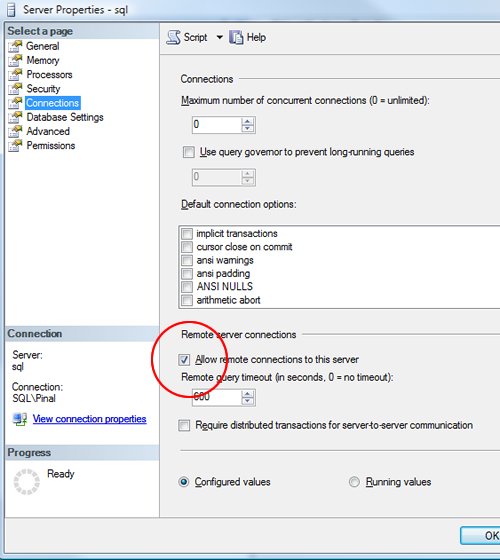
Enabling remote connection is another important, yet oft-neglected step that is frequently missed by database administrators while setting up SQL Server. If this feature is turned off SQL Server will function smoothly on local machine, but it will let another server connect to it remotely. By default this feature is ON in SQL Server 2008.
Right click on the server node and select Properties.
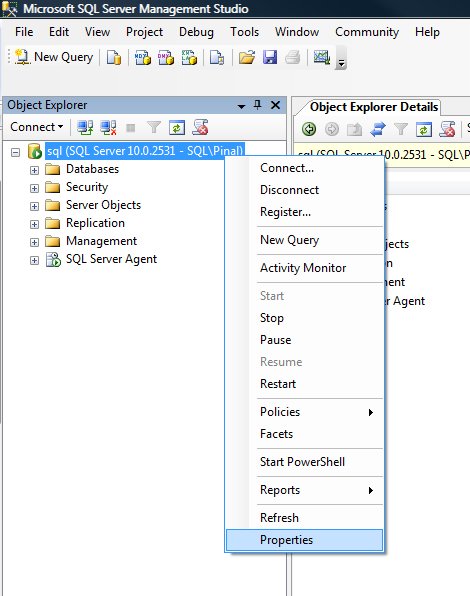
Go to Left Tab of Connections and check “Allow remote connections to this server”
5) Enable SQL Server Browser Service
If SQL Server is not installed as default instance but instead installed as named instance and also if there is no specific TCP/IP port configured, it will give rise to the error that is being discussed in this article. If SQL Server Browser service is enabled, it will allow the server to be connected through dynamic TCP/IP port. Enabling this service is a one-time process, as on enabling it once it will apply to all the instances installed on the same server.
Go to All Programs >> Microsoft SQL Server 2008 >> Configuration Tools >> SQL Server Configuration Manager >> SQL Server Browser

Right Click on SQL Server Browser >> Click on Enable
6) Create exception of sqlbrowser.exe in Firewall
As elucidated in Step 6, sqlbrowser service needs to be enabled for named instance. Windows Firewall may prevent sqlbrowser.exe to execute. So, it is imperative to add exception for the same in windows firewall.
Search for sqlbrowser.exe on your local drive where SQL Server is installed. Copy the path of the sqlbrowser.exe like C:\Program Files\Microsoft SQL Server\90\Shared\sqlbrowser.exe and create the exception of the file in Firewall, as delineated in Step 3.
7) Recreate Alias
It is getting quite common to create alias of SQL Server and use it in application. This will ensure that in future if any physical SQL Server has to be moved, it will not be required to change any code or connection string. You can simply create alias with the same name pointing to different SQL Server and it will start working instantaneously. I have observed that a couple of times due to internal error while recreating alias this error was fixed.
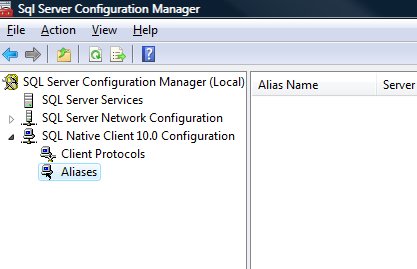
Go to All Programs >> Microsoft SQL Server 2008 >> Configuration Tools >> SQL Native Client 10.0 Configuration >> Aliases
Delete the alias that is giving problem and recreate it with identical parameters.
I have tried my best to include all the methods of fixing this error and if I have missed any, please leave a comment and I will be very glad to include them here. I have put in my effort to encompass this issue in one article that needs to be refereed when any connection error comes up.
Watch SQL in Sixty Seconds video to Resolve Connection Error:
[youtube=http://www.youtube.com/watch?v=1k00z82u4OI]
Reference : Pinal Dave (https://blog.sqlauthority.com)




658 Comments. Leave new
Grate job sir,It really works.I could Just find the error by following ur steps.Thanks a lot sir
thanks it is very helpful
I noticed that IPv6 is causing massiv problems.
I deactived it on the network stack but it did not work out. SQL / SQLExpress is still showing errors.
https://support.microsoft.com/en-us/help/929852/guidance-for-configuring-ipv6-in-windows-for-advanced-users/
After that it worked pretty fine
A network-related or instance-specific error occurred while establishing a connection to SQL Server. The server was not found or was not accessible. Verify that the instance name is correct and that SQL Server is configured to allow remote connections. (provider: SQL Network Interfaces, error: 26 – Error Locating Server/Instance Specified)
not working
same error
a network-related or intance-specific error occurred while establishing a connection to SQL server. The server was not found or was not accessible. Verify that the instance name is correct and that SQL server is configured to allow remote connections. (provider: Named Pipes Provider, errpr:40 – Could not open a connection to SQL Server)
plz provid proper solutions
As almost always you are the man with the correct solutions!!
BR
Henrik
I was getting the same problem for Sql Server authentication mode only.
Finally I have selected Windows and Sql Server authentication mode from server properties–>Security.
Thanks
dear sir,
i faced this error while connecting remote System, wt should i do? plz help me.
i need read the remote client system data base ( not in LAN)…. If u have connection string example rly me
System.Data.SqlClient.SqlException was unhandled by user code
Message=”An error has occurred while establishing a connection to the server. When connecting to SQL Server 2005, this failure may be caused by the fact that under the default settings SQL Server does not allow remote connections. (provider: TCP Provider, error: 0 – A connection attempt failed because the connected party did not properly respond after a period of time, or established connection failed because connected host has failed to respond.)”
Source=”.Net SqlClient Data Provider”
ErrorCode=-2146232060
Class=20
LineNumber=0
Number=10060
Server=””
State=0
StackTrace:
at System.Data.SqlClient.SqlInternalConnection.OnError(SqlException exception, Boolean breakConnection)
at System.Data.SqlClient.TdsParser.ThrowExceptionAndWarning(TdsParserStateObject stateObj)
at System.Data.SqlClient.TdsParser.Connect(ServerInfo serverInfo, SqlInternalConnectionTds connHandler, Boolean ignoreSniOpenTimeout, Int64 timerExpire, Boolean encrypt, Boolean trustServerCert, Boolean integratedSecurity, SqlConnection owningObject)
at System.Data.SqlClient.SqlInternalConnectionTds.AttemptOneLogin(ServerInfo serverInfo, String newPassword, Boolean ignoreSniOpenTimeout, Int64 timerExpire, SqlConnection owningObject)
at System.Data.SqlClient.SqlInternalConnectionTds.LoginNoFailover(String host, String newPassword, Boolean redirectedUserInstance, SqlConnection owningObject, SqlConnectionString connectionOptions, Int64 timerStart)
at System.Data.SqlClient.SqlInternalConnectionTds.OpenLoginEnlist(SqlConnection owningObject, SqlConnectionString connectionOptions, String newPassword, Boolean redirectedUserInstance)
at System.Data.SqlClient.SqlInternalConnectionTds..ctor(DbConnectionPoolIdentity identity, SqlConnectionString connectionOptions, Object providerInfo, String newPassword, SqlConnection owningObject, Boolean redirectedUserInstance)
at System.Data.SqlClient.SqlConnectionFactory.CreateConnection(DbConnectionOptions options, Object poolGroupProviderInfo, DbConnectionPool pool, DbConnection owningConnection)
at System.Data.ProviderBase.DbConnectionFactory.CreatePooledConnection(DbConnection owningConnection, DbConnectionPool pool, DbConnectionOptions options)
at System.Data.ProviderBase.DbConnectionPool.CreateObject(DbConnection owningObject)
at System.Data.ProviderBase.DbConnectionPool.UserCreateRequest(DbConnection owningObject)
at System.Data.ProviderBase.DbConnectionPool.GetConnection(DbConnection owningObject)
at System.Data.ProviderBase.DbConnectionFactory.GetConnection(DbConnection owningConnection)
at System.Data.ProviderBase.DbConnectionClosed.OpenConnection(DbConnection outerConnection, DbConnectionFactory connectionFactory)
at System.Data.SqlClient.SqlConnection.Open()
at System.Data.Common.DbDataAdapter.FillInternal(DataSet dataset, DataTable[] datatables, Int32 startRecord, Int32 maxRecords, String srcTable, IDbCommand command, CommandBehavior behavior)
at System.Data.Common.DbDataAdapter.Fill(DataSet dataSet, Int32 startRecord, Int32 maxRecords, String srcTable, IDbCommand command, CommandBehavior behavior)
at System.Data.Common.DbDataAdapter.Fill(DataSet dataSet, String srcTable)
at Default2.LoadGridview() in c:Documents and SettingspcDesktopSrLibraryFrmLib1.aspx.cs:line 66
at Default2.Page_Load(Object sender, EventArgs e) in c:Documents and SettingspcDesktopSrLibraryFrmLib1.aspx.cs:line 42
at System.Web.Util.CalliHelper.EventArgFunctionCaller(IntPtr fp, Object o, Object t, EventArgs e)
at System.Web.Util.CalliEventHandlerDelegateProxy.Callback(Object sender, EventArgs e)
at System.Web.UI.Control.OnLoad(EventArgs e)
at System.Web.UI.Control.LoadRecursive()
at System.Web.UI.Page.ProcessRequestMain(Boolean includeStagesBeforeAsyncPoint, Boolean includeStagesAfterAsyncPoint)
InnerException:
By Regards
Sarva
Thanks..You saved me lot of time
Thanks Pinal for one-stop solution for this error.
Was trying to fix this issue since long.
Thanks for ur very useful post. it saved my lots of time.. you are hero!!
I have this same error on sql server 2005 how can i solve this?
Thank you very much. It works.
My databases professor couldn’t even figure this out. Thanks to your guide here and the post by Vince I finally got it working. Thanks a bunch!
Thanks for your solution
Hi Sir,
This is my problem..PLz solve this…
See the end of this message for details on invoking
just-in-time (JIT) debugging instead of this dialog box.
************** Exception Text **************
Microsoft.SqlServer.Management.RegisteredServers.RegisteredServerException: Unable to read the list of previously registered servers on this system. Re-register your servers in the ‘Registered Servers’ window. —> Microsoft.SqlServer.Management.Sdk.Sfc.SfcSerializationException: Serialization output is invalid. —> System.NullReferenceException: Object reference not set to an instance of an object.
at Microsoft.SqlServer.Management.Sdk.Sfc.SfcSerializer.Deserialize(XmlReader xmlReader, SfcObjectState state)
— End of inner exception stack trace —
at Microsoft.SqlServer.Management.Sdk.Sfc.SfcSerializer.Deserialize(XmlReader xmlReader, SfcObjectState state)
at Microsoft.SqlServer.Management.RegisteredServers.RegisteredServersStore.InitChildObjects(String file)
— End of inner exception stack trace —
at Microsoft.SqlServer.Management.RegisteredServers.RegisteredServersStore.InitChildObjects(String file)
at Microsoft.SqlServer.Management.RegisteredServers.RegisteredServersStore.InitializeLocalRegisteredServersStore()
at Microsoft.SqlServer.Management.RegisteredServers.RegisteredServersStore.get_LocalFileStore()
at Microsoft.SqlServer.Management.UI.ConnectionDlg.ConnectionDialog.OnLoad(EventArgs e)
at System.Windows.Forms.Form.OnCreateControl()
at System.Windows.Forms.Control.CreateControl(Boolean fIgnoreVisible)
at System.Windows.Forms.Control.CreateControl()
at System.Windows.Forms.Control.WmShowWindow(Message& m)
at System.Windows.Forms.Control.WndProc(Message& m)
at System.Windows.Forms.ScrollableControl.WndProc(Message& m)
at System.Windows.Forms.ContainerControl.WndProc(Message& m)
at System.Windows.Forms.Form.WmShowWindow(Message& m)
at System.Windows.Forms.Form.WndProc(Message& m)
at System.Windows.Forms.Control.ControlNativeWindow.OnMessage(Message& m)
at System.Windows.Forms.Control.ControlNativeWindow.WndProc(Message& m)
at System.Windows.Forms.NativeWindow.Callback(IntPtr hWnd, Int32 msg, IntPtr wparam, IntPtr lparam)
************** Loaded Assemblies **************
mscorlib
Assembly Version: 2.0.0.0
Win32 Version: 2.0.50727.5456 (Win7SP1GDR.050727-5400)
CodeBase: file:///C:/Windows/Microsoft.NET/Framework/v2.0.50727/mscorlib.dll
—————————————-
AppIDPackage
Assembly Version: 10.0.0.0
Win32 Version: 10.0.1600.22 ((SQL_PreRelease).080709-1414 )
CodeBase: file:///C:/Program%20Files%20(x86)/Microsoft%20SQL%20Server/100/Tools/Binn/VSShell/Common7/IDE/AppIDPackage.DLL
—————————————-
System
Assembly Version: 2.0.0.0
Win32 Version: 2.0.50727.5456 (Win7SP1GDR.050727-5400)
CodeBase: file:///C:/Windows/assembly/GAC_MSIL/System/2.0.0.0__b77a5c561934e089/System.dll
—————————————-
Microsoft.SqlServer.SqlTools.VSIntegration
Assembly Version: 10.0.0.0
Win32 Version: 10.0.1600.22 ((SQL_PreRelease).080709-1414 )
CodeBase: file:///C:/Program%20Files%20(x86)/Microsoft%20SQL%20Server/100/Tools/Binn/VSShell/Common7/IDE/Microsoft.SqlServer.SqlTools.VSIntegration.DLL
—————————————-
Microsoft.VisualStudio.Shell.Interop
Assembly Version: 7.1.40304.0
Win32 Version: 7.10.6071
CodeBase: file:///C:/Windows/assembly/GAC/Microsoft.VisualStudio.Shell.Interop/7.1.40304.0__b03f5f7f11d50a3a/Microsoft.VisualStudio.Shell.Interop.dll
—————————————-
Microsoft.VisualStudio.OLE.Interop
Assembly Version: 7.1.40304.0
Win32 Version: 7.10.6070
CodeBase: file:///C:/Windows/assembly/GAC/Microsoft.VisualStudio.OLE.Interop/7.1.40304.0__b03f5f7f11d50a3a/Microsoft.VisualStudio.OLE.Interop.dll
—————————————-
System.Windows.Forms
Assembly Version: 2.0.0.0
Win32 Version: 2.0.50727.5456 (Win7SP1GDR.050727-5400)
CodeBase: file:///C:/Windows/assembly/GAC_MSIL/System.Windows.Forms/2.0.0.0__b77a5c561934e089/System.Windows.Forms.dll
—————————————-
System.Drawing
Assembly Version: 2.0.0.0
Win32 Version: 2.0.50727.5458 (Win7SP1GDR.050727-5400)
CodeBase: file:///C:/Windows/assembly/GAC_MSIL/System.Drawing/2.0.0.0__b03f5f7f11d50a3a/System.Drawing.dll
—————————————-
SqlWorkbench.Interfaces
Assembly Version: 10.0.0.0
Win32 Version: 10.0.1600.22 ((SQL_PreRelease).080709-1414 )
CodeBase: file:///C:/Program%20Files%20(x86)/Microsoft%20SQL%20Server/100/Tools/Binn/VSShell/Common7/IDE/SqlWorkbench.Interfaces.DLL
—————————————-
Microsoft.SqlServer.SqlTDiagM
Assembly Version: 10.0.0.0
Win32 Version: 10.0.1600.22 ((SQL_PreRelease).080709-1414 )
CodeBase: file:///C:/Windows/assembly/GAC_MSIL/Microsoft.SqlServer.SqlTDiagM/10.0.0.0__89845dcd8080cc91/Microsoft.SqlServer.SqlTDiagM.dll
—————————————-
Microsoft.SqlServer.Instapi
Assembly Version: 10.0.0.0
Win32 Version: 10.0.1600.22 ((SQL_PreRelease).080709-1414 )
CodeBase: file:///C:/Windows/assembly/GAC_MSIL/Microsoft.SqlServer.Instapi/10.0.0.0__89845dcd8080cc91/Microsoft.SqlServer.Instapi.dll
—————————————-
Microsoft.VisualStudio.Shell
Assembly Version: 2.0.0.0
Win32 Version: 2.0.50727.1826 (QFE.050727-1800)
CodeBase: file:///C:/Windows/assembly/GAC_MSIL/Microsoft.VisualStudio.Shell/2.0.0.0__b03f5f7f11d50a3a/Microsoft.VisualStudio.Shell.dll
—————————————-
Microsoft.VisualStudio.Shell.Interop.8.0
Assembly Version: 8.0.0.0
Win32 Version: 8.0.50727.1826 (QFE.050727-1800)
CodeBase: file:///C:/Windows/assembly/GAC/Microsoft.VisualStudio.Shell.Interop.8.0/8.0.0.0__b03f5f7f11d50a3a/Microsoft.VisualStudio.Shell.Interop.8.0.dll
—————————————-
Microsoft.SqlServer.Management.SDK.SqlStudio
Assembly Version: 10.0.0.0
Win32 Version: 10.0.1600.22 ((SQL_PreRelease).080709-1414 )
CodeBase: file:///C:/Program%20Files%20(x86)/Microsoft%20SQL%20Server/100/Tools/Binn/VSShell/Common7/IDE/Microsoft.SqlServer.Management.SDK.SqlStudio.DLL
—————————————-
SQLEditors
Assembly Version: 10.0.0.0
Win32 Version: 10.0.1600.22 ((SQL_PreRelease).080709-1414 )
CodeBase: file:///C:/Program%20Files%20(x86)/Microsoft%20SQL%20Server/100/Tools/Binn/VSShell/Common7/IDE/SQLEditors.DLL
—————————————-
Microsoft.VisualStudio.TextManager.Interop
Assembly Version: 7.1.40304.0
Win32 Version: 7.10.6070
CodeBase: file:///C:/Windows/assembly/GAC/Microsoft.VisualStudio.TextManager.Interop/7.1.40304.0__b03f5f7f11d50a3a/Microsoft.VisualStudio.TextManager.Interop.dll
—————————————-
SqlMgmt
Assembly Version: 10.0.0.0
Win32 Version: 10.0.1600.22 ((SQL_PreRelease).080709-1414 )
CodeBase: file:///C:/Program%20Files%20(x86)/Microsoft%20SQL%20Server/100/Tools/Binn/VSShell/Common7/IDE/SqlMgmt.DLL
—————————————-
Microsoft.SqlServer.Management.UserSettings
Assembly Version: 10.0.0.0
Win32 Version: 10.0.1600.22 ((SQL_PreRelease).080709-1414 )
CodeBase: file:///C:/Program%20Files%20(x86)/Microsoft%20SQL%20Server/100/Tools/Binn/VSShell/Common7/IDE/Microsoft.SqlServer.Management.UserSettings.DLL
—————————————-
EnvDTE
Assembly Version: 8.0.0.0
Win32 Version: 8.0.50727.1826 (QFE.050727-1800)
CodeBase: file:///C:/Windows/assembly/GAC/EnvDTE/8.0.0.0__b03f5f7f11d50a3a/EnvDTE.dll
—————————————-
Microsoft.SqlServer.Management.Sdk.Sfc
Assembly Version: 10.0.0.0
Win32 Version: 10.0.2531.0 ((Katmai_PCU_Main).090329-1045 )
CodeBase: file:///C:/Windows/assembly/GAC_MSIL/Microsoft.SqlServer.Management.Sdk.Sfc/10.0.0.0__89845dcd8080cc91/Microsoft.SqlServer.Management.Sdk.Sfc.dll
—————————————-
Microsoft.SqlServer.Management.Reports
Assembly Version: 10.0.0.0
Win32 Version: 10.0.1600.22 ((SQL_PreRelease).080709-1414 )
CodeBase: file:///C:/Program%20Files%20(x86)/Microsoft%20SQL%20Server/100/Tools/Binn/VSShell/Common7/IDE/Microsoft.SqlServer.Management.Reports.DLL
—————————————-
Microsoft.SqlServer.Management.Controls
Assembly Version: 10.0.0.0
Win32 Version: 10.0.1600.22 ((SQL_PreRelease).080709-1414 )
CodeBase: file:///C:/Program%20Files%20(x86)/Microsoft%20SQL%20Server/100/Tools/Binn/VSShell/Common7/IDE/Microsoft.SqlServer.Management.Controls.DLL
—————————————-
Microsoft.SqlServer.Management.SqlStudio.Migration
Assembly Version: 10.0.0.0
Win32 Version: 10.0.1600.22 ((SQL_PreRelease).080709-1414 )
CodeBase: file:///C:/Program%20Files%20(x86)/Microsoft%20SQL%20Server/100/Tools/Binn/VSShell/Common7/IDE/Microsoft.SqlServer.Management.SqlStudio.Migration.DLL
—————————————-
Microsoft.SqlServer.Smo
Assembly Version: 10.0.0.0
Win32 Version: 10.0.2531.0 ((Katmai_PCU_Main).090329-1045 )
CodeBase: file:///C:/Windows/assembly/GAC_MSIL/Microsoft.SqlServer.Smo/10.0.0.0__89845dcd8080cc91/Microsoft.SqlServer.Smo.dll
—————————————-
System.Xml
Assembly Version: 2.0.0.0
Win32 Version: 2.0.50727.5420 (Win7SP1.050727-5400)
CodeBase: file:///C:/Windows/assembly/GAC_MSIL/System.Xml/2.0.0.0__b77a5c561934e089/System.Xml.dll
—————————————-
Microsoft.NetEnterpriseServers.ExceptionMessageBox
Assembly Version: 10.0.0.0
Win32 Version: 10.0.2531.0 ((Katmai_PCU_Main).090329-1045 )
CodeBase: file:///C:/Windows/assembly/GAC_MSIL/Microsoft.NetEnterpriseServers.ExceptionMessageBox/10.0.0.0__89845dcd8080cc91/Microsoft.NetEnterpriseServers.ExceptionMessageBox.dll
—————————————-
ObjectExplorer
Assembly Version: 10.0.0.0
Win32 Version: 10.0.1600.22 ((SQL_PreRelease).080709-1414 )
CodeBase: file:///C:/Program%20Files%20(x86)/Microsoft%20SQL%20Server/100/Tools/Binn/VSShell/Common7/IDE/ObjectExplorer.DLL
—————————————-
Microsoft.VisualStudio
Assembly Version: 2.0.0.0
Win32 Version: 2.0.50727.1826 built by: QFE
CodeBase: file:///C:/Windows/assembly/GAC_MSIL/Microsoft.VisualStudio/2.0.0.0__b03f5f7f11d50a3a/Microsoft.VisualStudio.dll
—————————————-
System.Drawing.Design
Assembly Version: 2.0.0.0
Win32 Version: 2.0.50727.4927 (NetFXspW7.050727-4900)
CodeBase: file:///C:/Windows/assembly/GAC_MSIL/System.Drawing.Design/2.0.0.0__b03f5f7f11d50a3a/System.Drawing.Design.dll
—————————————-
Microsoft.VisualStudio.Designer.Interfaces
Assembly Version: 1.0.5000.0
Win32 Version: 1.1.4322.573
CodeBase: file:///C:/Windows/assembly/GAC/Microsoft.VisualStudio.Designer.Interfaces/1.0.5000.0__b03f5f7f11d50a3a/Microsoft.VisualStudio.Designer.Interfaces.dll
—————————————-
ConnectionDlg
Assembly Version: 10.0.0.0
Win32 Version: 10.0.1600.22 ((SQL_PreRelease).080709-1414 )
CodeBase: file:///C:/Program%20Files%20(x86)/Microsoft%20SQL%20Server/100/Tools/Binn/VSShell/Common7/IDE/ConnectionDlg.DLL
—————————————-
Accessibility
Assembly Version: 2.0.0.0
Win32 Version: 2.0.50727.4927 (NetFXspW7.050727-4900)
CodeBase: file:///C:/Windows/assembly/GAC_MSIL/Accessibility/2.0.0.0__b03f5f7f11d50a3a/Accessibility.dll
—————————————-
Microsoft.SqlServer.RegSvrEnum
Assembly Version: 10.0.0.0
Win32 Version: 10.0.1600.22 ((SQL_PreRelease).080709-1414 )
CodeBase: file:///C:/Windows/assembly/GAC_MSIL/Microsoft.SqlServer.RegSvrEnum/10.0.0.0__89845dcd8080cc91/Microsoft.SqlServer.RegSvrEnum.dll
—————————————-
Microsoft.SqlServer.Management.SqlStudio.Explorer
Assembly Version: 10.0.0.0
Win32 Version: 10.0.1600.22 ((SQL_PreRelease).080709-1414 )
CodeBase: file:///C:/Program%20Files%20(x86)/Microsoft%20SQL%20Server/100/Tools/Binn/VSShell/Common7/IDE/Microsoft.SqlServer.Management.SqlStudio.Explorer.DLL
—————————————-
System.Design
Assembly Version: 2.0.0.0
Win32 Version: 2.0.50727.5420 (Win7SP1.050727-5400)
CodeBase: file:///C:/Windows/assembly/GAC_MSIL/System.Design/2.0.0.0__b03f5f7f11d50a3a/System.Design.dll
—————————————-
System.Data
Assembly Version: 2.0.0.0
Win32 Version: 2.0.50727.5420 (Win7SP1.050727-5400)
CodeBase: file:///C:/Windows/assembly/GAC_32/System.Data/2.0.0.0__b77a5c561934e089/System.Data.dll
—————————————-
Microsoft.SqlServer.ConnectionInfo
Assembly Version: 10.0.0.0
Win32 Version: 10.0.2531.0 ((Katmai_PCU_Main).090329-1045 )
CodeBase: file:///C:/Windows/assembly/GAC_MSIL/Microsoft.SqlServer.ConnectionInfo/10.0.0.0__89845dcd8080cc91/Microsoft.SqlServer.ConnectionInfo.dll
—————————————-
Microsoft.SqlServer.Management.RegisteredServers
Assembly Version: 10.0.0.0
Win32 Version: 10.0.2531.0 ((Katmai_PCU_Main).090329-1045 )
CodeBase: file:///C:/Windows/assembly/GAC_MSIL/Microsoft.SqlServer.Management.RegisteredServers/10.0.0.0__89845dcd8080cc91/Microsoft.SqlServer.Management.RegisteredServers.dll
—————————————-
Microsoft.SqlServer.SqlClrProvider
Assembly Version: 10.0.0.0
Win32 Version: 10.0.1600.22 ((SQL_PreRelease).080709-1414 )
CodeBase: file:///C:/Windows/assembly/GAC_MSIL/Microsoft.SqlServer.SqlClrProvider/10.0.0.0__89845dcd8080cc91/Microsoft.SqlServer.SqlClrProvider.dll
—————————————-
System.Configuration
Assembly Version: 2.0.0.0
Win32 Version: 2.0.50727.5420 (Win7SP1.050727-5400)
CodeBase: file:///C:/Windows/assembly/GAC_MSIL/System.Configuration/2.0.0.0__b03f5f7f11d50a3a/System.Configuration.dll
—————————————-
System.Web
Assembly Version: 2.0.0.0
Win32 Version: 2.0.50727.5456 (Win7SP1GDR.050727-5400)
CodeBase: file:///C:/Windows/assembly/GAC_32/System.Web/2.0.0.0__b03f5f7f11d50a3a/System.Web.dll
—————————————-
Microsoft.DataWarehouse.SQM
Assembly Version: 10.0.0.0
Win32 Version: 10.0.1600.22 ((SQL_PreRelease).080709-1414 )
CodeBase: file:///C:/Program%20Files%20(x86)/Microsoft%20SQL%20Server/100/Tools/Binn/VSShell/Common7/IDE/Microsoft.DataWarehouse.SQM.DLL
—————————————-
Microsoft.SqlServer.Sqm
Assembly Version: 10.0.0.0
Win32 Version: 10.0.1600.22 ((SQL_PreRelease).080709-1414 )
CodeBase: file:///C:/Program%20Files%20(x86)/Microsoft%20SQL%20Server/100/Tools/Binn/VSShell/Common7/IDE/Microsoft.SqlServer.Sqm.DLL
—————————————-
************** JIT Debugging **************
To enable just-in-time (JIT) debugging, the .config file for this
application or computer (machine.config) must have the
jitDebugging value set in the system.windows.forms section.
The application must also be compiled with debugging
enabled.
For example:
When JIT debugging is enabled, any unhandled exception
will be sent to the JIT debugger registered on the computer
rather than be handled by this dialog box.
This has been bugging me… but now I have access and all is error free. Thanks.
Took me 2 days to figure this out but I changed the permissions on sqlbrowser service from network service to the sql service domain account.
It solves all the problems
Thanks a lot.
if there are no services at sql server configuration manager…then what should i do?