
I received another email describing error received due to my executing script from my previous article . The error was Msg 15123 from sp_configure.
Error :
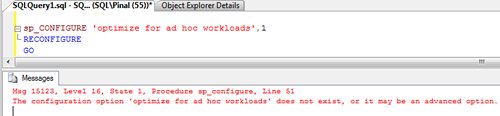
Msg 15123, Level 16, State 1, Procedure sp_configure, Line 51
The configuration option ‘optimize for ad hoc workloads’ does not exist, or it may be an advanced option.
Let us quickly see the reproduction of this error in following image.
Fix/Workaround/Solution:
The reason this error is happening because of not enabling advance option. Run complete following script and it should fix the problem.
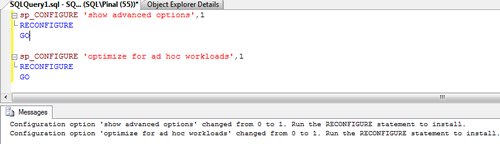
sp_CONFIGURE 'show advanced options',1

RECONFIGURE

GO
sp_CONFIGURE ‘optimize for ad hoc workloads’,1
RECONFIGURE
GO
Published by Pinal Dave on SQLAuthority. More of my work at pinaldave.com.
Discover more from SQL Authority with Pinal Dave
Subscribe to get the latest posts sent to your email.




11 Comments. Leave new
This is for SQL Server 2008 only, just want to let readers know, not 2005
—————————————————————————————————————————————————————————————————————————————————————-
Microsoft SQL Server 2005 – 9.00.3042.00 (X64)
Feb 10 2007 00:59:02
Copyright (c) 1988-2005 Microsoft Corporation
Standard Edition (64-bit) on Windows NT 5.2 (Build 3790: Service Pack 2)
Configuration option ‘show advanced options’ changed from 1 to 1. Run the RECONFIGURE statement to install.
Msg 15123, Level 16, State 1, Procedure sp_configure, Line 51
The configuration option ‘optimize for ad hoc workloads’ does not exist, or it may be an advanced option.
[Repost for email notification]
So, what do we do to enable distributed ad hoc in 2005? Is the Surface Area Config Wizard the only option?
This is Ok, But still I get eroor :
Server: Msg 15123, Level 16, State 1, Procedure sp_configure, Line 79
The configuration option ‘xp_cmdshell’ does not exist, or it may be an advanced option.
What should i do for enable xp_cmdshell sp.
Notice that I am user of sql server 2000 not DBA, I think its reason for that, is it?
Msg 102, Level 15, State 1, Line 2
Incorrect syntax near ‘‘’.
I thought this was sqlauthority!?
Thank you, it worked for me
‘Ad Hoc Distributed Queries’ entry not available in the sysconfigures master table in sql 2000 server how to solve this issue.
Gracias estimado.
Siempre es de mucha ayuda tus posts…
Thanks Nilton
still same error..
Before trying to change the advanced option, you need to enable the advanced option by running this query. The query works for SQL Server 2012 and 2014 versions.
sp_configure ‘show advanced options’, 1;
GO
RECONFIGURE;
GO
sp_configure ‘Database Mail XPs’, 1;
GO
RECONFIGURE;
GO
Hi,
I get this error ‘ Msg 15123, Level 16, State 1, Procedure sp_configure, Line 78 [Batch Start Line 1]
The configuration option ‘external scripts enabled’ does not exist, or it may be an advanced option.’
when I run that code in sql server 2017
sp_configure
exec sp_configure ‘external scripts enabled’,1
RECONFIGURE WITH OVERRIDE
sp_CONFIGURE ‘show advanced options’,1
RECONFIGURE
GO
sp_CONFIGURE ‘optimize for ad hoc workloads’,1
RECONFIGURE
GO
so basically i have installed sql server 2017 for machine learning services through python. but using my previous database which is in sql server 2008 management studio. not sure i am doing right or not.
Can someone help me out please?