Finding duplicates before adding a unique constraint saves you from a failed ALTER TABLE and a very awkward Friday. SQL Server will refuse the constraint when one repeated value exists. It also tells you about only one of them at a time. So let me show you how to find every duplicate first, on a small table you can paste into SSMS.

A contact table with three kinds of duplicates
A sales team once asked me to make Email unique on their contact list. Nobody checked the data. This table has the same mess in miniature: Ann twice with different capital letters, Ben twice with a hidden trailing space, and two contacts with no email at all.
DROP TABLE IF EXISTS dbo.DemoContacts;
CREATE TABLE dbo.DemoContacts (ContactId int IDENTITY(1,1) PRIMARY KEY, FullName varchar(30) NOT NULL,
                               Email varchar(60) NULL, CreatedDate date NOT NULL);
INSERT dbo.DemoContacts (FullName, Email, CreatedDate) VALUES
 ('Ann', 'ann@example.com', '2026-01-05'), ('Ben', 'ben@example.com', '2026-01-06'),
 ('Ann Lee', 'Ann@Example.com', '2026-01-09'), ('Cara', NULL, '2026-01-10'),
 ('Dev', NULL, '2026-01-11'), ('Ben R', 'ben@example.com ', '2026-01-12'),
 ('Eli', 'eli@example.com', '2026-01-13');
What the error tells you, and what it hides
Try the constraint first, just to see the failure. SQL Server answers with error 1505 and then error 1750. The 1505 message names one duplicate key value, and here that value is NULL. Not Ann. Not Ben. NULL.
ALTER TABLE dbo.DemoContacts ADD CONSTRAINT UQ_DemoContacts_Email UNIQUE (Email);
Two lessons sit in that message. First, a plain unique constraint treats NULL as a value, so only one NULL row may exist. Second, you get one duplicate per attempt. Fixing them one at a time on a big table is a slow way to spend an afternoon.
Find every duplicate group at once
Group by the column and keep the groups with more than one row. This lists all of them in one pass. The NULL group shows up with two copies, which matches what the constraint will do.
SELECT Email, COUNT(*) AS Copies, MIN(ContactId) AS FirstId, MAX(ContactId) AS LastId
FROM dbo.DemoContacts
GROUP BY Email
HAVING COUNT(*) > 1
ORDER BY Email;
You get three groups: NULL, ann@example.com and ben@example.com, two copies each. Eli is not listed because Eli is unique. Now the part that surprises people. ann@example.com and Ann@Example.com landed in one group despite the capital letters, and the Ben address with a trailing space did too. Check why on your own server.
SELECT CASE WHEN 'ANN@EXAMPLE.COM' = 'ann@example.com' THEN 'same' ELSE 'different' END AS CaseCheck,
       CASE WHEN 'ben@example.com ' = 'ben@example.com' THEN 'same' ELSE 'different' END AS SpaceCheck;
Both comparisons say same. That is the case-insensitive default collation, plus the way SQL Server ignores trailing spaces when it compares text. The unique constraint uses the same rules as GROUP BY, so your duplicate check and the constraint agree. If your column uses a case-sensitive collation, the answers change, so run this on your own column first.

Decide which row stays
Deleting blindly is how contacts go missing. List the full rows first and rank them inside each group. I keep the oldest row, with the id as a tie-breaker, so the result is the same every run.
SELECT ContactId, FullName, Email, CreatedDate,
       ROW_NUMBER() OVER (PARTITION BY Email ORDER BY CreatedDate, ContactId) AS KeepRank
FROM dbo.DemoContacts
WHERE Email IN (SELECT Email FROM dbo.DemoContacts GROUP BY Email HAVING COUNT(*) > 1)
ORDER BY Email, KeepRank;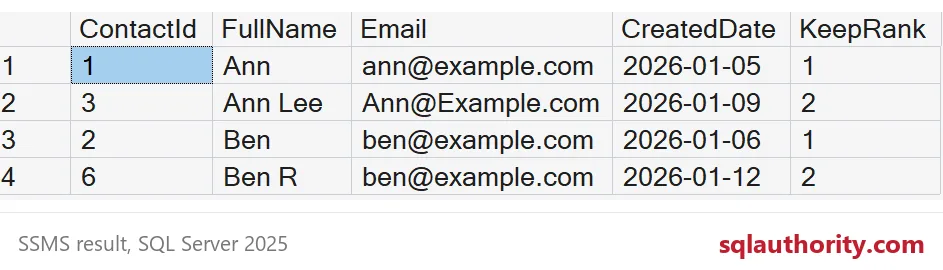
Rank 1 stays and rank 2 goes. Ann (1) beats Ann Lee (3). Ben (2) beats Ben R (6). If other tables point at the extra rows through a foreign key, move those rows to the survivor first. Then delete. The CTE below removes only the rank 2 rows and skips NULL emails on purpose.
WITH Ranked AS (
    SELECT ContactId,
           ROW_NUMBER() OVER (PARTITION BY Email ORDER BY CreatedDate, ContactId) AS KeepRank
    FROM dbo.DemoContacts
    WHERE Email IS NOT NULL)
DELETE FROM Ranked WHERE KeepRank > 1;
Handle the NULLs, then lock the door
The email text is clean now, but the constraint fails again with error 1505 and the value NULL, because two NULL rows remain. You can fill in real values, or you can allow any number of NULLs with a filtered unique index.
ALTER TABLE dbo.DemoContacts ADD CONSTRAINT UQ_DemoContacts_Email UNIQUE (Email);CREATE UNIQUE INDEX UX_DemoContacts_Email ON dbo.DemoContacts (Email) WHERE Email IS NOT NULL;
INSERT dbo.DemoContacts (FullName, Email, CreatedDate) VALUES ('Fay', NULL, '2026-01-14');
INSERT dbo.DemoContacts (FullName, Email, CreatedDate) VALUES ('Ann Again', 'ANN@example.com', '2026-01-15');The first insert, a third NULL, goes through. The second insert is Ann again in capital letters, and error 2601 stops it. The message names the value, ANN@example.com. That is the behavior you wanted: any number of unknown emails, but never the same address twice.
DROP TABLE IF EXISTS dbo.DemoContacts;Run the duplicate query on a copy of your real table before you plan the change. The result is your to-do list.
A unique constraint is not a cleaner, it is a gatekeeper for data you already cleaned.
Published by Pinal Dave on SQLAuthority. More of my work at pinaldave.com.
Discover more from SQL Authority with Pinal Dave
Subscribe to get the latest posts sent to your email.