Updating a large table in batches with a moving key range keeps each transaction small and each pass predictable. You walk the clustered key from the first value to the last, a slice at a time. It is the safest way I know to change millions of rows without waking the whole team at 2 AM.

Why one big UPDATE hurts
One statement that touches a huge table is one transaction. It holds its locks until the very end. It fills the transaction log in one go. If it fails, you wait for a long rollback. Users queue behind it. Nobody enjoys that phone call.
Batches fix this. Each slice commits on its own, so locks are released between slices and the log can be reused as you go. The demo below uses a temp table, so nothing permanent is created. It needs SQL Server 2022 or later for GENERATE_SERIES.
Build a table with a hole in it
I want 10,000 orders. Every fifth one is Closed, and the rest are Open. Then I delete orders 3001 to 4000, because real tables have gaps, and gaps are exactly what breaks naive loops.
DROP TABLE IF EXISTS #Orders;
CREATE TABLE #Orders (OrderId int PRIMARY KEY, Status varchar(10) NOT NULL);
INSERT #Orders
SELECT value, CASE WHEN value % 5 = 0 THEN 'Closed' ELSE 'Open' END
FROM GENERATE_SERIES(1, 10000);
DELETE #Orders WHERE OrderId BETWEEN 3001 AND 4000;
SELECT COUNT(*) AS TotalRows, SUM(CASE WHEN Status = 'Open' THEN 1 ELSE 0 END) AS OpenRows FROM #Orders;
Walk the key range
The loop below starts at the lowest key and ends at the highest. Each pass updates only the keys inside one slice of 1,000 and logs how many rows it touched. The WHERE clause on OrderId lets the clustered key do the seeking, and the Status test keeps already-finished rows out.
DROP TABLE IF EXISTS #BatchLog;
CREATE TABLE #BatchLog (Batch int IDENTITY(1,1), FromId int, RowsUpdated int);
DECLARE @From int = (SELECT MIN(OrderId) FROM #Orders),
        @Max int = (SELECT MAX(OrderId) FROM #Orders),
        @Size int = 1000, @Rows int;
WHILE @From <= @Max
BEGIN
    UPDATE #Orders SET Status = 'Archived'
    WHERE OrderId >= @From AND OrderId < @From + @Size AND Status = 'Open';
    SET @Rows = @@ROWCOUNT;
    INSERT #BatchLog (FromId, RowsUpdated) VALUES (@From, @Rows);
    SET @From += @Size;
END;
SELECT Batch, FromId, RowsUpdated FROM #BatchLog ORDER BY Batch;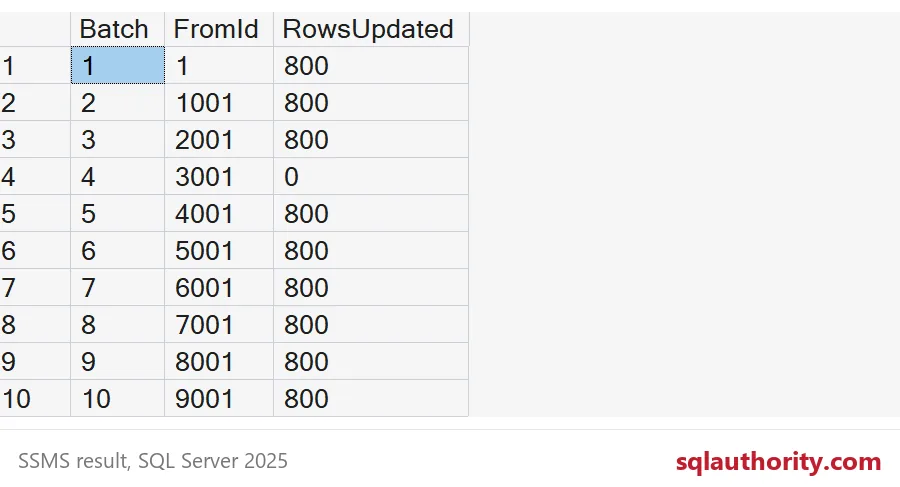
Ten batches ran, one per thousand keys. Nine of them touched 800 rows, because one in five was Closed. Batch 4 touched nothing, because that range is the hole I cut. The loop did not care. It kept walking.
SELECT Status, COUNT(*) AS RowTotal FROM #Orders GROUP BY Status ORDER BY Status;Every Open row is now Archived, and the Closed rows were never touched. Run a check like this after every big job, before you tell anyone it is done.

The mistake that stops early
Many loops stop when a batch changes zero rows. That feels natural, and it is wrong when keys have gaps. Reset the data and try it.
UPDATE #Orders SET Status = 'Open' WHERE Status = 'Archived';
DECLARE @From int = 1, @Size int = 1000, @Rows int = 1;
WHILE @Rows > 0
BEGIN
    UPDATE #Orders SET Status = 'Archived'
    WHERE OrderId >= @From AND OrderId < @From + @Size AND Status = 'Open';
    SET @Rows = @@ROWCOUNT;
    SET @From += @Size;
END;
SELECT COUNT(*) AS StillOpen FROM #Orders WHERE Status = 'Open';
The loop hit the empty range after keys 3000, quit, and left 4,800 rows Open. No error, no warning, just quiet bad data. Stopping at the highest key, as in the first loop, is the safe version.
Choosing a batch size
Start small, watch how long each batch takes, and grow only if the server stays calm. A batch size is a dial, not a law. Add a short WAITFOR DELAY between batches if users still feel it. Index the column you filter on, and make sure the key you walk is the clustered key, or each slice turns into a scan.
The log table earns its keep too. Because it records where each batch started, a stopped job can restart from the last FromId instead of from the top. Some people loop on UPDATE TOP (1000) instead. It works, but unless the filter column is indexed, every pass has to hunt for the next unfinished rows. A key range always knows exactly where it is, and it never goes back.
DROP TABLE IF EXISTS #BatchLog;
DROP TABLE IF EXISTS #Orders;
Next time someone says a big update is just one statement, ask how they plan to stop it halfway.
A batch is not a slow update, it is a safe one.
Published by Pinal Dave on SQLAuthority. More of my work at pinaldave.com.
Discover more from SQL Authority with Pinal Dave
Subscribe to get the latest posts sent to your email.