STRING_AGG order belongs in the aggregate’s ordering clause. I also decide whether missing labels should disappear before combining the values into a single display string.

Order the values inside the group
A grouped label needs two different order decisions. One concerns the values inside each label. The other concerns the final groups displayed by SELECT. An outer ORDER BY controls the groups, not the sequence inside each aggregated string.
WITHIN GROUP is STRING_AGG’s ordered form. The example orders by a unique sequence within each group. Its final SELECT separately orders the group identifiers. Those clauses express two different requirements.
I wouldn’t choose alphabetical ordering unless the label’s contract requires it. An original business sequence can carry its own meaning. Repeated label text doesn’t make repeated occurrences unnecessary. The complete input preserves a duplicate to keep that point visible.
Keep missing and empty labels distinct
STRING_AGG ignores NULL values and their separators. An empty string remains a value. The example contains both cases in one group. Its sequence column identifies exactly where each occurrence belongs.
The raw label contains beta, alpha, an empty value and another alpha in the stated sequence. The empty value leaves its separator visible. The NULL occurrence contributes no separator. I keep a second output that deliberately labels missing values.
That second expression converts NULL to the text [missing] before aggregation. It is an explicit presentation policy. The raw list remains beside that policy output for comparison. The two strings therefore answer different display questions.
WITH Inputs AS
(
    SELECT GroupId, Seq, CAST(Label AS nvarchar(20)) AS Label
    FROM (VALUES (1, 1, N'beta'), (1, 2, NULL),
                 (1, 3, N'alpha'), (1, 4, N''), (1, 5, N'alpha'),
                 (2, 1, NULL), (2, 2, NULL)) AS v(GroupId, Seq, Label)
), Grouped AS
(
    SELECT GroupId,
           STRING_AGG(CAST(Label AS nvarchar(max)), N'|')
               WITHIN GROUP (ORDER BY Seq) AS RawList,
           STRING_AGG(CAST(ISNULL(Label, N'[missing]') AS nvarchar(max)), N'|')
               WITHIN GROUP (ORDER BY Seq) AS PolicyList
    FROM Inputs
    GROUP BY GroupId
)
SELECT GroupId, RawList, PolicyList,
       DATALENGTH(RawList) AS RawBytes,
       DATALENGTH(PolicyList) AS PolicyBytes
FROM Grouped
ORDER BY GroupId;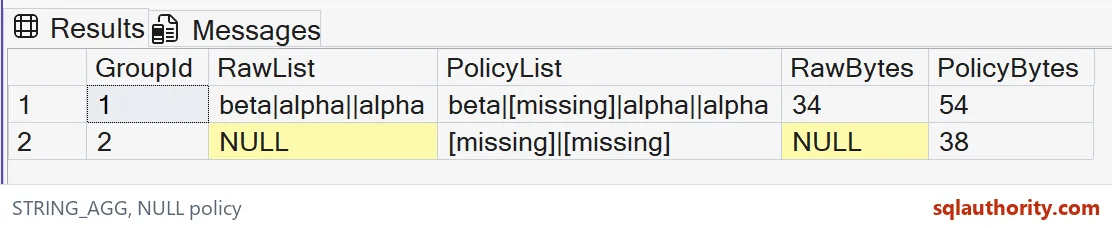

Choose the input width before aggregating
This query converts every label to nvarchar(max) inside STRING_AGG. The aggregate’s return type follows its input expression. Casting only the completed aggregate would be a later operation. The input conversion is where this width decision belongs.
The example’s short labels don’t require a large result. I still state the type deliberately so its available width is clear. That doesn’t promise unlimited application output. A destination screen or transport can impose a smaller limit.
For a fixed-width output contract, I’d define and test that limit separately. A list of thousands of values isn’t automatically a readable label. Combining the text doesn’t remove the need for a suitable consumer. The function and presentation design have separate jobs.
Check groups that have no usable label
The second group contains two NULL labels. Its raw aggregate is NULL. The policy expression instead gives two [missing] entries. Grouping still produces a row for that group because its input rows exist.
I can argue against placeholders in a compact report. They can distract from the useful labels. Another report needs to expose missing data instead. The correct choice depends on the reader’s task, not on the easiest expression to type.
Neither output reconstructs the entire original relation. Values have been combined and their identifiers aren’t retained inside the label. Keep the relational data when later operations need it. A display string shouldn’t silently become the application’s source of truth.
Keep the complete result reviewable
The script uses only literal inputs and a grouped SELECT. It creates no objects and changes no session options. Run it on SQL Server 2017 or later, because STRING_AGG needs that version. The ordered clause also needs database compatibility level 110 or higher.
Keep both group outputs beside their byte lengths. Those lengths expose the empty component and placeholder decisions. Compare complete strings rather than trusting clipped grid text. The raw list and policy list should retain their separate meanings.
I keep both order clauses in the example even when the tiny input looks predictably arranged. The clauses make the contract inspectable. That clarity matters more than saving a line of SQL. A convenient aggregate still deserves a precise rule.
Decide the order and the missing-label rule first, then write the aggregate.
An aggregated label is not an ordered relation, it is a string with rules for order and NULLs.
Published by Pinal Dave on SQLAuthority. More of my work at pinaldave.com.
Discover more from SQL Authority with Pinal Dave
Subscribe to get the latest posts sent to your email.