HAVING without GROUP BY filters the single implicit aggregate group produced by the query. I use that distinction when a summary should appear only if its aggregate condition passes. A false condition can remove the summary row entirely.
This is different from filtering individual input rows with WHERE. The aggregate condition applies to the group’s calculated values. The result can contain one summary row or no rows, even with the same populated source.

Compare three complete summary queries
The source contains amounts ten, twenty and NULL. COUNT_BIG star counts all three input rows. SUM uses the two populated amounts, producing thirty.
The first query requires at least three input rows. The second requires more than three. The final query removes every input row with WHERE before requiring a count of zero.
Each SELECT returns only aggregate expressions. There is no bare detail column pretending to belong beside the one summary. The batch is read-only and has no table setup or session changes.
WITH Inputs AS
(
    SELECT Amount FROM (VALUES (CAST(10 AS int)), (20), (NULL)) AS v(Amount)
)
SELECT COUNT_BIG(*) AS [RowCount], SUM(Amount) AS TotalAmount
FROM Inputs
HAVING COUNT_BIG(*) >= 3;

WITH Inputs AS
(
    SELECT Amount FROM (VALUES (CAST(10 AS int)), (20), (NULL)) AS v(Amount)
)
SELECT COUNT_BIG(*) AS [RowCount], SUM(Amount) AS TotalAmount
FROM Inputs
HAVING COUNT_BIG(*) > 3;

WITH Inputs AS
(
    SELECT Amount FROM (VALUES (CAST(10 AS int)), (20), (NULL)) AS v(Amount)
)
SELECT COUNT_BIG(*) AS [RowCount], SUM(Amount) AS TotalAmount
FROM Inputs
WHERE 1 = 0
HAVING COUNT_BIG(*) = 0;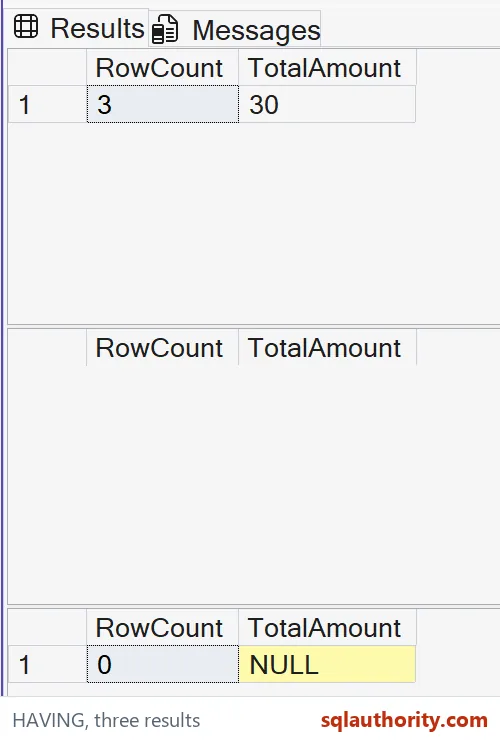
Read one row versus no row
The first expected result has one row: count three and total thirty. Its HAVING predicate is true for the implicit group. The summary is therefore included.
The second result has the same column definitions but zero rows. Its count is not greater than three, so the group is excluded. SQL Server does not return a row of zero values to represent that failure.
The empty-source query should return one row with count zero and total NULL. Its HAVING condition explicitly accepts that empty-input aggregate. The absence of qualifying input rows is not the same as absence of the aggregate result row.
The count and total describe different missing-input behavior. Count zero communicates no rows. The NULL total avoids inventing a numeric amount when there are no populated values to sum.

Keep WHERE and HAVING in their own roles
WHERE chooses the input rows before these aggregates are calculated. HAVING chooses whether their resulting group is returned. Moving a condition between them can change both the calculated value and output population.
The final query’s WHERE predicate is deliberately always false. That makes its empty input explicit without creating an empty physical table. The zero-count HAVING condition then tests the group’s aggregate outcome.
A HAVING predicate can also use several aggregate conditions together. Define each measure carefully, especially when missing values are possible. Counting populated amounts would not be the same measure as counting every input row here.
I don’t interpret an excluded summary as a zero amount. An application receiving no row should follow a deliberate rule for that outcome. Substituting a value automatically can hide whether the aggregate condition passed.
Keep the implicit group visible during review
The absence of GROUP BY is intentional, not a forgotten detail-column list. It asks for one aggregate over the chosen input population. Adding a grouping key changes that population into separate groups.
An ordinary detail column cannot be selected freely beside these aggregate expressions. The query must define how that column participates in aggregation or grouping. Keep summary and detail contracts clear rather than relying on a convenient sample value.
This example makes no execution-plan or performance claim. Its three result sets show true, false and empty-input cases. A populated-only test would miss the distinction between an excluded group and an accepted empty summary.
When adapting it, compare the row count as well as the numeric columns. Some consumers treat one NULL-bearing row differently from no row. Preserve that distinction when the report condition is part of the application contract.
Remember that HAVING can decide a group produces no output row at all.
HAVING is not a row filter, it is a decision about the whole aggregate group.
Published by Pinal Dave on SQLAuthority. More of my work at pinaldave.com.
Discover more from SQL Authority with Pinal Dave
Subscribe to get the latest posts sent to your email.