geometry STIsEmpty tests whether an existing spatial instance has an empty point set. I keep that condition separate from SQL NULL. A missing database value and a present empty geometry are different inputs.
The example compares a point, an empty collection and a typed NULL. Three diagnostic columns show their differences explicitly. None of the cases is replaced by a convenient fallback shape.

Construct three distinct inputs
The first row contains a point at coordinates two and three. The second row constructs an empty GeometryCollection using valid spatial text. The third row uses a NULL expression explicitly typed as geometry.
UNION ALL keeps all three rows in the input. Each row has a stable case identifier and a descriptive label. The final ORDER BY makes the diagnostic output predictable.
IsSqlNull answers whether the database value is absent. IsEmpty and PointCount inspect present values only. Their CASE expressions preserve NULL diagnostics for the missing row.
WITH Shapes AS
(
    SELECT 1 AS CaseId, 'Populated point' AS CaseName,
           geometry::STGeomFromText('POINT(2 3)', 0) AS Shape
    UNION ALL
    SELECT 2, 'Empty collection', geometry::STGeomFromText('GEOMETRYCOLLECTION EMPTY', 0)
    UNION ALL
    SELECT 3, 'Missing value', CAST(NULL AS geometry)
)
SELECT CaseId, CaseName,
       CASE WHEN Shape IS NULL THEN 1 ELSE 0 END AS IsSqlNull,
       CASE WHEN Shape IS NULL THEN NULL ELSE Shape.STIsEmpty() END AS IsEmpty,
       CASE WHEN Shape IS NULL THEN NULL ELSE Shape.STNumPoints() END AS PointCount
FROM Shapes
ORDER BY CaseId;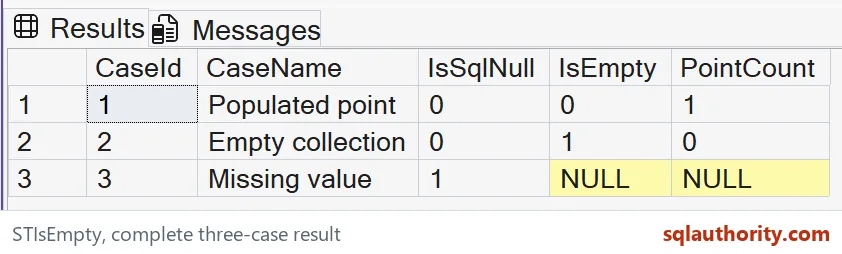
Read absence and emptiness independently
The populated point should have IsSqlNull zero, IsEmpty zero and PointCount one. It exists and contains a coordinate. Those facts do not say whether its location is correct.
The empty collection should have IsSqlNull zero, IsEmpty one and PointCount zero. It is a present value with no represented points. Its database column is not NULL.
The missing value should have IsSqlNull one and NULL in both geometry diagnostics. The query does not reinterpret absence as an empty instance. That distinction remains visible in the result.
All three rows remain in the output. A filter that keeps only nonempty shapes would change the result’s purpose. First inspect the categories before deciding which ones an application should accept.

Choose a business meaning explicitly
An empty result can be meaningful after a spatial operation finds no shared region. A missing input might mean that coordinates were never provided. Those interpretations are examples, not meanings supplied automatically by SQL Server.
I don’t use a default point to make the missing row look populated. That would introduce a location the source never supplied. It can distort later distance and intersection calculations.
Likewise, converting every empty instance to NULL loses the fact that a geometry value was produced. That may matter during validation or interchange. Preserve the distinction until the consuming rule is known.
The type of an empty instance is another separate property. This example deliberately uses a GeometryCollection. Other empty geometry types should be checked against the requirements of their intended consumers.
Keep inspection different from repair
The query changes no data and performs no spatial repair. It provides a compact classification of three input states. Any replacement or rejection policy belongs in a separate step.
PointCount is included as an explanatory witness rather than a general substitute for the emptiness method. Collections and their members can have additional structure. Use the method that directly answers the question being asked.
The example uses fixed coordinates and a common reference identifier for present values. It establishes no performance or indexing claim. Keep missing, empty and populated cases in tests when adapting the inspection to real data.
Check for NULL first, then ask about emptiness.
An empty shape is not a missing value, it is a real geometry with no points.
Published by Pinal Dave on SQLAuthority. More of my work at pinaldave.com.
Discover more from SQL Authority with Pinal Dave
Subscribe to get the latest posts sent to your email.