DATETRUNC can give an ISO week its Monday boundary without changing session settings. I also keep the input date type explicit. A boundary calculation should reveal both its calendar rule and its return type.
A Sunday and the following Monday belong to different ISO weeks. The same dates still belong to one month. Returning both boundaries makes that difference easy to inspect before grouping a report.

Use bounded dates and a typed timestamp
The first query contains four dates converted with style 112. It returns the ISO week start and month start for each. The display conversions provide complete year-month-day strings for comparison.
The second query starts with a datetime2 value whose fractional scale is three. It returns day and ISO week boundaries beside the original timestamp. Type and scale diagnostics describe the unformatted DATETRUNC expression.
SQL Server 2022 introduced DATETRUNC. This example uses supported dateparts and explicitly typed inputs. It creates no objects and does not issue SET DATEFIRST or other session-setting commands.
WITH Dates AS
(
    SELECT CaseId, CONVERT(date, DateText, 112) AS InputDate
    FROM (VALUES (1, '20240101'), (2, '20240107'),
                 (3, '20240108'), (4, '20241231')) AS v(CaseId, DateText)
)
SELECT CaseId, CONVERT(char(10), InputDate, 23) AS InputDate,
       CONVERT(char(10), DATETRUNC(iso_week, InputDate), 23) AS IsoWeekStart,
       CONVERT(char(10), DATETRUNC(month, InputDate), 23) AS MonthStart
FROM Dates
ORDER BY CaseId;

WITH Input AS
(
    SELECT CAST('2024-01-07T14:25:36.789' AS datetime2(3)) AS InputTimestamp
)
SELECT CONVERT(varchar(23), InputTimestamp, 121) AS InputTimestamp,
       CONVERT(varchar(23), DATETRUNC(day, InputTimestamp), 121) AS DayStart,
       CONVERT(varchar(23), DATETRUNC(iso_week, InputTimestamp), 121) AS IsoWeekStart,
       CAST(SQL_VARIANT_PROPERTY(DATETRUNC(iso_week, InputTimestamp), 'BaseType') AS varchar(20)) AS ReturnType,
       CAST(SQL_VARIANT_PROPERTY(DATETRUNC(iso_week, InputTimestamp), 'Scale') AS int) AS ReturnScale
FROM Input;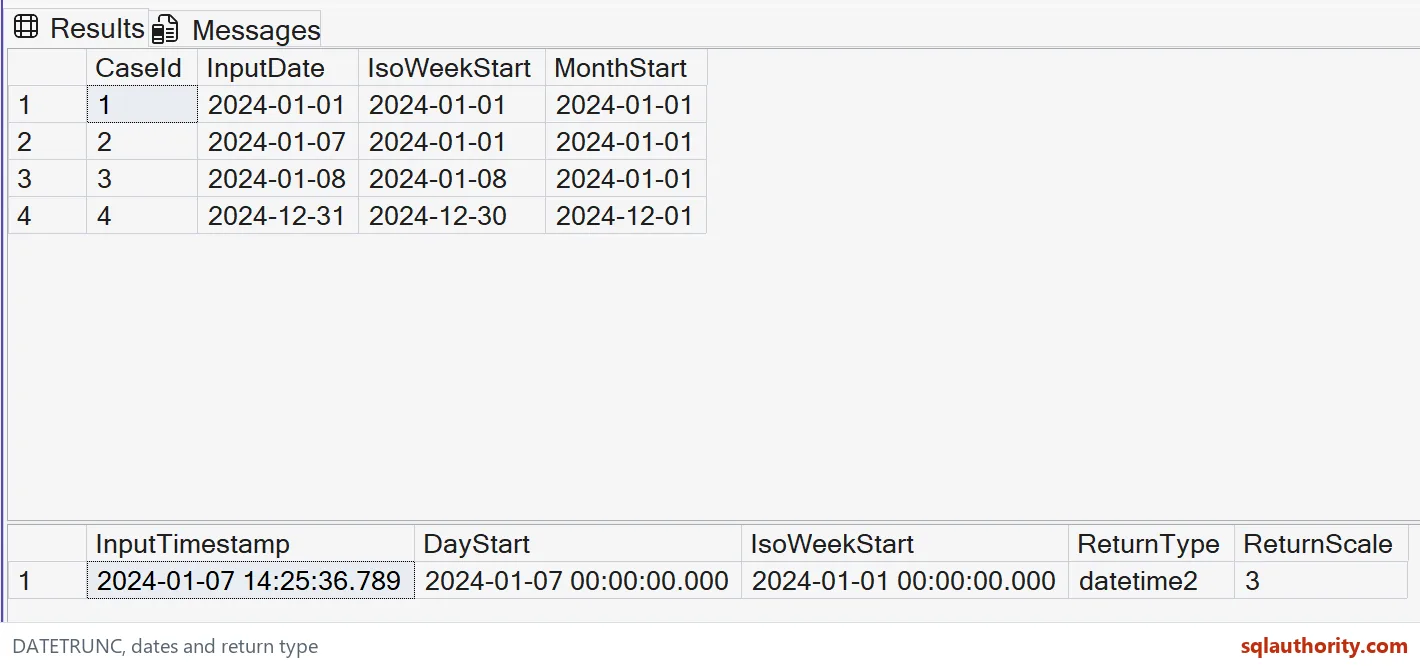
Read the Monday boundary
January 1, 2024 was Monday, so its ISO week start is the same date. January 7 was Sunday and shares that Monday boundary. January 8 begins the next ISO week.
December 31 has an expected ISO week start of December 30. A week boundary can therefore fall earlier than the input date. The query does not attempt to derive an ISO week-year label from the calendar year.
All three January inputs have January 1 as their month start. The December input has December 1. Month grouping and week grouping answer different reporting questions even when some boundary dates coincide.
The ordinary week datepart uses the session’s DATEFIRST setting. The iso_week datepart uses Monday instead. I choose the one that matches the report rather than assuming every week calculation has the same definition.

Preserve a deliberate date type
The timestamp’s day boundary removes its time of day. Its ISO week boundary also moves the date back to Monday. Both expected displayed timestamps end with midnight and three zero fractional digits.
DATETRUNC preserves the input type and fractional scale for these typed arguments. The diagnostic row should show datetime2 with scale three. The varchar display columns are deliberate formatting around those typed results.
Passing a string literal directly has different type behavior from passing an explicit date or datetime2 expression. I avoid that ambiguity in reusable examples. Decide the required output type before adding display formatting.
A date input cannot support a time-of-day datepart. Fractional dateparts also have scale requirements. The example stays within its types instead of relying on conversions to make unsupported combinations appear valid.
Use boundaries without inventing extra rules
A timestamp bucket identifies the beginning of its interval. It does not define the entire filtering predicate for a stored column. Choose the next boundary and comparison operators separately when selecting a complete reporting period.
These values have no time-zone offset or daylight-saving transition. DATETRUNC does not turn them into business-local timestamps. Perform any required time-zone interpretation using an explicit rule outside this narrow example.
The query’s ORDER BY makes the date rows easy to compare. A reporting query can group by the chosen boundary after its definition is agreed. Do not mix ordinary-week and ISO-week definitions under one ambiguous label.
Use the full expected dates and type diagnostics when adapting the example. A midnight-looking result alone does not establish its data type or week rule. The additional columns make those assumptions reviewable.
Pick the week rule first and your report will group the way you expect.
A week is not one calendar rule, it is a definition you choose before grouping.
Published by Pinal Dave on SQLAuthority. More of my work at pinaldave.com.
Discover more from SQL Authority with Pinal Dave
Subscribe to get the latest posts sent to your email.