
An index in SQL Server is a sorted copy of one or more columns, kept beside your table, with a pointer back to the full row. That is the whole idea. Everything else about indexing is a consequence of that one sentence, including why they make reads fast and writes slower.
The Back of the Book
Take a nine hundred page reference book and find every mention of one word. Without the index you read nine hundred pages. With it you turn to one page at the back, find the word, and it tells you exactly where to look.
The index is not the book. It is a second, smaller, sorted thing kept alongside it. Somebody had to build it, it takes up paper, and if a new edition adds a chapter the index has to be rebuilt. A database index is the same deal on all three counts.
What It Is Actually Worth
I built a table of 200,000 orders on SQL Server 2025 and counted the work. First without an index:
SET STATISTICS IO ON;
SELECT COUNT(*) FROM dbo.Orders WHERE city = 'Dublin';
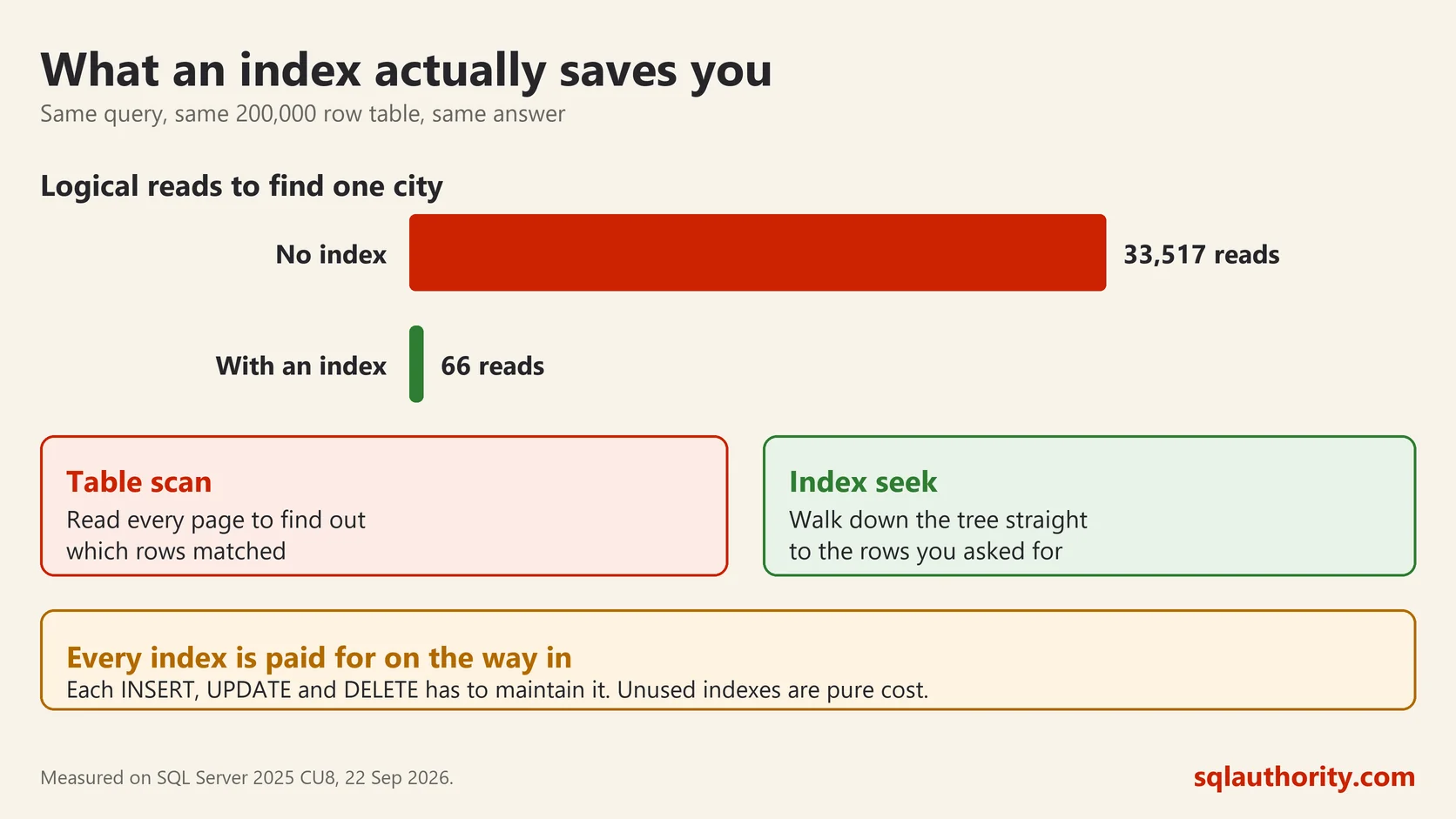
Table 'Orders'. Scan count 1, logical reads 3351733,517 reads to answer a question about 20,578 rows. SQL Server had no choice. Nothing told it where Dublin was, so it looked everywhere.
Then one line:
CREATE INDEX IX_Orders_city ON dbo.Orders(city);Table 'Orders'. Scan count 1, logical reads 6633,517 down to 66. Same query, same answer, five hundred times less work. That is the whole argument for indexing, and it is why the subject gets so much attention.
Clustered and Nonclustered
There are two kinds and the difference matters.
A clustered index is the table itself, held in that order. You get one, because rows can only be stored in one order at a time. Creating a primary key gives you one by default.
A nonclustered index is a separate structure: the columns you chose, sorted, plus a pointer back. You can have many. The one I created above is one of these.
A table with no clustered index is a heap, which means the rows sit in whatever order they arrived. This query tells you which you have:
SELECT i.type_desc AS structure
FROM sys.indexes AS i
WHERE i.object_id = OBJECT_ID('dbo.Orders') AND i.index_id IN (0, 1);
Seek and Scan
Two words you will meet in every execution plan. A seek jumps straight to the rows it needs. A scan reads everything and throws away what does not match.
A scan is not automatically bad. Reading a whole small table is cheaper than jumping about. A scan on a large table where you asked for three rows is the thing to chase.
What an Index Costs
This is the half people skip, and it is why the answer to “should I add an index” is never simply yes.
Every index is a second copy of those columns, so it takes disk and memory. Worse, every INSERT, UPDATE and DELETE has to maintain it. Ten indexes on a table means one insert does eleven pieces of work. On a busy order table that is felt.
So an index is a trade. You are buying read speed with write speed and space. On a reporting table that is a bargain. On a table taking thousands of inserts a minute it may not be.
How to Choose One
Index the columns you filter and join on, not the columns you display. WHERE, JOIN and ORDER BY are where an index earns its keep. A column that only appears in the SELECT list rarely needs one of its own.
Column order matters in an index with more than one column, and it matters more than people expect. An index on city then amount helps a query filtering on city. It does almost nothing for a query filtering only on amount.
SQL Server will suggest missing indexes, and those suggestions are a starting point rather than an instruction. They are generated one query at a time, with no idea what else runs on that table. I have seen a server with forty suggested indexes on one table, most of them near duplicates of each other.
The practical rule I use is this. Start with none beyond the primary key, find the queries that actually hurt, and add indexes for those. Then check a month later whether they are being used at all, because a surprising number never are.
An index is not a setting you turn on, it is a second copy of your data that somebody has to keep current.
This post was rewritten from scratch in September 2026. The original, published on 2008-04-28, was a short announcement about something that no longer exists. The address is the same, the subject is now a basic idea worth keeping.
Published by Pinal Dave on SQLAuthority. More of my work at pinaldave.com.
Discover more from SQL Authority with Pinal Dave
Subscribe to get the latest posts sent to your email.




36 Comments. Leave new
Hi,
I am having a problem related to INSERT INTO on the following platform:
Microsoft SQL Server 2005 – 9.00.3068.00 (X64) Feb 26 2008 23:02:54 Copyright (c) 1988-2005 Microsoft Corporation Enterprise Edition (64-bit) on Windows NT 5.2 (Build 3790: Service Pack 2).
However, if I use the same query on different platform, shown below, it works fine:
Microsoft SQL Server 2005 – 9.00.3054.00 (Intel X86) Mar 23 2007 16:28:52 Copyright (c) 1988-2005 Microsoft Corporation Standard Edition on Windows NT 5.2 (Build 3790: Service Pack 2).
My Query:
1) Drop and Create table
2) add index to its columns:
CREATE UNIQUE NONCLUSTERED INDEX [idxGroup4AndInseminationDate] ON [dbo].[tblForInseminationContainingHUKAndNMRDataWithNoDuplicates]
(
[herdBookNumber] ASC,
[breedId] ASC,
[IDType] ASC,
[pedigreeStatus] ASC,
[inseminationServiceDate] ASC
)WITH (STATISTICS_NORECOMPUTE = OFF, SORT_IN_TEMPDB = OFF, IGNORE_DUP_KEY = ON, DROP_EXISTING = OFF, ONLINE = OFF, ALLOW_ROW_LOCKS = ON, ALLOW_PAGE_LOCKS = ON) ON [PRIMARY]
GO
3) Insert data
INSERT INTO [DBO].[tblForInseminationContainingHUKAndNMRDataWithNoDuplicates]
SELECT *
FROM dbo.tblTestForInsemination AS tblA
WHERE tblA.herdBookNumber = ‘E5854/00220’ AND
tblA.breedId = ‘1’ AND
tblA.IDType = ‘2’ AND
tblA.pedigreeStatus = ‘2’ AND
tblA.inseminationServiceDate = ‘2001-03-16 00:00:00.000’
ORDER BY ISNULL(tblA.authenticSire, ‘N’) DESC, tblA.PDResult DESC
In expected result the order by works fine on the second platform but not on the first one, please help.
Thanks
hello Sir,
is there any way to execute a query based on time.
for example: evey 1st day of a month at 11am i want to execute one query. without user intraction
is it possible?
looking from you.
Make use of job which is specifically used for it
Great job buddy..
good sir in sqL Server
Great Job
Good Job…
Really a group of excellent query statement
I think the Microsoft website to download the trial version of their server sucks. I have spent 3 hours trying to find where to click to download the trial version. You get to one page and it’s a dead end every time. I would have thought that for a big IT company they would have hired people to do their web pages that knew what the hell they were doing.
I don’t want to here that it cost $50.00 for the trial because it doesn’t. If you registered as I did do your supposed to be able to download the thing for FREE.
Fantastic!
i want to know ihave find issue on sql server 2000 storedprocedure script excute in a 5 second and on same script excute on sql 2008 take 2 min time plz help
Are they in the same server? Are the table having the same number of records?
Hi all,
I am getting an error while restoring a database from production to test server.
Below is the error:
Operating system error 1130(Not enough server storage is available to process this command.
pls help
It means that your server’s disk does not have enough space to load the database files. Try restoring in another disk with enough space
Thanku very much 4 ur quick reply………backup file size is 140GB…and m having 350 GB of space in that drive…………….?
Hi Vikas, the backup may well be compressed so the size of the MDF and LDF may exceed 350GB when uncompressed