GREATEST and LEAST compare several expressions within the current row. I keep the input types aligned and check what happens when some, or all, values are NULL.

Separate a row comparison from an aggregate
Three measurements in one row need a different comparison from three rows in a group. GREATEST returns the largest supplied expression. LEAST returns the smallest. Neither function groups separate records or selects a different record’s columns.
GREATEST and LEAST need SQL Server 2022 or later and database compatibility level 160. Their arguments are compared after applicable type conversion. The example deliberately gives every argument the same decimal type. That keeps this demonstration focused on values and missingness.
I’d use these functions when the row already contains the candidate values. A normalized set of measurements might instead call for MIN or MAX over rows. Changing the storage model merely to use a shorter expression would miss the larger decision.
Make the input contract visible
The script supplies five rows with three decimal inputs each. Positive values, negative values and a tie all appear. Two rows contain only some missing inputs. One row contains three NULL values.
Every input is explicitly cast to decimal(7,2). That includes the expressions holding NULL. The result specification therefore records the same decimal precision and scale for both extremes. No numeric text or date conversion participates in this comparison.
The first row returns eight as its greatest value and three as its least. The negative row returns negative three and negative four. A tie does not produce extra rows. These functions return values within each row, rather than matching rows.
WITH Inputs AS
(
    SELECT Id, CAST(A AS decimal(7,2)) AS A,
           CAST(B AS decimal(7,2)) AS B,
           CAST(C AS decimal(7,2)) AS C
    FROM (VALUES (1, 3, 8, 5), (2, NULL, -2, 4),
                 (3, NULL, NULL, 6), (4, NULL, NULL, NULL),
                 (5, -3, -3, -4)) AS v(Id, A, B, C)
)
SELECT Id, A, B, C, GREATEST(A, B, C) AS GreatestValue,
       LEAST(A, B, C) AS LeastValue
FROM Inputs
ORDER BY Id;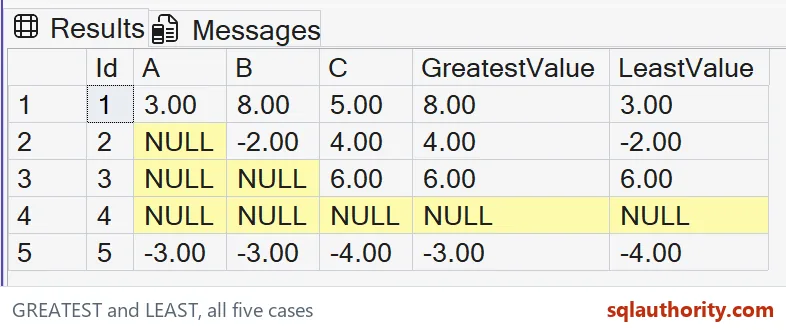
Read partial and complete missingness
Individual NULL arguments are ignored when a non-NULL argument is available. A row containing NULL, negative two and four therefore has two available candidates. Its greatest value is four and its least is negative two.
One available value makes both extremes equal to that value. This isn’t evidence that the missing values were zero. They were excluded from the comparison. Replacing them with zero beforehand would change the candidate list and potentially both results.
An entirely missing row returns NULL for both functions. I retain that row in the output. Its missing extremes remain different from a genuine zero measurement. The original three columns explain which situation produced the result.

Keep type conversion intentional
A mixed argument list needs a separate conversion review. Arguments are converted to the highest-precedence applicable type before comparison. A successful comparison of these decimals doesn’t establish that arbitrary strings will convert. Input conversion can fail before an extreme is chosen.
I can defend substituting a default for a missing measurement. That default belongs to the application’s rule, rather than the function’s NULL behavior. I’d label the derived input explicitly. Readers should be able to identify a measured value and a substituted one.
Likewise, a text comparison would introduce collation rules. This demonstration makes no claim about alphabetic order or numeric-looking labels. It uses typed numeric candidates only. Keep each example’s result contract as narrow as its actual input.
Compare every candidate and result
This complete script reads literal values through a CTE. It creates no objects and changes no connection options. The final ORDER BY fixes the displayed row sequence. Each output retains the input columns beside the chosen extremes.
Compare all five ordered tuples, including their negative and all-NULL cases. Keep each original input beside the resulting extrema. A row count alone cannot check those distinctions. Compare the entire result before reusing the expression.
Compare what is there, and let missing values stay missing.
A row extreme is not a replacement for missing measurements, it is a comparison of the available candidates.
Published by Pinal Dave on SQLAuthority. More of my work at pinaldave.com.
Discover more from SQL Authority with Pinal Dave
Subscribe to get the latest posts sent to your email.