
Update: This article is re-written with SQL Server 2008 R2 instance over here: SQL SERVER – 2008 – 2008 R2 – Create Script to Copy Database Schema and All The Objects – Data, Schema, Stored Procedure, Functions, Triggers, Tables, Views, Constraints and All Other Database Objects
Following quick tutorial demonstrates how to create T-SQL script to copy complete database schema and all of its objects such as Stored Procedure, Functions, Triggers, Tables, Views, Constraints etc. You can review your schema, backup for reference or use it to compare with previous backup.
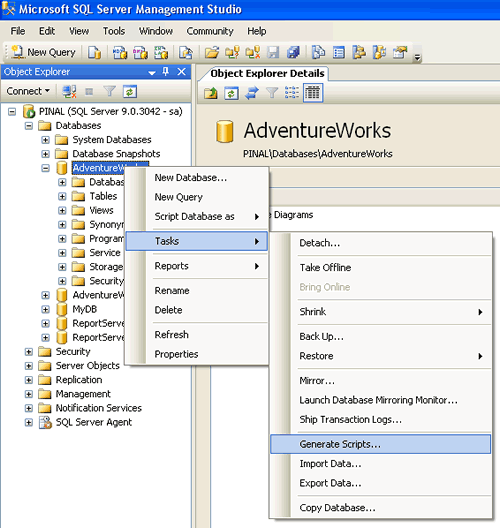
Step 1 : Start
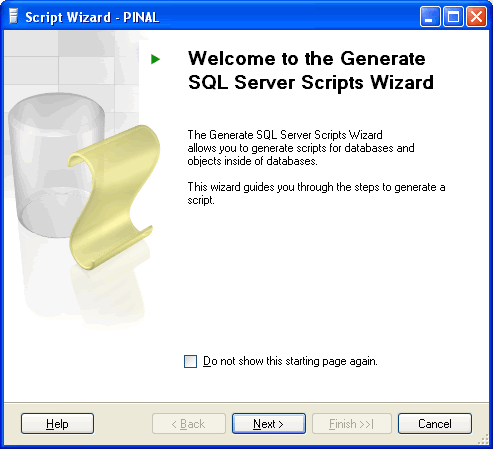
Step 2 : Welcome Screen
Step 3 : Select One or Multiple Database
If Script all objects in the selected database checkbox is not selected it will give options to selected individual objects on respective screen. (e.g. Stored Procedure, Triggers and all other object will have their own screen where they can be selected)

Step 4 : Select database options

Step 5 : Select output option

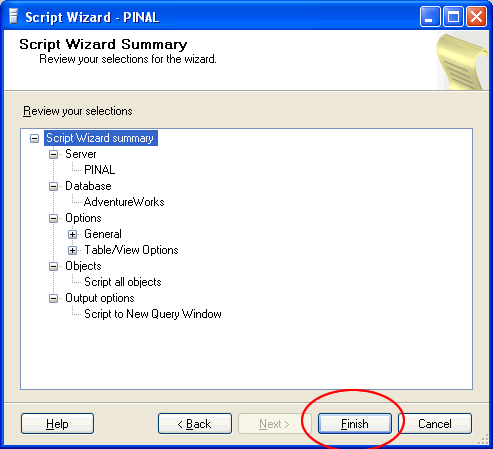
Step 6 : Review Summary
Step 7 : Observe script generation process

Step 8 : Database object script generation completed in new query window

Reference : Pinal Dave (https://blog.sqlauthority.com), All images are protected by copyright owner SQLAuthority.com




673 Comments. Leave new
USE [master]
GO
CREATE DATABASE [abc] ON PRIMARY
( NAME = N’abc’, FILENAME = N @mdf, SIZE = 20480KB , MAXSIZE = UNLIMITED, FILEGROWTH = 1024KB )
LOG ON
( NAME = N’abc_log’, FILENAME = N @fullldf , SIZE = 2304KB , MAXSIZE = 2048GB , FILEGROWTH = 10%)
COLLATE SQL_Latin1_General_CP1_CI_AS
GO
Hello i need to pass the path of mdf and ldf in varaiable . Can you help me to how to pass it becasuse i am getting error when i trying to do this
@Liliana
Check out the script below i used to copy data from a table in one database[db1] to another[db2] using a cursor,both databases had the same schema,u can modify it to include more than one table.
—–
declare @id int
declare @userid int
declare @logtime datetime
declare @logoff datetime
declare @isonline bit
declare @workstation varchar(50)
declare @modid int
declare mycursor cursor for select
db1.dbo.hrsloginhistory.loginhistoryid,
db1.dbo.hrsloginhistory.userid,
db1.dbo.hrsloginhistory.logintime,
db1.dbo.hrsloginhistory.logofftime,
db1.dbo.hrsloginhistory.isonline,
db1.dbo.hrsloginhistory.workstation,
db1.dbo.hrsloginhistory.moduleid from db1.dbo.hrsloginhistory
open mycursor
fetch mycursor into
@id ,
@userid,
@logtime,
@logoff,
@isonline,
@workstation,
@modid
while @@fetch_status=0
begin
insert into db2.dbo.hrsloginhistory(loginhistoryid,userid,logintime,logofftime,isonline,workstation,moduleid)
values(@id ,
@userid,
@logtime,
@logoff,
@isonline,
@workstation,
@modid)
fetch next from mycursor into
@id ,
@userid,
@logtime,
@logoff,
@isonline,
@workstation,
@modid
end
close mycursor
deallocate mycursor
Once I have my database create script how do I make a database from it?
Can we take only indexes script from one database if it is possiable than please help me because i want to move all indexes from default file to created new data file (specialy created for indexes).
In the Scripting Wizard, after you choose the DB, you come to Choose Script Options. about 2/3’s of the way down, you see an option labeled Script For Version where you can choose to script it for 2005 or 2000. I think in this way you can script a DB in order to restore to a sql2000 box, since the restore for last night’s backup option has never worked for me.
Thanks it is very usefule for me .
Thanks. This was helpful.
Somewhere in the blogs someone posted that this is self-explanatory.
I think the number of responses are self-explanatory to contradict this.
Could any one tell me how to take data base back up excluding few tables in MSSQL 2005
Thanks! solved my problem.
Hi
i do not have any instance of SQL server at my machine but while installing a DOTNET product i connect to the another machine SQL Server and i want to create a database by executing a script on that machine. Is it possible.
Thanks in Advance
VImal
Hi Pinal,
How to Clone a existing sql database???So that to create a new one…..or is there any query to generate this?if its possible please notify that also…
thanks in advance
Satheesh P.M.
Thank you very much ….
Sir,
I want to generate separate script files for each stored procedure in my database.
And it should be in the format
IF EXISTS DROP SP
CREATE sp
I am using sql server 2005 management sudio express
Thanks,
Priya
sir,
i want these scripts return to vb.net text box how can i?
thanks
my generated script for 2000 database don’t respect dependencies at all. It is issue for anyone try to copy 2000 database?
You sir are fantastic.
Keep up the great work =D
How i can take sqlserver 2005 database Backup using windows Application with C#?
What is the code run behind the Generate SQL Script. I need to build a code which will dynamically copy the table schema in DTS package using global variables. I tried using Config INI file and global variables but couldn’t reach to the solution of generating a schema of source table to destination table.
The purpose of doing this is we need to transfer table from one server to another server without having any manuall intervention. So we can just pass the parameters and everything sets on its own, The DTS package suppose to generate the schema at destination table and then copy the data at destination.
Could you please help me out in finding the code that SQL Server runs behind the Generate SQL Script GUI.
I tried to run SQL Server Profiler to trace the code but didn’t help enough.
Hellow sir
just i copy a database in my sql databases and i want paste this database in another system sql databases without taking any backup or any restoring process
Hello,
how can I add the ‘USE [DATABASE]’ statement to the create-script, when I’m using “SQL-Prompt Script Generation” as coded in SQL for automated Script Generation.
If I am using the Wizzard, there is an option to mark this issue as true. But in the ScriptMethod (for SQLDMOObjects) I can’t find any options to set this true.