
Update: This article is re-written with SQL Server 2008 R2 instance over here: SQL SERVER – 2008 – 2008 R2 – Create Script to Copy Database Schema and All The Objects – Data, Schema, Stored Procedure, Functions, Triggers, Tables, Views, Constraints and All Other Database Objects
Following quick tutorial demonstrates how to create T-SQL script to copy complete database schema and all of its objects such as Stored Procedure, Functions, Triggers, Tables, Views, Constraints etc. You can review your schema, backup for reference or use it to compare with previous backup.
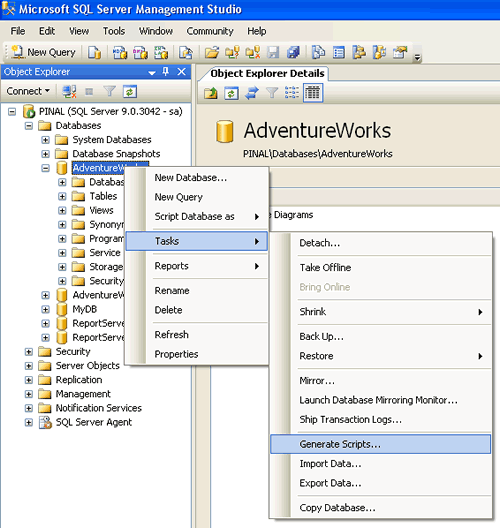
Step 1 : Start
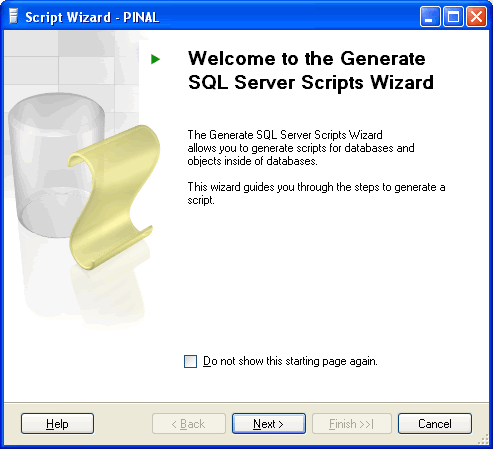
Step 2 : Welcome Screen
Step 3 : Select One or Multiple Database
If Script all objects in the selected database checkbox is not selected it will give options to selected individual objects on respective screen. (e.g. Stored Procedure, Triggers and all other object will have their own screen where they can be selected)

Step 4 : Select database options

Step 5 : Select output option

Step 6 : Review Summary
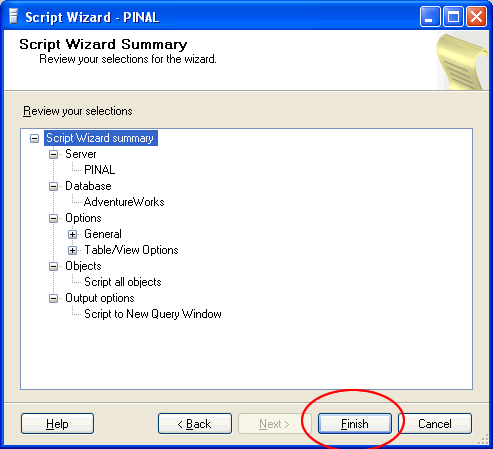
Step 7 : Observe script generation process

Step 8 : Database object script generation completed in new query window

Reference : Pinal Dave (https://blog.sqlauthority.com), All images are protected by copyright owner SQLAuthority.com




673 Comments. Leave new
hi,
This blog help me much. But once a create the scripts, how do i create a msi/exe file to create an automated installer for my database? please help me..
Thank You!
Pinal,
Excellent tutorial, precise and extremely helpful in getting a replica DB up and running. Great work.
Thank you.
Mike
When I execute the script, about 90% of the time I get the error message “‘IUSR_E18586’ is not a valid login or you do not have permission.”. The tables are created, but they are empty.
@ Mike Adams.
When I execute the script, about 90% of the time I get the error message “‘IUSR_E18586′ is not a valid login or you do not have permission.”.
Response: May be you are scripting users in the generate script. When users are scripted they include login information also. Just as an example, using the same screen, I have generated a script for a user called Imran which is attached to login ImranMohammed.
CREATE USER [Imran] FOR LOGIN [ImranMohammed] WITH DEFAULT_SCHEMA=[dbo]
When after you have generated script on a server, and you are trying to execute the same script on some other server, the above script will try to create a user, Imran in that database, but it will search for login name, ImranMohammed, if this login name is not present in new sql server instance then you will see that error : ImranMohammed is not a valid login.
or
In the script you generated, there could be a script that is actually impersonating another login, something like. Execute this stored procedure as IUSR_E18586 login ( which has high privileges) and this login might not be present on new sql server instance.
Long Story Short : Login Name is used some where in the script you generated and that login name is missing in the new sql server instance on which you are trying to execute this script.
Question 2:
The tables are created, but they are empty.
Response: You are just creating script for the table structure. This process actually copies only the structure of the table and all information about keys, indexes, constraints, that is it. This script will not generate data for you.
But if you follow this article, using this you can also generate script for data as well as sturcture, and when you execute this script on new server, you will see both tables and data inside those tables.
This is screen shot explanation, how to use Database Publishing wizard.
http://products.secureserver.net/products/hosting/PublishingWithDPW.htm
~ IM.
Does this script move sql logins too?
Hey
how this process can be automated?
I mean how the scripts can be automatically generated using osql or .. ??
so that i can schedule it ..
Hello
I want to scheduale copy table from several server.
Regards,
R.Haddadi
Hello
I want to copy a table from another server to my server, and schedual it.
up to now I create a vb.net program and did it, but from now i’m looking for a new way with sql server ability.
Regards,
R.Haddadi
I have looked in all the posts to this article, but no one seems to address the question – how does one get the wizard to include the data as well? I don’t just want the ” Database Schema and All The Objects – Stored Procedure, Functions, Triggers, Tables, Views, Constraints and All Other Database Objects”…I want the data as well?
I took the scripts of table and then I took the scripts of others. But I took errors when I executing other scripts especially on procedures:
1. Ambiguous column name ‘ID_SINIF’.
2. Invalid column name ‘ID_PERUCRGID’.”
3. Column “OkyAday.SEMT” is invalid in the ORDER BY clause because it is not contained in either an aggregate function or the GROUP BY clause.
4. Insert Error: Column name or number of supplied values does not match table definition.
5. Could not find server ‘LOGO’ in sys.servers. Verify that the correct server name was specified. If necessary, execute the stored procedure sp_addlinkedserver to add the server to sys.servers.
But the procedures are correct. How can I solve this problem?
Thanks.
Hi friends
I found a neat solution to execute scripts on nested views.
I have about 130 views with some having up to 4 layers of views each depending on the other in the lower layer.
The generate script function generates the script for all views correctly. But on execution, it fails when it cannot find the lower level views that are needed for higher layer views. This is because, the CREATE script for the views are not ordered in the dependency sequence correctly. Hence the script looked as if it failed.
However, i did get it right when I ran the script over and over again for 4 times on the same database. What happened was that the script kept adding views in each run for the lowest layer for which it found all the dependent views. The lowers layers were added in the first run and the higher level views were not added. In the second run, it could find the lowest level view for the next level views and hence they were created successfully. When I ran 4 times, it added all my views correctly into the database! It was so simple to do and it took so long to find the answer!
Raman Venkatraman
I want to transfer SQL server 2000 (Database with all users) to SQL server 2005.
How it is possible ?
Hi Pinal,
Need your advaise ,
I want to backup database from existing server and it should keep the backup in another server and this process should do daily.
Thanks
Hi Pinal ,
i sent mail but reply is not correct solution which i want
i do not want the scripts to take table , sp,trigger,functions etc.
I want to take single database backup and store it in other server in diffrent dirve will it work using mapping or any other way to workout this issue.
Thanks,
Harinath
Hi,
Do you have/know a scrip to copy the data of all the tables (or sometables) from one database to another???
I have done this with a software. But Id like to know if any script that do this kind of export…
Regards
Hi,
Can we do this stuff by using SQL Statement?.
If there are 500 Stored Procedures and I want to generate the script for 50 stored procedures, its difficult stuff to find out and generate the script by wizard.
if any any solution please give.
Thank You,
Jayraj Todkar
You can specify the procedure names and generate script
Modify this code accordingly
You are one man army! Are you available to hire?
I will hire you at any cost.
Kind Regards,
Pinal
i would like to copy database in flat file.. please can u help me
Hi ,
It’s very good…
Thanks
Regards,
Jeyavel N
Thank you for a helpful article. And no, it’s not like writing an article for Notepad — I would not have even known of the existence of this facility if it weren’t for your article, so thanks!