I read SET_BIT as a scalar calculation that returns a changed value. It doesn’t update a stored column by itself. An explicit requested bit distinguishes setting from clearing at the chosen position.

Keep the original value beside the result
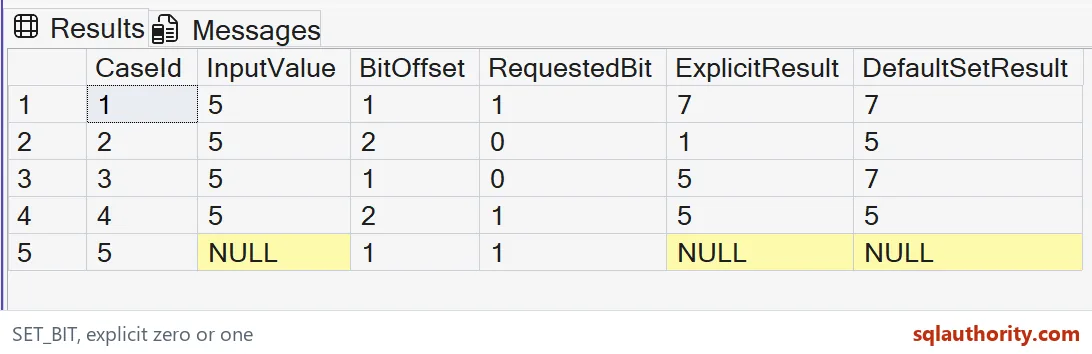
The example uses tinyint five and several requested positions. ExplicitResult follows the third argument, while DefaultSetResult omits it. Every input remains visible, so the changed value can be compared without hidden setup.
The first row sets offset one and returns seven. The original five isn’t replaced in its displayed source column. That is the behavior of this SELECT: it calculates a result rather than issuing a command to modify application data.
WITH Inputs AS
(
 SELECT CaseId,CAST(InputValue AS tinyint) AS InputValue,BitOffset,RequestedBit
 FROM (VALUES (1,5,1,1),(2,5,2,0),(3,5,1,0),(4,5,2,1),
              (5,CAST(NULL AS int),1,1)) v(CaseId,InputValue,BitOffset,RequestedBit)
)
SELECT CaseId,InputValue,BitOffset,RequestedBit,
       SET_BIT(InputValue,BitOffset,RequestedBit) AS ExplicitResult,
       SET_BIT(InputValue,BitOffset) AS DefaultSetResult
FROM Inputs
ORDER BY CaseId;
Read an explicit clear operation
The second row clears offset two. Five has that bit set, so the expected ExplicitResult is one. The default call sets the same position and therefore leaves five unchanged.
This difference comes from the requested bit value, not from a different offset convention. Both calls use the same zero-based position. I’d keep the requested state explicit wherever a reader could confuse a clear operation with the default set behavior.
Test an already satisfied state
The third row clears offset one, which is already clear in five. It returns five unchanged. The fourth sets offset two, which is already present, and also returns five unchanged.
Those cases establish useful final-state behavior. Repeating the same set or clear request doesn’t toggle the selected bit. I’d prefer that deliberate state request when retries are possible, while reviewing the application’s complete flag rule separately.
Keep the default and the type visible
When you omit the third argument, it defaults to one. SET_BIT also returns the same type as its source expression. These result columns are therefore tinyint, not unbounded integers.
The explicit input cast is part of the example’s contract. I’d retain it when demonstrating a type-width boundary. A larger source type can expose more valid offsets. Copying only the function call hides that assumption about available bits.

Preserve missing input and valid arguments
The final row supplies NULL source input and preserves NULL in both results. All requested bit values are zero or one, and every offset fits tinyint. The query doesn’t execute a deliberately invalid argument.
SET_BIT limits the requested bit value, the offset and large-object inputs. I’d validate a dynamic request against those limits before calculating it. A successful small example doesn’t establish that an arbitrary offset or custom state word is accepted.
Separate returned values from storage decisions
SET_BIT is available in SQL Server 2022 and later. This demonstration contains no UPDATE, assignment or schema change. Its five complete rows compare requested-state behavior within a fixed typed input domain.
I’d use the returned value in a write only after reviewing that write’s ownership and business contract. The function’s name doesn’t authorize a storage change. Validate the full tuples first, then decide separately whether and where the application should persist the calculated result.
A small function is easy to trust, so I keep its limits close.
SET_BIT is not an UPDATE statement, it is a scalar function returning the requested bit state.
Published by Pinal Dave on SQLAuthority. More of my work at pinaldave.com.
Discover more from SQL Authority with Pinal Dave
Subscribe to get the latest posts sent to your email.