LAST_VALUE needs an explicit window frame when I want the final row across an entire partition. The function name alone doesn’t tell SQL Server how far ahead to look. I define the ordering and frame before trusting the answer.

Read the frame before the function
Imagine several readings belonging to the same account. I want every reading beside the account’s final reading. That requirement covers the entire account, including rows following the current row.
An ordered window without an explicit frame has a default boundary ending at the current row. Its last visible value can therefore be the current reading. That answer follows the specified window, even when the function name suggests something else.
The query puts both definitions beside each other. The first expression leaves the frame implicit. The second explicitly includes every row in the partition.
I use a small VALUES input so the boundary remains visible. There are no tables to create or clean up. Both expressions read the same five rows.
WITH Readings AS
(
    SELECT Account, SequenceNo, RowId, Reading
    FROM (VALUES
        (N'A',1,1,CAST(10 AS int)),
        (N'A',2,2,CAST(20 AS int)),
        (N'A',2,3,CAST(30 AS int)),
        (N'B',1,4,CAST(40 AS int)),
        (N'B',2,5,CAST(NULL AS int))
    ) AS v(Account,SequenceNo,RowId,Reading)
)
SELECT Account,SequenceNo,RowId,Reading,
    LAST_VALUE(Reading) OVER
        (PARTITION BY Account ORDER BY SequenceNo,RowId) AS DefaultLast,
    LAST_VALUE(Reading) OVER
        (PARTITION BY Account ORDER BY SequenceNo,RowId
         ROWS BETWEEN UNBOUNDED PRECEDING AND UNBOUNDED FOLLOWING) AS PartitionLast
FROM Readings
ORDER BY Account,SequenceNo,RowId;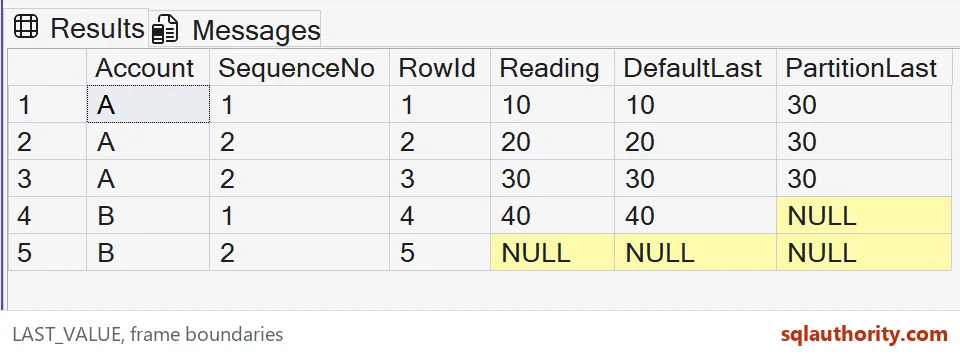
Give tied rows an order
Account A has two readings with sequence number 2. Their row IDs provide a unique second ordering column. The intended final reading is 30 because row 3 comes after row 2.
Without that tie-breaker, the sequence number does not distinguish those readings. A stable outer display order would not repair the window’s incomplete ordering. Each OVER clause needs the columns defining the business sequence.
I’d prefer a recorded event sequence when one exists. An arbitrary ID works only when it represents the intended tie rule. I don’t assume that a larger measurement happened later.
A final NULL is still the final value
Account B ends with a NULL reading. The whole-partition expression is expected to return NULL for both B rows. Replacing that with 40 would answer a different question.
The default behavior respects NULL values. SQL Server 2022 adds an IGNORE NULLS option, but this example does not use it. Decide whether missing final data should remain missing before choosing that option.
The distinction matters in completion reports. A final event with an unavailable reading can carry meaning of its own. I wouldn’t silently substitute an earlier successful measurement.

Check the question the query answers
The expected A rows show DefaultLast values 10, 20 and 30. Their PartitionLast values are all 30. The B rows show a current value of 40 followed by NULL, while their final value remains NULL.
I’m tempted to use MAX when the requirement says last. That shortcut fails when values decrease or the final row contains NULL. MAX answers a value-order question rather than the event-order question.
For a running last value, ending at the current row is appropriate. For the final partition value, the following boundary needs to reach the end. Neither expression creates an independent summary row for each account.
The window preserves all input rows, so repeated final values are expected. A later filter can select one row per account if the report needs that shape. Keep that separate from deciding which reading counts as last.
Try it on a few of your own rows and see which one comes back.
LAST_VALUE is not a synonym for MAX, it is the last value inside the chosen frame.
Published by Pinal Dave on SQLAuthority. More of my work at pinaldave.com.
Discover more from SQL Authority with Pinal Dave
Subscribe to get the latest posts sent to your email.