CONCAT_WS makes a separated label convenient, but I still distinguish NULL from an empty string. That distinction decides whether a separator appears and what a missing label becomes.

Decide what the fields mean
A missing middle name and an intentionally empty field aren’t necessarily the same input. A display label can ignore missing components. A positional export can require a place for each field. I’d choose that contract before replacing a concatenation expression.
CONCAT_WS joins values with a separator. It ignores NULL arguments without adding separators for those missing arguments. Empty strings remain values. That makes two similar-looking inputs produce different separated text.
The function is available in SQL Server 2017 and later. It requires the separator and at least two value arguments. Those arguments can be converted to strings. This example supplies explicitly typed text instead of mixing dates or numeric formatting rules.
Keep the inputs beside the output
The first query uses two input fields and a vertical-bar separator. Six cases retain NULL, empty text and a literal space. I cast the final label to nvarchar(100). That fixed display contract keeps the demonstration’s output type explicit.
A value followed by NULL yields that value without a trailing separator. A value followed by empty text includes the separator. The second case therefore ends with a visible bar. Both original fields remain available to explain the difference.
A literal space is another separate input. It isn’t removed by this query. The byte-length column makes an otherwise faint result easier to inspect. The example deliberately avoids a trimming policy so the function’s behavior remains visible.
WITH Inputs AS
(
    SELECT Id, CAST(PartA AS nvarchar(20)) AS PartA,
           CAST(PartB AS nvarchar(20)) AS PartB
    FROM (VALUES (1, N'A', NULL), (2, N'A', N''),
                 (3, NULL, N''), (4, NULL, NULL),
                 (5, N'', N'B'), (6, N' ', N'B')) AS v(Id, PartA, PartB)
)
SELECT i.Id, i.PartA, i.PartB, j.JoinedText,
       DATALENGTH(j.JoinedText) AS JoinedBytes
FROM Inputs AS i
CROSS APPLY (VALUES (CAST(CONCAT_WS(N'|', i.PartA, i.PartB)
    AS nvarchar(100)))) AS j(JoinedText)
ORDER BY i.Id;

SELECT CAST(CONCAT_WS(',', NULL, NULL) AS varchar(10)) AS AllMissingText,
       DATALENGTH(CONCAT_WS(',', NULL, NULL)) AS ResultBytes,
       CONVERT(varchar(20), SQL_VARIANT_PROPERTY(
           CONCAT_WS(',', NULL, NULL), 'BaseType')) AS ResultType,
       CONVERT(int, SQL_VARIANT_PROPERTY(
           CONCAT_WS(',', NULL, NULL), 'MaxLength')) AS ResultMaxBytes;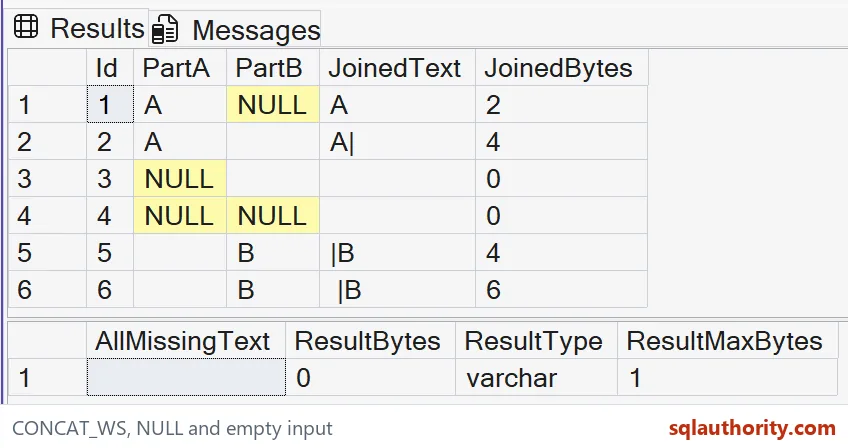
Understand an all-missing result
When every argument is NULL, the result is an empty varchar(1) string. That isn’t SQL NULL. A separate query records the type and maximum length of that expression. It also keeps the empty result and its byte length visible.
I wouldn’t test that result with IS NULL and expect to find the missing components. Information has already been combined into a different output. If the application needs missingness, retain a separate flag. An empty display label can’t explain every original field.
The first query includes both NULL and empty values. Some pairs produce the same final text despite different inputs. That is acceptable for a display label with a documented rule. It is insufficient for reconstructing the original record.

Use separators for the intended job
A joined label can be useful for a summary screen. A delimited data exchange requires a stronger format contract. Embedded delimiters and quotations need their own handling. CONCAT_WS doesn’t provide a complete CSV parser or serializer.
I can argue for replacing missing components with empty strings before joining. That preserves a position when the destination expects one. It also changes the demonstrated NULL-skipping rule. I’d make that transformation explicit rather than quietly treating it as cleanup.
Likewise, a missing separator needs its own input policy. This demonstration uses one fixed, non-NULL separator. It doesn’t claim every possible argument combination produces the same type or layout. The selected examples answer the narrower NULL-versus-empty question.
Check the complete string
The script contains read-only queries over literal values. It creates no objects and changes no connection state. Keep every input and output string in the comparison. Leading spaces and a trailing separator must survive that check.
Before adopting the pattern, I’d test the longest permitted labels too. The fixed output width here is sufficient for these small examples. It isn’t a production sizing recommendation. Choose the real width from the destination’s documented needs.
Compare the byte lengths with the complete values, including the all-missing row. Keep both positional and compact output policies visible. Neither an attractive grid nor a total row count proves the separator policy. The original fields make the result reviewable.
Pick the missing-field rule first, and the separator does the rest.
A joined label is not the original record, it is a display value with a stated missing-field policy.
Published by Pinal Dave on SQLAuthority. More of my work at pinaldave.com.
Discover more from SQL Authority with Pinal Dave
Subscribe to get the latest posts sent to your email.