
I have mentioned the history of NorthWind, Pubs and AdventureWorks in my previous post SQL SERVER – 2005 NorthWind Database or AdventureWorks Database – Samples Databases. I have been receiving very frequent request for NorthWind Database for SQL Server 2005 and installation method.
Follow the steps carefully and it will install Northwind and Pubs database in SQL Server without any issue. I have tested all the three methods on my home computer and attached the screen shots as well.
Common Step for all the 3 methods
First, go to Microsoft Download Center and download SQL2000SampleDb.msi.
Run SQL2000SampleDb.msi it will create “C:\SQL Server 2000 Sample Databases” folder.
Now follow any of the following three methods to install this database. I have listed methods in order of my preference.
Method 1: Running SQLCMD
Navigate to this folder using command prompt. Start >> Run >> C:\SQL Server 2000 Sample Databases.
If you have installed SQL Server as named instance run following command.
c:\>sqlcmd -S .\InstanceName -i instpubs.sql
c:\>sqlcmd -S .\InstanceName -i instnwnd.sql

If you have installed SQL Server as default instance run following command.
c:\>sqlcmd -i instpubs.sql
c:\>sqlcmd -i instnwnd.sql

Verify that NorthWind and Pubs database are installed correctly.
Method 2: Running SQL Script
Open SQL Server Management Studio. Go to File >> Open >> Navigate to “C:\SQL Server 2000 Sample Databases\instpubs.sql” and “C:\SQL Server 2000 Sample Databases\instnwnd.sql” and run those SQL files in order. This will install the database.

Method3: Attaching the Database
Move Northwind and Pubs database files (MDF and LDF files) to your default database file location (usually – C:\Program Files\Microsoft SQL Server\MSSQL\Data).
Open SQL Server Management Studio. Expand the database node >> Right click on Databases >> Click on Attach >> Select NorthWind Database. It will automatically find MDF and LDF file. Click OK.
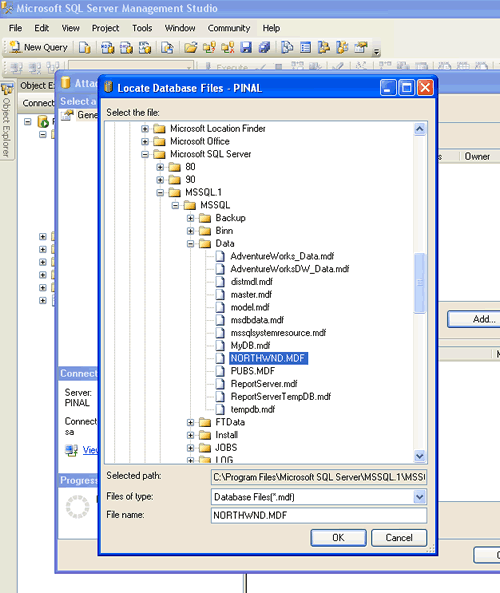
Repeat the process for Pubs and verify that databases are installed correctly.
Reference: Pinal Dave (https://blog.sqlauthority.com), Read-Me file in the installation folder, BOL




191 Comments. Leave new
my name is urbain, i am learning sql so please i need your help, can you please send me adventure works database download to my email which is so i can download it to my computer and i can practice and please i need your help
Excellent Article. I love it.
Great. Thanks a lot. It was so quick to install the both databases.
gr88 job man.really helped me a lot
Hi:
I download SQL2000SampleDb.msi (288k).
But, I can’t run it.
It used ‘Windows installer’ to run that file and give me the following message.
“This installation package could not be opened. Contact the application vendor to verify that this is a valid Windows installer package.”
Can you tell me how to fix it? Thanks.
Regards,
JJ
vaoov your are the best, five problems i had and you solve all of them easily. Loves from Turkey
Thanks a lot
hi i was trying to attach adventure works database but it gave me error stating failed to retrieve data for this request can u pls show some other way of attaching adventureworks database…
Thanks a bunch,you saved me a lot of time.You made it seem so simple
Sir, thanks for giving details about northwind and pubs….Can you tell me any site name to downlaod min 5000 Records.
thanks
arti
Desde Medellín, Colombia, Muchas gracias, EXCELENTE !Funciona perfecto.
:-)
According to the installation package, AdventureWorks installed correctly but I can not find it in order to attach it.
Also having trouble with attaching Northwind and Pubs. These I can find, but they fail to attach. I get the following message:
An exception occurred while executing a Transact-SQL statement or batch. (Microsoft.SQLServer.Express.ConnectionInfo)
Unable to open the physical file “C:\SQL Server 2000 Sample Databases\northwnd.mdf”. Operating system error 5: “5(Access is denied.)”. (Microsoft SQL Server, Error: 5120)
I am really in need of a fix for this. Thanks in advance.
Dear Pinal,
many thanks for instructions, they helped a lot. I did attach successfully Northwind and Pubs databases.
Kind regards,
Shavkat.
thanks man it helped me!!!
gv me sample databses
gr8 …. thanks alot
Hi Pinal –
You helped a lot! Great teaching skills – short and clear instructions. Thank you very much.
Julia
Dear Sir,
I m dhirendra Singh from DRDA, auraiya(UP). Plz, send me your course details and fee structure. I join your group.
Dhirendra Singh
Greate Job.!!
Hey thanks for the information.
It helped me to attach the sample databases