
I have mentioned the history of NorthWind, Pubs and AdventureWorks in my previous post SQL SERVER – 2005 NorthWind Database or AdventureWorks Database – Samples Databases. I have been receiving very frequent request for NorthWind Database for SQL Server 2005 and installation method.
Follow the steps carefully and it will install Northwind and Pubs database in SQL Server without any issue. I have tested all the three methods on my home computer and attached the screen shots as well.
Common Step for all the 3 methods
First, go to Microsoft Download Center and download SQL2000SampleDb.msi.
Run SQL2000SampleDb.msi it will create “C:\SQL Server 2000 Sample Databases” folder.
Now follow any of the following three methods to install this database. I have listed methods in order of my preference.
Method 1: Running SQLCMD
Navigate to this folder using command prompt. Start >> Run >> C:\SQL Server 2000 Sample Databases.
If you have installed SQL Server as named instance run following command.
c:\>sqlcmd -S .\InstanceName -i instpubs.sql
c:\>sqlcmd -S .\InstanceName -i instnwnd.sql

If you have installed SQL Server as default instance run following command.
c:\>sqlcmd -i instpubs.sql
c:\>sqlcmd -i instnwnd.sql

Verify that NorthWind and Pubs database are installed correctly.
Method 2: Running SQL Script
Open SQL Server Management Studio. Go to File >> Open >> Navigate to “C:\SQL Server 2000 Sample Databases\instpubs.sql” and “C:\SQL Server 2000 Sample Databases\instnwnd.sql” and run those SQL files in order. This will install the database.

Method3: Attaching the Database
Move Northwind and Pubs database files (MDF and LDF files) to your default database file location (usually – C:\Program Files\Microsoft SQL Server\MSSQL\Data).
Open SQL Server Management Studio. Expand the database node >> Right click on Databases >> Click on Attach >> Select NorthWind Database. It will automatically find MDF and LDF file. Click OK.
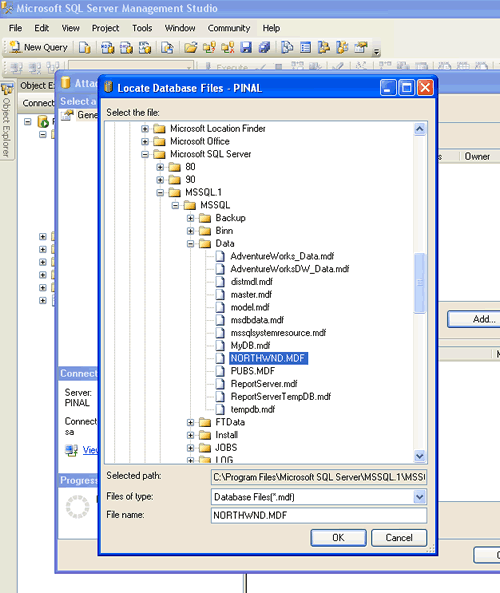
Repeat the process for Pubs and verify that databases are installed correctly.
Reference: Pinal Dave (https://blog.sqlauthority.com), Read-Me file in the installation folder, BOL




191 Comments. Leave new
hi,
i was struggling to work this out..but ur diagramatic approach has fixed it..
good work!!!
I was looking all over for a SQL Server 2005 version of the Northwind database and couldn’t find it anywhere… thanks very much for your help!
Hi I too have a problem similar to that posted by YUVA.
Getting the similar error as follows :
ADDITIONAL INFORMATION:
An exception occurred while executing a Transact-SQL statement or batch. (Microsoft.SqlServer.ConnectionInfo)
——————————
Could not find row in sysindexes for database ID 9, object ID 1, index ID 1. Run DBCC CHECKTABLE on sysindexes.
Could not open new database ‘AdventureWorks’. CREATE DATABASE is aborted. (Microsoft SQL Server, Error: 602)
And I do see sql 2000 files on my system.
However I installed Sql server 2005 and am not able to attach adventureworks database into it.
I dont know how to Upgrade my database server to SQL Server 2005.
No option is available to remove sql 2000 from my system in add/remove programs.
I would appreciate if anyone would be able to get me out from this problem.
Thanks in advance.
Didn’t see this mentioned — in Vista, if you’re executing sqlcmd from the command prompt, run cmd.exe as Administrator… otherwise the script will puke all over the place with ‘permission denied’ and ‘does not exist’ errors.
Yes I got what I needed
thankx very much. GOD BLESS U
Very help full site. clean site with not much noise of ads and disctractions.
But have a question though? Why email is necessary to post feed back.
Thank you so much for your commitment in providing this essential info…so many tutorials (ex. the ASP.NET 2.0 material I’m working with currently) is requiring the NWind db (and many legacy materials reference the Pubs db, of course), and to have such a clear resource to work with makes it a reality…and also reviewing the import scripts that create the db is a valuable exercise as well. CHEERS!
Thank you very much…..it is really helpful
Thanks Dave!!
Keep it Up.
Thanks man … !!!
Great job …
Hello,
Can anyone specify how can I find sample cude from Sql Server 2005?
Thanks and regards
George
thanks, that is really what i want.
Nice and user friendly. Thank you.
Very well done, Pinal. Wonderful job :-) This site is really very helpful.
Good article- not just the “what” but also the “why”.
Unfortunately trying to install the database files for use with Visual studio 2003 and sql server 2005 is a minefield and he has done his best to find a path through it.
Excellent article – Most useful.
I downloaded SQL2000SampleDb.msi and now I have SQL Server 2000 Sample Databases in my C drive. Then I tried executing this command in the command prompt
c:\>sqlcmd -S .\InstanceName -i instpubs.sql
c:\>sqlcmd -S .\InstanceName -i instnwnd.sql
but I got this error,
‘sqlcmd’ is not recognized as an internal or external command, operable program or batch file.
the I tried the other set of command too
c:\>sqlcmd -i instpubs.sql
c:\>sqlcmd -i instnwnd.sql
again I got the same error.. cannot figure out why. Please help me
Thanks
hey Pinal,
Thanks for this post..just the thing I was looking out for.
Give me a call anytime you land up in Ahmedabad, would be great to meet you…not that I’m a big techie..but i undestand whats going on :)
regards
Harish
thanks! great help.