
I have mentioned the history of NorthWind, Pubs and AdventureWorks in my previous post SQL SERVER – 2005 NorthWind Database or AdventureWorks Database – Samples Databases. I have been receiving very frequent request for NorthWind Database for SQL Server 2005 and installation method.
Follow the steps carefully and it will install Northwind and Pubs database in SQL Server without any issue. I have tested all the three methods on my home computer and attached the screen shots as well.
Common Step for all the 3 methods
First, go to Microsoft Download Center and download SQL2000SampleDb.msi.
Run SQL2000SampleDb.msi it will create “C:\SQL Server 2000 Sample Databases” folder.
Now follow any of the following three methods to install this database. I have listed methods in order of my preference.
Method 1: Running SQLCMD
Navigate to this folder using command prompt. Start >> Run >> C:\SQL Server 2000 Sample Databases.
If you have installed SQL Server as named instance run following command.
c:\>sqlcmd -S .\InstanceName -i instpubs.sql
c:\>sqlcmd -S .\InstanceName -i instnwnd.sql

If you have installed SQL Server as default instance run following command.
c:\>sqlcmd -i instpubs.sql
c:\>sqlcmd -i instnwnd.sql

Verify that NorthWind and Pubs database are installed correctly.
Method 2: Running SQL Script
Open SQL Server Management Studio. Go to File >> Open >> Navigate to “C:\SQL Server 2000 Sample Databases\instpubs.sql” and “C:\SQL Server 2000 Sample Databases\instnwnd.sql” and run those SQL files in order. This will install the database.

Method3: Attaching the Database
Move Northwind and Pubs database files (MDF and LDF files) to your default database file location (usually – C:\Program Files\Microsoft SQL Server\MSSQL\Data).
Open SQL Server Management Studio. Expand the database node >> Right click on Databases >> Click on Attach >> Select NorthWind Database. It will automatically find MDF and LDF file. Click OK.
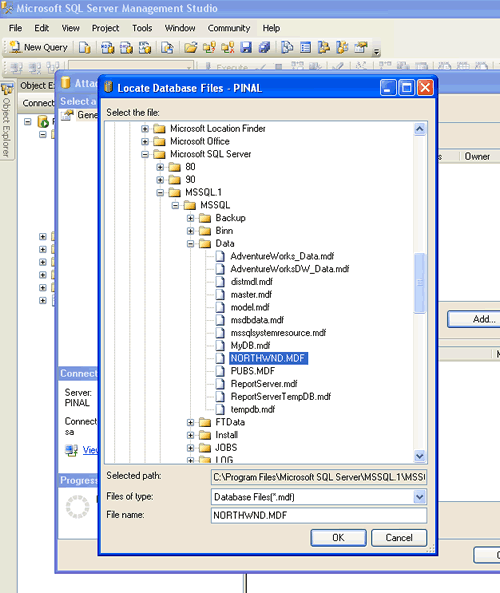
Repeat the process for Pubs and verify that databases are installed correctly.
Reference: Pinal Dave (https://blog.sqlauthority.com), Read-Me file in the installation folder, BOL




191 Comments. Leave new
Hey, kudos on this information. I was able to install both pubs and northwind in minutes :)
U r the best teacher. U made the installation of both Northwind and Pubs so easy. Thanks.
Good information. Thanks.
Jo Buddy,
This is good article, just wondering if you can elaborate why there is not change when you copy mdf, ldf file of MS 2000 in MS 2005 there is not effect.
This site has been a great help to me.
Good work… Keep it up!!!
yahooo…i could successfullly install Northwind and Pubs
Dear Pinal Dave,
I have purchased “The Guru’s Guide to Transact – SQL” by Ken Henderson at the advice of my supervisor. Ken recommended installation of the two databases, so I found your site on the net. The installation was easy and the two new databases appeared in the Object Explorer window of my Microsoft SQL Server Management Studio. However, when I tried to open each of the databases, I got a message box as follows:
“The database Northwind is not accessible”
“The database pubs is not accessible”
Perhaps you can reply with explanation of how I should gain access to these two new databases. I offer my thanks in advance to your reply, and certainly appreciated your help with the installation.
Sincerely,
Doug Thornton
Systems Integration Programmer
Pinal Dave,
I answered my own question, as I just had to authenticate via Windows instead of SQLServer when logging in using Management Studio. Access to databases complete !!!
Doug Thornton 082307
How do I Verify that NorthWind and Pubs database are installed correctly at the end?
I can load both databases and then I seem to be stuck on what to do next.
I am using method 2.
Also is this safe to do as I am connected to my workplace master database and do not want to affect anything in there.
Thanks Pinal
Jatinder
I cant seem to select statement. This is first time I’ve used SQL, hence why i’m not grasping it as easy as other people.
Can you show me please? tks
I do not have a C: drive. How in the world can I extract the files I need from the .msi?
Thanks.
Hi
I have the same problem… I don`t have a C: drive. What can I do?
Regards, Mircea
Thanks for the info was able to install northwind w/o any trouble
Once the Northwind database is installed, how do I go about getting/setting the admin username and password as well as other usernames and passwords?
Thanks
Jason
Thanks SO much – works VERY well- JC bless you!
Excellent help. It was easy and fast.
And by the way, the first method is the best.
thankx very much. got my solution in the first try! :)
Hi ,
i am getting the follwing error when i tried to attach Adventure Works Database.
——————————
ADDITIONAL INFORMATION:
An exception occurred while executing a Transact-SQL statement or batch. (Microsoft.SqlServer.ConnectionInfo)
——————————
Could not find row in sysindexes for database ID 9, object ID 1, index ID 1. Run DBCC CHECKTABLE on sysindexes.
Could not open new database ‘AdventureWorks’. CREATE DATABASE is aborted. (Microsoft SQL Server, Error: 602)
——————————
Please Help.
Thanks In Advance
Hello Pinal,
I am beginner of sql server 2005 and to the stored procedure.
I have created simple stored proc.
but it gives me error like
“The specified schema name “hr” either does not exist or you do not have permission to use it.”
i hv given the sp name hr.try
database is Nirmal
and table name is unamepass.
I am waiting for your response
Thank you very much
Nirmal Shah
Hello Yuva,
this error message appears when you try to attach a Microsoft SQL Server 2005 database in SQL Server 2000.
This behaviour occurs because attaching SQL Server 2005 databases in SQL Server 2000 is not supported. Upgrade your database server to SQL Server 2005.