
A heap in SQL Server is a table with no clustered index. The rows sit wherever there was room when they were written, in no order at all. Most of the time this is an accident rather than a decision, and it has one failure mode that is genuinely nasty.
The Pile and the Filing Drawer
Two ways to keep paper. Drop each sheet on a pile as it arrives, or file it in a drawer in order.
The pile is faster to add to. Finding one sheet means going through the whole pile. The drawer costs a moment on the way in and saves you every time you look something up. A heap is the pile. A clustered index is the drawer.
How You End Up With One
You create a table and never add a clustered index. That is the whole story.
The confusion is that a primary key usually creates a clustered index for you, so most tables get one without anybody thinking about it. Declare the primary key as NONCLUSTERED, or skip it entirely, and you have a heap. So does every table made with SELECT INTO.
SELECT SCHEMA_NAME(t.schema_id) AS sch, t.name, p.rows
FROM sys.tables AS t
JOIN sys.indexes AS i ON i.object_id = t.object_id AND i.index_id = 0
JOIN sys.partitions AS p ON p.object_id = t.object_id AND p.index_id = 0
ORDER BY p.rows DESC;
An index_id of 0 means heap. Run that on a database you look after. The large ones at the top are worth a second look.
Forwarded Records, the Real Problem
Here is the part that surprises people, and it is the reason heaps have a bad name.
Update a row in a heap so it no longer fits where it sits, and SQL Server moves it to a new page. It cannot update the pointers in every nonclustered index, so it leaves a forwarding address behind instead. Reading that row now costs two page reads: one to find the note, one to follow it.
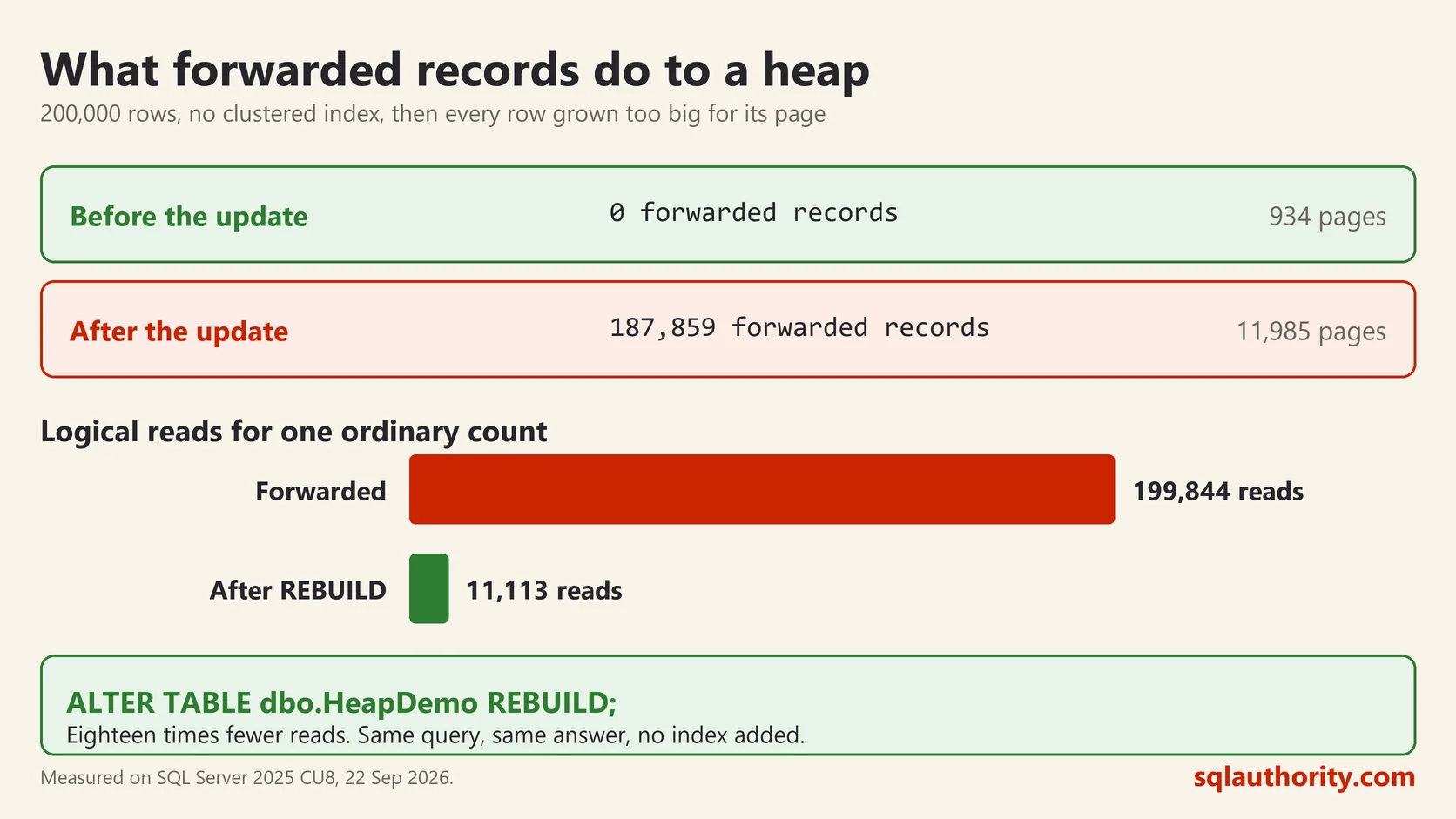
I built a heap of 200,000 rows on SQL Server 2025, then added a column and filled it, which made every row too big for its page.
SELECT forwarded_record_count, page_count, record_count
FROM sys.dm_db_index_physical_stats(
     DB_ID(), OBJECT_ID('dbo.HeapDemo'), 0, NULL, 'DETAILED');
forwarded_record_count page_count
before 0 934
after the update 187859 11985187,859 of the 200,000 rows are now forwarded. Then I ran an ordinary count:
SET STATISTICS IO ON;
SELECT COUNT(*) FROM dbo.HeapDemo WHERE city = 'Perth';
16440
Table 'HeapDemo'. Scan count 1, logical reads 199844199,844 logical reads on a table of 11,985 pages. The query read the table seventeen times over, chasing forwarding notes.
Rebuilding Fixes It
ALTER TABLE dbo.HeapDemo REBUILD;16440
Table 'HeapDemo'. Scan count 1, logical reads 11113199,844 down to 11,113. Eighteen times fewer reads, same query, same answer, no index added. The forwarded record count went to zero.
That command is worth knowing about. Before SQL Server 2008 there was no clean way to defragment a heap at all, which is part of why the advice hardened into “never use one”.
When a Heap Is Fine
It is not always wrong.
Staging tables. Load, read once, truncate. Nothing is updated so nothing gets forwarded, and skipping the clustered index makes the load faster.
Insert only logs that you rarely query by key. Rows go on the end and stay put.
Very small lookup tables. A handful of pages is a handful of pages either way.
The pattern is the same in all three: rows arrive and do not change size afterwards. That is the condition under which a heap behaves itself.
When It Is Not
Any table that is updated, especially with variable length columns that grow. Any table you look rows up in. Any table large enough that scanning it hurts.
Adding a clustered index on a sensible key solves it once and permanently. A narrow, ever increasing key is the usual choice, because then new rows go on the end instead of forcing space in the middle.
CREATE CLUSTERED INDEX CX_Orders_id ON dbo.Orders(id);Two checks if you inherit a database. Find the heaps with the query above. For the large ones, look at forwarded_record_count. A big number there is free performance waiting for one command.
A heap is not a broken table, it is a table nobody decided anything about.
This post was rewritten from scratch in September 2026. The original, published on 2007-05-04, was a short announcement about something that no longer exists. The address is the same, the subject is now a basic idea worth keeping.
Published by Pinal Dave on SQLAuthority. More of my work at pinaldave.com.
Discover more from SQL Authority with Pinal Dave
Subscribe to get the latest posts sent to your email.




19 Comments. Leave new
I’VE TO PREPARE FOR MESD/MCAD.NET EXAM OF MICROSOFT CERTIFICATION EXAM70-315-70-320 AND 70-316. IF U’VE ANY TIPS FOR IT. PLEASE, GIVE ME HOW WILL I GETTING SUCCESS.
thanks pinal…
the consolidated list was really helpfull…
ash :)
Is there a shortcut to insert the Current DateTime into a DateTime field within the SQL Server Management Studio editor?
Hey Thanks
gr8 work. very appreciated the good work you have done for us
best regards
jeny
Hi Pinal,
It’s a great work.
Regards.
Diwakar G.
Hi,
Is there anyway I can download SQL server 2005 for free,I do not want the express editions..
The Developer’s version of SQL Server 2005 is available for purchase, currently, for $49.95 on Amazon.com. This is a steal considering you can use all the functionallity available in the Enterprise edition. (Please, someone correct me if I am wrong.)
I wish there was a shortcut for moving the spliter up and down like we did in SQL 2000 with shortcut CTRL+B. Is there a way to do the same in SQL 2005? I want to hang the person who took it out in SQL 2005.
Has anyone figured how to enter a new line (carriage return) when editing a field directly into SMS? (In the result grid of the “Open Table”)
Same as number 3 – Is there a shortcut to insert the Current DateTime into a DateTime field within the SQL Server Management Studio editor?
Spelling mistake in the word ‘occurrence’. Mean in .pdf file.
How do I select the items on the right pane of SQL 2008 install using the keyboard? Ctrl+Tab moves between items in the left column, but I can’t get the focus to move to the right side.
where is ctrl+b in ssms/sqlwb?????
man, i miss that shortcut key. why they removed it is just beyond me!
nice job….thank u friend
Hi Pinal,
This linkis no longer valid.
Download SQL Server Management Studio Keyboard Shortcuts
Do you have a new link?
Thanks
Thank you, Pinal, very useful post!
Just wont to add tha you can “Execute Query / Refresh” not only with F5, but also with “ALT+X” shotcut key as well. Waybe someone will find it useful.
Hi, what’s the command, function or procedure for the shortcut key ALT+F1.
Thank’s
good….helpful
Hi Pinal,
Link does not work and it says that linked has been moved another location
but the other location does not work too.
Please update the post.