Whole unit allocation splits a fixed budget without losing units to rounding. I separate each share’s integer part from its remainder. A chosen tie rule decides who receives the leftover units.

Keep the budget visible
Imagine ten labels divided among three equally weighted bins. Each exact share is ten divided by three. Rounding every share independently gives nine labels instead of the required ten.
I’d start with three labels per bin, leaving one to distribute. The remaining unit goes to the first bin under a declared tie rule. The resulting allocation is four, three and three.
This is one allocation policy, rather than a universal definition of fairness. Agree on that policy before using the query. A different business rule can produce a different valid split.
Use integer quotients and remainders
Each numerator is Budget multiplied by Weight. Dividing by the group’s total weight supplies BaseUnits. The modulo operator retains the remainder without introducing approximate floating-point fractions.
Within one case, all shares have the same denominator. Ranking their remainder numerators therefore ranks their fractional shares. ItemId breaks equal remainders, giving each row a unique position.
The query subtracts the base allocations from the budget to find ResidualUnits. The highest-ranked residual rows receive one additional unit each. The final window total makes the complete allocation visible beside every member.
;WITH Input AS
(
    SELECT CaseId, ItemId, Weight, Budget
    FROM (VALUES
        (CAST(1 AS int), CAST(1 AS int), CAST(1 AS int), CAST(10 AS int)),
        (1, 2, 1, 10),
        (1, 3, 1, 10),
        (2, 1, 1, 7),
        (2, 2, 2, 7),
        (2, 3, 3, 7),
        (3, 1, 1, 0),
        (3, 2, 1, 0),
        (4, 1, 1, 1),
        (4, 2, 1, 1),
        (4, 3, 1, 1),
        (5, 1, 0, 3),
        (5, 2, 1, 3),
        (5, 3, 1, 3)
    ) AS v(CaseId, ItemId, Weight, Budget)
), Weighted AS
(
    SELECT CaseId, ItemId, Weight, Budget,
           SUM(CAST(Weight AS bigint)) OVER (PARTITION BY CaseId) AS TotalWeight,
           CAST(Budget AS bigint) * CAST(Weight AS bigint) AS Numerator
    FROM Input
), Divided AS
(
    SELECT CaseId, ItemId, Weight, Budget,
           Numerator / TotalWeight AS BaseUnits,
           Numerator % TotalWeight AS RemainderNumerator
    FROM Weighted
), Ranked AS
(
    SELECT CaseId, ItemId, Weight, Budget, BaseUnits, RemainderNumerator,
           ROW_NUMBER() OVER
               (PARTITION BY CaseId ORDER BY RemainderNumerator DESC, ItemId) AS RemainderRank,
           CAST(Budget AS bigint) - SUM(BaseUnits) OVER (PARTITION BY CaseId) AS ResidualUnits
    FROM Divided
), Allocated AS
(
    SELECT CaseId, ItemId, Weight, Budget, BaseUnits, RemainderNumerator,
           CASE WHEN RemainderRank <= ResidualUnits THEN 1 ELSE 0 END AS ExtraUnit,
           BaseUnits + CASE WHEN RemainderRank <= ResidualUnits THEN 1 ELSE 0 END AS AllocatedUnits
    FROM Ranked
)
SELECT CaseId, ItemId, Weight, Budget, BaseUnits, RemainderNumerator,
       ExtraUnit, AllocatedUnits,
       SUM(AllocatedUnits) OVER (PARTITION BY CaseId) AS AllocatedTotal
FROM Allocated
ORDER BY CaseId, ItemId;
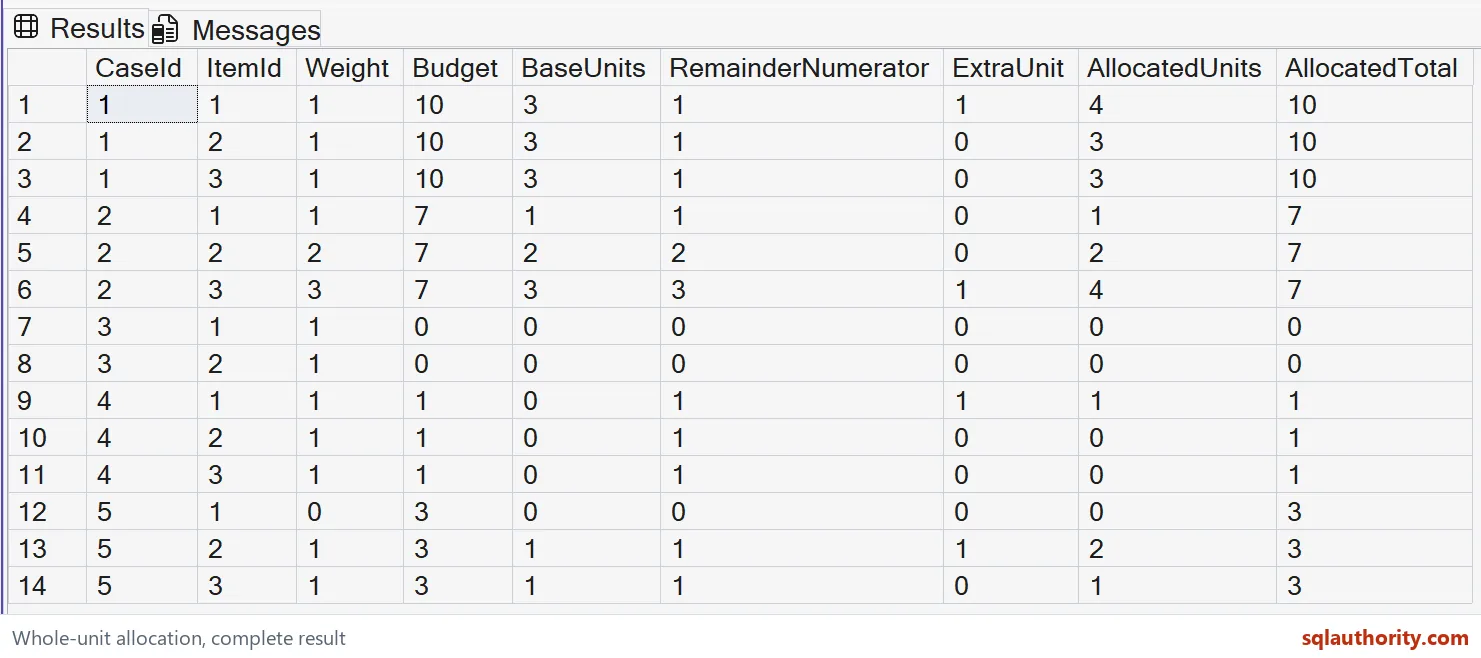

Check all five allocations
Case one divides ten units among three equal weights. Its allocation is four, three and three. Equal remainders favor ItemId 1 under the declared ordering rule.
Case two divides seven units using weights one, two and three. The base allocations are one, two and three. The largest remainder receives the last unit, producing one, two and four.
Case three has a zero budget and allocates zero to both members. Case four has one unit and three equal weights. Its tie rule gives that unit to ItemId 1.
Case five includes a zero-weight member. That member receives zero, while the other two receive two and one. The final AllocatedTotal stays three across all three output rows.
Validate the input contract
Each case needs one consistent nonnegative budget and unique ItemId values. Weights must be nonnegative integers, and their group total must be positive. NULL values and all-zero weight groups fall outside this contract.
I’d reject those invalid inputs before applying the calculation. Silently replacing missing weights changes the policy. A zero group total would also make the division undefined.
The query widens values to bigint before multiplication and aggregation. Casting an already-overflowed product wouldn’t help. The small literal budgets and weights keep every intermediate value within bigint range.
That widening doesn’t guarantee arbitrary bigint inputs are safe. Budget times Weight and the summed weights must fit the chosen type. Establish bounds for the intended workload before using larger values.
Keep the rule reproducible
Every output row exposes its base share, remainder and extra unit. Those columns let me explain an allocation without reverse-engineering a rounded number. The case identifier keeps each budget’s calculation separate.
I’d resist adding a random tie breaker for convenience. A stable identifier makes equal-remainder decisions repeatable for unchanged inputs. Whether that priority is appropriate remains a business decision.
The batch targets SQL Server 2012 or later and only reads CTE inputs. It doesn’t create objects or change settings. It also makes no claim about legal allocation rules or workload performance.
Agree on the tie rule first, and every unit finds a home.
A proportional split is not independent rounding, it is an allocation rule that preserves the complete budget.
Published by Pinal Dave on SQLAuthority. More of my work at pinaldave.com.
Discover more from SQL Authority with Pinal Dave
Subscribe to get the latest posts sent to your email.