
Here is the first thing I do when I get access to any new server – I check what are different permissions I have with respect to the database I am connected with. The matter of the fact is that most of the database consultants and administrator want to know what are different permissions they have on the database when they get access to any new system. I personally want to own only the permissions which help me to accomplish my work, not a single permission more or less. If I have more permissions, I request the team to take away so I do not make any mistakes accidently.
Here is the script which you can execute to get a list of the permissions over databases.
SELECT * FROM fn_my_permissions (NULL, 'DATABASE');
GO
Here is the result set of above query when I executed with sa or admin access.
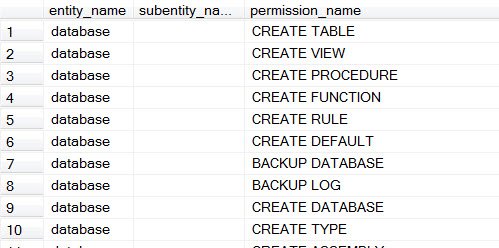
Here is the result set of above query when I executed with public access.

More Ways to Check the Permissions I Have
The database-level list is a good start, but permissions live at more than one level. Here are the checks I run next:
SELECT * FROM fn_my_permissions(NULL, 'SERVER');shows what you can do on the whole instance, such as creating databases or viewing server state.SELECT * FROM fn_my_permissions('dbo.YourTable', 'OBJECT');lists what you can do on one table, down to the column level.SELECT HAS_PERMS_BY_NAME('dbo.YourTable', 'OBJECT', 'UPDATE');returns 1 or 0 for a single permission, which is handy inside scripts.SELECT IS_SRVROLEMEMBER('sysadmin'), IS_ROLEMEMBER('db_owner');tells you right away if you have far more power than you need.
These functions show your effective permissions, which include what you get through roles and groups, not only what was granted to you by name. That is exactly what you want to know before you start work. I also run the same checks again after any role change, because permissions tend to grow over time and rarely shrink on their own.
You can check another account the same way, as long as you have permission to impersonate it. Run EXECUTE AS USER = 'SomeUser';, run the queries above, and then REVERT;. It is a quick way to confirm that an application account has only the rights it needs.
Published by Pinal Dave on SQLAuthority. More of my work at pinaldave.com.
Discover more from SQL Authority with Pinal Dave
Subscribe to get the latest posts sent to your email.




3 Comments. Leave new
Hello Pinal,
I tried above code with sa login but i got nothing.
Please see below result.
entity_name subentity_name permission_name
——————————————————————————————————————————– ——————————————————————————————————————————– ————————————————————
(0 row(s) affected)
BR,
Neha
Thanks Pinal. I have learnt something new today!
Thank you Eng PINAL DAVE, very easy, very helpful.