
Social media is evolving at a rapid pace and every day I keep on getting question from different methods. Here is the latest question which I received on my Facebook page. The question was how to export the data of query into CSV using SQLCMD.
This is indeed very easy process and very simple command to export any query data. For example we will use AdventureWorks2012 database. Here is the query we will be using for our demonstration.
USE AdventureWorks2012
GO
SELECT TOP 10 sp.BusinessEntityID,
sp.TerritoryID, sp.SalesQuota,
sp.Bonus, sp.CommissionPct
FROM Sales.SalesPerson sp
GO
The above query will return following result set.

Now we can export above data to CSV using SQLCMD using following command.
SQLCMD -S . -d AdventureWorks2012 -Q “SELECT TOP 10 sp.BusinessEntityID, sp.TerritoryID, sp.SalesQuota, sp.Bonus, sp.CommissionPct FROM Sales.SalesPerson sp” -s “,” -o “e:\result.csv”
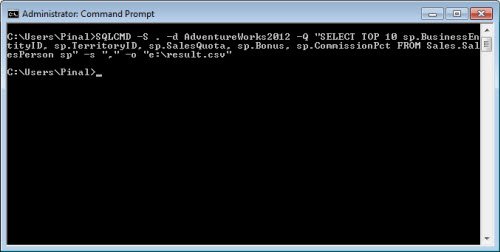
Generically you can use the following syntax:
SQLCMD -S YourSQLServer -d YourDatabase -U YourUserName -P YourPassword -Q “Your Query” -s “,” -o “C:\Yourfilename.csv”
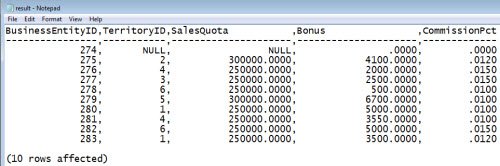
Now you can go to your file location and open the file and you will see that new csv file created there. When you open the csv file you will notice the results of the query.
Watch the video on the same subject:
Published by Pinal Dave on SQLAuthority. More of my work at pinaldave.com.
Discover more from SQL Authority with Pinal Dave
Subscribe to get the latest posts sent to your email.




22 Comments. Leave new
SQLCMD can be a very powerful tool in a DBA’s toolkit. Thanks for raising it’s profile.
Gives following output,
Sqlcmd: Error: Microsoft SQL Server Native Client 11.0 : Named Pipes Provider: Could not open a connection to SQL Server [2]. .
Sqlcmd: Error: Microsoft SQL Server Native Client 11.0 : Login timeout expired.
Sqlcmd: Error: Microsoft SQL Server Native Client 11.0 : A network-related or instance-specific error has occurred while establishing a connection to SQL Server. Server is not found or not accessible. Check if instance name is correct and if SQL Server is configured to allow remote connections. For more information see SQL Server Books Online..
I have same error.
hey Mukund,
Did you get the solution for this one. i am facing the same problem. can you please suggest how to go about resolving this?
Thank you
Error faced by Mukund is connectivity error. I have a separate article to troubleshoot that. http://blog.sqlauthority.com/2009/05/21/sql-server-fix-error-provider-named-pipes-provider-error-40-could-not-open-a-connection-to-sql-server-microsoft-sql-server-error/
nice post
cool … !
I am trying to execute below command from SQLCMD and it will gives error like:
Sqlcmd: Error: Internal error at ReadText (Reason: No mapping for the Unicode character exists in the target multi-byte code page).
Command:
SQLCMD -S ServerName -d Database -U YourUserName -P YourPassword -i “C:\sqlfile.sql”
Operating System: window server 2008 R2
this command is successfully executed before formating this machine
please kindly give any suggestions
Thanks
unexpected agrument error occur
unexpected agrument error occur
Unexpected argument error occuring
Unexpected argument error is because of the copy paste of the command. type the command and run then it will work fine.
how to remove thr addional row in header(hyphen)
Hello from Austria,
where Willi
really a good example. We want more.
Thank you.
Hi, I have been using the bcp utility to export my sqlserver database table(contains HTML elements in cells) using the command below: C:>bcp “select * from dbName.dbo.TableName” queryout c:bcpexport.xls -c -k -SServerName -U sa -P 111
However export is successful but the rows are messed up if some column contain HTML tags/elements. This is a serious problem I am facing since this results error while importing this excel to my MySql database. Below is screenshot of the excel with messed up rows/cols. Any help/support is highly appreciated.
Reference link:
Unfortunately, this isn’t a viable example.
I’m always surprised that it is not understood CSV’s have a very specific structure which this does not follow. It does not encapsulate values, it adds extra white spaces, it adds a column delimiting line (comprised of —–) that is format breaking, as well as adding the (xx rows affected) at the end.
I look forward to a true manner in which to write query outputs from MSSQL to a viable CSV file, as I would prefer MSSQL to MySQL.
You can get rid of the xx rows affected by adding SET NOCOUNT ON in your Query.
-Q “SET NOCOUNT ON; SELECT * FROM etc.
The hyphen is something I also would like to remove but still have the headers left, anybody?
If you don’t want the headers add -h-1 and the headers and hyphen will be removed.
Thank you – been looking for a way to remove the Headers/footers – this works great!
I created two views. One returned only the column names and the second all the data for export. Then used
sqlcmd -S sqld01\inst2012 -d SOURCEDEV -E -s, -W -Q “set nocount on; SELECT * FROM dbo.vw_create_header” -o”\\NETWORKLOCATION\Outputs\data.csv” -h-1
sqlcmd -S sqld01\inst2012 -d SOURCEDEV -E -s, -W -Q “set nocount on; SELECT * FROM dbo.vw_data” >>”\\NETWORKLOCATION\Outputs\data.csv” -h-1
The pipe >> will append the data to the file.
it’s very easy, thank so much ;)
Hello gentlemens.
I have a “problem” and maybe here someone can point me in the right direction… I need to export data from 60 diferent querys to 60 diferent .csv files atleast 3 times per day at specific times.
Is someone able to help me out please ?
Thank you !
Thank You!!! Really appreciate your work