Answer simple quiz at the end of the blog post and -
Every day one winner from India will get Joes 2 Pros Volume 2.
Every day one winner from United States will get Joes 2 Pros Volume 2.
Partitioning with the Over Clause (Part 2)
Yesterday we learned how the over clause can be used to compare your number against the overall aggregated number for an entire result set. Sometimes you might want your number to be compared against its category and not all records from a table. For example I don’t get any joy in saying I never won the state championship in Greco Roman wrestling. On the other hand with great joy I tell people was the Tacoma City Champion. By partitioning the sport down into City instead of the entire country or state my ranking is much better.
Businesses might have other reasons for partitioning a group. Let’s use an example of schools where they see most of them getting a drop in attendance during the summer time. Comparing an attendance trend from spring to summer would not show an uptrend even if your school is growing year after year. It makes more sense to compare this summer to last summer to find a trend then to compare the spring and summer where you always see a drop. Whatever your reason you can get a total by a level of your choosing with the OVER() clause. Now let’s try an example using the aggregate function COUNT( ) with the OVER( ) clause. We’ll start with a simple query on the Employee table. Here we see Alex Adams is just 1 employee out of 13. In fact each employee is one of 13 in this example.
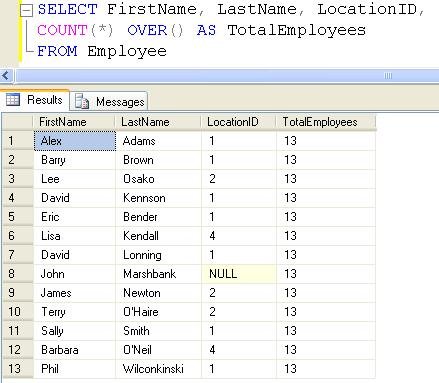
Now let’s look at Alex Adams. He works in Location 1. How many of JProCo’s employees are in Location 1 (Seattle)? And how many of the total employees work in Boston? Alongside the existing table records, we want to add a column showing the count of employees at each location. Recall that blank parentheses cause OVER( ) to apply the aggregation across all rows of a query. Our instruction to show employee count at each location means we don’t just want a total of all locations in our query – we already have that data displayed in the TotalEmployees column. We must include an argument inside the parentheses. PARTITION BY divides the result set into partitions. In this case we’ve added a partition by LocationID.

Similar to the behavior of GROUP BY, the command to PARTITION BY LocationID takes the LocationID for each employee and counts the number of records in that group which shares the same LocationID. Thus, each of the Seattle employees shows a 7 for LocationCount. The Boston employees have a LocationCount of 3, and the Spokane records have LocationCount of 2. John Marshbank shows LocationCount of 1, since he’s the only one with a null LocationID.
Since Seattle has 7 of the total 13 employees, we can guesstimate that just over ½ (or more than 50%) of JProCo employees work in Seattle (LocationID 1). Let’s run the query and check the results.

Our result set shows no ratios and all 0’s. This is because our calculation involved only integers. (The grant amount data was expressed in decimal form.) Rather than writing additional code using CAST, we’ll use a trick that works with many programming languages. Multiply the numerator by 1.0 to make each figure display as a decimal instead of an integer. Multiply the numerator by 1.0, so results appear as decimals instead of integers.

This result is a big improvement – each result is now in decimal form. The Seattle occupancy rate is about 53.85%. Now multiply instead by 100 so the values show as percentages, like we did with the Grant example. In this instance be sure to multiply by 100.0, so the values show as decimals and not integers.
Finally, polish your report by adding the descriptive title Pct in place of the blank column header. Sort your report in descending order of occupancy (Pct) and LastName.

Note: If you want to setup the sample JProCo database on your system you can watch this video. For this post you will want to run the SQLQueriesChapter5.0Setup.sql script from Volume 2.
Question 11
Q 11) You have a table named CurrentProducts. The table contains a column named Category. You need to make a T-SQL statement that calculates the percentage (with decimals) of products in each product Category. Which query should you use?
- SELECT DISTINCT Category,
COUNT(*) OVER (PARTITION BY Category)*100/ COUNT(*) OVER() as PctCategory
FROM CurrentProducts - SELECT DISTINCT Category,
COUNT(*) OVER (PARTITION BY Category)*100.0/ COUNT(*) OVER() as PctCategory
FROM CurrentProducts - SELECT DISTINCT Category,
COUNT(*) OVER ( )*100.0/ COUNT(*) OVER(PARTITION BY Category) as PctCategory
FROM CurrentProducts
Rules:
Please leave your answer in comment section below with correct option, explanation and your country of resident.
Every day one winner will be announced from United States.
Every day one winner will be announced from India.
A valid answer must contain country of residence of answerer.
Please check my facebook page for winners name and correct answer.
Winner from United States will get Joes 2 Pros Volume 2.
Winner from India will get Joes 2 Pros Volume 2.
The contest is open till next blog post shows up at http://blog.sqlauthority.com which is next day GTM+2.5.
Reference: Pinal Dave (http://blog.SQLAuthority.com)
Correct answer is option #2.
2.SELECT DISTINCT Category,
COUNT(*) OVER (PARTITION BY Category)*100.0/ COUNT(*) OVER() as PctCategory
FROM CurrentProducts
- as expained clearly in the aritcle above.
Option #1 displays categories with percentages in integer values.
Option #2 displays categories with percentages in decimal values.
Option #3 displays incorrect results.
Thanks.
Country – India
Correct answer is No. 2, because the OVER() includes a PARTITION BY clause and uses a multiplication by 100.0 to show results as percentage.
Rene Castro
El Salvador
Correct option is 2.
New Delhi
Hi
The answer is option 2
Reason we are counting for each category * 100.0 for making the result to float and / count * to divide by total count we will get category wise percentage for each category
Sathya – India
Option 2 is correct because we need to partition by Category and have result in decimal places so 100.0 must be used.
Thanks
Sudhir Chawla
New delhi, India
Correct Answer is 2
Thanks,
Basavaraj
India
Question 11
Ans : SELECT DISTINCT Category,
COUNT(*) OVER (PARTITION BY Category)*100.0/ COUNT(*) OVER() as PctCategory
FROM CurrentProducts
Chennai, INDIA
Question 11
Q 11) You have a table named CurrentProducts. The table contains a column named Category. You need to make a T-SQL statement that calculates the percentage (with decimals) of products in each product Category. Which query should you use?
Answer is :2 Gives the result in decimal with correct results
2. SELECT DISTINCT Category,
COUNT(*) OVER (PARTITION BY Category)*100.0/ COUNT(*) OVER() as PctCategory
FROM CurrentProducts
Wrong :As we expecting resulst in decimal, following query wont give results in decimal
1. SELECT DISTINCT Category,
COUNT(*) OVER (PARTITION BY Category)*100/ COUNT(*) OVER() as PctCategory
FROM CurrentProducts
Wrong:Before dividing we are using COUNT(*) OVER ( )*100.0–>this will takes the total count of all rows as over clause is not partitioned and
COUNT(*) OVER(PARTITION BY Category) —>divider will be less as we have specified the PARTITION BY Category for count ..This will give invalid result.
3. SELECT DISTINCT Category,
COUNT(*) OVER ( )*100.0/ COUNT(*) OVER(PARTITION BY Category) as PctCategory
FROM CurrentProducts
Thanks for the post :-)
Country: India
Option 2:
SELECT DISTINCT Category,
COUNT(*) OVER (PARTITION BY Category)*100.0/ COUNT(*) OVER() as PctCategory
FROM CurrentProducts
Option 1 has results in integer without the decimals
Option 3 is wrong as it has total product count in the numerator
Leo PIus
USA
Correct answer is option 2
SELECT DISTINCT Category,
COUNT(*) OVER (PARTITION BY Category)*100.0/ COUNT(*) OVER() as PctCategory
FROM CurrentProducts
Sumit
India
Pingback: SQL SERVER – Win a Book a Day – Contest Rules – Day 0 of 35 Journey to SQLAuthority
Ans is 2 option
2.SELECT DISTINCT Category,
COUNT(*) OVER ( )*100.0/ COUNT(*) OVER(PARTITION BY Category) as PctCategory
FROM CurrentProducts
Partha
India
Option 2 is correct.
2.SELECT DISTINCT Category,
COUNT(*) OVER (PARTITION BY Category)*100.0/ COUNT(*) OVER() as PctCategory
FROM CurrentProducts
As Option 1 is nearly correct but it will return value in integer.
Option 3 is incorrect any how.
INDIA
Correct answer is option 2 that is
SELECT DISTINCT Category,
COUNT(*) OVER (PARTITION BY Category)*100.0/ COUNT(*) OVER() as PctCategory
FROM CurrentProducts
Because we need to display percentage (with decimals) of products in each product Category we need first to find two things
1. No of product in particular category
2. Total no of products in the table
and also we need result in decimal point we have to use COUNT(*) OVER (PARTITION BY Category)*100.0/ COUNT(*) OVER() .
Mahmad Khoja
INDIA
AHMEDABAD
The answer to this question is 2nd option.
SELECT DISTINCT Category,
COUNT(*) OVER (PARTITION BY Category)*100.0/ COUNT(*) OVER() as PctCategory
FROM CurrentProducts
Option 1: Gives the Percentage of products since it is partitioned by Category without the decimals over the total count.
Option 2: Gives the Percentage of products since it is partitioned by Category with the decimals over the total count.
Option 3:This query doesn’t give the percentage but gives the value of total count over count per category.
Nagaraj Ejanthkar
USA
Option 2 is correct answer as
SELECT DISTINCT Category,
COUNT(*) OVER (PARTITION BY Category)*100.0/ COUNT(*) OVER() as PctCategory
FROM CurrentProducts
because it displays categories with percentages in decimal values.
Varinder Sandhu (India)
Answer No. 2 is correct
The OVER() includes a PARTITION BY clause with Category which count the records category wise and uses a multiplication by 100.0 and division by all records of the table to show results as percentage.
India
Answer is :
SELECT DISTINCT Category,
COUNT(*) OVER ( )*100.0/ COUNT(*) OVER(PARTITION BY Category) as PctCategory
FROM CurrentProducts
Answer is 2:
SELECT DISTINCT Category,
COUNT(*) OVER ( )*100.0/ COUNT(*) OVER(PARTITION BY Category) as PctCategory
FROM CurrentProducts
because: Answer 1 will give integer value,
answer 2 will give exact decimal points…
Chennai
India
Answer is 2:
SELECT DISTINCT Category,
COUNT(*) OVER ( )*100.0/ COUNT(*) OVER(PARTITION BY Category) as PctCategory
FROM CurrentProducts
because: Answer 1 is giving integer,
answer 2 will give exact decimal points…
Chennai
India
Answer for today blog quiz : Option 2
2) SELECT DISTINCT Category,
COUNT(*) OVER (PARTITION BY Category)*100.0/ COUNT(*) OVER() as PctCategory
FROM CurrentProducts
Chennai, TamilNadu, India
1st option gives only number eg: 20
3rd option gives in decimal but wrong answer eg:500.000000000000
2nd option is correct…it gives 20.000000000000
2.SELECT DISTINCT Category,
COUNT(*) OVER ( )*100.0/ COUNT(*) OVER(PARTITION BY Category) as PctCategory
FROM CurrentProducts
Arjun
India
Answer : Option 2
2) SELECT DISTINCT Category,
COUNT(*) OVER (PARTITION BY Category)*100.0/ COUNT(*) OVER() as PctCategory
FROM CurrentProducts
Chennai, TamilNadu, India
Correct Answer is: B
Because This Query only have proper syntax and multiple by 100.0 not 100. So we will get the Percentage with Decimal values.
by GVPrabu || INDIA ||
Hi,
Q: You have a table named CurrentProducts. The table contains a column named Category. You need to make a T-SQL statement that calculates the percentage (with decimals) of products in each product Category. Which query should you use?
2) SELECT DISTINCT Category,
COUNT(*) OVER (PARTITION BY Category)*100.0/ COUNT(*) OVER() as PctCategory
FROM CurrentProducts
Thanks pinal, I learn New Thing from Last To Day …..
I am from India….
Hi Sir,
Option no 2 is the correct answer as this will give the percentage of products in each product category with decimals
2. SELECT DISTINCT Category,
COUNT(*) OVER (PARTITION BY Category)*100.0/ COUNT(*) OVER() as PctCategory
FROM CurrentProducts
option no 1 also give the result but with out decimals
1. SELECT DISTINCT Category,
COUNT(*) OVER (PARTITION BY Category)*100/ COUNT(*) OVER() as PctCategory
FROM CurrentProducts
option no 3 will provide invalid result as the numerator and denominator are interchanged.
3. SELECT DISTINCT Category,
COUNT(*) OVER ( )*100.0/ COUNT(*) OVER(PARTITION BY Category) as PctCategory
FROM CurrentProducts
So the correct answer is option no 2.
P.Anish Shenoy
INDIA,Bangalore, Karnataka
The elimination method:
Q:: You need to make a T-SQL statement that calculates the percentage (with decimals) of products in each product Category.
1… (with decimals) >> Eliminates 1st query.
2… products in each product Category. >> Eliminates 3rd query.
So, #2 has to be right and it is.
The elimination method:
Q:: You need to make a T-SQL statement that calculates the percentage (with decimals) of products in each product Category.
1… (with decimals) >> Eliminates 1st query.
2… products in each product Category. >> Eliminates 3rd query.
So, #2 has to be right and it is.
Kedar (India)
Correct Answer is 2
SELECT DISTINCT Category,
COUNT(*) OVER (PARTITION BY Category)*100.0/ COUNT(*) OVER() as PctCategory
FROM CurrentProducts
Rajesh Garg
India
Correct Answer: #2
Country of residence: India
Hi,
Correct answer is 2
We have to use “100.0″, so it will give us result with Decimals (Accurate)
Option 1: will give us result in INT, so its not that much accurate
COUNTRY: INDIA
Answer 2 is correct:
2.SELECT DISTINCT Category,
COUNT(*) OVER (PARTITION BY Category)*100.0/ COUNT(*) OVER() as PctCategory
FROM CurrentProducts
City: Baroda
Country: India
Thanks,
GurjitSingh
Option 2 is correct answer as
SELECT DISTINCT Category,
COUNT(*) OVER (PARTITION BY Category)*100.0/ COUNT(*) OVER() as PctCategory
FROM CurrentProducts
because it displays categories with percentages in decimal values.
Explaniation:
1.First and second query are same there is only difference we are multiple with decimal value in second query that why! second query is returning in decimal. here //T-SQL statement that calculates the percentage (with decimals) of products in each product Category.// for each products we are getting decimal values
In SQL Server, The result is decimal when either of the following is true:
# Both expressions are decimal.
# One expression is decimal and the other is a data type with a lower precedence than decimal.
so here count is integer value and percentage [100.0] is contains decimal.
2. third query returns count of all rows as over clause and calculating but as per your question here we need //T-SQL statement that calculates the percentage (with decimals) of products in each product Category.// so third query is wrong..
Thanks,
Vijayakumar P Kochi (India)
2nd option is correct:
SELECT DISTINCT Category,
COUNT(*) OVER (PARTITION BY Category)*100.0/ COUNT(*) OVER() as PctCategory
FROM CurrentProducts
City: Baroda
Country: India
The Correct Answer is : 2
SELECT DISTINCT Category,
COUNT(*) OVER (PARTITION BY Category)*100.0/ COUNT(*) OVER() as PctCategory
FROM CurrentProducts
Mohd Thoufeek
India
Chennai
The correct Option is 2.
SELECT DISTINCT Category,
COUNT(*) OVER (PARTITION BY Category)*100.0/ COUNT(*) OVER() as PctCategory
FROM CurrentProducts
India
Correct Answer is 2
%age should be decimal point.
Krishna Prakash, India
Correct Answer is Option 2
SELECT DISTINCT Category,
COUNT(*) OVER (PARTITION BY Category)*100.0/ COUNT(*) OVER() as PctCategory
FROM CurrentProducts
Explanation: Option 1 provides the percentage of products in each product Category but not with decimals as there is not a single expression in decimals so result will be in integers only. In option 2 count of each type of category is divided by total count of products ad as it is multiplied by a expression having decimal points, the result will be with decimals.
and Option 3 will produce wrong result as it divides count of all products with count of each type of product.
Country – INDIA (Gujarat)
Answer 2 :
SELECT DISTINCT Category,
COUNT(*) OVER (PARTITION BY Category)*100.0/ COUNT(*) OVER() as PctCategory
FROM CurrentProducts
Country : India
2.SELECT DISTINCT Category,
COUNT(*) OVER (PARTITION BY Category)*100.0/ COUNT(*) OVER() as PctCategory
FROM CurrentProducts
Hello!
Option 2 will get the desired result.
Option 1 will suffer from calculating only with integers.
Option 3 does not use the “partition by” clause for the first over clause. Thus leads to wrong results since it will calculate always with all categories.
Best wishes,
Michael Mikic
from Germany
The Correct Answer is Option- 2
Thanks,
Narendra(India).
Answer 2. SELECT DISTINCT Category,
COUNT(*) OVER (PARTITION BY Category)*100.0/ COUNT(*) OVER() as PctCategory
FROM CurrentProducts
(Sale, Nigeria)
Correct Answer: option 2.
1. SELECT DISTINCT Category,
COUNT(*) OVER (PARTITION BY Category)*100/ COUNT(*) OVER() as PctCategory
FROM CurrentProducts
- This query involved only integers. So the result set shows no ratios and all 0’s.
2. SELECT DISTINCT Category,
COUNT(*) OVER (PARTITION BY Category)*100.0/ COUNT(*) OVER() as PctCategory
FROM CurrentProducts
- This query writes additional code using CAST. Multiply the numerator by 1.0 to make each figure display as a decimal instead of an integer.
3. SELECT DISTINCT Category,
COUNT(*) OVER ( )*100.0/ COUNT(*) OVER(PARTITION BY Category) as PctCategory
FROM CurrentProducts
- This query writes additional code using CAST. But the calculation is wrong.
Country: India
Correct answer is #2.SELECT DISTINCT Category,
COUNT(*) OVER (PARTITION BY Category)*100.0/ COUNT(*) OVER() as PctCategory
FROM CurrentProducts
Country: India
Ans is 2 option
2.SELECT DISTINCT Category,
COUNT(*) OVER ( )*100.0/ COUNT(*) OVER(PARTITION BY Category) as PctCategory
FROM CurrentProducts
Pritesh Mehta
India
Correct answer is option 2
SELECT DISTINCT Category,
COUNT(*) OVER (PARTITION BY Category)*100.0/ COUNT(*) OVER() as PctCategory
FROM CurrentProducts
Regards,
Prasad yangamuni
INDIA (PUNE)
Correct Answer is
2.SELECT DISTINCT Category,
COUNT(*) OVER (PARTITION BY Category)*100.0/ COUNT(*) OVER() as PctCategory
FROM CurrentProducts
Country: India.
Correct answer is option 2.
SELECT DISTINCT Category,
COUNT(*) OVER (PARTITION BY Category)*100.0/ COUNT(*) OVER() as PctCategory
FROM CurrentProducts
Karan,
India
Option 2 :-
SELECT DISTINCT Category,
COUNT(*) OVER (PARTITION BY Category)*100.0/ COUNT(*) OVER() as PctCategory
FROM CurrentProducts
Somnath Desai
India
Hi,
Correct answer is “SELECT DISTINCT Category,
COUNT(*) OVER (PARTITION BY Category)*100.0/ COUNT(*) OVER() as PctCategory
FROM CurrentProducts”
Option 2 is right.
Rajneesh Verma
(INDIA)
Answer: Option 2
India
correct option is 2
india
option 2 .
Ghanshyam
Bangalore
Correct Answer is option 2
Thanks,
Malay Shah,
City : Ahmedabad
Country : India
the correct answer is 2
it will show result in decimal pct
kaushik
india
coreect answer is option 2
India
correct answer is Option # 2
SELECT DISTINCT Category,
COUNT(*) OVER (PARTITION BY Category)*100.0/ COUNT(*) OVER() as PctCategory
FROM CurrentProducts
Ritesh (India)
Option 2 is correct:
[It will return results with decimal points.]
2.SELECT DISTINCT Category,
COUNT(*) OVER (PARTITION BY Category)*100.0/ COUNT(*) OVER() as PctCategory
FROM CurrentProducts
Option 1 will return values without perc therefore wrong.
Option 3 will result incorrect data therefore wrong again.
Thanks
Vivek Srivastava
Country: India
Option 2 is Correct.
2. SELECT DISTINCT Category,
COUNT(*) OVER (PARTITION BY Category)*100.0/ COUNT(*) OVER() as PctCategory FROM CurrentProducts SELECT DISTINCT Category,
Yeou Sunn
India
The answer is #2
SELECT DISTINCT Category,
COUNT(*) OVER (PARTITION BY Category)*100.0/ COUNT(*) OVER() as PctCategory
FROM CurrentProducts
Basically #1 will return an int, not a decimal and #3 is not the correct calculation for returning the percentage we want. To get a percent of each subset (categorey) we’d want the subset over the entire set, not the reverse.
Deb – USA
Correct Answer : 2
SELECT DISTINCT Category,
COUNT(*) OVER (PARTITION BY Category)*100.0/ COUNT(*) OVER() as PctCategory
FROM CurrentProducts
Shekhar Gurav.
Country : INDIA
In order to achieve the desired results, the second option would be the correct SQL query to use:
2.SELECT DISTINCT Category,
COUNT(*) OVER (PARTITION BY Category)*100.0/ COUNT(*) OVER() as PctCategory
FROM CurrentProducts
Country: United States
Correct option:-2
Shilpa
India
The correct answer is #2
#1 has *100 and should be *100.0 to get decimals and
#3 has the overall count in the numerator and the Category count in the denominator which is backwards.
USA
Mike Michalicek
Option : 2 is correct.
SELECT DISTINCT Category,
COUNT(*) OVER (PARTITION BY Category)*100.0/ COUNT(*) OVER() as PctCategory
FROM CurrentProducts
This query will gives the decimal values.
————
Option :1 (Wrong) this query will return only integer values
Option :2 (Wrong) this query will return without percentage but gives the value of total count over count per category
Thanks,
Rajasekar.k
Bangalore- INDIA
Option : 2 is correct.
SELECT DISTINCT Category,
COUNT(*) OVER (PARTITION BY Category)*100.0/ COUNT(*) OVER() as PctCategory
FROM CurrentProducts
This query will gives the decimal values.
————
Option :1 (Wrong) this query will return only integer values
Option :3 (Wrong) this query will return without percentage but gives the value of total count over count per category
Thanks,
Rajasekar.k
Bangalore- INDIA
Option : 2 Is correct.
Dhina-Bangalore-India.
SELECT DISTINCT Category,
COUNT(*) OVER (PARTITION BY Category)*100.0/ COUNT(*) OVER() as PctCategory
FROM CurrentProducts
Chetan – USA
Answer is Option 2
# SELECT DISTINCT Category,
COUNT(*) OVER (PARTITION BY Category)*100.0/ COUNT(*) OVER() as PctCategory
FROM CurrentProducts
because it gives the decimal values as output
From India
2. SELECT DISTINCT Category,
COUNT(*) OVER (PARTITION BY Category)*100.0/ COUNT(*) OVER() as PctCategory
FROM CurrentProducts
USA
Here is how I would make a T-SQL statement that calculates the percentage (with decimals) of products in each product Category.
SELECT DISTINCT Category,
COUNT(*) OVER (PARTITION BY Category)*100.0/ COUNT(*) OVER() as PctCategory
FROM CurrentProducts
The answer is option 2.
David
USA
Answer for today blog quiz : Option 2
2) SELECT DISTINCT Category,
COUNT(*) OVER (PARTITION BY Category)*100.0/ COUNT(*) OVER() as PctCategory
FROM CurrentProducts
Chennai, TamilNadu, India
correct answer is Option# 2
Country: USA
I will use the option #2. Option #1 and Option #2 are almost the same except for multiplier of 100.0 vs. 100 in the first case. Using 100.0 we implicitly tell SQL Server to use decimals and not integer math. In SQL Server (and in some other languages) when you divide one integer by another integer you get an integer as a result. So, that’s why the option #1 is not correct.
Option #3 has the calculation backwards.
I am from USA
#2 is calculates the percentage
SELECT DISTINCT Category,
COUNT(*) OVER (PARTITION BY Category)*100.0/ COUNT(*) OVER() as PctCategory
FROM CurrentProducts
Answer is 2:
SELECT DISTINCT Category,
COUNT(*) OVER ( )*100.0/ COUNT(*) OVER(PARTITION BY Category) as PctCategory
FROM CurrentProducts
Ramdas,Charlotte,USA
The correct option is 2
SELECT DISTINCT Category,
COUNT(*) OVER (PARTITION BY Category)*100.0/ COUNT(*) OVER() as PctCategory
FROM CurrentProducts
Option 1 is incorrect because it doesn’t multiply by 1.0 to get the answer in decimal.
Option 3 is incorrect because it divides the total products by the number of products in the category. This is not the correct calculation.
Option 2 is correct because it divides the number of products in the categury by the dotal number of products, and uses the *100.0 to ensure that the answer comes out as decimal.
Country of Residence: USA
Correct answer for the above question is 2 option
Option 2) SELECT DISTINCT Category,
COUNT(*) OVER (PARTITION BY Category)*100.0/ COUNT(*) OVER() as PctCategory
FROM CurrentProducts
Explaining the reason :
As the Requirement is we need to display percentage (with decimals) of products in each product Category needing first to find two things
A. No of product in particular category
B. Total no of products in the table
and the requirement is that we need the result in decimal point so we have to use COUNT(*) OVER (PARTITION BY Category)*100.0/ COUNT(*) OVER() as clearly explained by you.
Diljeet kumari
INDIA
Hi Pinal,
Challenge:
Q 11) You have a table named CurrentProducts. The table contains a column named Category. You need to make a T-SQL statement that calculates the percentage (with decimals) of products in each product Category. Which query should you use?
1.SELECT DISTINCT Category,
COUNT(*) OVER (PARTITION BY Category)*100/ COUNT(*) OVER() as PctCategory
FROM CurrentProducts
2.SELECT DISTINCT Category,
COUNT(*) OVER (PARTITION BY Category)*100.0/ COUNT(*) OVER() as PctCategory
FROM CurrentProducts
3.SELECT DISTINCT Category,
COUNT(*) OVER ( )*100.0/ COUNT(*) OVER(PARTITION BY Category) as PctCategory
FROM CurrentProducts
Correct Answer:
The correct answer is #2:
SELECT DISTINCT Category, COUNT(*) OVER (PARTITION BY Category)*100.0/ COUNT(*) OVER() as PctCategory
FROM CurrentProducts
Explanation:
Items #1 will not give you the resultant PctCategory in decimals since you are dividing with an integer.
Item #3 is giving you the percentage that is greater than 100%.
The correct answer is #2.
Country:
United States
Thanks for the knowledge!
Regards,
Bill Pepping
Answer is Option #2….we have to use 100.0 in order to get decimals, so option #1 is out, and Option #3 does not give what we want either.
Thomas Riehle
USA
2) SELECT DISTINCT Category,
COUNT(*) OVER (PARTITION BY Category)*100.0/ COUNT(*) OVER() as PctCategory
FROM CurrentProducts
Chennai, TamilNadu, India
Correct Answer is 2
India
Correct ans is 2.
2.SELECT DISTINCT Category,
COUNT(*) OVER (PARTITION BY Category)*100.0/ COUNT(*) OVER() as PctCategory
FROM CurrentProducts
India
Answer ::—>
1. SELECT DISTINCT Category, COUNT(*) OVER (PARTITION BY Category)*100/ COUNT(*) OVER() as PctCategory
FROM CurrentProducts
–This option will be incorrect because,statement will calculate percentage without decimal.
2.SELECT DISTINCT Category, COUNT(*) OVER (PARTITION BY Category)*100.0/ COUNT(*) OVER() as PctCategory
FROM CurrentProducts
–This is correct option.
3.SELECT DISTINCT Category, COUNT(*) OVER ( )*100.0/ COUNT(*) OVER(PARTITION BY Category) as PctCategory
FROM CurrentProducts
–In this case formula to calculate percentage is incorrect so, this option will generate wrong result. So this is incorrect option.
County- India
-Dnyanesh
2.SELECT DISTINCT Category,
COUNT(*) OVER (PARTITION BY Category)*100.0/ COUNT(*) OVER() as PctCategory
FROM CurrentProducts
Gordon Kane
Allen TX
USA
The correct answer is option 2
SELECT DISTINCT Category,
COUNT(*) OVER (PARTITION BY Category)*100.0/ COUNT(*) OVER() as PctCategory
FROM CurrentProducts
because option 1 show result wih no decimals, and option 3 whow wrong information
Leonardo
From: Chile
The correct Answer is Option #2.
Shyam
Country: USA
Thanks for the example. Answer is 2..
Sddesh
USA
Hi Pinal Sir,
The answer for the above question is Option no 2 is the correct Option as this calculates the percentage (with decimals) of products in each product Category with decimals
2. SELECT DISTINCT Category,
COUNT(*) OVER (PARTITION BY Category)*100.0/ COUNT(*) OVER() as PctCategory
FROM CurrentProducts
Option 1) This gives us the results products in each product Category but with out decimals
Option 3)This option provide invalid result as the numerator and denominator are reversed and will not fetch the result.
So the option left and which gives us the result is is option no 2.
DILIP KUMAR JENA
Country : INDIA
Answer is :
2.SELECT DISTINCT Category,
COUNT(*) OVER (PARTITION BY Category)*100.0/ COUNT(*) OVER() as PctCategory
FROM CurrentProducts
Vinay,
Pune
India
SELECT DISTINCT Category,
COUNT(*) OVER (PARTITION BY Category)*100.0/ COUNT(*) OVER() as PctCategory
FROM CurrentProducts
To calculate the percentage (with decimals) of products in each product Category.
Option 2:
SELECT DISTINCT Category,
COUNT(*) OVER (PARTITION BY Category)*100.0/ COUNT(*) OVER() as PctCategory
FROM CurrentProducts
Option 1 -> has results in integer without the decimals
Option 3 -> is wrong as it has total product count in the numerator
country : USA
Option 2 is correct
INDIA
Hi Pinal,
I checked your Facebook link and I didn’t find the winner for this post mentioned explicitly. Its the same page as this one.
Am I missing something ?
Thanks
Correct Answer is option 2.
INDIA
Option 2 is correct one.
I am from India
Hi
The correct answer is #2.
Love this series.
Eric
USA
#2
Will provide with decimals by utilizing the multiplier of 100.0 versus 100
Dan
New Jersey USA
Check SQL Server 2011 “Denali” Books Online – there are a lot of improvements to analytical/ranking functions. Also OVER clause was enhanced very much.
Q 11) SQL SERVER – Tips from the SQL Joes 2 Pros Development Series – Advanced Aggregates with the Over
Clause – Day 11 of 35
A.) Because multiplying an aggregate by 100 (an integer) will result in the nearest integer (1) will not work. Since alculating a category’s percentage of the total products is done by dividing the quantity in the category by the quantity of all the products then multiplying by 100.0 (3) will be incorrect because it is dividing the total (COUNT(*) OVER ( )) by the category (COUNT(*) OVER(PARTITION BY Category)) instead. Because the category’s quantity is being multiplied by 100.0 (a decimal) before being divided by the quantity of all the products it will result in a decimal making (2) the correct answer.
Winner from USA: Nagaraj Ejanthkar
Winner from India: P.Anish Shenoy
I thank you all for participating here. The permanent record of this update is posted on facebook page.
Correct answer is option 2
Uday
USA
Correct answer is answer 2 ie..
2.SELECT DISTINCT Category,
COUNT(*) OVER (PARTITION BY Category)*100.0/ COUNT(*) OVER() as PctCategory
FROM CurrentProducts
because
Option no 1–> displays categories with percentages in integer values.
Option no2 –> displays categories with percentages in decimal values.
Option no 3 –> displays incorrect results.
India
Correct Answer 2
SELECT DISTINCT Category,
COUNT(*) OVER (PARTITION BY Category)*100.0/ COUNT(*) OVER() as PctCategory
FROM CurrentProducts
Wrong Answer 1 : your are meansed Percentage with decimals, this query division value integer and count result value also integer , so result should be integer
Wrong Answer 3: this query it will provide invalid result set as the numerator and denominator are interchanged.
Sivaguru.u
India
Answer is #2:
SELECT DISTINCT Category,
COUNT(*) OVER (PARTITION BY Category)*100.0/ COUNT(*) OVER() as PctCategory
FROM CurrentProducts
Thanks,
Wayne (USA)
Pingback: SQL SERVER – SQL Query Techniques For Microsoft SQL Server 2008 – Book Available for SQL Server Certification Journey to SQLAuthority
Thanks for the post. Really helpful.
Dear Pinal,
I think you have the wrong picture before this text : “Our result set shows no ratios and all 0’s.”
Thank you for all the extremely useful content.
Cheers, Spyros
Pingback: SQL SERVER – Identity Fields – Contest Win Joes 2 Pros Combo (USD 198) – Day 2 of 5 « SQL Server Journey with SQL Authority