Quite often I get the request regarding how to copy all the objects – including schema and data from any database and re-create it on another instance.
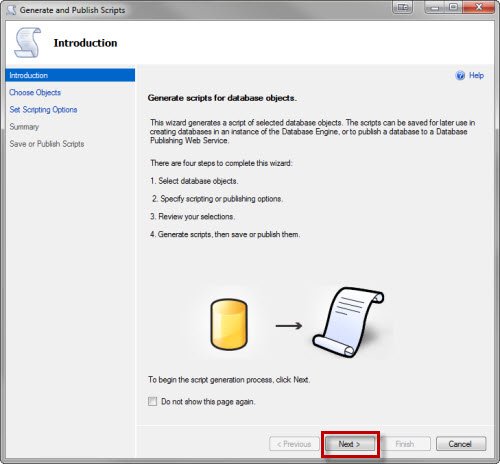
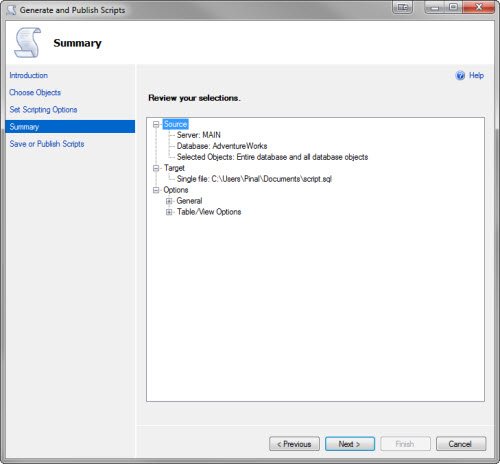
SQL Server 2008 and SQL Server 2008 R2 has script generator wizard which does it for us. I ask you to pay special attention to image #5.
After the script is generated, the next challenge often users face is how to execute this large script as SQL Server Management Studio does not open the file. One can use SQLCMD for the same. See that in the last image of this post.

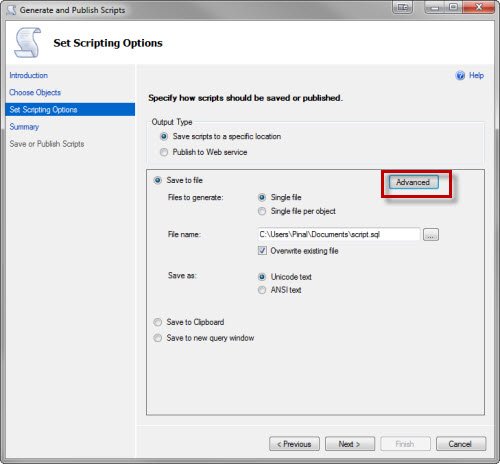
Pay attention to the option Types of data to script – select option ‘Schema and data’

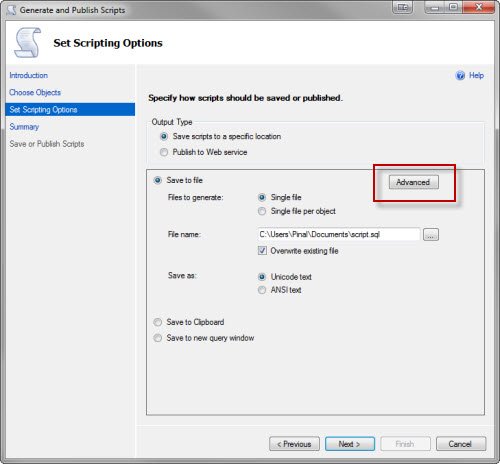


As the file with data will be very large, use SQLCMD to execute the large script which will create database with schema & data.

Please let me know if you have any question or suggestion on this blog post.
Watch SQL in Sixty Seconds Episode on same subject.
Reference : Pinal Dave (http://blog.SQLAuthority.com)


Why use SQLCMD in the command prompt in the end? Any alternatives/issues with the UI way?
What I personally prefer as a method of transferring schema objects and data across databases or even across instances is the scripting method above together with the SSIS.
The method of scripting you mention above is quite good, and I use it to generate the script of the schema. It is very flexible, since I get to chose which objects and what granularity of detail to script. The scripting in SSMS also checks for dependencies and scripts the objects in a particular order.
For moving data, though, I find it very clumsy, especially with larger amount of data.
The best way to do it is to script the schema and then use SSIS to load the data. SSIS is very easy to use and it offers isolation and lock handling which speed up the process of the data loading.
Feodor
Hi Feodor..
I want to import/export DB schema using SSIS ..
How can i do that
how could we do same thing in sqlserver 2005
@Sunil,
You can use Database Publishing Wizard to generate DML Statements along with DLL Statements.
Database Publishing Wizard is a free tool and works with SQL Server 2005. I believe Microsoft has embedded the same feature in SQL Server 2008. Its exactly same, Pinal Dave has already written an article on this topic, please refer to his example.
http://blog.sqlauthority.com/2007/11/16/sql-server-2005-generate-script-with-data-from-database-database-publishing-wizard/
You can use Database Publishing wizard from cmd prompt or you use use its User friendly GUI (I refer GUI) to script out schema with Data for SQL Server 2005 databases.
~IM.
@Sunil: the scripting of data is new for SQL 2008. In SQL 2005 you can script only the schema. Scripting the schema is sufficient, though; look at my comment above and you will see that you can use the scripted schema and then SSIS to move the data.
Feodor
Thanks Pinal And Feodor for the explanation on Scripting and loading of the data.
Thanks for sharing. Nice picture guide.
Hi,
This is good way but if you have altered the table those schema is not coming when you use Generate Scripts. I’m using this only for generating the schema but many times the table that i altered are skipped(i.e. new columns or datatype changes are not reflected). I don’t know the reason But whethere I go to Design editor and alter or use command its not reflected. Have any of you faced this problem???
All,
I have generated .sql scripts from both the Studio Express tool as well as from a dos prompt and now I’m creating a .bat file to execute the .sql scripts. One script drops the database, the next script (schema/database) creates the database and tables and the last script is a data only script to insert the data back into the database/tables, when I execute the .bat the scripts all run, the database gets dropped, database & tables get created and it appears the data load script runs however the tables don’t get populated, I created a bat_log.txt file that captured the dos stuff and in there it tells me that XX rows affected (the xx number matches the number of rows I expect in each tables) however the data doesn’t get into the database tables, any ideas why?
thanks,
~Scott.
We just perform a backup of the source db & then restore it to the target server.
About all that’s left to do then is clean up the list of user accounts and reset permissions.
It’s not especially elegant, but it’s fast, and it works every time.
Mike
if i want new Database not same name. can i change name on script ?
Thanks, I was losing my mind over the “ADVANCED” button !!!
What about doing the opposite? Can we not script the database with all objects from SQLCMD?
Thanks.
How can I apply filter on table to create data script of selected data?
–Shalini
I am using SQL Server 2008 but the Choose Objects page in Generate Scripts does not display DDL Triggers as shown above, and these are what I want to script. Any ideas??
It appears there is no longer any option to script the actual Create Database statement?
(& wow thats one cranky commenting system)
I have learned something new, and this is very good as far as it went. However, I’m missing something. I used the generate script to copy the users and schemas for one DB on a server to a clone on another server. I used the drop and create option. After it executed, the hundreds of securables for the users where I generated the script are missing from my target database.How can I copy this data for the database users?
I am working on an instance of SQL Server Standard Edition and the Script Wizard Choose Object Types screen only has Tables and Users. The other object types are not there to be selected. Any idea why this is?
Hi Pinal,
I am genertaing Sql Script for all objects like Tables, Storedprocedure,Triggers, Function etc. Its Generating Scuccessfully and showing all the objects as scuccess in the final report but some of the tables are missing in the script. I had selected all the objects and aslo showing those objects scuccess in the report. Can u please Help me to find the reason that why this happening.
Where is Save ?
Create Script to Copy Database Schema and All The Objects
Hello,
I’m doing it to transfer a db from sql 2008 to 2005.
The file with the datas is to large to be executed in sql 2005.
Even with sql cmd it’s the same result, not working.
What should i do?
Getting a lot of errors in the restore process. Seems like this method is not fool proof. Oh well
hello all,
I just want to take complete backup of databases as above process is doing.
But the problem is I want it by command so that i can use it in batch to schedule it. Please let me know hot to set that .
HOW TO GENERATE SCRIPTS FOR STORED PROCEDURES IN MASTER DATABASE. I HAVE CREATED SO MANY SP IN MASTER DB.
HI Deepak, You have answer for this please? Anyone?
How to go about invoking generate scripts and everything by scripts and with no manual intervention?
Pinal in reading this comment listing I found some fairly significant questions that I would like the answer to.
Is there anyway you could take the time to go through these comments and answer some of these questions?
HI i generated the scripts in 2008 but the scripts not working in 2005. Please help me how to execute in 2005
Pinal
This was perfect – I find myself hitting your blogs many times when I have SQL questions – thanks a million for taking the effort to post this items.
Hi
I am using ms sql server R2 2008 .For generating script from remote server(2005) to my local server(2008) ,i have used the approach u told here,
but getting an error while saving to new query window since data is bulk i guess.
This is the error
System.Data.SqlClient.SqlException: Timeout expired. The timeout period elapsed prior to completion of the operation or the server is not responding.
at Microsoft.SqlServer.Management.SqlScriptPublish.GeneratePublishPage.worker_DoWork(Object sender, DoWorkEventArgs e)
at System.ComponentModel.BackgroundWorker.OnDoWork(DoWorkEventArgs e)
at System.ComponentModel.BackgroundWorker.WorkerThreadStart(Object argument)
The company I work for is doing data migration from SQL server 2005 to 2008 R2 Enterprise. The former DBA sent me the generated schema for the database in a .sql file, which I can open and see in SSMS. The DBA also sent me the tables in .dat format.
How can I have the tables transfer to the new 2008 R2 with the schema of the original 2005?
Thanks a lot for your help.
Hi Pinal,
It will generate whole scripts which also includes tables from other databases which depends the current selected DB.
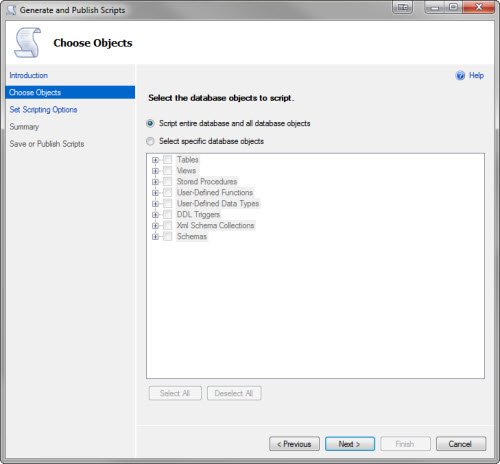
Choose “Select Specific database objects” option, (3rd image)
Thanks for this post.
Hello everyone!
I have an issue doing this… the export of the objects works fine (I’m doing it without data) but when i open the file in a text editor i can’t find some objects that the wizard said was exported… Any suggestions?
perfect
Iam doing it to transfer db from device to device .but how to restore this script file to the second device please help me .
thanks
HI pinal,
I am getting “Login failed” error , when i run the script on cmd.
Please , help me.
Thanks in advance.
date datatype conversion error is getting in one table while generating script for converting sql 2008 to sql 2005
I have recently started learning SQL, and was instructed by DBA that you can not export the sysdiagrams, that with 2005 it just breaks it and with 2008 r2, it is related to the way that the SQL translates the sysdiagram upon exporting, where it is into an excel or flat-file(which is all I am experienced on). They database diagram is what officially makes the database a relational database(is the way I understand it), so my question is why can I not or how can I export they sysdiagrams along with the tables? If it can’t be done via excel or flat-file, then why? I am just wanted to understand why every time I am doing this, I must recreate the relationships between PK, CPK, and FKs. It would be so convienant if I could just export the sysdiagrams along with them and then not be forced to re-invent the wheel everytime.
So I was told, sysdiagrams can’t be exported and imported by excel or flat-file, but why is this? All that was explained was it has to do with the way the sql code translates xml(what’s that even got to do with it). xml is scripting, so I am not seeing the big picture.
Please advise. I want to make sure I understand completely how and why this is not possible?
How to deny permission to user for generating scripts.I want to restrict some users so that they cannot generate the script.
Hello Pinal…
I want to generate database script using store procedure or through query..
How can i do it..??
The output sql file is huge in size. It is taking hrs to run. May we not take multiple .sql files – one after another? Any 3rd party tool for this?
Hi All
Does anyone know how to create script for a Master Data Services Database. SInce there are complicated relationships between the tables , I am not able to execute the generated script. Basically I am trying to change collations, so generating the script and then changing the collation would perhaps help. Any ideas guys
Cheers
Nithin
[...] This often seems to be big challenge for many new developers and DBA. However, if you watch today’s SQL in Sixty Seconds you will find that it is very very easy to accomplish. I have previously written about this subject over here Create Script to Copy Database Schema and All The Objects. [...]
I used ”SQL Server 2008 – Developer Edition” for a few year only for use the ”SQL Server Management Studio” and the ”Import and Export Data” tool, no SQL Server needed becouse I always use remote server.
Now, I tryed the ”SQL Server Management Studio Express 2012”, it have the ”Import and Export Data” tool, just what I need but now I have a issue, when I do a right-click on a database to access the ”Generate Scripts” wizard I receive the following message:
Cannot open database ”msdb” requested by the login. The login failed.
Login failed for user ’stocks’. (Microsoft SQL Server, Error: 4060)
I never had this issue with SQL Server 2008, 2005 and 2000. Anyone knows why the login to database ”msdb” is required to do this action? Is there any alternate method to access the ”Generate Scripts” wizard?
Some options were different and some were as it is as shown in this page, when i create script. But finally i was successsful in creating script.
What privileges on what objects are required to generate script of a database?
I tried to generate a database on which I am having db_owner privilege but failed!!
What is the workaround for that?
Hi,
I’m using the same method to transfer a table with more than 13M records to another database on another server. the problem is there is a prompt message for each 100 records saying Processed ???? total records and it causes the process take too long. on the other hand, since the script file is too big, it’s not possible to open it with an editor and remove that message from the script. Is there any way to create such script without that prompt message? Or use another SQL script to insert the records as a bulk copy or something?
Thank you
Farhad
I’m using a MSSQL 2008 (Microsoft SQL Server Management Studio 10.0.1600.22 ((SQL_PreRelease).080709-1414 )). When I use TASK > GENERATE SCRIPTS I get a slightly different interface and at IMAGE 5 I don’t get the option to choose advanced (though I see these options on a previous screen) and there is no options to change TYPE OF DATA TO SCRIPT. Any clues?
Hi
i have some data with date filed in it so when i generate the insert script the date field values coming like this CAST(0x22250B00 AS Date any idea how to tackle this.
Do not worry. The resultant date will be added correctly
I know this is a dumb question, but I want to use this for a test DB on the same server it came from. I DO NOT want to create the same DB. Can I change the name of the script, or is there a way to point it to the DB I want to put it in?
Maybe my mistake was taking the schemas. Tables, data and procs is really all I needed. Any input is welcome!
I am copying a Database between two servers, where the Source server is on a webhotel, so I only can use scripting. I been struggling for days with this. But so fare I succeed to copy most, but are missing the DATABASE DIAGRAM ??? How do I make sure the DIAGRAM will follow in the copy??
I am copying a Database with this scriping technic, but it does not transfer the DATABASE DIAGRAM, how do I do that???
Hello, I want to take a 2012 SQL Express Database and convert it to SQL 2008 Database. Is this possible and is it done the same way as you mentioned above?
Without wizard you can import/export data/schema..
——————————————————————
CREATE PROCEDURE [dbo].[sp_Table_Data_Script]
@SchemaName VARCHAR(MAX),
@TableName VARCHAR(Max),
@WhereClause NVARCHAR(Max),
@TopNo INT
AS
DECLARE @SQL VARCHAR(max)
DECLARE @nSQL NVARCHAR(Max)
DECLARE @RecordCount INT
DECLARE @FirstColumn NVARCHAR(Max)
–SET @TableName=QUOTENAME(@TableName) — Quote the table name
SET @TableName =@SchemaName + ‘.’ + QUOTENAME(@TableName)
Print @TableName
/*We need to find the record count in order to remove Union ALL from the last row*/
SET @nSQL=”
SET @nSQL= N’SELECT @RecordCount=COUNT(*) FROM ‘ + @TableName + (CASE WHEN ISNULL(@Whereclause,”) ” THEN ‘ Where ‘ + @Whereclause ELSE ” END)
Print @nSQL
EXEC sp_executesql @query = @nSQL, @params = N’@RecordCount INT OUTPUT’, @RecordCount = @RecordCount OUTPUT
/*****************************************************************/
/*Need to check either top No of record is less than record count
in order to remove union all from the last row */
IF @TopNo IS NOT NULL And @TopNo<@RecordCount
BEGIN
SET @RecordCount=@TopNo
END
/***************************************************************/
/*** Here we need to find the first column name to generate a serial number and insert an "Insert into statement" in the first row ***/
SET @nSQL=''
SET @nSQL= N'SELECT @FirstColumn=[name] FROM sys.columns WHERE [Column_id]=1 And object_ID=object_ID('''+ @TableName + ''')'
Print @nSQL
EXEC sp_executesql @query = @nSQL, @params = N'@FirstColumn nvarchar(Max) OUTPUT', @FirstColumn = @FirstColumn OUTPUT
/**************************************************************/
DECLARE @FieldName VARCHAR(max)
SET @FieldName=''
If (Select Count(*) FROM sys.columns WHERE object_id=object_id('' + @TableName + '') And is_identity0)=1
BEGIN
SET @FieldName = STUFF(
(
SELECT ‘,’ + QUOTENAME([Name]) FROM sys.columns WHERE object_id=object_id(” + @TableName + ”) Order By [column_id]
FOR XML PATH(”)), 1, 1, ”)
Set @FieldName =’(‘ + @FieldName + ‘)’
Print @FieldName
Print len(@FieldName)
END
/*******Create list of comma seperated columns *******/
SET @SQL= (SELECT STUFF((SELECT(CASE
WHEN system_type_id In (167,175,189) THEN + ‘ Cast(ISNULL(LTRIM(RTRIM(”N”””+Replace(‘ + QUOTENAME([Name])+ ‘,””””,””””””)+””””’+ ‘)),”NULL”) as varchar(max)) + ” AS ‘ + QUOTENAME([Name]) + ”’ + ” ,”’+'+ ‘
WHEN system_type_id In (231,239) THEN + ‘ Cast(ISNULL(LTRIM(RTRIM(”N”””+Replace(‘ + QUOTENAME([Name])+ ‘,””””,””””””)+””””’+ ‘)),”NULL”) as nvarchar(max)) + ” AS ‘ + QUOTENAME([Name]) + ”’ + ” ,”’+'+ ‘
WHEN system_type_id In (58,61,36) THEN + ‘ ISNULL(LTRIM(RTRIM(”N””” + Cast(‘ + QUOTENAME([Name])+ ‘ as varchar(max))+””””’ + ‘)),”NULL”) + ” AS ‘ + QUOTENAME([Name]) + ”’+ ” ,”’+’ + ‘
WHEN system_type_id In (48,52,56,59,60,62,104,106,108,122,127) THEN + ‘ ISNULL(Cast(‘ + QUOTENAME([Name])+ ‘ as varchar(max)),”NULL”)+ ” AS ‘ + QUOTENAME([Name]) + ”’ + ” ,”’+'+ ‘
END
)
FROM
sys.columns WHERE object_ID=object_ID(”+ @TableName + ”) FOR XML PATH(”)),1,1,’ ‘))
/*******************************************************/
/* Here 500 means if the record count is 500 or top no 500 then it will generate “Insert into select ..Union All ”
Because more than 500 might reduce its performance. */
IF @TopNo <500 or @RecordCount<500
BEGIN
IF @TopNo IS NULL
BEGIN
SET @SQl='SELECT (Case When ROW_NUMBER() OVER (ORDER BY ' + QUOTENAME(@FirstColumn) + ') =1 THEN '' INSERT INTO ' + @TableName + ' ' + ' '+ @FieldName + ' ''' + ' ELSE '''' END) + ''SELECT ''+'
+ Left(@SQL,Len(@SQL)-8) + ' + (CASE WHEN ROW_NUMBER() OVER (ORDER BY ' + QUOTENAME(@FirstColumn) + ') ‘ + CONVERT(VARCHAR(10),@RecordCount)
+ ‘ THEN ” UNION ALL” ELSE ”” END) AS [Name] ‘ + ‘ FROM ‘ + @TableName +(CASE WHEN ISNULL(@Whereclause,”) ” THEN ‘ WHERE ‘ + @Whereclause ELSE ” END)
END
ELSE
BEGIN
SET @SQl= ‘SELECT TOP ‘ + CONVERT(VARCHAR(10),@TopNo) + ‘ (CASE WHEN ROW_NUMBER() OVER (ORDER BY ‘ + QUOTENAME(@FirstColumn) + ‘) =1 THEN ” INSERT INTO ‘
+ @TableName + ‘ ‘ + ‘ ‘+ @FieldName + ”” + ‘ ELSE ”” END) + ”SELECT ”+’ + LEFT(@SQL,LEN(@SQL)-8) + ‘ + (CASE WHEN ROW_NUMBER() OVER (ORDER BY ‘ + QUOTENAME(@FirstColumn) + ‘) ‘
+ CONVERT(VARCHAR(10),@RecordCount) + ‘ THEN ” Union All” ELSE ”” END) AS [Name]‘ + ‘ FROM ‘ + @TableName + (CASE WHEN ISNULL(@Whereclause,”) ” THEN ‘ WHERE ‘ + @Whereclause ELSE ” END)
END
END
ELSE
— Greator then 500 will generate “insert into select *” … for each record.
BEGIN
IF @TopNo IS NULL
BEGIN
SET @SQl=’SELECT ” INSERT INTO ‘ + @TableName + ‘ ‘ + ‘ ‘+ @FieldName + ‘ ” + ”SELECT ”+’ + Left(@SQL,Len(@SQL)-8)
+ ‘ AS [Name] ‘ + ‘ FROM ‘ + @TableName +(CASE WHEN ISNULL(@Whereclause,”) ” THEN ‘ WHERE ‘ + @Whereclause ELSE ” END)
END
ELSE
BEGIN
SET @SQl=’SELECT TOP ‘ + CONVERT(VARCHAR(10),@TopNo) + ”’ INSERT INTO ‘ + @TableName + ‘ ‘ + ‘ ‘+ @FieldName
+ ‘ ” + ”SELECT ”+’ + Left(@SQL,Len(@SQL)-8) + ‘ AS [Name] ‘ + ‘ FROM ‘ + @TableName +(CASE WHEN ISNULL(@Whereclause,”) ” THEN ‘ WHERE ‘ + @Whereclause ELSE ” END)
END
END
EXEC (@SQL)
GO
CREATE PROCEDURE [dbo].[spS_DatabaseInformationGet]
@getValue VARCHAR(50) = NULL
AS
SET NOCOUNT ON;
IF @getValue = ‘DATABASE’
BEGIN
SELECT [name]
FROM sys.databases
END
ELSE IF @getValue = ‘TABLE’
BEGIN
declare @TableList TABLE
(
name nvarchar(max)
)
DECLARE @name VARCHAR(128),@setvalgo varchar(5)
SET @setvalgo = ‘GO’
SELECT @name = (SELECT TOP 1 [name] FROM sysobjects WHERE [type] = ‘U’ AND category = 0 ORDER BY [name])
WHILE @name IS NOT NULL
BEGIN
insert into @TableList
SELECT ‘IF EXISTS (SELECT * FROM sys.objects WHERE object_id = OBJECT_ID(N”’ +RTRIM(@name)+”’) AND type in (N”U”)) DROP TABLE ‘+RTRIM(@name)
–SELECT ‘DROP TABLE [dbo].[' + RTRIM(@name) +']‘
SELECT @name = (SELECT TOP 1 [name] FROM sysobjects WHERE [type] = ‘U’ AND category = 0 AND [name] > @name ORDER BY [name])
insert into @TableList
select @setvalgo
END
insert into @TableList
SELECT ‘create table [' + so.name + '] (‘ + o.list + ‘)’ + CASE WHEN tc.Constraint_Name IS NULL THEN ” ELSE ‘ALTER TABLE ‘ + so.Name + ‘ ADD CONSTRAINT ‘ + tc.Constraint_Name + ‘ PRIMARY KEY ‘ + ‘ (‘ + LEFT(j.List, Len(j.List)-1) + ‘)’ END
as name
from sysobjects so
cross apply
(SELECT
‘ ['+column_name+'] ‘ +
data_type + case data_type
when ‘sql_variant’ then ”
when ‘text’ then ”
when ‘decimal’ then ‘(‘ + cast(numeric_precision_radix as varchar) + ‘, ‘ + cast(numeric_scale as varchar) + ‘)’
else coalesce(‘(‘+case when character_maximum_length = -1 then ‘MAX’ else cast(character_maximum_length as varchar) end +’)',”) end + ‘ ‘ +
case when exists (
select id from syscolumns
where object_name(id)=so.name
and name=column_name
and columnproperty(id,name,’IsIdentity’) = 1
) then
‘IDENTITY(‘ +
cast(ident_seed(so.name) as varchar) + ‘,’ +
cast(ident_incr(so.name) as varchar) + ‘)’
else ”
end + ‘ ‘ +
(case when IS_NULLABLE = ‘No’ then ‘NOT ‘ else ” end ) + ‘NULL ‘ +
case when information_schema.columns.COLUMN_DEFAULT IS NOT NULL THEN ‘DEFAULT ‘+ information_schema.columns.COLUMN_DEFAULT ELSE ” END + ‘, ‘
from information_schema.columns where table_name = so.name
order by ordinal_position
FOR XML PATH(”)) o (list)
left join
information_schema.table_constraints tc
on tc.Table_name = so.Name
AND tc.Constraint_Type = ‘PRIMARY KEY’
cross apply
(select ‘[' + Column_Name + '], ‘
FROM information_schema.key_column_usage kcu
WHERE kcu.Constraint_Name = tc.Constraint_Name
ORDER BY
ORDINAL_POSITION
FOR XML PATH(”)) j (list)
where xtype = ‘U’
AND name NOT IN (‘dtproperties’)
select * from @TableList
END
ELSE IF @getValue = ‘TABLE_DATA’
BEGIN
DECLARE @TableName VARCHAR(1000)
DECLARE @TableDataRow BIGINT
DECLARE @TabIdenOn varchar(100)
DECLARE @TabIdenOff varchar(100)
create table #temp(name varchar(MAX))
–Cursor
DECLARE @getTable CURSOR
SET @getTable = CURSOR FOR
SELECT TABLE_NAME
FROM information_Schema.tables
OPEN @getTable
FETCH NEXT
FROM @getTable INTO @TableName
WHILE @@FETCH_STATUS = 0
BEGIN
SELECT @TableDataRow=rows FROM sys.partitions
WHERE object_id = object_id(@TableName)
AND index_id 0
BEGIN
IF ((SELECT OBJECTPROPERTY( OBJECT_ID(N”+@TableName+”), ‘TableHasIdentity’)) = 1)
BEGIN
set @TabIdenOn = ‘SET IDENTITY_INSERT ‘ + @TableName + ‘ ON’
set @TabIdenOff = ‘SET IDENTITY_INSERT ‘ + @TableName + ‘ OFF’
insert into #temp(name)
select @TabIdenOn
insert into #temp(name)
exec sp_Table_Data_Script ”,@TableName,NULL,NULL
insert into #temp(name)
select @TabIdenOff
END
ELSE
BEGIN
insert into #temp(name)
exec sp_Table_Data_Script ”,@TableName,NULL,NULL
END
END
FETCH NEXT
FROM @getTable INTO @TableName
END
CLOSE @getTable
DEALLOCATE @getTable
SELECT name
FROM #temp
DROP TABLE #temp
END
ELSE IF @getValue = ‘P_F_T_V_SCRIPT’
BEGIN
–SELECT object_definition(object_id) AS name
–FROM sys.objects
–WHERE type_desc in (‘SQL_SCALAR_FUNCTION’,
– ‘SQL_STORED_PROCEDURE’,
– ‘SQL_TABLE_VALUED_FUNCTION’,
– ‘SQL_TRIGGER’,
– ‘VIEW’)
DECLARE @ProcName VARCHAR(200),@FunName VARCHAR(200),@PExist VARCHAR(MAX)
DECLARE @MyCursor CURSOR,@MyCursorSPS CURSOR,@MyCursorFUN CURSOR,@MyCursorFUNS CURSOR
DECLARE @setval1 VARCHAR(25),@setval2 VARCHAR(5),@setval3 VARCHAR(25),@setval4 VARCHAR(5)
SET @setval1=’SET ANSI_NULLS ON ‘
SET @setval2=’GO’
SET @setval3=’SET QUOTED_IDENTIFIER ON’
DECLARE @StoredProcsList TABLE
(
name TEXT
)
–Add Go
INSERT INTO @StoredProcsList
SELECT @setval2
DECLARE @SPCHECKEXIST CURSOR
SET @SPCHECKEXIST = CURSOR FOR
–Select
SELECT name FROM sys.objects WHERE type = ‘P’
OPEN @SPCHECKEXIST
FETCH NEXT
FROM @SPCHECKEXIST INTO @ProcName
WHILE @@FETCH_STATUS = 0
BEGIN
SET @PExist= ‘IF EXISTS (SELECT * FROM sys.objects WHERE object_id = OBJECT_ID(N”’ +@ProcName+”’) AND type in (N”P”, N”PC”)) DROP PROCEDURE ‘+@ProcName
INSERT INTO @StoredProcsList
SELECT @PExist
FETCH NEXT
FROM @SPCHECKEXIST INTO @ProcName
END
CLOSE @SPCHECKEXIST
DEALLOCATE @SPCHECKEXIST
DECLARE @FUNCHECKEXIST CURSOR
SET @FUNCHECKEXIST = CURSOR FOR
–Select
SELECT name FROM sys.objects where type_desc in (‘SQL_SCALAR_FUNCTION’,'SQL_TABLE_VALUED_FUNCTION’)
OPEN @FUNCHECKEXIST
FETCH NEXT
FROM @FUNCHECKEXIST INTO @FunName
WHILE @@FETCH_STATUS = 0
BEGIN
SET @PExist= ‘IF EXISTS (SELECT * FROM sys.objects WHERE object_id = OBJECT_ID(N”’ +@FunName+”’) AND type in (N”FN”, N”IF”, N”TF”, N”FS”, N”FT”)) DROP FUNCTION ‘+@FunName
INSERT INTO @StoredProcsList
SELECT @PExist
FETCH NEXT
FROM @FUNCHECKEXIST INTO @FunName
END
CLOSE @FUNCHECKEXIST
DEALLOCATE @FUNCHECKEXIST
DECLARE @SPGENERATESCRIPT CURSOR
SET @SPGENERATESCRIPT = CURSOR FOR
–Select
SELECT name FROM sys.objects WHERE type = ‘P’
OPEN @SPGENERATESCRIPT
FETCH NEXT
FROM @SPGENERATESCRIPT INTO @ProcName
WHILE @@FETCH_STATUS = 0
BEGIN
INSERT INTO @StoredProcsList
SELECT @setval1
INSERT INTO @StoredProcsList
SELECT @setval2
INSERT INTO @StoredProcsList
SELECT @setval3
INSERT INTO @StoredProcsList
SELECT @setval2
INSERT INTO @StoredProcsList
EXEC sp_helptext @ProcName
FETCH NEXT
FROM @SPGENERATESCRIPT INTO @ProcName
END
CLOSE @SPGENERATESCRIPT
DEALLOCATE @SPGENERATESCRIPT
DECLARE @FUNGENERATESCRIPT CURSOR
SET @FUNGENERATESCRIPT = CURSOR FOR
–Select
SELECT name FROM sys.objects where type_desc in (‘SQL_SCALAR_FUNCTION’,'SQL_TABLE_VALUED_FUNCTION’)
OPEN @FUNGENERATESCRIPT
FETCH NEXT
FROM @FUNGENERATESCRIPT INTO @FunName
WHILE @@FETCH_STATUS = 0
BEGIN
INSERT INTO @StoredProcsList
SELECT @setval1
INSERT INTO @StoredProcsList
SELECT @setval2
INSERT INTO @StoredProcsList
SELECT @setval3
INSERT INTO @StoredProcsList
SELECT @setval2
INSERT INTO @StoredProcsList
EXEC sp_helptext @FunName
INSERT INTO @StoredProcsList
SELECT @setval2
FETCH NEXT
FROM @FUNGENERATESCRIPT INTO @FunName
END
CLOSE @FUNGENERATESCRIPT
DEALLOCATE @FUNGENERATESCRIPT
SELECT name FROM @StoredProcsList
END
ELSE IF @getValue = ‘D_USER’
BEGIN
select princ.name
, princ.type_desc
, perm.permission_name
, perm.state_desc
, perm.class_desc
, object_name(perm.major_id)
from sys.database_principals princ
left join
sys.database_permissions perm
on perm.grantee_principal_id = princ.principal_id
where type_desc in (‘SQL_USER’) and state_desc in (‘GRANT’)
END
GO
I want to generate scirpt for a large table in a database through command
wht’s issue.. using this function/procedure you can do it.
Thank Q so much….
Hi I’need to replicate the database which is in sql server 2008 with different name is that possible?
Hi, can this process be done through the maintenance plan ? is there some way this can be scheduled automatically. I use sql server 2008 and 2012
I tried the above mentioned thing in my system to move the DB from 2008 R2 to 2005, script has been successfully taken. but the below mentioned error is getting occurred while execute the script through SQL Command,
HResult 0×57, Level 16, State 1
SQL Network Interfaces: Connection string is not valid [87].
Sqlcmd: Error: Microsoft SQL Native Client : An error has occurred while establi
shing a connection to the server. When connecting to SQL Server 2005, this failu
re may be caused by the fact that under the default settings SQL Server does not
allow remote connections..
Sqlcmd: Error: Microsoft SQL Native Client : Login timeout expired.
Kindly have a look into this and let me know the possible result please…
Hi, I want sql query to generate this script.
I dont want to generate it manualy from ssms.
Can anybody help me?
Thanks in advance….
[…] Create Script to Copy Database Schema and All The Objects – Data, Schema, Stored Procedure, Functi… One of the most popular blog post because it is the basic requirement of the developer. Developers like to do things their own way on their database. This blog post explains how developers can absolutely create another replica of the database and later do practice over it. […]