
One of the most common problem SQL Server developers face while dealing with XML is related to writing the correct XPath expression to read a specific value from an XML document. I usually get a lot of questions by email, on my blog or in the forums which looks like the following:
“I have the following XML document and I am trying to read the value from xyz node. When I run my query, I get a NULL value”
My friend Jacob Sebastian (SQL Server MVP) has written excellent article on the subject SELECT * FROM XML, I strongly recommend to either bookmark it and read it before continuing further in this article.
In most cases, I have seen that the problem was due to an incorrect XPath expression. XPath expressions are not complicated at all, but they need a close attention to get them right. Assume that we have the following XML fragment.
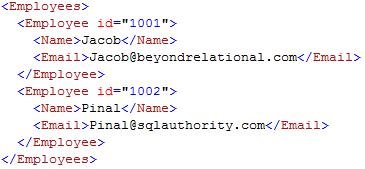
Looking at the structure of the XML document, it is quite easy to figure out the XPath expression pointing to each element and attribute. The following illustration shows how to do this.

One of the simplest ways is to identify the nodes with their position as given in the above illustration. A more detailed listing is given below.
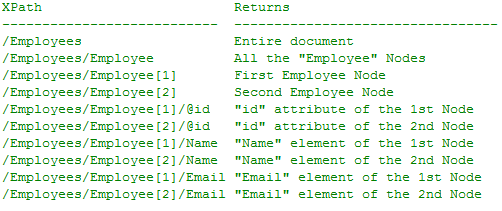
The above example also used the “position” of the elements to uniquely identify them. In real life you might need to have more complex matching criteria such as the “email of the Employee element whose id is 10001”. The following example shows how to apply this type of filters.
/Employees/Employee[@id=”1001″]/Email
In most cases, you will be able to easily build your XPath expressions. However, if you find it difficult, you can take help from my helper function given here. This function allows you to run ‘blind’ queries on the XML document very similar to the ‘select * from table’ queries that we usually run on unknown tables.
For example, if you would like to quickly examine the above XML document and see the elements, attributes and their XPath expression, you can execute something like the following:

Make sure that you create the function XMLTable() using the script given in the above URL.
Once you have the output of the function, you can copy the XPath expressions from the results and use in your Queries. For example, if you are looking for the email address of Pinal, you can just copy the expression from row 8 (highlighted in the image given above) and use in your query as:
SELECT @x.value('Employees[1]/Employee[2]/Email[1]','VARCHAR(50)')
I hope you will find this post interesting and the XMLTable() function might help you to solve some of the XML querying problems you may face in your SQL Server Journey. If you have got any question about XML in general, or about this function in particular, please feel free to post them on the XML forum and I will try my best to help you out.
Reference: Pinal Dave (https://blog.sqlauthority.com)





19 Comments. Leave new
Very nice article. I was always scared using XML. But, after reading this, I think it is very easy and handy. Thanks for sharing such a nice thing.
Very Nice article………Pinal can u explain about the what are the diff types of Database Documentation,how it is useful? etc…and How a Start up firm implement these types of documentation based on Agile model.I am Expecting an Interesting Article from you………
Very nicely written, This really helps out with XPATH, one of the challenging things i have faced with XML is more of the mechanics of XPATH, this example makes it easier.
Very nicely written. I’m wonderin how the function can be modified to take namespaces into account?
I’m looking for
SELECT * FROM @Xml
into one result row, one column per attribute,
with the attribute name as the column name,
and the attribute value as the value in the one row.
I’m not there yet,
but this T-Sql:
declare @idoc int
exec sp_xml_preparedocument @idoc OUTPUT,
”;
WITH EdgeTable AS
(
SELECT *
FROM OPENXML (@idoc, ‘/*’)
)
SELECT e1.localname Attribute,
e2.text Value
FROM EdgeTable e1 join
EdgeTable e2 on e1.id = e2.parentid
where e2.localname = ‘#text’;
EXEC sp_xml_removedocument @idoc
returns this:
Attribute Value
——— —–
Name Jones
Phone 123
And I don’t know the schema.
I’m trying to make a generic routine that can be run on any xml. All I want is the data.
I’m trying to get it into one row though,
and so far, no luck.
Any help would be appreciated.
A solution not involving OPENXML would be better also.
I’ll post if I solve it first.
Did you get a solution?
my xml got chopped out of my sample code.
exec sp_xml_preparedocument @idoc OUTPUT,
‘<Customer Name=”Jones” Phone=”123″ />’;
Also,
my result data has 2 columns and looks like this:
Attribute|Value
Name |Jones
Phone |123
Sorry about the 2nd post.
Very useful article Pinal :)
Hi Pinal,
Please see the query below,
declare @tstTable table(txt xml)
insert @tstTable
select ‘
X
Y
A
B
‘
select * from @tstTable
I need to get the output as following, i need to use the xml.Modify
I am expecting your reply.Plese help.
X Y
A B
declare @tstTable table(txt xml)
insert @tstTable
select ‘<root>
<parent>
<firstname>X</firstname>
<lastname>Y</lastname>
</parent>
<child>
<firstname>A</firstname>
<lastname>B</lastname>
</child>
</root>’
select * from @tstTable
I need to get the output as following, i need to use the xml.Modify
I am expecting your reply.Plese help.
<root>
<parent>
<fullname>X Y</fullname>
</parent>
<child>
<fullname>A B</fullname>
</child>
</root>
If node randomly change then how get the node value
Hi Pinal,
I have a particular content to be searched in an attribute of an xml column where attribute might vary with different columns but content to be searched is same
suppose want to search vmqa1 content in an xml column where I m not sure of the attribute where it appears within the xml column
I searched a lot but did not get proper syntax for this
Am worried about Xpath mapping. Now am free mind…Extremely thank you.
——//
——// Vince
——// Lakka
——// Dinki
——// Lucy
——// Mac
——//
Hi Pinal / Members,
I have a questin for you, how to read a file witohut using static mathod, the list is dynamic and it can be any numbers from 1 to 100s. I tried using static variables and its bit messy, there must be a proper way to read and convert this XML file to SQL
:( cant put XML code here…
—— //
–LINE-1//
—— // Vince
—– -//
–LINE-2//
—– -// Lakka
—- –//
–LINE-3//
—- –// Dinki
—- –//
–LINE-4//
—- –// Lucy
—- –//
–LINE-5//
—- –// Mac
—- –//
—- –//
Could you please provide xmldata() function ? i need to retrieve all elements metadata for all columns from XSD.. Could some one help on this ?
Where can i find the XMLTable() function script?
I cannot find the code for the XMLTable() function either.