
It is quite common to get the SQL Server version details from following query.
SELECT @@VERSION VersionInfo
GO
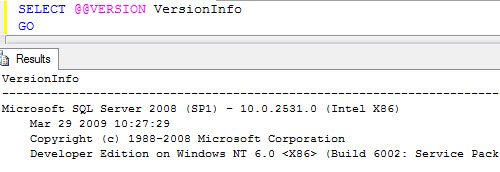
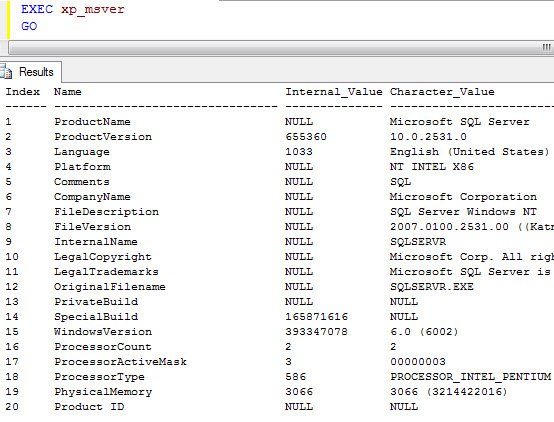
Recently I have been using following SP to get version details as it also provides me few more information about the server where the SQL Server is installed.
EXEC xp_msver
GO
Watch a 60 second video on this subject
I like to use the second one but again that is my preference.
Published by Pinal Dave on SQLAuthority. More of my work at pinaldave.com.
Discover more from SQL Authority with Pinal Dave
Subscribe to get the latest posts sent to your email.



9 Comments. Leave new
Hey Pinal,
This may not be the right thread for such question/help, but I could not find any other.
Actually I am trying to install SQL Server 2005 Enterprise Edition (x32) on Windows 7 (64 bit), but getting lot of errors like Asp.Net is not registered with IIS etc.
Please guide me as how can I install it successfully. Do I need to do some settings before installing SQL Server – 32 bit on Windows 7 – 64 bit ?
Please help …!
Thanks,
Munish Bansal
Hi Pinal
how to see the latest version info in sql
for example
if i am using 2005 sql server,
i want the information about latest product (2012 RCO) like that
Thanks in advance
Gopi
xp_msver does not work on SQL 2000, the very reason I want to use it,
Hi i need get the Platform of sql then compare this platform with the platmform of OS im using C# but i dont would use fuction SUBSTRING() I WISH A SINGLE SQL SINTAX
From the article, I see how to get the SQL Server version and edition, as well as the Windows version.
Is there a way to get the Windows Edition name (Enterprise vs Standard, etc)?
Thanks!
Hi all
How could we found BULK INSERT completion percentage in SQL server using C#?
I have tried with the following query:
SELECT d.name databasename,
r.command,
r.percent_complete,
r.session_id,
r.start_time,
estimated_finish_time = DATEADD(MILLISECOND,estimated_completion_time, CURRENT_TIMESTAMP) FROM sys.dm_exec_requests r INNER JOIN sys.databases d ON r.database_id = d.database_id WHERE r.command like ‘%BULK INSERT%’
But I am unable to get the result as per the requirement.
Everybody having trouble using xp_msver may wish to try the following:
— reference:
— https://support.microsoft.com/en-us/help/321185/how-to-determine-the-version-edition-and-update-level-of-sql-server-an#bookmark-completeversion
SET NOCOUNT ON;
SELECT
serverproperty(‘ServerName’) [Server Name],
serverproperty(‘Edition’) [Edition],
CASE serverproperty(‘EngineEdition’)
WHEN 1 THEN ‘Personal or Desktop’
WHEN 2 THEN ‘Standard or Workgroup’
WHEN 3 THEN ‘Enterprise, Enterprise Evaluation, or Developer’
WHEN 4 THEN ‘Express, Express Edition with Advanced Services, or Windows Embedded SQL’
WHEN 5 THEN ‘SQL Database’
ELSE ‘{unknown}’
END [Engine Edition],
serverproperty(‘ProductVersion’) [Product Version],
serverproperty(‘ProductLevel’) [Product Level],
serverproperty(‘ProductUpdateLevel’) [Product Update Level],
serverproperty(‘ProductUpdateReference’) [Product Update Reference],
serverproperty(‘SqlSortOrderName’) [Sql Sort Order Name],
serverproperty(‘InstanceDefaultDataPath’) [Instance Default Data Path],
serverproperty(‘InstanceDefaultLogPath’) [Instance Default Log Path]
This will also do the trick:(Easy to run on number of servers that are registered in CMS)
https://gallery.technet.microsoft.com/T-SQL-to-find-Windows-Name-ee224b80
CREATE TABLE #WinNames
(
WinID float,
WinName varchar(max)
)
insert into #WinNames values (3.10,’Windows NT 3.1′)
insert into #WinNames values (3.50,’Windows NT 3.5′)
insert into #WinNames values (3.51,’Windows NT 3.51′)
insert into #WinNames values (4.0,’Windows NT 4.0′)
insert into #WinNames values (5.0,’Windows 2000′)
insert into #WinNames values (5.1,’Windows Server 2003′)
insert into #WinNames values (5.2,’Windows Server 2003 R2′)
insert into #WinNames values (3.50,’Windows NT 3.5′)
insert into #WinNames values (3.10,’Windows NT 3.1′)
insert into #WinNames values (6.0,’Windows Server 2008′)
insert into #WinNames values (6.1,’Windows Server 2008 R2′)
insert into #WinNames values (6.2,’Windows Server 2012′)
insert into #WinNames values (6.3,’Windows Server 2012 R2′)
SELECT OSVersion =RIGHT(@@version, LEN(@@version)- 3 -charindex (‘ ON ‘, @@VERSION)) into #WVer
select SUBSTRING(OSVersion, 11,4 ) AS WinID, OSVersion into #WVer1 from #WVer
select WN.WinName, wn1.OSVersion
from #WinNames WN
inner join #WVer1 wn1
on wn1.WinID = wn.WinID
drop table #WVer1
drop table #WVer
drop table #WinNames
Thanks for sharing.