
It is quite common to get the SQL Server version details from following query.
SELECT @@VERSION VersionInfo

GO
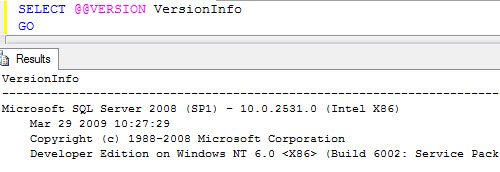
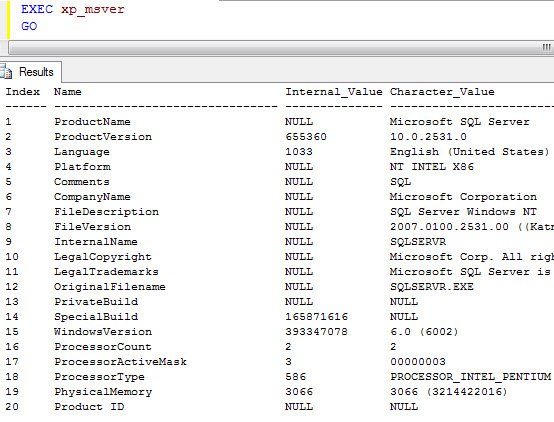
Recently I have been using following SP to get version details as it also provides me few more information about the server where the SQL Server is installed.
EXEC xp_msver

GO
Watch a 60 second video on this subject
I like to use the second one but again that is my preference.
Published by Pinal Dave on SQLAuthority. More of my work at pinaldave.com.



9 Comments. Leave new
Hey Pinal,
This may not be the right thread for such question/help, but I could not find any other.
Actually I am trying to install SQL Server 2005 Enterprise Edition (x32) on Windows 7 (64 bit), but getting lot of errors like Asp.Net is not registered with IIS etc.
Please guide me as how can I install it successfully. Do I need to do some settings before installing SQL Server – 32 bit on Windows 7 – 64 bit ?
Please help …!
Thanks,
Munish Bansal
Hi Pinal
how to see the latest version info in sql
for example
if i am using 2005 sql server,
i want the information about latest product (2012 RCO) like that
Thanks in advance
Gopi
xp_msver does not work on SQL 2000, the very reason I want to use it,
Hi i need get the Platform of sql then compare this platform with the platmform of OS im using C# but i dont would use fuction SUBSTRING() I WISH A SINGLE SQL SINTAX
From the article, I see how to get the SQL Server version and edition, as well as the Windows version.
Is there a way to get the Windows Edition name (Enterprise vs Standard, etc)?
Thanks!
Hi all
How could we found BULK INSERT completion percentage in SQL server using C#?
I have tried with the following query:
SELECT d.name databasename,
r.command,
r.percent_complete,
r.session_id,
r.start_time,
estimated_finish_time = DATEADD(MILLISECOND,estimated_completion_time, CURRENT_TIMESTAMP) FROM sys.dm_exec_requests r INNER JOIN sys.databases d ON r.database_id = d.database_id WHERE r.command like ‘%BULK INSERT%’
But I am unable to get the result as per the requirement.
Everybody having trouble using xp_msver may wish to try the following:
— reference:
— https://support.microsoft.com/en-us/help/321185/how-to-determine-the-version-edition-and-update-level-of-sql-server-an#bookmark-completeversion
SET NOCOUNT ON;
SELECT
serverproperty(‘ServerName’) [Server Name],
serverproperty(‘Edition’) [Edition],
CASE serverproperty(‘EngineEdition’)
WHEN 1 THEN ‘Personal or Desktop’
WHEN 2 THEN ‘Standard or Workgroup’
WHEN 3 THEN ‘Enterprise, Enterprise Evaluation, or Developer’
WHEN 4 THEN ‘Express, Express Edition with Advanced Services, or Windows Embedded SQL’
WHEN 5 THEN ‘SQL Database’
ELSE ‘{unknown}’
END [Engine Edition],
serverproperty(‘ProductVersion’) [Product Version],
serverproperty(‘ProductLevel’) [Product Level],
serverproperty(‘ProductUpdateLevel’) [Product Update Level],
serverproperty(‘ProductUpdateReference’) [Product Update Reference],
serverproperty(‘SqlSortOrderName’) [Sql Sort Order Name],
serverproperty(‘InstanceDefaultDataPath’) [Instance Default Data Path],
serverproperty(‘InstanceDefaultLogPath’) [Instance Default Log Path]
This will also do the trick:(Easy to run on number of servers that are registered in CMS)
https://gallery.technet.microsoft.com/T-SQL-to-find-Windows-Name-ee224b80
CREATE TABLE #WinNames
(
WinID float,
WinName varchar(max)
)
insert into #WinNames values (3.10,’Windows NT 3.1′)
insert into #WinNames values (3.50,’Windows NT 3.5′)
insert into #WinNames values (3.51,’Windows NT 3.51′)
insert into #WinNames values (4.0,’Windows NT 4.0′)
insert into #WinNames values (5.0,’Windows 2000′)
insert into #WinNames values (5.1,’Windows Server 2003′)
insert into #WinNames values (5.2,’Windows Server 2003 R2′)
insert into #WinNames values (3.50,’Windows NT 3.5′)
insert into #WinNames values (3.10,’Windows NT 3.1′)
insert into #WinNames values (6.0,’Windows Server 2008′)
insert into #WinNames values (6.1,’Windows Server 2008 R2′)
insert into #WinNames values (6.2,’Windows Server 2012′)
insert into #WinNames values (6.3,’Windows Server 2012 R2′)
SELECT OSVersion =RIGHT(@@version, LEN(@@version)- 3 -charindex (‘ ON ‘, @@VERSION)) into #WVer
select SUBSTRING(OSVersion, 11,4 ) AS WinID, OSVersion into #WVer1 from #WVer
select WN.WinName, wn1.OSVersion
from #WinNames WN
inner join #WVer1 wn1
on wn1.WinID = wn.WinID
drop table #WVer1
drop table #WVer
drop table #WinNames
Thanks for sharing.