
Many developers picture a table variable in memory and a temp table in TempDB, but both actually live in TempDB. Recently, I have been conducting many training sessions at a leading technology company in India. During the discussion of temp table and table variable, I quite commonly hear that Table Variables are stored in memory and Temp Tables are stored in TempDB. I would like to bust this misconception by suggesting following:
Temp Table and Table Variable — both are created in TempDB and not in memory.
Let us prove this concept by running the following T-SQL script.
/* Check the difference between Temp Table and Memory Tables */
-- Get Current Session ID
SELECT @@SPID AS Current_SessionID
-- Check the space usage in page files
SELECT user_objects_alloc_page_count
FROM sys.dm_db_session_space_usage
WHERE session_id = (SELECT @@SPID )
GO
-- Create Temp Table and insert three thousand rows
CREATE TABLE #TempTable (Col1 INT)
INSERT INTO #TempTable (Col1)
SELECT TOP 3000 ROW_NUMBER() OVER(ORDER BY a.name)
FROM sys.all_objects a
CROSS JOIN sys.all_objects b
GO
-- Check the space usage in page files
SELECT user_objects_alloc_page_count
FROM sys.dm_db_session_space_usage
WHERE session_id = (SELECT @@SPID )
GO
-- Create Table Variable and insert three thousand rows
DECLARE @temp TABLE(Col1 INT)
INSERT INTO @temp (Col1)
SELECT TOP 3000 ROW_NUMBER() OVER(ORDER BY a.name)
FROM sys.all_objects a
CROSS JOIN sys.all_objects b
GO
-- Check the space usage in page files
SELECT user_objects_alloc_page_count
FROM sys.dm_db_session_space_usage
WHERE session_id = (SELECT @@SPID )
GO
-- Clean up
DROP TABLE #TempTable
GO
Let us see the resultset. It is very clear that the size of the table variable and temp table is the same and created in TempDb.
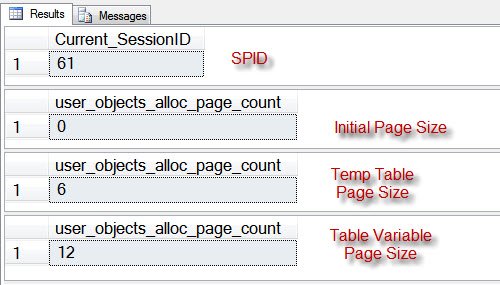
Have you ever heard of this misconception? Do you know any other method to prove that both Temp Table and TableVariable are created in TempDB.
Beyond the Table Variable in Memory Myth: Real Differences
If both live in TempDB, why pick one over the other? Because they behave differently in ways that matter far more than where the pages sit. Also, small objects of either kind may stay in the buffer pool as cached pages, just like any other table, so ‘memory versus disk’ was never the right way to think about it.
- Statistics. A temp table gets column statistics. A table variable does not, so the optimizer often guesses a tiny row count. In SQL Server 2019 and later, deferred compilation at compatibility level 150 helps by using the actual row count at first compile.
- Transactions. Rows in a table variable stay put after a ROLLBACK. Rows in a temp table roll back with the transaction.
- Scope. A table variable lives only for the batch or procedure. A temp table can be seen by procedures called from the one that created it.
My simple rule: small row counts and simple use, a table variable is fine. Larger sets that get joined or filtered, try a temp table and compare the plans.
If you truly want memory, SQL Server 2014 and later offer memory-optimized table types through In-Memory OLTP. That is the one case where a table variable really does skip TempDB.
Published by Pinal Dave on SQLAuthority. More of my work at pinaldave.com.



68 Comments. Leave new
Hi Pinal,
On which basis we will distinguish Large Table and Small Table.
Can I say transaction table as Large table and master table is small table.Please Clarify . Thanks.
Hi Pinal,
Let I am creating a Payroll module which is supposed to generate pay slip for 50 Thousands employees at a time and In my Proc I am dealing with temp table ,which is not good by some experts view ,so please help me how should I deal ?
I think , I should adopt table partitioning concept on main transaction table and based on that i will go forward in my GUI.Is it Fine or what step should I adopt.
Please Clarify ASAP . Thanks.
@Pinal.
The only reason I can think of when I use temporary variables against temporary tables is when I have to perform ROLLBACK operation.
Like some one mentioned above in their comments. Rollback operation also rollesback data from temporary tables. I usually do logging in temporary variables and even if the transactiosn rollsback, I still want to see why the transaction failed and until what point it executed with no errors. I capture all this information in table variables, on error I rollback the transaction but I still have all my information logged in table variables which is not rolledback which I then write to my permemnant tables as part of error handling.
There is a difference in scope of Table Variable and Temporary table. I usually prefer Temporary tables over table variables when working with Dynamix SQL, they are easy to work with.
~ IM.
I use #temp table in select statements in nested if I am getting error that table already declared in second if statement. Why is that.
Post the exact code you used so that it is easy to answer
Great tutorial
Hi Pinal,
Thanks for the article. I noticed the below with your example. When I execute the below query
SELECT *
FROM sys.dm_db_session_space_usage
where session_id =
I see after creating temp table the user_objects_dealloc_page_count value is 0. But After creating table variable the value is equal to the pages created. It seems, the pages are deallocated and the data is kept in memory incase of table variable. I also read an article which says, table variable will flush the data to tempdb when it come across memory pressure.
declare @var1 numeric(10,2),
@var2 numeric(10,2),
@var3 numeric(10,2),
@var4 numeric(10,2)
set @var1=12500
set @var2=NULL
set @var3=500
select @var4=(@var1+@var2+@var3)
print @var4
Why its not print the value sir…
Null + anything = null
Use IsNull…
I have written the following code in my stored Procedure which cause error while compiling. Please help.
if @l_Class_Code ’55’
begin
SELECT row_number() over(order by t.Class_Code) as srl,t.*
into #TmpPolicyDetails
FROM uplPolicyDetails t
Where convert(nvarchar(10),DateReceiptatTpa,103) = @DateReceivedAtTpa
and Office_Code = @BranchCode
and LocationID = @LocationID
and UploadedByID = cast(@UserCode as nvarchar(20))
and Class_Code = @l_Class_Code
and Updated = ‘N’;
end;
else
begin
SELECT row_number() over(order by t.Class_Code) as srl,t.*
into #TmpPolicyDetails
FROM uplPolicyDetails t
Where convert(nvarchar(10),DateReceiptatTpa,103) = @DateReceivedAtTpa
and Office_Code = @BranchCode
and LocationID = @LocationID
and UploadedByID = cast(@UserCode as nvarchar(20))
and Class_Code = @l_Class_Code
and cast(rtrim(ltrim(DevOfficerID)) as int) = @l_DevOfficerID
and Updated = ‘N’;
end;
hi,
I have created procedure like .
USE [master]
GO
/****** Object: StoredProcedure [dbo].[b] Script Date: 04/28/2013 01:09:39 ******/
SET ANSI_NULLS ON
GO
SET QUOTED_IDENTIFIER ON
GO
ALTER proc [dbo].[b]
as
begin
declare @i table (id int)
select * From tempdb.sys.tables
end
and after i ran the executed my proce
exec b
The result is :
name objectid
#023D5A04 37575172 and so on…
i closed the above connection and after i opened new connection and ran the query like
select * from tempdb.sys.tables
it is showing the below result and table exists in tempdb with the name:
The result is :
name objectid
#023D5A04 37575172 and so on…
Question is:
Why did not it automatically dropped when i ran procedure and even i closed the connection please help on this..
Thanks,
Dastagiri
This article might be old but topic is ever refreshing..thought of adding one more input which is major performance difference between Table variable and Temp table
@table variable doesnt use Parallel operator where as temp table does, No matter how much is ur data in @table variable this would be a major hit in DWH
Thanks,
Aditya
HI
If both are created on TempDB then Why we can use @table in function and why can use #table in function.
Great
Ken Simmons link is not hyperlinked to “here”.
Is it change the page count size to initial page count size when I drop this temp table?
I am not able to understand, how is it proved?
Please any one clarify.
For me the sentence “Table Variables are stored in memory and Temp Tables are stored in TempDB” is what the article is talking about. If table variables are *only* stored in memory, then no object related to the table variable would be found in tempdb? Since Pinal was able to find an object which he shows does relate to the table variable. He shows that table variables are created in TempDB not in memory. Does that make sense?