
Just about a year ago, I had written on the subject of how to insert data from one table to another table without generating any script or using wizard in my article SQL SERVER – Insert Data From One Table to Another Table – INSERT INTO SELECT – SELECT INTO TABLE. Today, we will go over a similar question regarding how to generate script for data from database as well as table. SQL Server 2008 has simplified everything.
Let us take a look at an example where we will generate script database. In our example, we will just take one table for convenience.
Right Click on Database >> Tasks >> Generate Scripts >>


This will pop up Generate SQL Server Scripts Wizards >> Click on Next >> Select Database >> This will bring up a screen that will suggest to Choose Script Option.

On Choose Script Option Screen of Script Wizard under section Table/View Options Look at Script Data row and Turn the Option to True.

The Next Screen will ask about object types. Select all the objects that are required in the generated script. Depending on the previous screen it will show few more screen requesting details about the objects required in script generation.


On the very last screen it will request output options. Select the desired output options of Script to file, Script to Clipboard or Script New Query Window.3
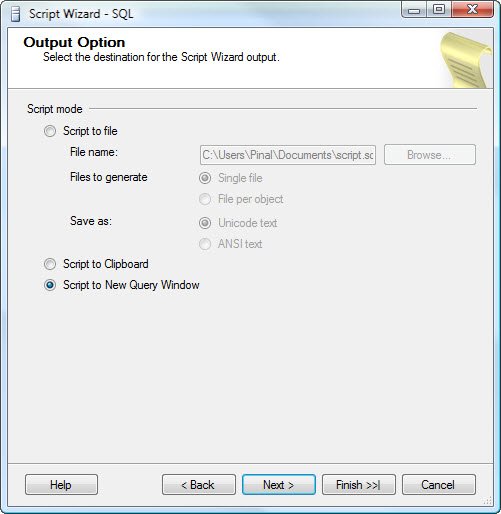
Clicking on Finish button will generate a review screen containing the required objects along with script generating data.


Clicking on Finish button one more time will generate the requested output.

Similarly, if you want to generate data for only one table, you can right click on the table and follow almost a similar wizard. I am sure this neat feature will help everybody who has been requesting for it for a long time.
Reference : Pinal Dave (http://blog.SQLAuthority.com)


in Sql Server 2000 and Sql Server 2005 this kind of utility is not available so here is a way to do so
SELECT * into TabInstMaster FROM OPENDATASOURCE( ‘SQLOLEDB’, ‘Data Source=Servername IP\Name;User ID=USERNAME; Password= PASSWORD’ ).fullyqualifiedtablepath(db.owner.table)
Nice, new feature in sql2008 That’s not possible in sql2000 or sql2005,
In past when i want to transfer data from one server to another server i find the tool which create the script like this,
but in sql2008 it’s very simple now as you explain this functionality.
Dear Mr. Pinaldave,
I am happy to see this feature in 2008.
Thank you very much for Introduced
Gangadhar.
Ashish,
Does the script above generate the ‘INSERT SCRIPT’ for a table? (so that it can be sent to some one over email and can be executed in SSMS to recreate data)?
I found this feature added in SSMS 2008 very interesting. In fact, it is something MYSQL had several years back.
In SQL Server 2000/2005, I used to write a simple dirty query when I wanted to move data quickly from one location to another. Well, it is handy only when you need something quickly and the table has lesser number of columns.
A query like the following can generate an INSERT script for a given table.
SELECT ‘
INSERT INTO Customers(CustomerID, CustomerName)
SELECT ‘ + CAST(CustomerID AS VARCHAR) +
‘,”’ + CustomerName + ””
FROM Customers
/*
INSERT INTO Customers(CustomerID, CustomerName)
SELECT 1,’Jacob’
INSERT INTO Customers(CustomerID, CustomerName)
SELECT 2,’Pinal’
INSERT INTO Customers(CustomerID, CustomerName)
SELECT 3,’Binoy’
INSERT INTO Customers(CustomerID, CustomerName)
SELECT 4,’Sreejumon’
*/
Hi Pinal,
Very good Feature in 2008, Thanks for posting it
Hi Pinal,
Nice feature indeed, use it quite a bit. One of things to be noted is that in the Option Script for Server Version, there are choices for Sql server 2005 and Sql Server 2000. This provides for backward compatability. I found this very useful since we have databases on both SQL Server 2005 and SQL Server 2008.
Thank you
It is a pity the SQL Server 2008 wizard does not resort to row value constructors yet.
Pinal,
Nice to see the feature integrated within the database.
In SQL 2000 and SQL 2005 the same thing could be achieved using SQL Server Database Publishing Wizard. Link here,
http://www.microsoft.com/downloads/details.aspx?FamilyId=56E5B1C5-BF17-42E0-A410-371A838E570A&displaylang=en
I used to use this tool to generate data from SQL 2005 using the option in Server Explorer from VS 2005.
There is a cool free tool from SQLTeam known as Scriptio which lets you choose the objects of interest to be Scripted.
I guess that will also do the necessary
Thanks for really nice information.
You always rock..
@Jacob Sir
No this one not generate insert scripts yea but i use it when i want to move data over two servers and so. i have a procedure for this which needs a table in your DB which stores information about the other server and the tables which we going to send over two servers. I will send my script to Pinal sir, so if he wish to upload it on blog so this is useful to people who working on SQL Server 2000 and SQL Server 2005. :)
i will also try to write a script which create all the insert startements and create statements for all objects.
Very good Ashish, I look forward to see your script.
Hello Sir
I want to copy table structure & its data in Sql Server 2005.
How i will do?
Please help me.
Jignesh,
One option is the Database Publishing Wizard posted by Ponnu.
If you have the Management Studio Of SQL Server 2008, you can connect to a SQL Server 2005 instance and can generate the schema and data for a SQL Server 2005 database.
regards
Jacob
@Jignesh
You can simply generate Scripts for table through SSMS by right clicking on your table and Script Create to in this way you can .. and if you want to script out all the tables in your database then here is a script for that i find it some where on internet and i am still struggling for generate Insert Scripts
so soon you will be find out some thing till then here is script to all create tables…
select ‘create table [' + so.name + '] (‘ + o.list + ‘)’ + CASE WHEN tc.Constraint_Name IS NULL THEN ” ELSE ‘ALTER TABLE ‘ + so.Name + ‘ ADD CONSTRAINT ‘ + tc.Constraint_Name + ‘ PRIMARY KEY ‘ + ‘ (‘ + LEFT(j.List, Len(j.List)-1) + ‘)’ END
from sysobjects so
cross apply
(SELECT
‘ ['+column_name+'] ‘ +
data_type + case data_type
when ’sql_variant’ then ”
when ‘text’ then ”
when ‘decimal’ then ‘(‘ + cast(numeric_precision_radix as varchar) + ‘, ‘ + cast(numeric_scale as varchar) + ‘)’
else coalesce(‘(‘+case when character_maximum_length = -1 then ‘MAX’ else cast(character_maximum_length as varchar) end +’)',”) end + ‘ ‘ +
case when exists (
select id from syscolumns
where object_name(id)=so.name
and name=column_name
and columnproperty(id,name,’IsIdentity’) = 1
) then
‘IDENTITY(‘ +
cast(ident_seed(so.name) as varchar) + ‘,’ +
cast(ident_incr(so.name) as varchar) + ‘)’
else ”
end + ‘ ‘ +
(case when IS_NULLABLE = ‘No’ then ‘NOT ‘ else ” end ) + ‘NULL ‘ +
case when information_schema.columns.COLUMN_DEFAULT IS NOT NULL THEN ‘DEFAULT ‘+ information_schema.columns.COLUMN_DEFAULT ELSE ” END + ‘, ‘
from information_schema.columns where table_name = so.name
order by ordinal_position
FOR XML PATH(”)) o (list)
left join
information_schema.table_constraints tc
on tc.Table_name = so.Name
AND tc.Constraint_Type = ‘PRIMARY KEY’
cross apply
(select ‘[' + Column_Name + '], ‘
FROM information_schema.key_column_usage kcu
WHERE kcu.Constraint_Name = tc.Constraint_Name
ORDER BY
ORDINAL_POSITION
FOR XML PATH(”)) j (list)
where xtype = ‘U’
AND name NOT IN (‘dtproperties’)
Thanks Jacob
Now my problem is solved.
@Jignesh,
You are welcome! Glad to know it helped.
As Ponnu said, this can be achieved with the Publishing Wizard. But I’m guessing that this offers a higher level of granular control? :-)
Too bad you can’t use the wizard to configure the table query to use a “where filter” or a “columns to include filter” like DB Artisan. ;-)
In fact Database Publishing Wizard was created before the launch of SQL Server 2008 and was the only tool available for moving data and schema (except for the 3rd party tools). Given that SQL Server 2008 added this feature out of the box, it may be a better choice to go with.
Great article on how to solve a problem I have faced many times.
Why at all waste time in generating script and then rerunning it again to transfer data from one system to another. just
detach…
the database you want to transfer from one system to another
Copy its mdf and ldf file in a pendrive or rar them and mail
paste them in another system
then
attach….
Yousuf Khan,
Not always you will have the freedom to copy the backup or mdf/ldf file to the server box. Usually it happens with shared hosting. There are times when you dont have access to the computer, but will be given a webbased interface where you can run your db scripts only.
regards
Jacob
Hello, i have a similar issue, i have to DB, at beginning both have the same schema but i had added some tables and columms to one of the DB, and i would like to make all these changes up to the second DB, but the 2 DB do not cantain the same data, so i dont want to lose it, do you know how can i update the scheme of the second DB with the first one, but without losing all the data?
thanks in advance.
@Mariano
There are a number of tools available that allow you to compare the schema of two databases and generate the update script to synchronize the changes.
I used Visual Studio Team Edition for Database Professionals (dbpro) which comes with a number of such tools/utilities. http://www.microsoft.com/downloads/details.aspx?FamilyID=7DE00386-893D-4142-A778-992B69D482AD&displaylang=en
regards
Jacob
I have provided a solution for moving complete db from one system to another. And after that one can run scipt on which system he wants.
In cases
when you dont have access to the computer, but will be given a webbased interface where you can run your db scripts only.
transfer of db is not at all required
I have made web based application like dynamic query builder i.e. asp.net front end sql server back end and application running throug IIS on systems which acess them throug web address provided
These web based application dont require transfer of db on all systems but the application is deployed using IIS on server and others acess it
GOOD ONE!
And other good add on from Jacob, where he mentioned that those who are feeling isolated with 2005, can generate the script by connecting sql server2008 to your instance. (If you have the Management Studio Of SQL Server 2008)
If I recall correctly from another post of Pinal’s, I would like to bring a small change in the generated script. It would really help when you have a long insert script in hand.
Except first we can replace rest of the insert line with UNION ALL, which will finally add up to performance.
But curious to know…
Why dint this tool generate a script with UNION ALL?
Hi,
Scripting data option in sql server 2008 is really a good option, i have tried this, it works. I found it good for Non-xml data in the database.
I have 2 tables which has 4000 records, 420000 records in these two tables 1 field is of xml datatype, in which if i try to have a script of these two tables separately, even then it is giving error as timeout exception. For this we have to do separately in a different way. Is there any way to script these data using sql server 2008, Please let me know
Hi,
I want to copy a database from one sql server to a different sql server.
How can i do this???? Please let me know
@Raj,
Probably backup and restore would be the best choice for you. Take a backup from the old server and restore in the new server.
@Raj,
detach…
copy mdf+ldf in usb
paste
attach…
Hi,
Sometimes when we try to attach a copy pasted .mdf and .ldf file of a SQL Server Database from one system to another it gives an error unable to attach read the Hyperlink for more details.
In such case Create a New Folder paste the .mdf and .ldf
inside it .
Right Click the Folder->
Go to Properties of that folder->
Go to Security->
Go to Edit Security->
Assign Full Control to all users, users like SYSTEM etc.
SQL Server throws this error sometimes because of Security features.

