Today, we will examine something very simple and very generic that can apply to hordes of programming languages. Let’s take a common question that is frequently discussed – What is difference between Line Feed (\n) and Carriage Return (\r)?
Prior to continuing with this article let us first look into few synonyms for LF and CR.
Line Feed – LF – \n – 0x0a – 10 (decimal)
Carriage Return – CR – \r – 0x0D – 13 (decimal)
Now that we have understood that we have two different options to get new line, the question that arises is – why is it so?
The reason is simple. Different operating systems have a different way of understanding new line. Mac only understands ‘\r’ as new line, while Unix and Linux understand ‘\n’ as new line character. Our favorite OS windows needs both the characters together to interpret as new line, which is ‘\r\n’. This is the reason why a file created in one OS does not open properly in another OS and makes it messy.
Now, let us see how we can create a new line in SQL Server. It is a very simple script yet very useful when we have to do run print something or generate scripts. I have illustrated two examples below that are very easy to understand. In the first example, there are no new line chars inserted and for the same, everything is displayed in a single line. However, in the second example, new line char is inserted and the lines are separated with a new line.
Example 1: No new line feed char
DECLARE @NewLineChar AS CHAR(2) = CHAR(13) + CHAR(10)
PRINT ('SELECT FirstLine AS FL SELECT SecondLine AS SL' )
GO
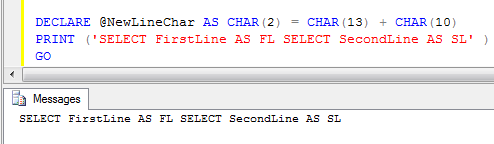
Example 2: With new line feed char
DECLARE @NewLineChar AS CHAR(2) = CHAR(13) + CHAR(10)
PRINT ('SELECT FirstLine AS FL ' +@NewLineChar + 'SELECT SecondLine AS SL' )
GO

I hope my examples make things more clear to you all. Let me have your feedback on this article.
Reference : Pinal Dave (http://blog.SQLAuthority.com)


This is really cool information. I never think this minute difference in my experience.
Hello,
I am sending email using sp_send_dbmail.
My @msg variable is set as
set @msg= @msg + char(10)
set @msg= @msg + ‘By: ‘ + @ReportedBy + char(10)
set @msg= @msg + ‘On: ‘ + cast(getdate() as varchar(50)) + char(10)
set @msg= @msg + ‘With Ticket Number :’ + @TicketNumber + char(10)+ char(10)
set @msg= @msg + ‘Of Department:’ + @Department + char(10)
set @msg= @msg + ‘For Module:’ + @Module + char(10)
set @msg= @msg + ‘of Error Type:’ + @ErrorType + char(10)
set @msg= @msg + ‘Having Priority:’ + @Priority + char(10)
set @msg= @msg + ‘With Short Text: ‘ + @TicketShortText +’.'+ char(10)+ char(10)
set @msg= @msg + ‘Please do not respond to this mail, as it was automatically generated.’ + char(10)+ char(10)
set @msg= @msg + ‘Best Wishes From’ + char(10)
set @msg= @msg + ‘System Administrator’
it is showing in sql as
Hello,
The Following Ticket has been changed.
By: Sandeep Vaidya
On: Jan 11 2011 3:49PM
With Ticket Number :10004
Of Department:Information Technology
For Module:IT
of Error Type:Customization
Having Priority:Low
With Short Text: Testing To All Changes.
Please do not respond to this mail, as it was automatically generated.
Best Wishes From
System Administrator
But in email as
Hello, The Following Ticket has been changed. By: Sandeep Vaidya On: Jan 11 2011 3:43PM With Ticket Number :10004 Of Department:Information Technology For Module:IT of Error Type:Customization Having Priority:Low With Short Text: Testing To All Changes. Please do not respond to this mail, as it was automatically generated. Best Wishes From System Administrator
Thanks in advance
Please advise.
Pankaj Phukane
You need to use char(13) along with char(10)
I am trying to generate SQL script through Java and using \r\n doesn’t work. What should I use in Java?
you need to use ” in the char(10) place it should be work .
you need to use
in the char(10) place it should be work .
Nice tip…
Thank you…
In my system only one of them is producing the new line. I do not need bothe chars togather.
Both of below statements insert line char
PRINT (‘SELECT FirstLine AS FL ‘ + char(13) + ‘SELECT SecondLine AS SL’)
PRINT (‘SELECT FirstLine AS FL ‘ + char(10) + ‘SELECT SecondLine AS SL’ )
Hi
I can see a space in front of the second line in the output this is happening by use of newline char as a variable, infact if i use char(13) or char(10) it isn’t producing space in front.
here is the code snippet
DECLARE @NewLineChar AS CHAR(2)
set @NewLineChar= CHAR(13)
PRINT (‘SELECT FirstLine AS FL ‘ + @NewLineChar + ‘SELECT SecondLine AS SL’ )
GO
Print ‘————————’
PRINT (‘SELECT FirstLine AS FL ‘ + char(13) + ‘SELECT SecondLine AS SL’)
Print ‘————————’
PRINT (‘SELECT FirstLine AS FL ‘ + char(10) + ‘SELECT SecondLine AS SL’ )
Is is some thing in the code which cause of space in the output?
Sanjay
set @NewLineChar= CHAR(13) + ?????
Space is from u missed the char(10) to add
Nice tip….
I’m sure this is old, but your extra space comes because your variable (@NewLineChar) has the type of CHAR(2).
If the value of @NewLineChar is only one character in length, then it will fill the remaining missing characters with a space.
Your code only assigns @NewLineChar one character (CHAR(13)). So the Print line prints the Carriage Return and then the extra space at the end of the variable.
Thanks for the info.
Sanjay, the reason you are getting a space at the beginning of the second is due to the declaration of @NewLineChar as a fixed length 2 character string.
Some background on ‘Carriage Return’ and ‘Line Feed”.
Back in the ‘old’ days when I was first programming we used printers that had a fixed number of characters per line and fixed number of lines per page. Each character had a specific page location. “Carriage Return” brought the carriage back to the beginning of the current line. You could then overprint for bold or underline effects. “Line feed” moved the print head down 1 line, but kept the same horizontal position. So both were needed to move the print head to the beginning of the next line.
Very useful information Grant. Cheers.
Just a clarification for anyone trying out this useful example.
The syntax :
DECLARE @NewLineChar AS CHAR(2) = CHAR(13) + CHAR(10)
is for SQL 2008 only (i.e. initializing variables inline as part of the variable declaration statement instead of using separate DECLARE and SET statements).
For SQL 2005, we’d need to use separate DECLARE and SET statements :
DECLARE @NewLineChar AS CHAR(2)
SET @NewLineChar= CHAR(13) + CHAR(10)
Great post, one question. Is there any way in tsql to use this with SELECT? I can only get this to work with PRINT
Ok nevermind. I turned on Result to Text and this works perfectly with SELECT or PRINT. Just not when I have results to grid.
Nice post.
I have a question:
If want to do this:
print ‘bla bla’
Execute something
Print ‘ After bla’
And i want the result like this:
bla bla After bla
How do i do this?
Hmm,
i wasn’t clear
First, I want something like this
bla bla
on the screen and after the execution
bla bla After bla
a print prints a CRLF right a way
Hi Pinal\All,
This is very useful information.
However I have a question. I tried to implement the above use of NewLineChar.
I do not undersand why there is space printed before the 2nd column values.
Please let me know what I am missing out here.
Code Snippet :
CREATE TABLE TEMP_TEST
(GID INT IDENTITY(1,1),
NAME NVARCHAR(1000))
GO
INSERT INTO TEMP_TEST(NAME) VALUES(‘ABC’)
INSERT INTO TEMP_TEST(NAME) VALUES(‘XYZ’)
INSERT INTO TEMP_TEST(NAME) VALUES(‘PQR’)
DECLARE @NewLineChar AS CHAR(2)
SET @NewLineChar = CHAR(13) + CHAR(10)
SELECT GID ,@NewLineChar, NAME
FROM TEMP_TEST
OUTPUT LOOKS LIKE THIS :
1
ABC
2
XYZ
3
PQR
—————————————————————————
Note :
1. The behaviour is same for all columns except for the 1st one.
2. The behaviour remains the same if the order of the columns is changed the select
i.e if I query as
SELECT NAME , @NewLineChar, GID
FROM TEMP_TEST
Then the output will have spaces before the GID values.
Hi All,
Just so that everyone is on the same page regarding my question about the additional spaces I asked above.
1. The spaces are not visible above in the above cut\paste of my work.
2. The spaces do appear when
i) I set results to Text.
ii) I set results to file.
iii) I export results to a file.
Example of result set is something like this:
1
[SPACES]ABC
2
[SPACES]XYZ
3
[SPACES]PQR
Off course you can just do a find and replace and fix it, but I am curious about what the reason for those extra spaces to appear out there.
Thanks to all.
Hi,
I’m wondering what you mean by “set results to …”. For example, how you set results to file? Do you use some external program or script to do it?
And are you sure those are space-characters? If you open up the file in hex-editor does it show space-char 0×20 or something else?
Hi Marko,
I am not using any external program or script all my work is done using Management Studio 2005.
About “set results to …”
i) I set results to Text.–> Ctrl + T
ii) I set results to file.–> Ctrl + Shift + F
iii) I export results to a file.–> Using the Import\Export feature. On this one I used the column delimiter as verticalbar {|}
and then did a find and replace on it, to get expected results.
I am not sure if its space or tab. but there are white spaces before the 2nd column data is printed.
and yes the spaces continue to exist and appear in other editors as well.
Thanks for looking into this one.
–Nilesh
Ah. Okay. Now I got it. I’m using Sql Server Management Studio 2008 and it’s maybe producing different kinds of results but try this:
SELECT GID ,@NewLineChar as FOOBAR, NAME FROM TEMP_TEST
Now you see header name for the middle column also. Otherwise it’s empty but you should see four minus-signs left of NAME column.
I think results just goes little berzerk from that line-break. I think the three spaces you see at the beginning of the line extra line is delimeter and/or padding, which both are spaces by default.
So output goes like:
GID-field @NewLineChar
three-spaces-for-delimeter NAME-field line-break-by-SSMS
GID-field @NewLineChar
three-spaces-for-delimeter NAME-field line-break-by-SSMS
GID-field @NewLineChar
three-spaces-for-delimeter NAME-field line-break-by-SSMS
…
Hi Marko\All,
Thanks for the response Marko..
Your suggestions could be the way its works in the back ground.
Is there a way to tell SSMS to NOT add any extra line breaks or delimiters?
Otherwise we have to use Find & Replace or write an external script to clean up the extra white spaces.
–Nilesh
Go to Query Options (Query -> Query Options from the top menu bar). Select Results/Text from the tree on the left. Now you see combobox on the right with label “Output format”.
Try and see what’s the best setting for you.
Line breaks you’ll see in the output aren’t actuallu extra. They are the line breaks that your query returns in the second field.
Thanks Marko. This helped.
I Set the custom delimited to ~ and fed the results to another temp table that had an identity column.
————————
1~
~ABC
2~
~XYZ
3~
~PQR
————————
For odd rows used substring function to get rid of the last character.
For even ones used to same to get rid of the first one.
Did not use Replace since sometimes the result data can actually have ~ in it.
Thanks for all the help on this one.
–Nilesh
Nice article.
I did notice that if you simply
Declare @var varchar (100)
and
SET @var = ‘SELECT
111′
Then the value of @var will be
SELECT
111
thus including the new line.
Alexander.
Hey, Dave. I’ve been reading your blog for some time and I’ve pretty much gotten all the answers I’ve needed without having to ask any questions, but I’ve got one that’s stumping me.
I’m pulling records from a SQL Server 2005 database via a SqlDataReader in C#, then rendering the output in HTML. When I render the output, all of the data is present, but there are no newlines in the output, which can make large blocks of text difficult to read. I just want the HTML to respect the newlines.
I’ve tried replacing characters with several options, including CHAR(10) and CHAR(13) (and both together), as well as trying to commit direct HTML (i.e., ). Nothing is doing the trick. Do you have any ideas?
Hi,
Try adding tag after every line you read from data reader. “\r\n” does not render as new line in HTML.
Or write the data inside pre-tag with “\r\n” line delimiters which tells the browser to handle them as “real” new lines.
Or better yet, databind your data source to, for example, GridView control.
Blog software ate my br tag. First line should be…
Try adding br-tag after every line you read from data reader
I would like to know if there is anyway in SQL Server 2005
Management Studio’s query results to grid have | (pipe) while saving the resultset in .CSV file not the generic , (comma)
Hi Dave,
I am a regular reader of ur blog….Never asked any questions but whenever i had any query i just came here and got the answer…like this one…..Thanks.
:)
Dave,
I like the idea of declaring a variable for the new line and have cleaned up some of my sql. I am currently using sendmail on sql 2008 to obviously send email. However I’m having some trouble formatting the body of the email.
here is an example of the sql…
‘Account Name: ‘ + @Customer_Name + @NewLineChar +
@NewLineChar +
‘Port of Call: ‘+ @xFBB_PortofCall +’ ‘+ @NewLineChar +
‘Vessel Name: ‘ + @xFBB_Vessel_Name +’ ‘+ @NewLineChar +
‘Vessel Number-IMO: ‘ + @xFBB_Vessel_Number +’ ‘+ @NewLineChar +
‘ETA Date: ‘ + @xFBB_ETA_Date + ‘ ‘ + ‘ETA Local Time: ‘ + @xFBB_ETA_Time + @NewLineChar +
Here is what the email looks like:
Account Name: H Fluggesaft
Port of Call: Port of Rotterdam – Pier 33 Vessel Name: The Giant Maria Callendar Vessel Number-IMO: VS23409
ETA Date: 12/16/2010 ETA Local Time: 08:00 PM
The problem is on the line with Port of Call: ideally I want a CR\LF after ‘Pier 33′ and before ‘Vessel Name:’ however it seems to completely disregard the @NewLineChar function unless I insert a 2nd one in whcih case I then get an extra space between each row. Seems to work fine for Account Name and on the ETA lines just not in between. All variables are declared varchar any ideas?
Are you using char(10)+char(13) for @NewLineChar?
Yes I’ve declared the variable as:
DECLARE @NewLineChar AS CHAR(2) = CHAR(13) + CHAR(10)
It works fine every where else just not on those 3 lines (i.e.):
Port of Call:
Vessel Name:
Vessle Number-IMO:
I thought adding extra space between the field and the variable might force it to cr\lf (+’ ‘+) but that isn’t working either, I’ve removed the extra space but still get the same results:
@NewLineChar +
‘Port of Call: ‘+ @xFBB_PortofCall + @NewLineChar +
‘Vessel Name: ‘ + @xFBB_Vessel_Name + @NewLineChar +
‘Vessel Number-IMO: ‘ + @xFBB_Vessel_Number + @NewLineChar +
‘ETA Date: ‘ + @xFBB_ETA_Date + ‘ ‘ + ‘ETA Local Time: ‘ + @xFBB_ETA_Time + @NewLineChar +
FYI, there are more lines above and below and all those lines work properly with the @NewLineChar variable this one just run’s on for some reason.
I am using T-SQL to update the online help in an application. The help is displayed when the mouse hovers over the field.
I do not have source code.
To make the help more readable, I have used CR / LF to create new paragraphs.
I do not like embedding control characters in fields, it can cause problems for people who come after me.
Is there a better or standard way to do this or must I use CR / LF
Hello Dave,
I’m running into a problem related to carriage return, line feeds in converting an application from SS 2005 to SS 2008 R2.
In the earlier version of the app, using SS 2005, I was able store multiple lines of text, each terminated with “CHAR(13)+CHAR(10)” into a text field in a SQL data record.
However I find that with SS 2008 R2, the field doesn’t seem to actually store the characters, but converts them to spaces?
This happens both with in my VB code and when I try it directly in the SS Management Studio. Doesn’t seem to matter if the target field is type TEXT (now deprecated) or VARCHAR(MAX).
Following is an example of what I mean:
INSERT INTO [adminSLOT].[dbo].[ProcessLogs]
([SessionID]
,[UserID]
,[LogText])
VALUES (
CONVERT(varchar(22),GETDATE())
,’Me’
,’This is one line of code.’ + CHAR(13) + CHAR(10) + ‘Here is another.’ + CHAR(13) + CHAR(10) + ‘Third and last line.’)
It works in 2005, but not in 2008R2?
Follow-up: Messing with the Results as Text option seems to have fixed this problem for me.
Thanks a lot Pinal! I just want to let you know that I enjoy your posts very much. They’re filled with information and good examples. Keep up the good work!
Very good sample……..
Nice post.
I have a question:
If want to do this:
print ‘bla bla’
WAITFOR DELAY ’00:00:10′;
Print ‘ After bla’
And I want something like this:
bla bla
on the screen and after 10 seconds
bla bla After bla
a print prints a CRLF right a way
– Sorry for my poor English and I borrow the words from Hennie de Nooijer
Hi,
Dave,
Could u please help me in this:
I have to convert multiple rows (Record-set as in Table1) returned from a query into a single column data(As in Table2) with line in between the row data and store it to another table.
Is this possible using CR / LF, if yes please let me know how to use the same.
Table1
RowNumber Data
1 A
2 B
3 C
4 D
5 E
Table2
RowNumber Data
1 A
B
C
D
E
Thanks in advance – Lakshmi
This is the formation issue which should be done in the front end application
cant this be handled using some logic?
Search for rowset concatenation in this site
I am generating SQL script through Java. \r\n does not work, what should I be using in Java?
[...] (Read more here) [...]
Hi all ,
I am exporting data from SQL server 2005 to a text file using stored procedure. But line break between two records are not working. My code looks like this
SET @Data = @FNAME
SET @Data = @Data + CHAR(13) + @LName
I also tried \r\n , CHAR(13) + CHAR(10) etc.
Thanx
Hi MIT,
Please check this solution http://blog.sqlauthority.com/2008/01/08/sql-server-2005-export-data-from-sql-server-2005-to-microsoft-excel-datasheet/
You need to set the result mode to Text in the Query Analyser
I know it’s an old post, but Apple only used \r to OS9 – OSX, a Unix, uses \n like the rest of the civilized world :)
For Oracle databases, one can make use of REPLACE function as follows –
REPLACE(Con.COMMENTS, CHR(13) || CHR(10), ‘ ‘) as “Updated_Comments”
For a detailed example, please refer to following link:
http://crackingsiebel.wordpress.com/2010/08/21/oracle-sql-replace-newline-or-linefeed-character/
beautiful explanation .. thanks
/r—->says go to starting position of same line
/n—->says go to next line
so
/r/n—>goes to starting position of next line