
I just received an email from one of my regular readers who is curious to know if there is any way to find out when a table is recently updated (or last date time updated). I was ready with my answer! I promptly suggested him that if a table contains UpdatedDate or ModifiedDate date column with default together with value GETDATE(), he should make use of it. On close observation, the table is not required to keep history when any row is inserted. However, the sole prerequisite is to be aware of when any table has been updated. That’s it!
If a user wants to find out when was the last table updated he can query dynamic management view (DMV) – sys.dm_db_index_usage_stats and easily figure out when was the table updated last. Let us comprehend this example by creating a table and updating it. We can use DMV to determine when it was updated last.
USE AdventureWorks
GO
CREATE TABLE Test
(ID INT,
COL VARCHAR(100))
GO
INSERT INTO Test
SELECT 1,'First'
UNION ALL
SELECT 2,'Second'
GO
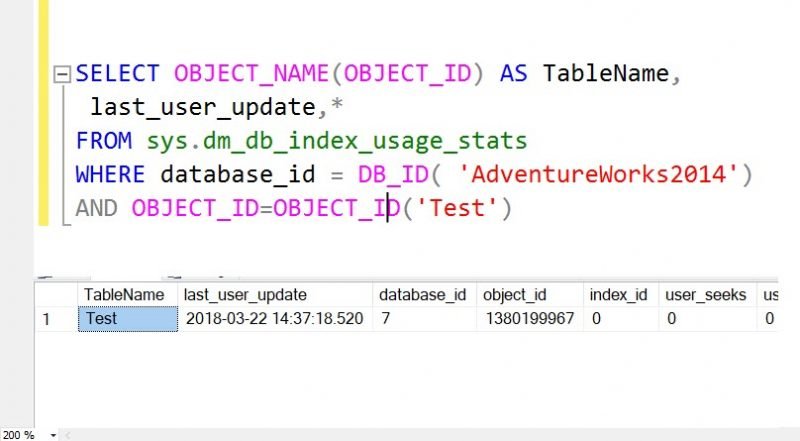
Now we have created a table and populated it with data. Next, we will run the following query to find out when it was last updated.
SELECT OBJECT_NAME(OBJECT_ID) AS TableName,
 last_user_update,*
FROM sys.dm_db_index_usage_stats
WHERE database_id = DB_ID( 'AdventureWorks')
AND OBJECT_ID=OBJECT_ID('test')
Running query provides accurate details of when was the table last updated. If WHERE condition is entirely removed it will provide details of the entire database.
Published by Pinal Dave on SQLAuthority. More of my work at pinaldave.com.
Discover more from SQL Authority with Pinal Dave
Subscribe to get the latest posts sent to your email.




189 Comments. Leave new
Hi Pinal,
You have a typo: SELECT OBJECT_NAME(OBJECT_ID) AS DatabaseName.
This is not DatabaseName.
Such a good article to get last update of table, I found in web.Thanks
Great. Thanks.
Somehow not working for me ,
i got 10k rows in my table, is it possible to find which row was modified or updated
In a third part server, I have no permissions to execute this statement. i receive this error:
Msg 300, Level 14, State 1, Line 1
VIEW SERVER STATE permission was denied on object ‘server’, database ‘master’.
Msg 297, Level 16, State 1, Line 1
The user does not have permission to perform this action.
Is there another way to get this information ?
I’ve run into the same error and have the same question.
You need permission do move forward. Sorry, no easy way to break in to SQL Security.
Useful information, helped me at right situation.
Thanks
Hi,
Is it possible to find which script user was used to modify a particular object
Hi,
When looking for the Updated Date/Time on a table you have to take into account the Index and Partition as well. This is because SQL maintains separate metadata for each index part in each partition your table resides in… so you could update an index without updating the data.
SELECT DISTINCT
OBJECT_NAME([IUS].OBJECT_ID) AS [TableName],
*
FROM
[sys].[dm_db_index_usage_stats] AS [IUS]
INNER JOIN [sys].[partitions] AS [P]
ON
[IUS].object_id = [P].object_id
WHERE
[database_id] = DB_ID(‘{Database}’) AND
[IUS].OBJECT_ID = OBJECT_ID(‘{schema}.{table}’) AND
P.index_id = 1
;
If I use the query together with OBJECT_ID and check for all databases, I don’t get any results. If use without “AND OBJECT_ID =” then I have some entries and object name is NULL – what does it mean? database was used or not?
It appears to only function correctly for me if I prefix the query with a ‘USE [table-name]’ statement. I am not certain of the NULL table names however the only results I get without both WHERE clause elements AND the USE statement are the index names.
303/5000
Hello Pinal, how are you?
I am your follower and starting in the SQL world, I need your help, I need a script that takes the last update command from a table, but you need to have the IP or name of the machine executed this update command, you can help me, I already thank you immensely.
This only helps find changes since the last SQL restart!
Without WHERE it is showing only two rows: one for a minor function, the other one for some primary key, although there are more than 50 tables in the database
SELECT last_user_update
FROM sys.dm_db_index_usage_stats
WHERE OBJECT_NAME(object_id) = ‘kpitargets’;