The launch of Gandhinagar SQL Server User Group was a tremendous, astonishing success! It was overwhelming to see a large gathering of enthusiasts looking up to me (I was the Key Speaker) eager to enhance their knowledge and participate in some brainstorming discussions. Some members of User Group had requested me to write a simple article on JOINS elucidating its different types.
Download SQL Script used throughout in this article to practice along. Now, take a quick look at the following two tables I have created.
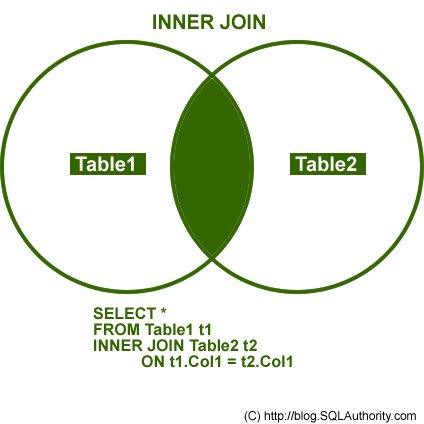
INNER JOIN
This join returns rows when there is at least one match in both the tables.
OUTER JOIN
There are three different Outer Join methods.
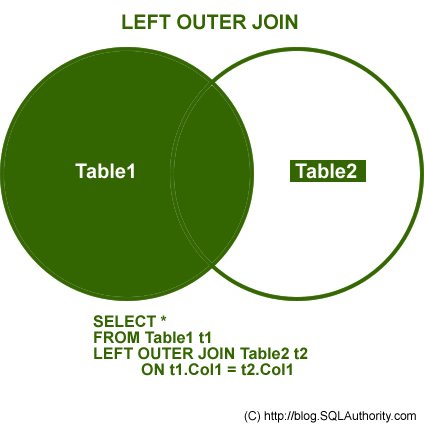
LEFT OUTER JOIN
This join returns all the rows from the left table in conjunction with the matching rows from the right table. If there are no columns matching in the right table, it returns NULL values.
RIGHT OUTER JOIN
This join returns all the rows from the right table in conjunction with the matching rows from the left table. If there are no columns matching in the left table, it returns NULL values.

FULL OUTER JOIN
This join combines left outer join and right outer join. It returns row from either table when the conditions are met and returns null value when there is no match.

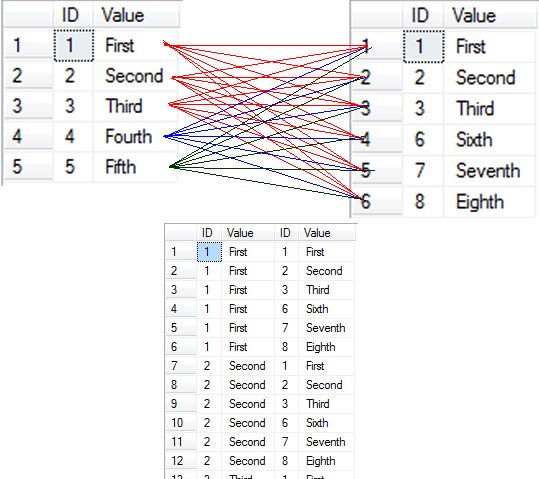
CROSS JOIN
This join is a Cartesian join that does not necessitate any condition to join. The resultset contains records that are multiplication of record number from both the tables.
Additional Notes related to JOIN:
The following are three classic examples to display where Outer Join is useful. You will notice several instances where developers write query as given below.
SELECT t1.*
FROM Table1 t1
WHERE t1.ID NOT IN (SELECT t2.ID FROM Table2 t2)
GO
The query demonstrated above can be easily replaced by Outer Join. Indeed, replacing it by Outer Join is the best practice. The query that gives same result as above is displayed here using Outer Join and WHERE clause in join.
/* LEFT JOIN - WHERE NULL */
SELECT t1.*,t2.*
FROM Table1 t1
LEFT JOIN Table2 t2 ON t1.ID = t2.ID
WHERE t2.ID IS NULL
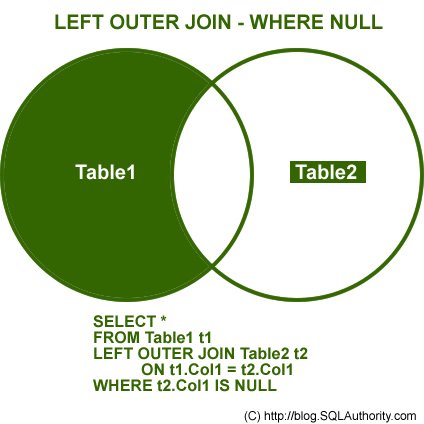
The above example can also be created using Right Outer Join.
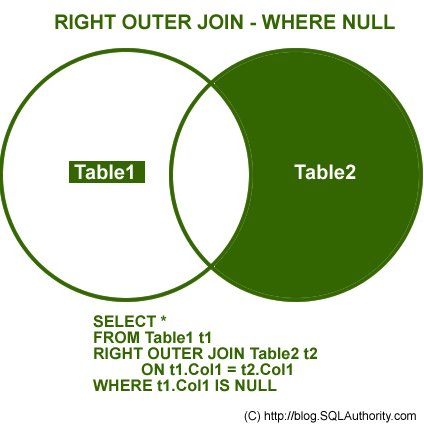
NOT INNER JOIN
Remember, the term Not Inner Join does not exist in database terminology. However, when full Outer Join is used along with WHERE condition, as explained in the above two examples, it will give you exclusive result to Inner Join. This join will give all the results that were not present in Inner Join.
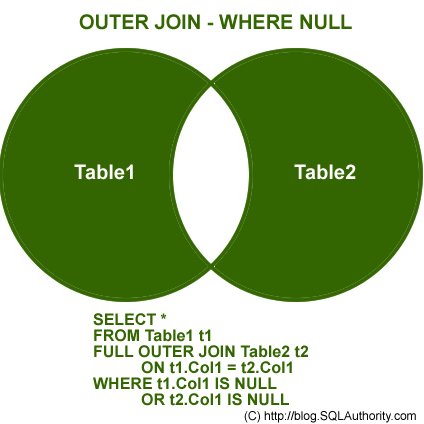
You can download the complete SQL Script here, but for the sake of complicity I am including the same script here.
USE AdventureWorks
GO
CREATE TABLE table1
(ID INT, Value VARCHAR(10))
INSERT INTO Table1 (ID, Value)
SELECT 1,'First'
UNION ALL
SELECT 2,'Second'
UNION ALL
SELECT 3,'Third'
UNION ALL
SELECT 4,'Fourth'
UNION ALL
SELECT 5,'Fifth'
GO
CREATE TABLE table2
(ID INT, Value VARCHAR(10))
INSERT INTO Table2 (ID, Value)
SELECT 1,'First'
UNION ALL
SELECT 2,'Second'
UNION ALL
SELECT 3,'Third'
UNION ALL
SELECT 6,'Sixth'
UNION ALL
SELECT 7,'Seventh'
UNION ALL
SELECT 8,'Eighth'
GO
SELECT *
FROM Table1
SELECT *
FROM Table2
GO
USE AdventureWorks
GO
/* INNER JOIN */
SELECT t1.*,t2.*
FROM Table1 t1
INNER JOIN Table2 t2 ON t1.ID = t2.ID
GO
/* LEFT JOIN */
SELECT t1.*,t2.*
FROM Table1 t1
LEFT JOIN Table2 t2 ON t1.ID = t2.ID
GO
/* RIGHT JOIN */
SELECT t1.*,t2.*
FROM Table1 t1
RIGHT JOIN Table2 t2 ON t1.ID = t2.ID
GO
/* OUTER JOIN */
SELECT t1.*,t2.*
FROM Table1 t1
FULL OUTER JOIN Table2 t2 ON t1.ID = t2.ID
GO
/* LEFT JOIN - WHERE NULL */
SELECT t1.*,t2.*
FROM Table1 t1
LEFT JOIN Table2 t2 ON t1.ID = t2.ID
WHERE t2.ID IS NULL
GO
/* RIGHT JOIN - WHERE NULL */
SELECT t1.*,t2.*
FROM Table1 t1
RIGHT JOIN Table2 t2 ON t1.ID = t2.ID
WHERE t1.ID IS NULL
GO
/* OUTER JOIN - WHERE NULL */
SELECT t1.*,t2.*
FROM Table1 t1
FULL OUTER JOIN Table2 t2 ON t1.ID = t2.ID
WHERE t1.ID IS NULL OR t2.ID IS NULL
GO
/* CROSS JOIN */
SELECT t1.*,t2.*
FROM Table1 t1
CROSS JOIN Table2 t2
GO
DROP TABLE table1
DROP TABLE table2
GO
I hope this article fulfills its purpose. I would like to have feedback from my blog readers. Please suggest me where do you all want me to take this article next.
Reference : Pinal Dave (http://blog.SQLAuthority.com)


very good article, this is almost by far the best article that explains the various types of JOIN in SQL server i have ever read.
Mr pinal dave. need a help on this immediately. I need to generate a report.
Lets guess a column in a table has the following data:
Robert
Tommy
Russel
Honda
i need to arrange it like this
Robert
Tommy
Russel
Honda
Robert | Tommy
Tommy | Russel
..
Tommy|Russel| Honda
…
Tommy|Russel|Honda|Robert
there shudnt be:
Tommy | Rusell
Rusell | Tommy
Only One of them allow.
@Pana
How’s this?
WITH
Data(First_Name)
AS
(
SELECT ‘Robert’ UNION ALL
SELECT ‘Tommy’ UNION ALL
SELECT ‘Russel’ UNION ALL
SELECT ‘Honda’
),
Data_RN(First_Name, RN)
AS
(
SELECT
First_Name,
ROW_NUMBER() OVER(ORDER BY First_Name)
FROM
Data
),
CTE(RN, First_Name, List)
AS
(
SELECT
RN,
First_Name,
CAST(First_Name AS VARCHAR(MAX))
FROM
Data_RN
UNION ALL
SELECT
Data_RN.RN,
Data_RN.First_Name,
CTE.List + ‘|’ + Data_RN.First_Name
FROM
CTE,
Data_RN
WHERE
Data_RN.RN = CTE.RN + 1
)
SELECT
List
FROM
CTE;
I agree! Excelent!
awesome site…………..yaar
Nicely presented.
Live example diya kro
The images aren’t loading for me today so I can only read the descriptions. On their own the text descriptions of the LEFT / RIGHT outer joins isn’t 100% clear to me.
What about anti semi joins or semi joins?
http://msdn.microsoft.com/en-us/library/ms191171.aspx
Hi,
The article is excellent! Keep up the good work.
Best,
Joydip
Never mind my last comment, now the images have loaded I can see you have included the anti semi join, although I think left anti semi join is an operator in sql 2008.
Explanation and presentation is really very good. thanks.
I like blog post’s with many images and code examples. Great and clear article. Thanx ;)
Hello Pinal,
Very nice article. kepe it up. Hope to see more in same series.
Thanks a lot for this article. What I never really figured out suddenly seems so obvious :-)
Pinal,
Great blog post. I love the visualizations for the join. I was not even aware there was a “cross join”! Do you know if that is standard SQL or MS SQL Server only?
Hi Ben,
Thank you for your comment. Cross Join is part of Standard SQL.
Kind Regards,
Pinal
@Pinal,
Do you know if a cross-join is basically the same thing as performing a join where the condition is always true?
ie.
SELECT t1.*, t2.*
FROM t1
INNER JOIN t2
ON ( 1 = 1 )
@Ben,
Yeah, that is very True!
I never visualized that cross join like that.
Good concept.
Regards,
Pinal
Hiii Friends i am Upendra.I am New here
SELECT * from t1, t2
This is giving same Cross Join result.
@Pinal,
Ah, ok cool. I thought I had been able to make cross joins before, but never knew the “cross join” keyword. Of course, the idea of creating an ON clause that is not related to either table in the join is a bit odd :)
Hello Ben…,
I am not able to get your point. can u please describe me other syntax for CROSS JOIN ?
HI @Ben Nadel good point
@Ben Nadel,
Very true!
I never knew the other syntax for cross join so thanks :)
Regards,
Pinal
Its very nice to understand with diagrams.Thank u
Hi,
Its a very giid article by which anyone can get understand it easily and thoroughly.
Its a too good to understand it with Diagram, which gives more understanding.
Many many thanks to you.
Thanks,
Tejas
Ya its true..
Very great article, I have to clap…
Thanks for article. I did not know about the use of where Null clause and an easy way to get the results for NOT INNER JOIN.
Pinal,
Isn’t Left outer join where NULL same as
Select col1 from Table1
except
select col1 from table2
and viceversa for right outer join where null?
Nice Article Pinal. :)
Very very very great! With some charts, it is quite easy to understand!
@Pinal
This is perhaps a point i have with ANSI syntax. I don’t think joins add rows, they restrict rows. That is, all joins are Cartesian joins (because all records of each TABLE match all records in every other TABLE) the join condition limits the actual records matched, resulting in less comments in the final result.
So, when i explain joins to other people, i first explain how the FROM clause works. That is, it loads the data into a page, and a cursor runs through the page until the EOF. (And the results returns are x,y coordinates. The “x” is the records the cursor points to, the “y” in the COLUMN in the SELECT clause.) Adding another TABLE to the FROM clause opens two pages, with the second page being run through one time for each and every record in the first page/TABLE. (This is the logical explanation, not what is actually done do to optimization and INDEXes.)
To me, the images you have here explain the effective result set, but not how it is done. The difference? Explaining the logical perspective should empower the user to do a lot more, and it isn’t just magic anymore. It is something logical. The images help by giving the “overall” view.
@Brian Tkatch
Thanks your comments are very valuable.
Regards,
Pinal
Hiii Pinal, I am Upendra.I have 1 Question Related to JOIN.My Question is,You have 2 tables Called as TAB1 and TAB2.TAB1 has 1000 Rows & TAB2 has 100 Rows.So While you are writing the INNER JOIN,Which Table you will consider first? and WHY?…….Please Reply me…..
regards
Upendra
@Pinal,
Excellent article…!! Explaining “Join” with “Where Null” is great..!! A very easy and clear representation is superb..!!
Thanks, Thanks a lot for writing this article.
Can you please explain when we use all this join, what happen exactly behind the seen, how SQL server process all this joins.
Thanks…
Thank You Very Much
This is a VeryGood Artical on Joins
Firstly thanks..
Very useful and worth article to study and easy to understand.
Hope more articles from u….
article is simple but excellent
Thank You
Excellent Post !!
I love the way u used Venn Diagrams to explain the JOINS.
Thank you – your examples of queries that can be replaced by joins – and going from a venn representation of one’s query to the corresponding sql was very helpful.
Hi Sir
Can you please describe about the SELF JOIN i was questioned in one interview,where they asked the functinality of SELF JOIN with example.
Regards
Amarnath
Excellent!
Wonderful !
This is EXCELLENT !
BRAVO !
Yaar ! You sense of Explanation is Amazing
:)
K.K.B
superb article on joins… best ever explanation…
First Time i have cleared my concept.
A lots of thanks with best wishes.
Really Excellent Post !! Please post these kinds of Articles usually and help the devlopers….
Thank you for your article ! I bookmarked it on my browser.
Amazing any one can understand only one sight , today i visualize use of joins
thanks
very good one for beginner
Really very good article !! I cleared my doubts about joins..!!! Thanks a lot ..
select x1.itemname as ‘equipment name’,
x2.itemname as ‘wbs’
from jnameditem
join jnameditem x1 on jequipmentocc.oid=x1.oid
join jnameditem x2 on x2.oid=xbelongstoproject.oidorigin
i am getting multipart identifier cannot be bound error for this query …can anyone help??
Hi Pinal,
I have a question concerning a statement you made above where rather than writing a query as
SELECT t1.*
FROM Table1 t1
WHERE t1.ID NOT IN (SELECT t2.ID FROM Table2 t2)
I should write it as
SELECT t1.*,t2.*
FROM Table1 t1
LEFT JOIN Table2 t2 ON t1.ID = t2.ID
WHERE t2.ID IS NULL
as it is a best practice. Does this mean that the later statement will run more quickly than the former or are you calling it a best practice from a legibility stand point?
The reason I am asking is I tend to use my WHERE clause for the main table and put my other filter conditions on my INNER JOINs for example:
SELECT *
FROM customers c
INNER JOIN sales s ON c.id = s.id AND YEAR(s.date) = 2009
WHERE c.country = ‘USA’
I find more legible than:
SELECT *
FROM customers c
INNER JOIN sales s ON c.id = s.id
WHERE c.country = ‘USA’ AND YEAR(s.date) = 2009
and I feel the same about
SELECT t1.*
FROM Table1 t1
WHERE t1.ID NOT IN (SELECT t2.ID FROM Table2 t2)
as I can see everything in fail swoop and I don’t have to look at several places.
Naturally we are all artists and there is always a personal preference, but when it comes to speed, that takes precedence over everything!! :-)
Love the site and am becoming a huge fan, thank you for being there for us. Peace!
Very nice article. I could refresh my skills about joins quickly as i lost touch to SQL.
very nice article indeed. thanks for helping and sharing :)
Good one Pinal.
Was wondering if you have something on optimizing the joins.
This is EXCELLENT !
thanks for providing such a nice article.
GREAT,
finally I can finish my work
this is the best join’s example i have seen so for.
Cool very simple and explanatory!
This is a good example. Anyone can learn easily with such examples. Nice work. no more words to say..
Excellent Article!
After more than 15 years dealing with DB,
this is the best article that explains JOIN concept.
2 da point explanation with an image.. That’s what the others don’t do..
Thanks, very helpful.. ^^
Sir,
This is very good article about the SQL Joins and I have never seen such type of a detailed article about the subject. It is very help ful to the beginners as well as to the next level developers.
Once again thank you very much for giving us this type of articles.
Ranganath.G
Mr Dave
Thanks for a great article. Your site was the first place I checked because I find your explanations really good – simple and to the point. Personally I found the Venn diagrams the most logical way to show joins.
From glancing at your article, I noticed immediately that I was using the wrong join. Having switched from full outer to left outer, i was still getting the wrong result.
After much searching other sites and realising that your explanation was the best I could find, and a lot of playing about I realised that I had to include the ID from the original table and select distinct.
Now I need to find out how to hide the ID on the report…
Hello Chief,
Thank you for good comments on this article. To hide a column (ID here) you can select a subset of columns by placing the main query in CTE or subquery.
Regards,
Pinal Dave
Good i not ever seen the explanation for joins thanks its helped me a lot
Thanks, it helped me to know about join
Simple, easy and very well presented. Bravo
really very good i am not found like this in other wesites process of display is good.
Wonderfull representation.. I always have the doubt in Join conditions. I think i never forget hereafter..
Yes, it is very comprehensive tutorial about joins. But as you know join is a very expensive, it takes great time to execute. What in your opinion is the alternate way to avoid joins and bring some optimization to queries.
Regards.
nice article,but what about self join
what about self join,
Hello Rathnakar,
Here I described the types of joins. These are methods supported by SQL Server, in which one table can be linked with other table to get a result.
“Self join” is not a method of linking one table to another. It is just a case where one table is joined with itself to get the desired output. SQL Server does not have keyword for “self join”. Eventually “self join” is also implemented using one of the method described above.
Regards,
Pinal Dave
Hi Pinal Dave,
Thanks for prompt reply
Regards,
K.Rathnakar
Great.. good explanation ..,, much easier to understand .
thanks a lot
Very good article. I found it useful.
Love it. Thanks.
Really a nice article …
One thing i need to clarify what is the difference b/w JOINING and NESTED QUERIES in terms of performance wise and internal execution.
Thanks.
Hello Pinal\All,
Any update on the question posted by “Noel Stefan Stoyanoff” on August 25, 2009 at 2:00 am.
——————————————————
I have a question concerning a statement you made above where rather than writing a query as
–QUERY 1
SELECT t1.*
FROM Table1 t1
WHERE t1.ID NOT IN (SELECT t2.ID FROM Table2 t2)
I should write it as
–QUERY 2
SELECT t1.*,t2.*
FROM Table1 t1
LEFT JOIN Table2 t2 ON t1.ID = t2.ID
WHERE t2.ID IS NULL
as it is a best practice. Does this mean that the later statement will run more quickly than the former or are you calling it a best practice from a legibility stand point?
——————————————————
The estimated execution plan for Query 1 and Query 2 do not look very different.
When dealing with large tables which approach would prove better from performace point of view.
Please let us know.
NOT IN is always a very bad operator. Especially if Table2.ID is not indexed. You will end up nested loops which takes a lot of CPU time. So execution goes like:
for-each ID in Table1
for-each ID in Table2
if Table1.ID Table2.ID
AddToResults Table1.ID
What if Table 2 only has 10 records?
Execution takes count(Table1.ID) * count(Table2.ID) * t (where t = time to do the actual comparison operation and store results) to finish. In any case.
It might be that Query Optimizer decides to do nested loop even with LEFT JOIN. Sometimes it’s faster than other join types. But I think that with NOT IN operator you lock yourself into a nested loop and optimizer can’t optimize it at all.
And remember to use indexes if possible. My friend got the task to speed up a Oracle database which had NOT IN operator used with unindexed fields. He put two indexes to the tables and query execution time dropped down from something like 2 minutes to 30 seconds. Btw. it took almost 2 days from the DB to create those indexes ;)
But if anyone has better knowledge about this I’m happy to be corrected.
Thank you Marko..
Really it’s a nice article and easy to learn.
Thank you Pinal.
Keep writting…
Hi Pinal,
This is really an excellent article on joins. As am a beginner it cleared my confusion as it covered the basic knowledge on joins which is absolutely brilliant.
Regards,
Vish.
Hi I am Irfan Ali and i was much doupt about joins in sql but after studing from this site my doupt was removed .So finally thanks of ur site.
hi pinal,
Excellent article appreciated.
I have a question,which type join will be used here.
Select T1.* ,T2.* from T1,T2
where T1.col1=T2.col1
Select T1.* ,T2.* from T1,T2
where T1.col1T2.col1
Can u explain few details on this type of queries.
Thanks & Regards,
Sameer
Hello Sameer,
Your second select statement is not correct.
The type of join to be used, depends on the required output not on the output columns or where clause.
Regards,
Pinal Dave
@sameer
The first query is an inner join.
The second statement is invalid.
Considering that there is a WHERE clause the first statement is indeed an INNER JOIN or a LEFT OUTER JOIN which omits the rows having NULL values for the 2nd table, but if you will omit the WHERE clause it is a cross-join or cartesian product between the first and second table.
You could imagine this the other way around:
If the WHERE clause would be “where T1.col1 \T2.col1″ the first statement would become a RIGHT OUTER JOIN where you omit the rows with any NULL values or a cartesian product between Table1 and Table2 where you omit the rows where the IDs have same value.
This is how I see it.
Please correct me if I’m wrong.
PS: 2nd statement probably contains the less-than greater-than ( Not equal to ) statement which can’t be rendered on the website ;).
Very good article regarding joins.
Now though my question is not relevant here but I don’t know how to ask questions from you (Pinal).
I am having sql server 2005 enterprise edition with sp3 which works smoothly but at some time it stops accepting new connections and the problem gets resolved when I restart the service. I have tried my level best to find out a solution for it but still not successful. Then one of the instructor of CBT Nuggets for the course of 70-432 mentioned your name.
Now I am waiting for your answer, what could be the possible reason due to which I am having this problem.
please help me.
Hello Tahir,
When server stop accepting new connections, does it return any error or just stop responding? If you get error that please let us know that.
Regards,
Pinal Dave
Thanks a lot for responding.
The server does not return any error, it just stop responding, cause I always check the error log when it stops accepting connection.
how do i use outer joins in more than 3 tables?
@reginald
More than three TABLEs is no different than three TABLEs, Just use the same syntax.
nice presentation. really a great oppertunity to learn the concept indetail. thanks a lot.
Simply Superb , Nice Explanation
Thank you very much
hi, i have one problem
table1
salesperson,region,customercreated,createddate,closeddate,
table2
salesperson,region,targetassigned
i want to join this 2 table so that i can view what is the target given to salesperson,region & how much he has achieved.
target achieved is computed by sum of customercreated
which join i must use.
thanks in advance.
@irfan
how’s this?
SELECT
table1.salesperson,
table1.region,
table2.targetassigned,
SUM(table1.customercreated) targetachieved,
MIN(createddate) started,
MAX(closeddate) completed
FROM
table1,
Table2
WHERE
table2.salesperson = table1.salesperson
AND table2.region = table1.region
GROUP BY
table1.salesperson,
table1.region,
table2.targetassigned;
Thanks Brain Tkatch
this is exactly what i had tried but in closed date (for every row)i’m getting null value….
Is this because Some closeddate are null in original table as they are not yet confirmed or under progress.
i want date also in resultant table so that i can know when
has started & completed it
thanks
Hi
Excellent artical … i learnt joins very easily using these given examples.. nice way of explaning the joins using venn diagrams.
Thanks a lot…
Hello Pinal..
I read ur JOIN article…
But in LEFT OUTER JOIN
If there are no columns matching in the right table, it returns NULL values.
I didn’t get it…can u explain me in depth…
Thanks..
very good approach for joins using venn diagram.
simply superb
hi,
i have one problem
there are 2 table
1) impressions (id, pub_id, ad_id, ip, click)
2) clicks (id, pub_id, ad_id, ip)
i want to find the following in single query
1) total number of impressions
2) total number of clicks
3) total number of clicks where impressions IP matches clicks IP
4) total number of clicks where impressions IP does not match clicks IP
plz help me
thanks
Starts with this
select
count(*),
count(c.id),
count(c.ip),
sum(case when c.ip is null then 1 else end)
from impressions as i left join clicks as c
on i.id=c.id
superb
it is more helpful
who is tyro
Hi Pinal,
Need some information on Cartesian Product.
How much info do you need? Here’s plenty of it. Enough to blow off at least my head :)
http://en.wikipedia.org/wiki/Cartesian_product
http://en.wikipedia.org/wiki/Cartesian_join
GREAT WORK MY FRIEND…THIS ARTICLE HELPED ME TO KNOW JOINS CONCEPT VERY EASILY….CHEERS
Hello Pinal Dave,
I had a problem with the below query where I have used left outer join with where clause. It is not considering the where clause. Can u help me with this.
SELECT * FROM bill_cancellation left outer join bill_cancellation_details on bill_cancellation.reciept_no=bill_cancellation_details.reciept_no Where ((CONVERT(VARCHAR(10), date, 101) >= @todate) AND (CONVERT(VARCHAR(10), date, 101) <= @uptodate))
Thanks,
Minakshi.
Basic concepts very nicely explained
Hi Pinal Dave,
I had post this query before also. I had used this query to get the records between two given date. When I had used this where clause in normal query its working properly for same todate & uptodate it is working but in following case it is not working.
Can u help me with this.
SELECT * FROM bill_cancellation left outer join bill_cancellation_details on bill_cancellation.reciept_no=bill_cancellation_details.reciept_no Where ((CONVERT(VARCHAR(10),bill_cancellation. date, 101) >= @todate) AND (CONVERT(VARCHAR(10),bill_cancellation.date, 101) <= @uptodate))
Thanks,
Minakshi.
See if this works
SELECT * FROM bill_cancellation left outer join bill_cancellation_details on bill_cancellation.reciept_no=bill_cancellation_details.reciept_no
Where
bill_cancellation.date>= @todate
and
bill_cancellation.date, 101) < dateadd(day,1,@uptodate)
Thenx frnd
it really gud example and it works well
Hi,
I am truely thankful to u, for explaining the table joins in such a easy manner. to be very frank with u, i was very confused with the table join, but now i can say that table join is very easy. ‘
thanks a lot man
Can you explain more about joins with subquery and how to reduce the overhead when you joining something by subquery?
superb.
excellent article.
very easy to understand.
Hope u will give more articles.
Thanks
Hi,
It Seems Cross Join on 2 tables can be written in many ways. Here are some ways i found :
1)Select * from table1,table2
2)Select * from table1 t1
left outer join table2 t2 On t2.id = t2.id
3)Select t1.*,t2.* from table1 t1
inner join table2 t2 On (1=1)
Chill
Hi, the queries are simple and very gud.
i was very confused before going through this material.
now i m very confident in joins.
thank you very much.
Good article
Simple and usefull
Thanks
I was really looking for these join-explanations. Thanks alot!
I was really looking for these join-explanations……….give me more examples in real time ……….thank u a lot
[...] July 8, 2010 by pinaldave Self Join has always been an note-worthy case. It is interesting to ask questions on self join in a room full of developers. I often ask – if there are three kind of joins, i.e.- Inner Join, Outer Join and Cross Join; what type of join is Self Join? The usual answer is that it is an Inner Join. In fact, it can be classified under any type of join. I have previously written about this in my interview questions and answers series. I have also mentioned this subject when I explained the joins in detail over SQL SERVER – Introduction to JOINs – Basic of JOINs. [...]
Pinal,
Really you have framed a very nice article about the basic of joins and conveyed everything in a much easier way. Thanks a lot and keep up your good work.
Veera.
This is very useful for me,Thanks alot..
error ADO error Code: 0×80004005 Source Microsoft OLE DB Provider for SQL Server Description: [DBNETLIB][ConnectionOpen (Connect()).]SQL Server does not exist or access denied. SQL State: 08001 Native Error:17 Line 23171 Char: 4 Code: 0
How did you get this error?
Make sure you have right access to the server
Mr. Dave,
Very nicely done — thank you very much and keep up the great work!
Nice article Pinal. Especially the set diagrams which make very easy to understand. Your article reminds me one question which I use to ask in all interviews. I like to share the question;
SELECT tbl1.ObjId, tbl1.PersName, tbl2.PersAdd1, tbl2.PersAddr2
FROM dbo.tbl1
INNER JOIN
dbo.tbl2
ON tbl1.ObjId = tbl2.tbl1ObjId
Write a select statement, use LEFT OUTER JOIN instead of INNER JOIN which will produce the same result set.
Thanks,
Deb
select *
from Table1, table2
where table1.ID =table2.id
select *
from Table1
full outer join Table2 on (table1.ID=table2.ID )
where table1.ID is not null and table2.id is not null
SELECT *
FROM Table1 t1
LEFT JOIN Table2 t2 ON t1.ID = t2.ID
WHERE t2.ID IS not NULL
Great Dave…!
Very Very good article i have ever gone through.
now i have a very good idea about joins
Debdutta Nath…..Want to know the answer for the question you always pose for the students.
Very Good Article
Keep it up
Good Luck
This is an awosome post about joins. Very nicely presented. You simply ROCK….
This article gives me enough basic knowledge about joins….Thank u
yes it is great and so helpful.
Thanks a lot. It’s a easiest way to learn. I understood clearly. Please give this way of presentation for all the concepts of sql queries statement. it’s very useful.
This is the best article i ever saw. clean representation.. just diagrams enough to understand.
Hello
Pinal,
This one is very good article. But I need your help in one query.
There is two table PO and Inventory. PO and Inventory has orderno and Itemno common.But PO table has qty and inventory has two records for that same orederno.
like example:
PO table Inventory table
1| 1|600 1|1|400|8001
1|1|200 1|1|200|8002
Now I need data like 1|1|600|400|8001
1|1|200|200|8002
Bur when i join two table it will give me
1|1|600|400|8001
1|1|600|200|8001
1|1|200|200|8002
1|1|200|400|8002
Can you help me? How can i solve this problem?
Hi Pinky,
Generally the in same PO Inventory table primary key must be combination of PO and Item No.. because for the same PO, Item Id must not be repeated..In your case if u still want to continue u must have to increment item no… or else add a extra column
Great work.. keep going man.
Hi Pinky,
Generally the in same PO Inventory table primary key must be combination of PO and Item No.. because for the same PO, Item Id must not be repeated..In your case if u still want to continue u must have to increment item no… or else add a extra column
Hi Pinal,
The examples given were wonderful. Since you used the images it gives very clear understanding… Great job….
Great article
Need help in making a join between two tables of different tablespaces.
Lets say, table1 t1 from tablespace tb1 and table2 t2 from tablespace t2 have one corresponding column c1, c2 with same values which can be used to make a join so we can write:
select * from tb1.t1, tb2.t2 where
tb1.t1.c1 = tb2.t2.c2
this syntax is not getting me the result, so could anyone please help me with the correct syntax.
select t1.* from tb1..t1 as t1 inner join tb2..t2 as t2 on t1.c1 = t2.c2
Wow, you are very smart. I got the ideas right away. Thank you so much!
Very good approach to understand easily.
hi ,its very nice..easily understandable..
thanks a lot…
Pinal,
First of all i must say article is really nice and easy to understand.
secondly, i m used to old method of joining the table, but i understood this way of joining but my question of interest is how to perform join where we have more than two table from where we want to fetch records?
can u let me know the answer…
Hi pinal ,
I need some help on this..
I have 2 tables sales and salesdetails
sales table have (sid ,itemid ,date)
and salesdetails have (id, sid, itemid, qty)
now i want to compare sales of two years like
qty(2008-09) qty(2009-10) month
100 2000 aug
200 250 dec
plz tell me hw 2 get the same…
Search about Cross-tab reports in this site
Hello Pinal,
A very good blog, very helpful, thanks a million.
SMA
thanq very much this one i need. very good explanation hopping to have few more article related to this topic from you very soon
superb article on joins… best ever explanation…
Good article and very simple to understand ,but i think explaining it with table data would be more informative.
well,its a simple and more understanble article.I feel anybody can get basic information about JOINs.Explanation with quries is very good it was very useful for me in learning basics
Hi… Pinal Sir! nice techniques for understanding various joining techniques through coding and pictures.It helps me too much to understand joining.
Thanks…….
what is the difference between LEFT JOIN and LEFT OUTER JOIN ?
Both are same. The word OUTER is optional
[...] What is the differences Between Left Join and Left Outer Join? Click here to read original comment. [...]
Hi pinal ,
I need some help on this..
I am pursuing bscIT from Kuvempu University and
I want to become a DBA but where can i start this, i am so confuse which course is better for me and which institute is best for DBA can u plz suggest me on this matter
Plz help me
Hi Pinal,
I know there is no difference between Cross join without where clause and Cartesian product. Then why cross join is there at first place.
Because everything that cross join can be replaced by Cartesian product.
For example the below query:
Select *
from A a
cross join B b
where a.id = b.id
can be replace with
Select *
from A a, B b
where a.id = b.id
then what’s the point of having cross join ?
Thanks,
Manish
hi pinal,
the above detail abt join is very informative.
thanks for this knowledge.
Thank’s this tutorial help me lot…..
This is the best Article I have ever read on JOINS. I was always confused about this from long time(long time meaning from my engineering, now I’m working and its been 5 years. you can understand how I am :D). Thanks man.
Wow, super explanation. More useful information.
Good One, diagrams only cleared my concepts. Very useful for the learners. Thank U
Hi Pinal,
The diagramatic representation clears most of the doubts. Great article!!!
Can you tell something about Self Join, the scenarios in which Self-JOINS are useful?
If you store empid and manager id in the same table and you want to find out manager name for each employee, you need to use the self join
Hi,
The article is very nice and useful. I got clarity about the join concepts because of this article.
But I would like to request to explain joins with live examples or examples which will include a complete database and tables in it.
Or more practical examples which are actual used in programming or development of any application.
Great representation,,, Thanks a lot………
Hi Pinal,
the presentation is just awesome.made understanding of joins clearer..
thank you so much…
TNX 4 your grate explanation.it is so easy to understand.and helped me alot.
Hi Pinal,
I have been following your website and blog for a while and it’s been quite an eye opener especially for a noob like me.
I have an issue I think I can get my eyes open here.
I need to generate an report based on the database at my new work place and I need it to be in a compact query (if possible 1 select from multiple select statements).
The tables look like this:
clients
id last_name first_name
1 LN1 FN1
2 LN2 FN2
3 LN3 FN3
sales
id procedure nr_of_times
1 a 1
1 b 2
1 f 1
2 b 3
2 f 2
3 d 1
3 g 2
3 h 1
item
item_id description
a description1
b description2
c description3
d description4
e description5
f description6
g description7
h description8
i description9
I need to find out total unique buyers and how many of each article was sold for each item. The result should look like this.
results_table
item_id description total_buyers total_sold
a description1 1 1
b description2 2 5
c description3 0 0
d description4 1 1
e description5 0 0
f description6 2 3
g description7 1 2
h description8 1 1
i description9 0 0
Looking forward for your reply ;)
Please replace procedures from the sales table with item_id, number_of_times ibeing total times that item/service was purchased
@Biberon
hope this will work for your task
Please replace procedures from the sales table with item_id
with cte as
(
select itemid,sum(nr_of_times) as total ,count(id) as users
from sales
group by itemid
)
select t1.*,cte.users,cte.total
from item t1 left outer join cte
on t1.itemid=cte.itemid
this helped me really alot.
Hi Pinal,
I am new to SQL server,This really helps me a lot.
And also please let me know how i can upgrade my knowledge.
Thanks,
Prasad
Hi Pinal,
1. What is the difference between left join and left outer join as well as right joins.
2. And also please let me know what is the use of cross join.
1 outer is the optional word
2 Read about it in SQL Server help file
Good Article.
Thank You
Hi,Pinal
Thats Good article regarding to JOINS, but how about Self join? And is self join is as same as inner join?
Regards,
RAm.
Yes except that same table is used in the joins
HI pinal,
Usually when we use sub queries in an Sp, there will be performance issue right? that too when there will be a usage of NOT IN(…………..). and this can be replaced by left join right?
Regards,
Ram
Hyderabad
hi panal sir,
Really this article helps me a lot regarding join,can u please tell what is equi join thanks in advance
Great Fan! you really rock
after a month i can understand the join n its type
very very thankful to u
super.
Excellent article on JOINs.
thank u.
If you are searching for the Joins…..then you need not to worry at all, because i have posted a complete article with 3 parts on it;
SQL Server – How to Merge Data with JOINS? – PART 1
SQL Server – How to Merge Data with JOINS? – PART 2
SQL Server – How to Merge Data with JOINS? – PART 3
SELECT L.request_session_id AS SPID,
DB_NAME(L.resource_database_id) AS DatabaseName,
O.Name AS LockedObjectName,
P.object_id AS LockedObjectId,
L.resource_type AS LockedResource,
L.request_mode AS LockType,
ST.text AS SqlStatementText,
ES.login_name AS LoginName,
ES.host_name AS HostName,
TST.is_user_transaction as IsUserTransaction,
AT.name as TransactionName,
CN.auth_scheme as AuthenticationMethod
FROM sys.dm_tran_locks L
JOIN sys.partitions P ON P.hobt_id = L.resource_associated_entity_id
JOIN sys.objects O ON O.object_id = P.object_id
JOIN sys.dm_exec_sessions ES ON ES.session_id = L.request_session_id
JOIN sys.dm_tran_session_transactions TST ON ES.session_id = TST.session_id
JOIN sys.dm_tran_active_transactions AT ON TST.transaction_id = AT.transaction_id
JOIN sys.dm_exec_connections CN ON CN.session_id = ES.session_id
CROSS APPLY sys.dm_exec_sql_text(CN.most_recent_sql_handle) AS ST
WHERE resource_database_id = db_id()
ORDER BY L.request_session_id
Hello
This was a great help to me …. thx
Its an Exllent article… Thanks a lot…
Hello sir,
Really great tutorials regarding joins and very good explanation.
But i m not fully satisfied as i have some questions in my mind. In this post you have not told about the advantages and disadvantages of using different types of joins. If we are using more than two tables then what would be the situation at that time. I m a beginner and not fully known to the concepts related to the sql server, so can u guide me to learn the concepts about it.
Thanks and regards
pinal sir yahan aapke blog me multiple records ko insert karne ke liye kisi ne coding likhi hai. but run ho nahi sakti wo ghalat hai. so pls usko remove kardo. so readers will not be misguided.
wo coding ye hai.
insert into table name(col1,col2) values(1,’abc’),(2,’pqr’),(3,’str’)……;
here is a error of , so pls try this.
Hi Faisal,
insert into TryTable (id,name) values(1,’abc’),(2,’cde’),(3,’fgh’)
it is working fine with sql server 2008.
good article
Nice Article, Easy to understand joins with the diagrams.
Hi Pinal.
I cant see the diagram or the table explained in the join Article.
Help me
Thanks for the diagram, now I see them.
what would this query do
Select * from table 1, table 2
Table 1 and Table 2 have the same data structure
Is it a type of Cross Join ?
Hi Pinal,
There is an spelling mistake in Full Outer Join explanation, instead of “right outer join” you typed “right after join”. Even thought it is not a big mistake, i just want to notify you.
Hi Pinal,
In Full Outer Join – Where NULL picture having spelling mistake, instead of “Full Outer Join – Where NULL” there is only “Outer Join – Where NULL”, it is in in the final picture.
Excellent article. How can I download this article, for feature reference.
Great explained, thanks
But Is there any Technical difference between Left Outer Join And right Outer Join
as i think if table order in the query is interchanged result is same?
hi pinal,
the best sql server website is sqlauthority.
i want complete material of sqlserver plz send to my mail [emailremoved]
i am waiting for ur reply.
Nice
nice article to understand joins ..
thanks
Excellent article.Really no more words to express..
Great Article. Simple and best way to understand.
Mr pinal dave
this article is a new hope for all Fresher..
and u r only one hope to provide best article
with the help of figure,and simple code…..
only one request if u will give new topic please first
make simple table “like this code” because through
“AdventureWorks” table its little tough to learn for fresher
and then query……..
please continue excellent Article..I have no word to express…
But
Thank’s lot……………………………………
nice article :-)
keep it up..
I have fear to use join earlier but now i can use it without any feal ;)
This is good article
Please I need help retrieving data from four tables.
I am trying to retrieve data from multiple table but I could not get the right data.
Below are the tables:
STUDENT
studentid
firstname
lastname
DOB
gender
race
startdate
INDIVIDUALVALUE
studentid
schoolid
ddvalueid
DDVALUES
ddvalueid
ddvalue
SCHOOLS
schoolid
schoolnumber
I want to retrieve firstname, lastname, dob, gender, race, startdate, ddvalue, schoolnumber
where ddvalue = 6
[...] SQL SERVER – Introduction to PERCENTILE_CONT() – Analytic Functions Introduced in SQL Server 20… [...]
Thank you for these article pinal.
Mr. Pinal Dave,
I have been benefiting from your blog from years and I just thought that how callous I am that never appreciated your efforts. Thus, I am writing these line to thank you for sharing all this knowledge with us.
Thanks,
Rao
Hi Pinal,
Your articles are always inspiring, thank you for helping those of us trying to learn.
I have three tables, fieldnames & records simplified for brevity:
[Athletes]
ID Athlete
1 Athlete1
2 Athlete2
3 Athlete3
4 Athlete4
[Events]
ID Event
1 Event1
2 Event2
3 Event3
4 Event4
[SummaryData]
ID Event Athlete
1 1 1
2 1 2
3 2 1
4 2 3
5 3 1
6 3 3
7 3 4
I want to select one or more Events from [SummaryData] and only get Athletes that were in both Events,
eg:
Events 1 & 2 had only Athlete1
Events 2 & 3 had Athlete1 + Athlete3
Please help me in the right direction. What sort of join is simplest and most efficient in achieving this?
Thank you in advance, Peter
Thank U SQL Authority…!
Very Good….
Thanks.. Always a Saviour :)
great article
Thanks for this post
Thanks i got a job with your concept
great graphic description for joins. thanks
Very Good artical i learnt joins very easily using these given examples nice way of explaning the joins using diagrams
[...] Note: If you combine the data of Query 1 and Query 2, you will get the same result as CROSS JOIN of both the tables. If you want to understand further, read my earlier article Introduction to Join – Visual Explanation. [...]
very good explanation of join thanks
Superlike
excellent explanation with diagrams i have never seen
It helped me a lot….
thanks….
I always used to come to this page atleast once in a month. :-)
Really nice work, well done, good job
Concepts are too simple and fine
Thanks a lot,
I have searched in many places to learn joins, Found it here with venn diagram, Thanks a lot.
your notes are superb…….
Amazing….
AA Badhu Mithya 6 bhai bhai…………..
Really too good work, well done, best job
Concepts are too simple and fine
i say only what a concept
thank you for sharing your knowledge and time with us.
Thanks a lot.
I have searched because i went learned about SQLserver, thanks a lot.
really anice article and easy to understand……Thanks for it
very nice explanation….very useful article…..clearly defined things..
Good article. Crisp and to the point. Venn diagrams explain better than any amount of verbal explanation. Good job and thank you.
Simply Superb…Thanks a lot.
very very very goood explaination…. Thank you …
I have a question.
Let us assume, I have Table t1(c1, c2, c3) & t2(c2, c4, c5).
SELECT t1.*, t2.*
FROM t1 LEFT JOIN t2 ON t1.C2=t2.C2;
SELECT t1.*, t2.*
FROM t2 RIGHT JOIN t1 ON t2.C2=t1.C2;
Both yields same results. Then Why LEFT and RIGHT JOINS Required?
Here you have the column names in the above example. Give some values to understand why is returning the same results. For example, if in t1 the values are (a,1,aa), (b,2,bb) and in t2 you have (1,d,dd) and (2,e,ee) you will have the same results. Because the common set of data is 1,2 for column c2 and there are no values that are only in t1 or only in t2.
very very very goood explaination…. Thank you
thanks man .
thats a great job.
it has help me grab the concept without stress at all.
Excellent work brother. It is easy understand. For me who fear with joins, its a splendid explanation by presentaing graphically.
Thanks a lot……
Keep adding interesting stuff.
Excellent explanation Dave. It would be really useful if you can present similar explanation for joining 3 tables or more. It gets really complicated when we need a left outer join of 1 table with more than 1 table.
Excellent but some more explanation needed
Excellent Explanation
than k u sir very useful sir……
Thanks sir very much.This article help me a lot
GOOD
Simply Superb !!
Awesome description of join
The description is very impressive and easy to understand.
Thank You very much.
Pinal, good explanation, Can you also explain about External Join
hai pinaldave,
Please can u help on joins
i’ve three tables A,B,C
A table having 1 row and B Table having 2 rows and C Table having three rows .
Now i want to select all the rows from 3 tables.
can u help on this task
Thanks,
Narasimha.M
hai pinaldave,
Please can u help on joins
i’ve three tables A,B,C
A table having 1 row and B Table having 2 rows and C Table having three rows .A table pk is fk for remaining tables[B,C]
Now i want to select all the rows from 3 tables.
can u help on this task
select instr(‘sumitishappay’,'p’,-1)from dual;
it should count from left …….but i m getting o/p,,11
can you help me
——————————————————–
I have a table namely “Table1”
Table1
Code Description
120537924442 TEST1
SQL
SELECT A.Code, ContactNo, Table1.Code, Description
From
(
SELECT (JobNo+’4′+’442′) AS Code, Table2.JobNo, Table2.ContactNo, Table1.Code, Table1.Description
FROM Table2
Where CategoryID=4 AND SubCategoryID=442
) A
LEFT OUTER JOIN Table1
ON Table1.Code=A.Code
I want to output like below:
Table2.Code ContactNo Table1.Code Description
130539914442 XXXXXXX NULL NULL
120537924442 YYYYYYY 120537924442 TEST1
250932584442 ZZZZZZZZ NULL NULL
But I am getting …..
Table2.Code ContactNo Table1.Code Description
130539914442 XXXXXXX NULL NULL
120537924442 YYYYYYY NULL NULL
250932584442 ZZZZZZZZ NULL NULL
nice
it simply great article
thanks
I want to know, is it possible to join four to five tables in a data base
and result should be different rows
Yes possible. Have you tried it?
sir can you provide the query. if it possible
simply awesome for beginers
Really These article Helpful for me , As QA person we are not very sure about working in SQL but most of my concepts are clear here , Thnaks Pinal and keep good work
really super explanation thank u sir,,
Great stuff!
Hi,
It’s Really helpful to me. Thanks for sharing the KT on SQL.
hi
Please solve the my problem
for table bind the join and use the one table in one column in one month many entry use the group by
i am all posible condition apply
my answer is not correct
please mail the my answer
please send the Email
Really helpful, Thank you so much
I need a sol for this:
I have a query which transfers records from one server to another server which is in NJ.The query is something like this..
use MYDBNAME
go
insert into [191.168.5.1].[HOSTEDDBANME].[dbo].[TABLE NAME]
select * from [MYDBNAME].[dbo].[TABLE NAME] with (nolock)
where TIMESTAMP BETWEEN ’2012-07-23 00:00:00′ AND
’2012-07-24 00:00:00′
For transferring 80000 records taking more than 14hrs.Is there any change in query which gives fast performance.Please help me.
what is the output of this
select count(distinct tbl1.a) as c from tbl1
inner join tbl2 0n tbl1.a=tbl2.a
left join tbl3 on tbl1.a=tbl2.a AND tbl2.b=tbl3.b
where
tbl1.a in(select a from tbl4 where tbl4.c=tbl3.c)
AND (tbl4.e=tbl3.e OR tbl4.f < tbl2.f)
reply must……..
Hello Sir,
I am working on a project where there is one Stored procedure containing many inner joins. Recently i added more logic to that stored procedure….
Now when i give input to that stored procedure i want to check whether the results are ok… Problem here is the database tables are new to me .. Please suggest…
This is one of the best understandable article from ever i read.
Please keep up like this article
nice article
Excellent description..
This is a great article PinalDave. One problem I am having is when I try to do a left join that is using a function such as sum I am not getting everything listed only where the sum is not null and a Left Outer Join is being used. For example,
Select e.EmpId, s.SaleDate, sum(s.Sales)
from Employee e
Left Outer Join Sales s on e.EmpId = s.EmpId
Where s.SaleDate between ’8/1/2012′ and ’8/10/2012′
Group by e.EmpId, s.SaleDate
Any way to make sure all Employees show up even if they didn’t sell anything for a day?
Thanks.
Just Simply Awsome……….
Good Article. Excellent Work
Hi Pinal, Its really nice depiction. Could you pl extend this article to “Cross APPLY” and “Outer APPLY” as well..
@_sreekanth_
Fantastic Article. Excellent Work
fabulous and precious article. You spoon feed the sql in awesome manner.I never forgot sql again.
really nice artical………i like the way of your presentation……………..can u tell me how to connect the database to visual studio web applications ………………..plz
Good One………………
Dear Pinal sir,
i have a small problem of the following query but i m not getting the proper result ..my query like
create table T1(C1C1 varchar(10),C1C2 varchar(10))
insert into T1(C1C1,C1C2)
select ‘c11′,’c12′
union All
select’A11′,’A12′
create table T2(C2C1 varchar(10),C2C2 varchar(10))
insert into T2(C2C1,C2C2)
select ‘c21′,’c22′
union All
select’A21′,’A22′
create table T3(C3C1 varchar(10),C3C2 varchar(10))
insert into T3(C3C1,C3C2)
select ‘c31′,’c32′
union All
select’A31′,’A32′
i want the result in this format
C1C1 C2C1 C3C1
A11 A21 A31
plz reply ,i am waiting for the result
thanks in advance
select c1c1,c2c1,c3c1
from
(select * ,Row_number() over(order by c1c1) as RowSeqNo from t1)
as t1
join (select * ,Row_number() over(order by c2c1) as RowSeqNo from t2)
as t2
on(t1.RowSeqNo=t2.RowSeqNo)
join (select * ,Row_number() over(order by c3c1) as RowSeqNo from t3) as t3
on(t3.RowSeqNo=t2.RowSeqNo)
where t1.RowSeqNo=1
Thanks for the clean and easy to understand examples! Just what I needed.
Hello, nice diagrams, but I have a problem with Inner joins. Many people recommend them as faster than left outer and routinely use inner rather than an outer join. The diagram shows a good use, where the purpose is to identify a small set of rows that have a common link field. I think many people use inner joins in a situation where the two circles are almost completely overlapping. The assumption is that nothing will get left out. That may work well if you have complete confidence that it is impossible to have a record in one table without a match in the other, but NULL values in either table will cause data to disappear. If your database has referential integrity to ensure a match, then go for it. Transaction processing databases may be set up with triggers and transaction rollbacks to ensure this problem doesn’t occur. But there is a whole big world out there that has wilder data. I work with electronic medical record systems and find that NULL values are a constant headache. Someone either misunderstood that the field should be filled in or got distracted, or just didn’t want to take the time. A left outer join will tend to identify these situations so they can be corrected. An inner join will make them invisible and worse.. you will still probably get enough data returned by the query to be overly confident that is it correct and complete. It comes down to knowing your data/database. If you want to use an inner join between two tables, make sure there are no NULLs in the link field. Run a separate test, and remember you only proved it to be true today, tomorrow is another day. Thanks for hearing me out.
good article…………
nicely cleared concept of joins
Brilliant work… Awesome dude…
sir, i have 2 database table,one with 700 rows and other with 2000 rows.in both of tables,there is a primary key as column name serial no.Now what i have to do is,i have to make a webpage in which when we enter serial no in textbox,all the remaining enteris will shown automatically.I have done it for table with 700 rows,now i left with is when i enter the serial no,it should pick values from table with 2000 rows.so,how i shuold do it,please help me in the context.
Awesome article.. easy to understand the Joins Concept. Thank you…
mindblowing guideness
Superb article … Very simple to understand with lots of complicated information simplified.
Pinal Dave: I need a result similar to the NOT INNER JOIN example wherein I need all unique records from both tables, but not with the result id value | id value. I need them to combine into simply id value. Is this possible using a join? I am trying to avoid large deduping queries using a UNION.
A very sofisticated description……………….. THANKYOU
Excelente !!! Congrats !!
Thank you :)
it is excellent presentation
Very useful for the beginners like me..
u r explanation excellent
thanks a milion, this article will not be forgotten, NEVER, very nice……..
Hi,
I have a small problem of the following Tables, I have MyTable1 (for example) and I want to attach content of following MyTable2 to MyTable1, but MyTable2 have the Data just 1 week ago, and it should be in appropriate columns against that columns in MyTable1, pl tel me what can I do?
MyTable 1 :
Id_Date Id_Branch NewBalance
07/08/2012 1270 160000
07/08/2012 1654 170000
07/08/2012 3046 160000
11/08/2012 2046 140000
11/08/2012 4395 170000
11/08/2012 1720 160000
18/08/2012 3046 110000
18/08/2012 3046 160000
MyTable 2 :
Id_Date OldBalance
11/08/2012 170000
11/08/2012 150000
11/08/2012 180000
18/08/2012 130000
18/08/2012 100000
It should be some thing like this :
Id_Date Id_Branch NewBalance OldBalance
07/08/2012 1270 160000 -
07/08/2012 1654 170000 -
07/08/2012 3046 160000 -
11/08/2012 2046 140000 170000
11/08/2012 4395 170000 150000
11/08/2012 1720 160000 180000
18/08/2012 3046 110000 130000
18/08/2012 3046 160000 100000
Thanks a lot…..
Thanku Sir….what you are given data is very needfull for learners
I am fortunate enough to have found your blog. This is by far the absolute best tutorial/ explanation of sql joins I have ever found in 14 years in the IT industry. You visual examples clarify joins like no other. For a visual learner this presentation completes my understanding of joins after all of these years. If I woud have seen examples like this years ago…
Thank you sir!
superb N awesome site n explanation..!!
Thanks…!!
Very nice and good illustarte. Keep it up…
really superbbbb !!!!!!!! SITEEEEEE
Very useful artical :)
Please explain Inner join of three or more table same way….
can you please put some lights on some three table join.
soundarya
nice creation
thank u
welcome
i want to join two queries like select * from table1 where custid in(with DirectReports(……)).But its not giving me the permission to use DirectReports.I will be very much thankful if you show me the way to do it
Please explain Inner join of three or more table same way
it is same as two tables.
is it possible to switch between two table in SQL Server
Means in one condition we can use one table and in another condition we can use another table
like
if @Q=1
select * from table1 t1 inner join table2 t2 on t1.id=t2.id
else
select * from table1
end
without using if else
sir, can you please explain only the keyword “JOIN” and how can we use it in a syntax.
thanx
Hi,
thanks, this is the best description of joins concept in the web.
Thanks a lot, when i have any doubt about SQL joins, i open this site.. Really
helpful.
sir, how to write these query?
“employee work under either pradeep or srinivas?
Do you have parent id as part of your table?
select cols from table
where parent_id in (select id from table where name in ‘pradeep’,”srinivas)
This is a good one for help
how to count id in join query for perticluer where ???????///
Hi is there any way to delete rows from down lets say i have to delete 10 ros from bottom and here i have not used any indexes. not any constraint like unique or Primary key.
I like the example’s simplicity.
This is really a very good article which I was looking for on joins
Thanks
thank’s for it. It is simplicity to understand
very good article for join. hat off you boss.
Thank you for the wonderful Explaination aout joins. All my boubts are cleared thank you so much. Keep posting.
Nice articles….
This is great, I refer to many articles on SQl Authority, really helpful. Thank a ton!
[...] Introduction to JOINs – Basic of JOINs I have tried to explain the fundamentals of the join using following quick method. I used diagram and simple script which are quite popular. [...]
this is really nice article
What is the mean of “s.PID *= p.PID” ?
Hi Pinal, I follow your blog frequently, but some seem tough to understand. Can you please forward the Sql Server material if you have any, which is best in understanding. I’m very passionate in learning SqlServer. I’m unable to write complex queries using sub queries, group by, joins. But I really want to learn and write such kind of queries which seem very tough for me. [email removed]
Thanks
I cannot make queries of such kind if an interviewer asks me. Kindly suggest me in this regard. Thanks again