
This article is an outcome of the technical discussion of activity monitor and its behavior with my friend and SQL Expert Tejas Shah. Tejas told me that he does not like to re-write content from MSDN, but rather prefer to write real life scenarios, as that prepares him to become a better SQL Expert. While discussing about Activity Monitor he informed that it throws an error when there is a permissions issue. He has even blogged about how to give permissions to user to launch activity monitor on his blog . Tejas asked me to write on the same subject for SQL Server 2008. Here is the article covering the discussion I had with Tejas. In short, when Activity Monitor is empty for a user, look at permissions first.
I have used called ‘ActivityUser’ when turned on Activity Monitor (while logging in with user ActivityUser’) it does not have show anything on the screen.
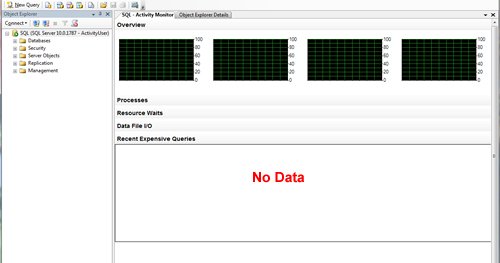
The issue here is a permissions issue. If user ActivityUser is given all the necessary permissions it will start showing up data in Activity Monitor. It is a new tool in SQL Server, which displays activity in five sections. 1) Overview, 2) Processes, 3) Resources Waits, 4) Data File I/O, 5) Recent Expensive Queries. It is one of the new and very useful tool introduced by SQL Server.
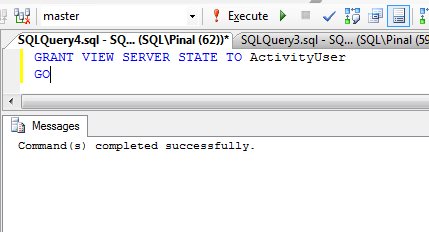
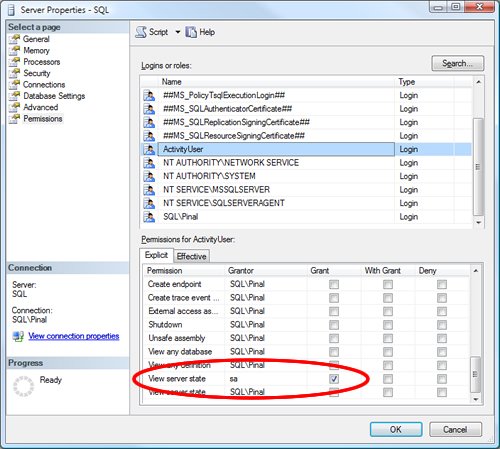
Activity Monitor captures all the information at server level. For the same reason we need to give “View Server State” permission to user name to view the data on Monitor. We can give permission, either using T-SQL or using SSMS.
T-SQL to give permission to others:
SSMS to give permission to others:
Once permissions are given to the user, it displays the data in Activity Monitor. Click on images to enlarge the images.
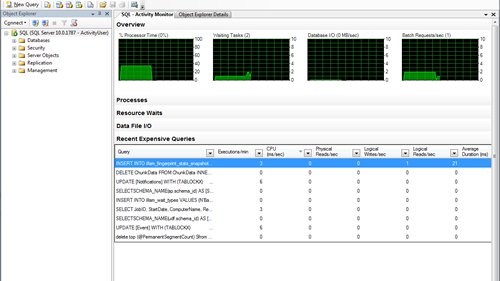
Additionally, note that if you are user belonging to sysadmin role, you can always see all the data in Activity Monitor without additional permissions.
Let me know what you think about this blog post in the comment section.
Published by Pinal Dave on SQLAuthority. More of my work at pinaldave.com.
Discover more from SQL Authority with Pinal Dave
Subscribe to get the latest posts sent to your email.




6 Comments. Leave new
At the very beginning you refer the user name as “ActivityMon”, the one who does not have enough permission b’cos of which the data does not get displayed in the “Activity Monitor” UI. After that you DO NOT show anywhere in this blog on how this users “ActivityMon” gets the desired permission, but you used the user name as “ActivityUser” (2 different user names)
Not sure if there is a broken-link in your documentation or there is a TYPO error
Dear Sir,
I receive following error.
Msg 4621, Level 16, State 10, Line 1
Permissions at the server scope can only be granted when the current database is master
Please tell me how to fix it.
Radha
Hello
I`m login with sa user but steel my activity monitor is empty :(
my sql Server version is SQLServer 2008 Enterprise Edition
I feel this is among the most vital info for me. And i am glad studying your article. However want to observation on few basic issues, The site taste is ideal, the articles is actually excellent : D. Just right activity, cheers
This article solved my problem. Thanks.
Glad to hear the same.