
In one of the previous article we have seen how we can create XML file using SELECT statement SQL SERVER – Simple Example of Creating XML File Using T-SQL. Today we will see how we can read the XML file using the SELECT statement. Reading XML file content with T-SQL takes only a few lines.
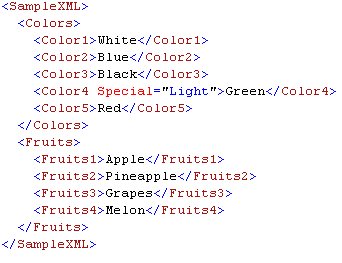
Following is the XML which we will read using T-SQL:
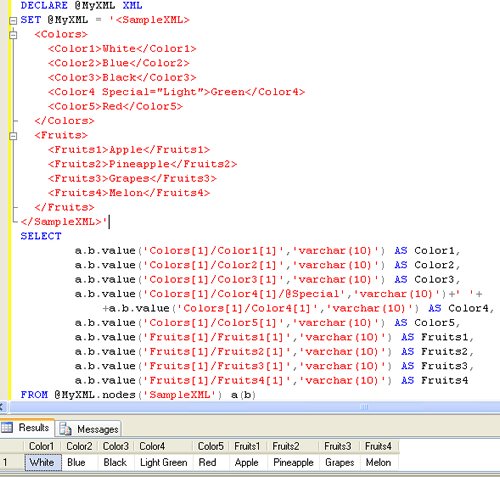
Following is the T-SQL script which we will be used to read the XML:
DECLARE @MyXML XML
SET @MyXML = '<SampleXML>
<Colors>
<Color1>White</Color1>
<Color2>Blue</Color2>
<Color3>Black</Color3>
<Color4 Special="Light">Green</Color4>
<Color5>Red</Color5>
</Colors>
<Fruits>
<Fruits1>Apple</Fruits1>
<Fruits2>Pineapple</Fruits2>
<Fruits3>Grapes</Fruits3>
<Fruits4>Melon</Fruits4>
</Fruits>
</SampleXML>'
SELECT
a.b.value(‘Colors[1]/Color1[1]’,‘varchar(10)’) AS Color1,
a.b.value(‘Colors[1]/Color2[1]’,‘varchar(10)’) AS Color2,
a.b.value(‘Colors[1]/Color3[1]’,‘varchar(10)’) AS Color3,
a.b.value(‘Colors[1]/Color4[1]/@Special’,‘varchar(10)’)+‘ ‘+
+a.b.value(‘Colors[1]/Color4[1]’,‘varchar(10)’) AS Color4,
a.b.value(‘Colors[1]/Color5[1]’,‘varchar(10)’) AS Color5,
a.b.value(‘Fruits[1]/Fruits1[1]’,‘varchar(10)’) AS Fruits1,
a.b.value(‘Fruits[1]/Fruits2[1]’,‘varchar(10)’) AS Fruits2,
a.b.value(‘Fruits[1]/Fruits3[1]’,‘varchar(10)’) AS Fruits3,
a.b.value(‘Fruits[1]/Fruits4[1]’,‘varchar(10)’) AS Fruits4
FROM @MyXML.nodes(‘SampleXML’) a(b)
Please note in above T-SQL statement XML attributes is read the same as XML Value.
Published by Pinal Dave on SQLAuthority. More of my work at pinaldave.com.
Discover more from SQL Authority with Pinal Dave
Subscribe to get the latest posts sent to your email.




94 Comments. Leave new
Hi Pinal Dave,
I am new to XML and i need to insert following XML data to SQL Table(PID,CID,phone..). Pl help me in this.
thanks in advance.
Thanks pinal
Hi Dave,
Is there any way to read the data, More in more generic manner, In above scripts columns names/XML tags are hard codes.
If we can soft code it then it might be more helpful.
Regards
Lokesh
Can you supply a sample of using an actual XML file rather than a variable to hold the XML data?