Today in this article I would discuss about the Database Mail which is used to send the Email using SQL Server. Previously I had discussed about SQL SERVER – Difference Between Database Mail and SQLMail. Database mail is the replacement of the SQLMail with many enhancements. So one should stop using the SQL Mail and upgrade to the Database Mail. Special thanks to Software Developer Monica, who helped with all the images and extensive testing of subject matter of this article.
Here is the video of the same subject:
In order to send mail using Database Mail in SQL Server, there are 3 basic steps that need to be carried out. 1) Create Profile and Account 2) Configure Email 3) Send Email.
Step 1) Create Profile and Account:
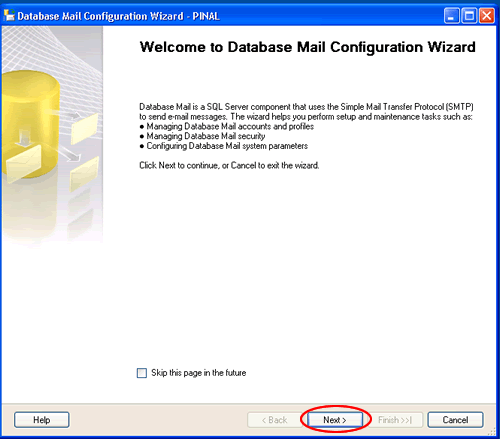
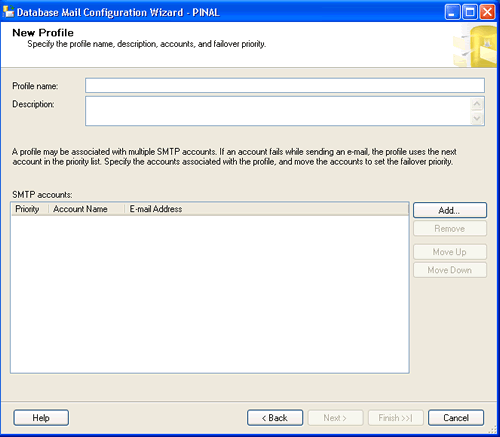
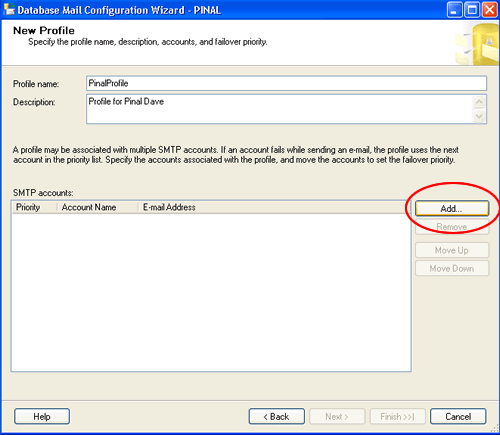
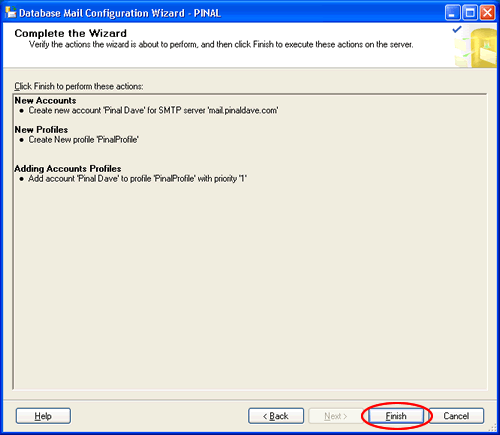
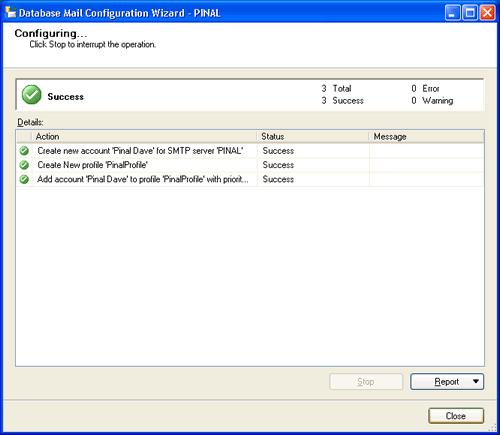
You need to create a profile and account using the Configure Database Mail Wizard which can be accessed from the Configure Database Mail context menu of the Database Mail node in Management Node. This wizard is used to manage accounts, profiles, and Database Mail global settings which are shown below:
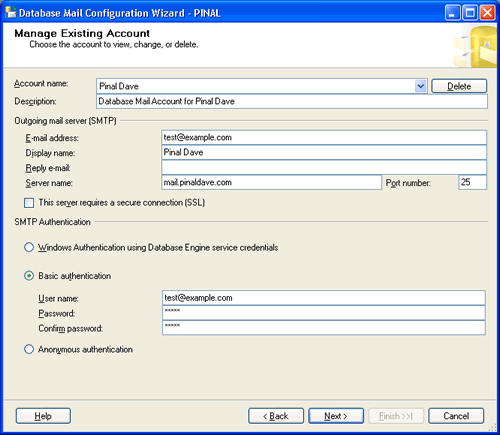
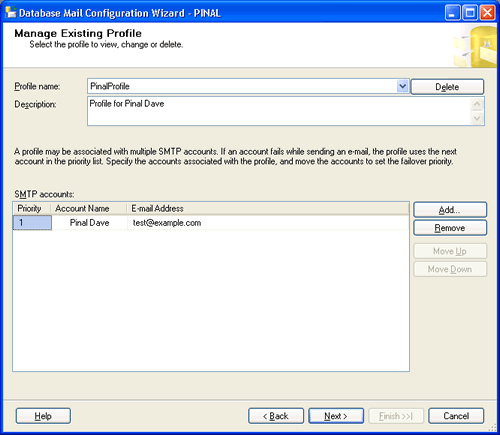
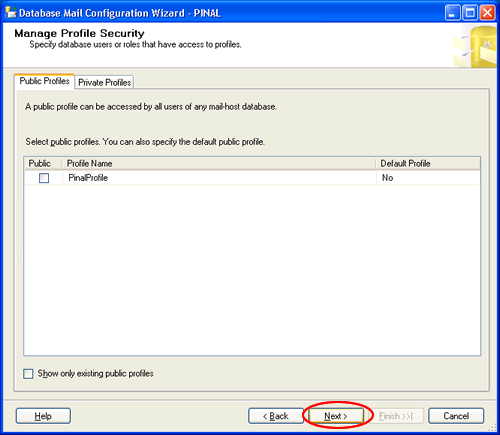
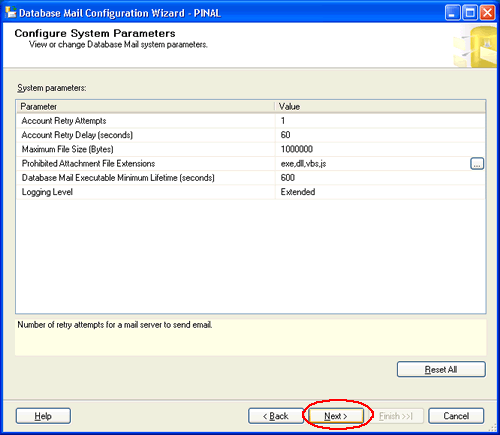
Step 2) Configure Email:
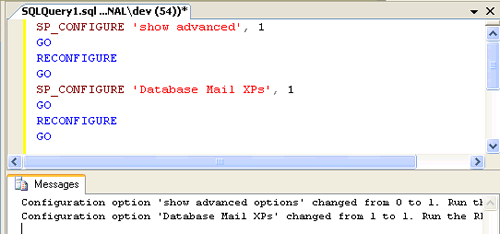
After the Account and the Profile are created successfully, we need to configure the Database Mail. To configure it, we need to enable the Database Mail XPs parameter through the sp_configure stored procedure, as shown here:
sp_CONFIGURE 'show advanced', 1
GO
RECONFIGURE
GO
sp_CONFIGURE 'Database Mail XPs', 1
GO
RECONFIGURE
GO
Step 3) Send Email:
After all configurations are done, we are now ready to send an email. To send mail, we need to execute a stored procedure sp_send_dbmail and provide the required parameters as shown below:
USE msdb
GO
EXEC sp_send_dbmail @profile_name='PinalProfile',
@recipients='test@Example.com',
@subject='Test message',
@body='This is the body of the test message.
Congrates Database Mail Received By you Successfully.'
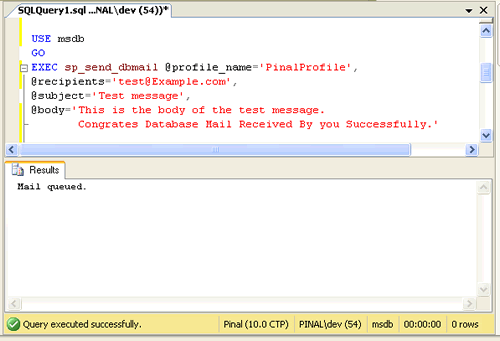
After all validations of the parameters entered are done, certain stored procedures are executed and the mail is queued by Service Broker, read more at SQL SERVER – Introduction to Service Broker.
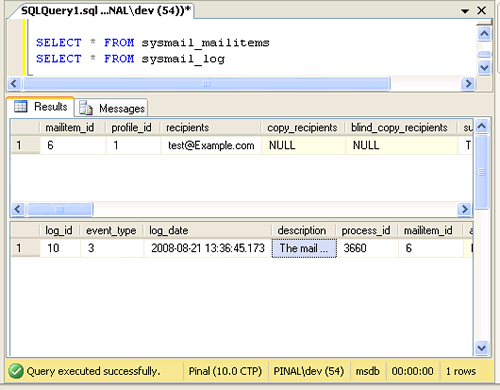
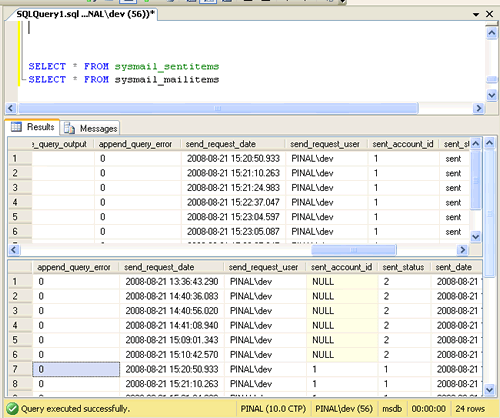
Database Mail keeps copies of outgoing e-mail messages and displays them in the sysmail_allitems, sysmail_sentitems, sysmail_unsentitems, sysmail_faileditems . The status of the mail sent can be seen in sysmail_mailitems table, when the mail is sent successfully the sent_status field of the sysmail_mailitems table is set to 1 which can again be seen in sysmail_sentitems table. The mails that are failed will have the sent_status field value to 2 and those are unsent will have value 3.
The log can be checked in sysmail_log table as shown below:
SELECT *
FROM sysmail_mailitems
GO
SELECT *
FROM sysmail_log
GO
Status can be verified using sysmail_sentitems table.
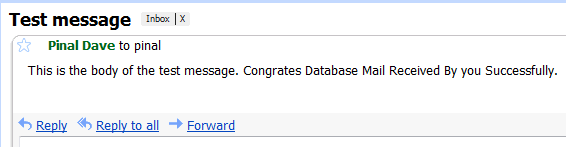
After sending mail you can check the mail received in your inbox, just as I received as shown below.
Let me know what you think about this tutorial.
Reference : Pinal Dave (http://blog.SQLAuthority.com)


Hello,
Its really Good. I appreciate Monica’s patience in getting all the pics.
Also, the moment you right click database mail, and you try to configure it, and this feature is off ( default setting ) then you will get a dialogue box saying do you want to on this setting…
As a learner I would also like to see where we will be using this useful feature of SQL Server 2005. The one good reason where we can use Database mail is to send alerts.
It would be good if you also add how to sent alerts using database mail.
1. Create operator,
2. In response to job, sent email to this operator ( this email will be sent by database mail).
I know I am asking too much, I still appreciate her for spending so much time, I use database mail every day, but I learnt some new things in this post.
Thanks Monica and Pinal Dave.
Imran.
this worked like a charm and thank you for providing such a great breakdown on how to do this. I have set up one of our servers without a hitch but another server, which is virtual gave me the following error:
*****************************************
The mail could not be sent to the recipients because of the mail server failure. (Sending Mail using Account 1 (2009-11-19T08:34:02).
Exception Message: Cannot send mails to mail server. (Mailbox unavailable. The server response was: 5.7.1 …
Relaying denied. IP name possibly forged [10.1.
*****************************************
Is this because it is virtual or do you think there is something going on with the specific IP?
i am also facing the same error:
The mail could not be sent to the recipients because of the mail server failure. (Sending Mail using Account 1 (2009-11-19T08:34:02).
Exception Message: Cannot send mails to mail server. (Mailbox unavailable. The server response was: 5.7.1 …
Relaying denied. IP name possibly forged [10.1.
what could be the reason
This is really cool. The mail works. I am able to send mail in first attempt.
hi ,how did u did it ??? it doesnot works on mine same problem mail doesnot sent
hi, thanks for the great document, is it possible for me to send automated (daily)e-mails that gets the results of different stored procedures?
Imran,
I appreciate your suggestions. I totally agree with you what you suggested and I will follow up on it.
Create operator is something on my list and I will have that done very soon. Sending important SQL Server related alerts to operator is very crucial task and this article is base for it.
Again, thank you for your words and I will work on your suggestions.
Kind Regards,
Pinal
I have a website that has (Members)each member has a profile and I want to be able to send updates to them and to give them emails all at once.How can I do this?
Hi Pinal
is it possible to access network share location to attach a file in email when sql serivece runs under local system account? to whome the share should give permisions in that case?
Regards
Rupali
Dear pinaldave
I m getting an exception after executing the procedure sp_send_dbmail as below
Cannot send mails to mail server. (The operation has timed out.). )
Exception Information =================== Exception Type: Microsoft.SqlServer.Management.SqlIMail.Server.Common.BaseException
Message: The Transaction not longer valid.
For all of you having the folowing ERROR:
******************************
The mail could not be sent to the recipients because of the mail server failure. (Sending Mail using Account 10 (2010-05-31T15:12:25). Exception Message: Cannot send mails to mail server. (The operation has timed out.).)
******************************
It’s caused by a bug in Management Studio:
Use smtp.gmail.com for the server
port to 587 (Use port 587, port 465 lets you waiting)
Require secure connections checked
*Basic authentication*
username (use the full email address with @gmail.com)
password (RETYPE – the SSMS messes up the password so the autentication fails with port 587)
You may also want to read this…
(http://support.microsoft.com/kb/970315/LN/kb/968834/)
(http://support.microsoft.com/kb/968834/ )
i m also getting the same error…
The mail could not be sent to the recipients because of the mail server failure. (Sending Mail using Account 1 (2011-05-15T17:47:17). Exception Message: Cannot send mails to mail server. (The operation has timed out.). )
and tried the solution u hav given…but it didnt worked
plz do tell wht to do..???
aishwarya,
If you are using a gmail account in the settings, do as follows.
After the previous steps check the last one: Basic authentication – password – REENTER THE PASSWORD – the SSMS messes up the password so the autentication fails with port 587 if you don’t RETYPE it
Thanks Frank.. I was getting the Same Error and now its Fixed..
Nilesh,
Are you using SQL Server 2008? It works great for me.
Thanks Pinal.
Great work.
Good Work! This is very helpful post.
Imran you are correct. Monica good pics.
Mike Aaron – Microsoft MVP
As i’m newbie to sql server i started with this new feature of sql server 2005 (i.e. using SMTP not MAPI) i got stuck with few things as my sql server 2005 has the default settings.
firstly enable database stored procedures.
start – programs – microsoft sql server 2005 –
configuration tool – sql server surface area configuration – surface area configuration and features
the two more things what we have to keep these things in mind while configuring database mail:
* by default port for database mail is 25.
so open that port in the firewall.
* grant permissions to relay e-mail through SMTP
start – administrative tools- Internet Information Services – expand local computer – default SMTP virtual Server Properties
- thn click tab Access thn Relay – add -
then enter IP address – click ok
Now i guess it would definately work. please correct if i’m wrong.
Sandeep-MCTS
– using T-SQL
use msdb
declare @profile_id smallint
exec msdb.dbo.sysmail_add_profile_sp
@profile_name=’DATABASEMAIL’,
@description=’DATABASEMAIL’,
@profile_id=@profile_id output;
select @profile_id
–exec msdb.dbo.sysmail_help_profile_sp select * from msdb.dbo.sysmail_profile
declare @account_id int
execute msdb.dbo.sysmail_add_account_sp
@account_name=’sandeep’,
@email_address=’s.charaya@server.com’,
@display_name=’sandy’,
@description=’kuch bhi’,
@account_id=@account_id output;
select @account_id
/* to update
declare @account_id int
execute msdb.dbo.sysmail_update_account_sp
@account_id=1,
@account_name=’sandeep’,
@email_address=’s.charaya@server.com’,
@display_name=’ElixirCT’,
@description=’Sandeep Charaya’,
@replyto_address=’s.charaya@gmail.com’,
@mailserver_name=’server name’,
@mailserver_type=’SMTP’,
@port=25,
@username=null,
@password=null,
@use_default_credentials=1,
@enable_ssl=0;
exec sysmail_help_account_sp
*/
–select * from sysmail_account exec sysmail_help_account_sp
–exec sysmail_help_profile_sp exec sysmail_help_account_sp
/*
exec msdb.dbo.sysmail_add_profileaccount_sp
@profile_id=1,
@account_name=’sandeep’,
@sequence_number=1
–or
@account_id=1,
@profile_name=’DATABASEMAIL’,
@sequence_number=2
*/
–exec sysmail_help_profileaccount_sp
–make the profile public
exec sysmail_add_principalprofile_sp
@profile_name=’DATABASEMAIL’,
@profile_id=1,
@is_default=0,
@principal_name=’public’
–exec sysmail_help_principalprofile_sp
exec msdb.dbo.sp_send_dbmail
@profile_name=’DATABASEMAIL’,
@recipients=’s.charaya@gmail.com’,
@subject=’hello…test mail’,
@body=’hi,
h r u’
SELECT * FROM sysmail_allitems
i hope it works !!
Thank you so much. It worked like a charm.
Very useful queries and statements for understanding sp_send_dbmail in detail. Nice compilation.
Hi Pinal Dave,
Actually it’s not different much with SQL 2005, isn’t it :)
What I’ve written in my previous post –>
http://thomas.wordpress.com/2008/08/26/send-mail-sql-server-2005/
was only kind of shortcut so that I don’t have to open the wizard, and when I red your post, the wizard looked the same as SQL 2005 (I’m not yet explore SQL 2008 because my latest software version, Ms Dynamic SL, is still using sQL 2005)
Thank you for informing :)
Really a good post. I want to ask one thing, can we take backup of database using Job, and then send the backup as attatchment to a particular email ID using Database mail. This will provide a backup to the superadmin who is in fact a nontech person. My database is very crucial and have encrypted all the varchar column using 128 bit encryption. There is requirement of the highest degree of protection of data as well as database.
To achieve this the work to be done in sequence (as it think):
1. Create profile
2. Create job for Backup
3. Create job for sending mail.
Can you help me out how to achieve all these.
Regards,
Jitendra Gupta
Hi Pinal,
I have created a maintenance Plan for database and Log backup in SQL Server 2005 using Wizard. But it does not execute at the time specified. When I ran it mannually it gave error like:
“Execution failed. See the maintenance plan and SQL Server Agent job History logs for details.
Additional Information:
An exception occurred while executing a Transact-SQL statement or batch.”
When I peeped into the Job History Log, there was nothing under the maintenance plan.
Please let me clear where, what I am missing.
Regards,
Jitendra Gupta
Excellent Post – thanks.
I successfully configured as above several days ago in a new production SQL 2005 cluster. My problem is that the Test function is not available for the SQL Agent configuration unless using SQL Mail AND the job notifications fail…?
The actual Database Mail configuration test works fine.
Any ideas?
Hello friends…
Great work by monica. I have done all the things mentioned by monica. But finally i am getting an error saying that
“The mail could not be sent to the recipients because of the mail server failure. (Sending Mail using Account 1 (2008-08-30T16:31:11). Exception Message: Cannot send mails to mail server. (The operation has timed out.). )”
how to overcome this.
Thanks in advance
Regards
Zak
Hello Pinal,
How can we send mail in ibm db2/400 (database of as/400)?
Thanks and regards,
Himanshu
Hello Pinal and Zakeer,
Mr. Zakeer, i am getting the same error as u had.
“The mail could not be sent to the recipients because of the mail server failure. (Sending Mail using Account 1 (2008-08-30T16:31:11). Exception Message: Cannot send mails to mail server. (The operation has timed out.). )”
how to overcome this.
Thanks in advance
Narayana
@ Narayan,
By default we will use port 25 to configure database mail, which is usually blocked by windows firewall for security reason,
try the following.
1. Disable firewall and test if databasemail sends email.
2. Make an exception in the windows firewall.
Or this also happens when you use wrong port numbers,
Just as an example use these values when setting up a database mail feature: You need to have a gmail account, which can be created free if you go to gmail.com, you can send email using gmail service free of cost :) So you can try this example and it works perfect.
In database mail, first create profile, and when you create an account, use these values.
Give Account name: SQL Server Alerts System
Description: XYZ
Outgoing mail Server ( SMTP)
email id: youremailid#gmail.com ( should have gmail.com)
Display Name: SQL Server
Reply email: can leave blank
Server name: smtp.gmail.com ( this is really important)
port no: 587 ( on many website this is given as 465 which is wrong, use 587 )
Check : This server requires a secure connection
Check Basic Authentication
username: youremailid@gmail.com ( should have gmail.com)
password: ( top secret , dont display ) … ;)
confirm password: confirm your password
click next and also you need to make it default public profile.
After you do this, you also have to change SQL Server Agent properties, in Properties click alerts system and then select database mail.
MOST IMRORTANT when you make changes, to SQL SERVER AGENT properties, restart only SQL SERVER AGENT.
right click SQL Server Agent and click restart, and then test your database mail.
to test, right click database mail and click send test mail… VERY IMPORTANT ( Select right profile/account from drop down list), put any email id and click send test email. click ok.
Right click database mail, select view database mail logs keep refreshing … to see if any error message had occured. mean while look in your inbox if you recieved your email.
In few days I will take screen shots on how to configure database mail, taking a live example.
All with GUI’s no scripts :)
Hope this helps.
Imran.
Hi Imran Mohammed I am Trying the same thing now.but i can unable to send mail.In Log File Viewer-Message- Its Showing this Error (04/09/2010 06:11:57,,Error,13,The mail could not be sent to the recipients because of the mail server failure. (Sending Mail using Account 1 (2010-04-09T06:11:57). Exception Message: Cannot send mails to mail server. (The SMTP server requires a secure connection or the client was not authenticated. The server response was: 5.7.0 Must issue a STARTTLS command first. 8sm165107yxg.67).),3480,6,,4/9/2010 6:11:57 AM,sa)
Plz Help me regarding this…
@Nirmal
Looks like this is a Authentication issue or port no issue.
Authentication Issue:
—————————-
Please make sure you have put the information as explained below:
Server name: smtp.gmail.com ( this is really important)
port no: 587 ( on many website this is given as 465 which is wrong, use 587 )
Check : This server requires a secure connection
Check Basic Authentication
username: youremailid@gmail.com ( should have gmail.com)
password: XXXXXXXXXXXXX
confirm password: confirm your password
Port No Issue:
——————–
Make sure port 587 is opened in your machine if you are following above example. If you are using any other port number (usually its port 25) to set up database mail in your office, make sure you speak with your security team and ask them to unblock port 25. Once they unblock port 25, your databasemail will work.
Network Connectivity:
—————————–
Also check network connectivity from your machine, if you can connect to internet from your machine on which you are testing your database mail. To test, do the following
Start- Run- type cmd – Hit Enter
Type ping gmail.com -t and then hit enter.
If output displays as Request timed out, it actually means there is network connectivity problem. Otherwise, your network connectivity is good.
~ IM.
Very thanks Imran…Now it works properly…..
@@Imran Mohammed
Thank you Soo Much… DB mail is working for me without any issues…
thanks imran sir;
your post(April 9, 2010 at 7:31 am ) solved my all problem.
now i have send mail sucessfully.
thanks Imran Mohammed, it works grate …..
after configuring the datamail, when i send the test mail using send test mail tab..i am getting following error.
exception mesgae:can not send mails to mail server, mailbox is unavailble.
server response was 5.7.1;client does nto ahve permssions to send as this sender,
am using the sql service acoutn.
how do i knwo, wthether my account is having mailbox or not or do we need mailbox user account.
Regards
Srinivas
Hi Srinivas
My guess is, that you are not allowed to relay on the (SMTP) server you are using. Make sure the SQL servers IP address is allowed to relay on the SMTP/mail server – og use Basic Authentication with a username/password.
Best regards
Jakob H. Heidelberg
MVP:Enterprise Security
Hi thanks, a lot for posting solution for sending mail.
Can anyone help me with this?
the following script which returns the count of cases in the support queue and the date/time of the oldest case. Then it emails me the stats.
It works fine when I run from the query window, but when I run as a step in the job, the @body1 assignment is lost and I have no body in my email. Do you have any ideas about why the job appears to lose the variable assignment?
declare @CasesInSupportQueueCount varchar(10)
declare @OldestCaseInSupportQueue DATETIME
declare @body1 varchar(100)
declare @CRLF char(2)
SET @CasesInSupportQueueCount = (SELECT COUNT (qi.queueitemid) AS CasesInSupportQueueCount
FROM FilteredQueueItem as qi
JOIN FilteredQueue as q
ON qi.queueid = q.queueid
WHERE q.Name = ‘Support’ AND qi.objecttypecodename = ‘Case’)
SET @OldestCaseInSupportQueue = (SELECT MIN (qi.createdon)
FROM FilteredQueueItem as qi
JOIN FilteredQueue as q
ON qi.queueid = q.queueid
WHERE q.Name = ‘Support’ AND qi.objecttypecodename = ‘Case’)
SET @CRLF = CHAR(13) + CHAR(10)
SET @body1 = ‘Queue Statistics: ‘ + @CRLF +
‘Queue Count: ‘ + @CasesInSupportQueueCount + @CRLF +
‘Earliest in Queue: ‘ + CAST(@OldestCaseInSupportQueue AS varchar(30))
exec msdb.dbo.sp_send_dbmail
@recipients = ‘Email@email.com’,
@subject = ‘CRM QUEUE STATISTICS’ ,
@body = @body1,
@body_format = ‘TEXT’,
@profile_name = ‘Admin’
RESULTS WHEN SCRIPT IS EXECUTED FROM QUERY ANALYZER WINDOW:
Queue Statistics:
Queue Count: 7
Earliest in Queue: Otc 9 2008 1:59PM
RESULTS WHEN RUN AS JOB. (There is only one step in my job.)
Email sent but no body is display
IF I CHANGE
@body = @body1,
TO
@body = ‘just a test’,
On the email I get:
Just a test
Thanks
Thanks Pinal , Monica.
Good Article .Really helpful .
Rgds,
Hari
hello, i followed the procedure and i am able to send email from the server successfully.
HOWEVER – i cant get the Jobs to use the db mail feature – when i go to Job Properties — Notifications, check the E-mail box the drop down is EMPTY ! nothing to select from although i have the db email profile setup and working.
any ideas? (i restarted the agent, didnt help)
Those drop downs are for “operators” — add them below the sql server agent area. Basically, a “profile” is used to send mail using an “account” that sends to a “operator”…
good luck!
Wow
Very,very interesting, i never had of Db Mail before.
I am currently using VB .NET 2008.
My question is, is this what i need to send emails.
Can i get data from the database.
Do you something i can us when i want to send SMS?
How do send email from Microsoft Access using VB .NET 2008?
Thank you
Imran you promised screenshot…..
Where Are they?
Your Solution is Not working for me….
Its giving error
The mail could not be sent to the recipients because of the mail server failure. (Sending Mail using Account 5 (2008-11-07T15:23:49). Exception Message: Could not connect to mail server. (No such host is known). )
Hi Dave & All,
I want to implement a trigger that will send email using database mail whenever anybody creates a new database on a server without letting me know aobut it.Can anybody give me the detail to do it please?
Thanks
!!!!the posts are awesome here.
Marshall
Hi Dave & All
I configured database mail to send me emails when job fails.When the job fails and emial is sent to me on the subject box it says’job completed’.same thing appear if i configure database mail to send email when the job succeeds or completes.How to make the ‘subject’ to say ‘job failed’ when the condition was ‘send email when job fails’ and ‘job succeed’ when the condition is ‘send email when job succeeds’?
Thanks
Marshall
Hello, I need to create a database that will contain student’s grades for different subjects and different grades. Then I need to send each student their individual grades only. How can I achieve that?
Hello Pinal Dev
Thanx for ur this gr8 help.
Some days before i just heard abt Database mail.
I fired query in Google (thanx google :) )
I got ur article.
It works finly.
Just one silly question :
If i want to send mail with HTML tags so what to do for that ?
Thanx again to you and Monica also
Regards,
Saagar
Hi Pinal,
I got the solution for HTML Tags Mail format
Thnax
Regards,
saagar
Hi, I have tried setting up database mail (SQL SERVER 2005) before seeing your article, and it is the same thing basically that I did (your gmail example).
I get the error:
The mail could not be sent to the recipients because of the mail server failure. (Sending Mail using Account 1 (2008-12-01T07:01:53). Exception Message: Cannot send mails to mail server. (The SMTP server requires a secure connection or the client was not authenticated. The server response was: 5.5.1 Authentication Required.
I use this exact same account and settings for smtp in C#/ASP.NET and it works there.
Here are my configurations:
- enabled Database Mail stored procedures
- created a new account (smtp.gmail.com, port 587, checked SSL required, valid username, valid password)
- created a new profile that uses that account (public, default)
- send test email (valid email)…
Am I missing something? Do I need to manually add user to DatabaseMailUserRole? (somehow that role did not exist, I had to add it manually)
Do I need to setup an SMTP server in IIS?
Thanks,
Amy
I was having this same problem and didn’t find an answer. So, I ended up deleting the profile and mail account and starting over. Once I did that it started working. I think the problem could have been that I modified the original configuration of the mail account after it was setup.
- Good Luck! -
@Amy:
You don’t have to setup SMTP on IIS, unless you are planning to use it instead of GMail’s SMTP server.
If you do setup an SMTP server on IIS, then you’ve got to specify “localhost” instead of “smtp.gmail.com”.
-Nitin
Thanks Nitin,
So do you have any idea why it’s giving me an ‘authentication required’ error?
What about reading emails? Is it true that Microsoft will, or did, disable this functionality ?
If so this will be very Interesting logic… If you can’t secure it then kill it… Well…I hope I am wrong, I have an application that reads and process email in 2000 and hoped to upgrade… Any feedback?
How to create Scheduling of SQL Email?
I wish to have email generation from SQL Server daily at 0900 with particular data from database.
….
how to check the date in database & send the mail using c#
Hey Pinal
Can you set up the email so that it is not automatically being sent but rather being sent at a programmed time and date? and how can this be done for world time zones so that the email is set to arrive in your inbox at a particular time say 9am on the 10 January 2009 in your time zone?
Thanks
I just want to say that your work (not only on this topic) is great!!!!!
Hi everybody,
I configured the datamailfollowing the above steps…
when i am trying to send a test mail, i m getting following error…
please anybody can help me regarding this. i need to finish this task immediately.
Error message:
The mail could not be sent to the recipients because of the mail server failure. (Sending Mail using Account 3 (2009-02-05T10:52:07). Exception Message: Cannot send mails to mail server. (The SMTP server requires a secure connection or the client was not authenticated. The server response was: 5.7.0 Authentication required).
Thanks
Mohan
Hi,
I want to send an SMS using this feature.
when i try to send SMS(9198xxxxxxxx@airtelkk.com) using webmail i’m getting the SMS clearly. but when i try the same using database mail am getting some junk value or may be the encrypted form.
How to overcome this..?
plz help……
Thanks in advance..
Pramod..
Saagar Wrote :
“——-”
Saagar
Hi Pinal,
I got the solution for HTML Tags Mail format
Thnax
Regards,
saagar
“——”
What is the solution? Please share.
is outlook is required for the database mail to be working..????
Hey, Pinal:
I think you should publish a similar article with the total GUI explanation given by Imran Mohammed. My attempt to config settings/permissions on a VISTA localhost had all kinds of blocking problems and I could never get passed “actively blocking” message.
But I followed Imran Mohammed’s clear explanation above and no problems!
Might be useful for other developers fighting with Vista Firewall, SMTP, etc.
Thanks!
How do you Receive email into SQL Server? If we get an email to support@ how can we set it up to receive into our SQL Server database?
Hi Pinal,
how are you?
I did that same as your showing. However, I cannot recieve the email in Inbox. The error in log is “…because of the mail server failure.” but the server did successfully pass in Database Mail Configureation Wizard.
Please tell me how can handle that issues.
Thank you,
Frank
Does anyone know if SQL Express 2008 has e-mail functionality? I do not see the “Database Mail” anywhere.
I know the full version has a wizard for this, but I am unable to locate or find documentation that supports e-mail with the Express version. Any assistance would be greatly appreciated.
Thank you.
Mark
@Mark A. Ross
Database Mail is only available in following Editions of 2008.
1. Enterprise Edition
2. standard Edition
3. Workgroup
4. Web
Express Edition does not have database mail feature.
Look under Manageability section for more details in below link
Link : http://msdn.microsoft.com/en-us/library/cc645993.aspx
Suggestion: Why dont you use developer Edition or Evaluation copy.
IM.
Hi Pinal Dave,
I have tried to Configure Database Mail in my SQL server 2005 with my gmail account, but it always shows
Mail queued.
It not sends the mail to receipent email account.
Can u help me out, where I am doing the mistake while configuring the database mail.
Thanks in advance,
Thank you guys Big time. Am sorted.
Greate articale, very helpful.
Good article. However, most applications will not be connecting to the server as SA. To send mail using sp_send_dbmail the account being used must be a member of DatabaseMailUserRole, Most application accounts will not be so if you have a stored procedure in anotherdatabase that wants to execute sp_send_dbmail you will get an error.
As yet I am not sure what the bet solution for this is. ie create a sendmail role and allow the sql accounts to be members of this and allow this role to execute sp_send_dbmail
Any one got any better ideas ?
Hello Sir,
I lost some record from tables and I don’t have any backup.
Is it possible to retrive that data? How? Please help me.
Sir
I am also unable to receive email on the address that i specified there . Can you Plz provide help ?
Hi Dave,
Awesome directions on setting up SQL Server Emails. Followed step by step instructions and now my email’s are working.
Thanks
Jeff
U r g8
Hi Dave
i would like to Thank you for getting know a new concept
But i got error while send mail after successfully finished 2 steps
Please let me know and tell me when we have to use database mail(give me a real time example )
once again thanks
The err msg
Msg 8145, Level 16, State 1, Procedure sp_send_dbmail, Line 0
@profilename is not a parameter for procedure sp_send_dbmail.
Wow nice article it is. It will be useful to all.
Thanks so much for this wonderful article!!! Its a very good explanation for whole setup with diagrams.
I learn’t a new thing in SQL Server today. Once again thanks to Pinal and Monica.
Can I configure Database Mail to work with a hotmail acclount ? Can you explain how to configure it, please ?
Hi Pinal
I would like to say thanx for providing detail infomation. It works great for me
Dear Pinal,
I am using MS Reporting Service 2008.
After excuting the report I want that the report should be
send to his supirior at that moment using as user email id to
his superior to suerior adderess in SSRS only.
Very difficult facing please give some idea or hint to solve this problem.
Thanks in Advance
Ramesh Sahoo
I too am facing same issue with SQL 2008. It seems the account works from application using SMTP account, but not in SQL 2008? Can any one give complete details for SQL 2008.
Thanks a lot!
Hi,
I am getting different kind of error in sending database mail from SQL server 2005 which is not included in troubleshooting database mail.
I am getting the error as per the log file
“Message
The mail could not be sent to the recipients because of the mail server failure. (Sending Mail using Account 5 (2009-06-01T11:03:23). Exception Message: Cannot send mails to mail server. (Command not implemented. The server response was: Error: command not implemented).
)”
Using the same SMTP server info and same steps I am able to send test mail from different servers. But in a particular server I am not able to send test database mail but I am able to send message through cmd prompt using telnet command.
Please advice any server setup needs to be checked.
Hi all,
Please help me to solve the problem when I send mail by Database Mail, I encounter error message:
The mail could not be sent to the recipients because of the mail server failure. (Sending Mail using Account 4 (2009-06-04T16:22:26). Exception Message: Could not connect to mail server. (A socket operation was attempted to an unreachable host 209.85.147.109:465). )
I used smtp.gmail.com on 465 port
@Dung Ding Tien.
Please use
Server name: smtp.gmail.com ( this is really important)
port no: 587 ( on many website this is given as 465 which is wrong, use 587 )
I have demonstrated an example above on the same page, please take a look at it.
~ IM.
@Imran Mohammed
Thank Imran Mohammed,
I also used port 587 as you said but I still got the error message.I did step by step to configure database mail as same as guide in the article and I took your demonstration.
If you can,please explain detail.
Hi Imran Mohammed,
I am using SQL Server 2005, i configured database mail and followed all the steps accordingly but got the following error in log file and unable to get a mail also. Could you please help me.
————————————————————————
The mail could not be sent to the recipients because of the mail
server failure. (Sending Mail using Account 1
(2009-06-10T18:10:07).
Exception Message: Could not connect to mail server.
(No such host is known).
Hi,
Thank you So much for u r efforts. I successfully implemented today.
THanks for u r effort Pinal,Monica,Imran..
Regards,
Hari.
I have setup Database Mail – I can right-click on it and send myself a test email message. I get this message correctly.
However, from a Job, I go to Notifications and select my operator (my own email) and select “When the job completes”. Then I execute this job and I never get an email!
What am I missing?
Thanks
- Gustavo
@Gustavo.
Did you configure your SQL Server Agent to use database mail profile when sending an email.
All Alerts or emails are sent by SQL Server Agent.
Go to SQL Server Agent Properties and select Database mail profile. After you make this change, Restart SQL Server Agent ( Remember. no need to restart SQL Server Service, Just Restart, SQL Server Agent thats it).
And then try again to send email. Should work, In case if it did not, let us know.
~ IM.
Where i will find SQL Server Agent Properties ??
Hi Pinal,
Great to see your post.. I was very new to databasemail but reading your blog, now m not…. :)
Thanks !!!
Hello,
I have some problem with MS SQL Server 2005 standard.
I dont use sql mail server service at all. but still in SQL Agent log it says following
Message
[355] The mail system failed to initialize; check configuration settings
Message
[260] Unable to start mail session (reason: Microsoft.SqlServer.Management.SqlIMail.Server.Common.BaseException: Mail configuration information could not be read from the database. —> System.Data.SqlClient.SqlException: profile name is not valid
at System.Data.SqlClient.SqlConnection.OnError(SqlException exception, Boolean breakConnection)
at System.Data.SqlClient.SqlInternalConnection.OnError(SqlException exception, Boolean breakConnection)
at System.Data.SqlClient.TdsParser.ThrowExceptionAndWarning(TdsParserStateObject stateObj)
a)
After that it Halt the SQL server and then I need to restart sql server and agent.
@Imran,
Error :
Unable to start mail session
profile name is not valid
Please check SQL Server Agent properties. And see if SQL Server Agent is using either database mail or SQL Mail.
If SQL Server Agent says it is using database mail, then it will also show you what is the name that account is using
Then, go to database mail ( in SSMS, Object Explorer), click configure and check if that profile exists ( Some one might have deleted that profile from Database mail.
If SQL Server Agent uses SQL Mail, then check in OUT
If you are sure you are not using it, then go to Surface Area Configuration anc uncheck Database mail, saying SQL Server not to start this service when sql server instance starts.
Its just a wild guess.
~ IM.
Thanks for the article! I’ve referred to it several times. I was wondering… How would I grant someone permission to View Database Mail Log? So far research has said that I need to grant the role securityadmin, but there’s got to be a better way.
Every time i try to send a test mail it show me the following error..
The mail could not be sent to the recipients because of the mail server failure. (Sending Mail using Account 1 (2009-07-22T13:26:53). Exception Message: Could not connect to mail server. (No such host is known). )
plese let me know if i m wrong some where.
i have provided followind details :
E-mail address: sql@adveture-works.com
Display name: SQL account
Reply e-mail : sql@adventure-works.com
server name: mail.adventure-works.com
hi pinal,
i have configured the db mail & operator to send notification when job fails.
but i am not getting any notifications.
I am using sql2008
Thanks
Pragnesh
@Pragnesh,
After you configure database mail. You should change SQL Server Agent Properties to use this new database mail profile you just created.
After making a change, Restart only SQL Server Agent.
Also, Check Database mail logs (Right Click Database Mail, click View logs) to fnd out what is the issue.
~ IM.
Inmran Thanks for quick reply.
I have configured as you told.
& it also shows notification email in the log.
but i did not received any email.
Pragnesh
Pinal, nice example of the mail configuration.
Is this working also with an Microsoft exchange server ?
Which is the configuration for this ?
Thanks in advance,
Kurt
Excellent article, i tried this working fine (tried in SQL Server 2008 Standard Edition).
1. I created a auto backup job.
2. Created a alert and operator.
Now i am receiving schedule mail
Thank you very much, saved a lot of time.
Kumar
Sir,
I have a job in sql server 2005 which executes at 11:00 am everyday. It executes a query and sends the query result to users.
Since the server is in a remote location, sometimes we are unable to get connection to the same.
If we are disconnected from the server at around 11:00 am, or for any other reason (powerfailure) the server shutsdown, how can we get the email on the next restart of the server?
Thanks a lot in advance for your kind help !
Hi Pinal & All
I m using sql server 2005 and i used the db mail facility of the sql server. i want to do auto mail means job to the employee for the wish of birthday for that i am using cursor but it doesnt work..
so how to use cursor for fetch the one by one email id of employee and send the mail to them..
if there are many employee born on same date then how can i send wish mail to all with the help of cursor and cursor is not working in job schedule pls help me…
in job it is use msdb sp like
USE msdb
GO
EXEC sp_send_dbmail @profile_name=’test’,
@recipients=’dhavalsanghvi2006@gmail.com’,
@subject=’Test message’,
@body=’This is the body of the test message.
Congrates Database Mail Received By you Successfully.’
above code is working in job schedule but when i m use of cursor id doesnt work..
Thanks,
Dhaval
when i use the @query option database mail fails to send the email, if i quote it it works just fine.
Is there a way to use it fine?
or just work arounds like generating strings outside the email and later merge them in the @body option (which i dont want to).
note: using SQL2008, i know query works in a separate process, double single quote marks used, query was tested and works fine, @execute_query_database used to relate schema
@Boxek
What is your question ?
Is there a way to use it fine ?
This does not makes any sense to me.
You already know a solution, When you dont want to use it, please specify why you dont want to use a solution and what is that you want us to do.
Please help us to help you by providing complete information.
~ IM.
Sorry, my english might be not good, hehe. I meant, that i followed Pinal’s tutorial and everything worked out just fine, to send mail with database mail.
But, if i use something like
USE msdb
GO
EXEC sp_send_dbmail @profile_name=’PinalProfile’,
@recipients=’test@Example.com’,
@subject=’Test message’,
@body=’This is the body of the test message.
Congrates Database Mail Received By you Successfully.’
–this is the problematic part–
@query = ‘SELECT * From sysobjects’;
@attach_query_result_as_file = 1,
@query_attachment_filename =’Results.txt’;
It shows an error (i cant remember the exact sentence, but i’ll write again when im in my workstation). My question is: Why if i use @query option i get an error (the sentence works) and it doesn’t show error if i dont use that option.
Sorry i had some misspellings in the code (in the comment, not in my test source). I’ll write it again:
USE msdb
GO
EXEC sp_send_dbmail @profile_name=’PinalProfile’,
@recipients=’test@Example.com’,
@subject=’Test message’,
@body=’This is the body of the test message.
Congrates Database Mail Received By you Successfully.’,
- – this is the problematic part
@query = ‘SELECT * From sysobjects’,
@attach_query_result_as_file = 1,
@query_attachment_filename =’Results.txt’;
Hi Boxek
Try @query = ‘SELECT * From master.dbo.sysobjects’,
Make sure you are setup as DBA on the server.
Thank you for the nice overview.
I would also recommend that you also add some instructions and screenshots showing how to configure SQL Server Agents to use Database Mail.
Microsoft’s article cover it here: http://msdn.microsoft.com/en-us/library/ms190437(SQL.90).aspx
Enjoy.
Thank you very much to every one
I learned a lot today
Hi Pinal
When i Right click on the database mail i am not able to see the option to configure database mail please help me
Hi Imran & Pinal,
I go the Database Mail setup correctly and able to send test mails to my email id.
Now my question is in real time i hava a scenario it works like this.
Every day @10Pm i have to send an email to users.
That email will consists of results for 5 columns from different tables using joins.
I like to know how to do this step by step.
Do i have to create this using trigger, or stored procedure or jobs or alerts.I’m totally confused.
and this is very urgent for me.
Please send me the reply asap.
@srinivas reddy
Read this article,
http://articles.techrepublic.com.com/5100-10878_11-6164310.html#
Read : query result section.
Step 1: Write a sql statement, to send email, put you select statement in the same query and send the output of the query in the email.
Step2: Now put this script in a job as one of the job step and then schedule this job to run at 10 PM.
~ IM.
Thanks Imran..it worked for me.
Thansk a lot.
Hi Pinal,
I want to send email when the SSIS Package fails due to any reason. If you know how achive this task then please let me know asap.
Thanks in advance
Pratik
@Pratik,
Execute SSIS Package as a job, and schedule that job.
And set a notification to that job, like if job fails then send an alert. Meaning when SSIS Packege will fail, job will fail and if job fails then you will get a notification email.
~ IM.
Dear, its very very very helpful, now i can send some automated e-mail through sqlserver.
but now my problem is i want to send the result of the qeury, i don’t want to send plain, please let me know, how can i send the data which will be the result of my Select Statement.
example.
select buyername, address, credilimit from emp
where creditlimit > 25,000.
@RamZan
Read this article,
http://articles.techrepublic.com.com/5100-10878_11-6164310.html#
Read : query result section.
Step 1: Write a sql statement, to send email, put you select statement in the same query and send the output of the query in the email.
~ IM.
Hi all, I have configured database mail and it is working well.
My query is is there any possibility to configure database mail on SQL server 2008 Express Edition.
Thanks
Hey Pinal,
It’s indeed a greate articale.
Good efforts, thanks a ton.
Ninad
MCTS
Hey Pinal,
i have two consecutive statements in the same procedure to send mail . it was working for almost 2years. all of a sudden we are facing a problem. some time only first mail is going through. second mail fails with the reason …..Relaying not allowed”. what went wrong? How do I solve this issue?. any help is appreciated
priya
Hi Pinal,
I am adding these to the above post
I am using Sql server 2005,
I am sending mails using EXEC msdb.dbo.sp_send_dbmail
we don’t have Exchange server. once we configured the database mail, is it using any SMTP sever?. could you clarify how the mail works?
we are using the third party email server, Network solutions for our office mails.
where do I configure the “Relaying”.. We don’t have IIS in the sql server machine
The mail works sometime , but sometimes it fails. Is this a network issue?
i did all the configurations for gmail it did not work…
but works fine for mail company id and server name and with given port number
answers:
priya:
yes, sql it is sending using an SMTP server; this is configured when creating the mail profile along with the accounts; these accounts are “SMTP accounts”, that means these they are used to send the email
katheesh kumar:
mail sending is restricted to local company accounts; in order to send email to outside you have to add the exceptions (external mail addresses) or make an automatic relay to forward the emails form the sql server
@katheesh kumar
STMP uses a port to send data from your computer to mail server. Just like SQL Server uses port 1433 (default).
STMP for gmail server is 587.
Default port for SMTP is 25. Usually in many companies they block all port that are not needed. It could be possible that port 25 has been unblocked and that is why you could send email through your office mail server and port 587 is blocked that is why you cannot send email using gmail server.
Solution, make exception in Firewall to unblock 587 Or Turn off firewall and test sending an email using gmail mail server, if it goes through. Then it is confirmed that problem is with Firewall blocking. Don’t forget to turn on your Firewall after testing is completed.
~ IM.
@Octavian
Thanks for the reply.
Do you have any idea why the email is not going through some time?. It works one day , next day it fails. we have a bunch of jobs and each send emails. some of the mails have no problem but some have . this Database mail has been working for about 2 years without any issues. all of a sudden this issue happened. (Relaying not allowed error..) We have not changed anything on the SQl server side. Do you think it is the problem with third party mail server?
congrats to all and especially Pinal, Monica and Imran.
However, although i followed Imran’s instructions regarding gmail’s SMTP configuration, i receive the message:
“The mail could not be sent to the recipients because of the mail server failure. (Sending Mail using Account 1 (2009-11-29T02:28:02). Exception Message: Cannot send mails to mail server. (The SMTP server requires a secure connection or the client was not authenticated. The server response was: 5.7.0 Must issue a STARTTLS command first. 3sm6267711fge.15).
)”
I’d be grateful for any suggestions
Best regards
Hi all,
i have configured successfully database mail. and i have gone step by as pinal has guied above.
i have executed :
EXEC sp_send_dbmail @profile_name=’Faiz’,
@recipients=’info@geteternal.com’,
@subject=’Test message’,
@body=’This is the body of the test message.
Congrates Database Mail Received By you Successfully.’
but i m getting error below : –
Msg 14607, Level 16, State 1, Procedure sysmail_verify_profile_sp, Line 42
profile name is not valid
please help me.
Thanks
WORKED IN FIRST INSTANCE – GOOD JOB
THANKS
Pls how can get this Db mail
thanks inanticipation
pls how can i step up the SQL SEVER ON MY SYSYTEM
@mario
Are you looking for a download link? If so, which edition?
SQL Server 2008 Express is available here: http://www.microsoft.com/express/sql/download/
Thanks for the useful information, Cheers
Dear,
i got this error message:
“could not load Dll xpsmtp80.dll or one of the dll is refrences .reason 193″
please give the short solution.
thanks with /mohan
Dear Pinal/Monica,
I have been trying this since days. And was done in one shot after I went through this solution.
That was a real helpful one.
-Malaya
Hi set up email (sql server 2008) OK.
However some get through and some don’t.
At this point, if can not figure out how to fix it,
how do you tell it to resend?
select sent_date,mailitem_id,profile_id,sent_account_id,sent_status from sysmail_allitems
where sent_date > ’2009-12-15′
sent_date mailitem_id profile_id sent_account_id sent_status
2009-12-15 04:44:41.000 51 1 1 sent
2009-12-15 04:45:36.000 52 1 NULL failed
2009-12-15 04:45:51.000 53 1 NULL failed
2009-12-15 05:00:08.000 54 1 1 sent
Great article, Pinal. Do you know if there are system sprocs that return the email profiles and accounts? I’d like to avoid using the Database Mail wizard if possible.
Cheers,
Gerry
i have created a SP for sending mail.
if the all mail id is correct it send mail properly, but if any mail id is wrong or it set to auto reply.
This SP send mail twice to other correct mail ids.Please give me the solution.
Is there any another way to send mail?
ALTER PROCEDURE [dbo].[spSendMail_DailyReport]
AS
BEGIN
SET NOCOUNT ON;
declare @count int
declare @Query varchar(1000)
declare @SubDate varchar(100)
Declare @cmd nvarchar(4000)
declare @Error varchar(100)
declare @ErrMsg varchar(1000)
SET @ErrMsg = ”
DECLARE @tableHTML NVARCHAR(MAX)
IF @Error = ” or @Error is null
BEGIN
IF @count != 0
BEGIN
SET @tableHTML =
N’ Daily Report’ +
N” +
N’TransactionDateTransactionId’ +
N’SenderidSubmittedTotalUploaded’ +
CAST ( ( SELECT td = convert(varchar,BM.SentOn,103), ”,
td = BM.TransactionId, ”,
td = BM.Senderid, ”,
td = Count(*), ”,
td = Count(*)
from MakerChecker.dbo.BulkTransactionDetailsMAINTABLE BM
group by BM.TransactionId,convert(varchar,BM.SentOn,103),BM.Senderid
order by BM.TransactionId
FOR XML PATH(‘tr’), TYPE
) AS NVARCHAR(MAX) ) +
N” ;
print @tableHTML
–SET @tableHTML = ‘Test Message For Daily Log please ignore it’
END
END
ELSE
BEGIN
SET @tableHTML = ‘job is throwing error please check and Error no. is =’ +@Error+’ and ErrMessage is = ‘+@ErrMsg
END
————————– For Mail Sending ——————————
IF @count != 0
BEGIN
SET @SubDate = ‘Daily Log for ‘ + convert(varchar,getdate(),103)
–SET @Query = ‘master.dbo.xp_cmdshell @cmd = ”bcp “select convert(varchar,BM.SentOn,103) AS TransactionDate,BM.TransactionId,BM.Senderid,Count(*) as Submitted,Count(*) AS TotalUploaded from MakerChecker.dbo.BulkTransactionDetailsMAINTABLE BM group by BM.TransactionId,convert(varchar,BM.SentOn,103),BM.Senderid order by BM.TransactionId” queryout “D:\ETHold.csv” -U sa -P sa123 -c -t -S”’
declare @FileName varchar(100)
SET @FileName = ‘DailyLog_’ + convert(varchar,getdate(),104) + ‘.xls’
DECLARE @q VARCHAR(MAX)
SELECT @q = ‘SELECT ”’ + @tableHTML +””
SET @Query = ‘SET NOCOUNT ON;’+@q+ ‘SET NOCOUNT OFF;’
– print ‘mail’
EXEC msdb.dbo.sp_send_dbmail
@profile_name = ‘alerts ‘,
@recipients = ‘yogendra.mishra@bsmart.in’,
@copy_recipients= ‘darshan1.thacker@bsmart.in’,
@subject = @SubDate,
@body = @tableHTML,
@body_format = ‘html’ ,
@query_result_header = 1;
END
else
BEGIN
print ‘no data for mail sending’
END
————————————————————————-
SET NOCOUNT OFF;
END
Thanks Pinaldave.
It is working.
Hi,
I have a problem. Can you help me?
I want to send a mail using SQL server 2005 in every 12 hrs.
The attachment will be the result of a select statement in this email.
I don’t know how I will send it by sql server 2005.
Hi Rakesh,
In SQL Server 2005 to send mails, first you need to configure the database mail and create a mail profile. Then you can use the sp_send_dbmail stored procedure as below:
EXEC msdb.dbo.sp_send_dbmail
@profile_name = ‘mail profile name here’,
@recipients = ‘recipients email-id here’,
@query = ‘T-sql query here which result would be sent as attachment’ ,
@subject = ‘subject of email here’,
@attach_query_result_as_file = 1
Regards,
Pinal Dave
Hi pinal,
quiet good ..
but i need a small help..like i need to send a notification mail whenever my job is stopped or failed..
could u plz help me on this
Hello Chandu,
You can send notification on the failure of a job step by adding a job stepin job and call it on “On Failure” of other steps.
But SQL Server does not have any feature to identify stopped, hanged or slow running job. To identify such jobs you can use the code from following blog:
http://code.msdn.microsoft.com/SQLExamples/Wiki/View.aspx?title=LongRunningJobMon
You can customized this code according to your defination of slow running jobs.
Regards,
Pinal Dave
We have .net and asp applications sending mails using Jmail.smtp. If I enable Database mail ( Sql 2005 ), will it break the Jmail?
I have created Database mail alert in an job while the job is executing the mail is send to the queue.
When we check the log, it is not showing that Database mail started and shout down.
When we execute database.exe file then it delivering the mail to the recepient. Can anyone reply why this problem is existing and solution for this?????
Nice article Pinal…Keep rocking
Regards,
Venkatesan Prabu .J
Hello Sir,
Iam using SQL server 2005 ,but i am not able to configure Database Mail services on it .main problem is that iam not able to configue SMTP server name and its port number ,
server name , and recipent name .
Please help !
Thanks
Hi, First Go to your SQL Server 2005 Surface area Cofigaration and go to Surface Area Configuration for Features and Enable ur SQl Mail . Iam tried Just 2 Days back Its Working From Sql Sever 2005 . Cheak it out this link for Clear http://www.sql-server-performance.com/articles/dba/email_functionality_p1.aspx
Firstly thank you for such an enlightening tutorial.
When I first installed SQL 2008, expanding the Management node showed no sign of any email configuration link – finally I removed all trace of my old SQL 2005, SQL 2008 and Visual Studio installations, cleaned the registers, defraged and cleaned the drive.
After doing a fresh install of my new SQL 2008 package all was revealed…it was really worth the effort!
Great work, cheers
Mike dJ
Thankz Sandeep & Imran Mohammed !!!!!!!!
Both of ur posts helped me !!!!!!
I tried this in SQL SERVER 2008 & Works well !!!!!
hi
i want to sent mail in bulk to my clients or user
plz. help me what i can do this with mysql or sql
Hello Vipan,
In SQL Server 2005/2008 configure the database mail and then use sp_send_dbmail stored procedure in loop to fire mails.
Regards,
Pinal Dave
Seems to be a great article bcos so many comments were left.
But I am a newbie and can’t see any images at all to put my solution together.
Please can you look into this. It would be great help.
Thanks
Shri.
Hello Friends,
I am using asp.net, .NET 3.5, C#, and SQL Server Express 2005.
I have created a stored procedure in SQL, and when I run SP from SQL server it takes less than 1 second to return results. I have also tried that query in query analyzer and it also gives me results in less than 1 second. But when I try to call this SP from .NET (C#), it takes a long time, and then gives a timeout error.
//*******************************1. ArtifactEntityDetails*************************************
SqlCommand cmd_delete = new SqlCommand(@”update ArtifactEntityDetails set OriginPlaceId=null where OriginPlaceId=@id” , con);
cmd_delete.Parameters.AddWithValue(“@id” , vCity.ENTITYID);
cmd_delete.Transaction = Tran;
cmd_delete.ExecuteNonQuery();
cmd_delete.CommandText = @”update ArtifactEntityDetails set LocationID=null where LocationID=@id”;
cmd_delete.ExecuteNonQuery();
//******************************* 2.AwardEntityDetail *************************************
cmd_delete.CommandText = @”update AwardEntityDetail set LocationPlaceId=null where LocationPlaceId=@id”;
cmd_delete.ExecuteNonQuery();
Hi Pinal,
Excellent post, I configured my Database Mail using your blog, but how do I ask the stored procedure sp_send_db_mail to send all the file names in the back job when the backup is successful
or fails. I have created a job and sends test mail until the following: but when I add @file_attachements = ‘C:\Program Files\Microsoft SQL Server\….., it states access
denied.
Use msdb
GO
EXEC sp_send_dbmail @profile_name =’DB Mail Profile’,
@recipients =’csaha@imsa.edu’,
@copy_recipients =’csaha@imsa.edu’,
@blind_copy_recipients=’csaha@imsa.edu’,
@body =’This is a test message’,
@subject=’Database Backup’,
@body_format=’TEXT’,
@importance=’Normal’,
@sensitivity=’Normal’
Regards
Chitra
Hi Pinal,
I learn to send mails by using ur article so thx from me .
I want ti fire a mail to multiple peoples which should contain report about daily transaction.
So please guide me fot that.
Hi,
The articals are good in this blog. How to become member and how can post queries
Worked really well, thanks!
I think step 2 may be redundant though as the database wizard automatically configures Database Mail XPs to 1.
The reason I think this is that when I ran the code in step 2 after doing step 1 in both SQL server 2005 and SQL server 2008, the message I got was
‘Configuration option ‘Database Mail XPs’ changed from 1 to 1.’,
which would imply that this setting had already been taken care of by step 1.
Hi,
I read your article. It is perfect. I want to say you thanks, you spent so much time for such valuable article. I implemented this in my project and it is running perfectly.
Whenever i use database mail to send mails,its showing as ‘Mail is queued’ however the mail doesn’t get delivered to the specified destination.
Tried all the above solutions but still not working :(
Thanks for the tutorial. Everything works for me as expected with one exception: it can’t find the stored procedure ‘sp_send_dbmail’. I’m using SQL 2008. Any suggestions?
Dear Sir,
I have a email report jobs that run good, but just some days (random) the email no body that means, looks like @body = @tableHTML no work. However, it really has data in database and if manully run it and had body in email.
Thank you,
Frank
Hello,
PLEASE HELP ME its URGENT……
I have developed one web application through whivh i am able to send emails and its working fine when i run application but when i upload the same application on live server, emails are not sent and i get no error massege…..
I dont understand what is the problem???
Can anyone help me???
Excellend article, all worked fine … but when I set up new maintenance plan, and get to the final page, try clicking on ‘email report to’ and it won’t let me, saying “there are no operators defined on the system”. Argh! Hope you can help!
Cheers, Jules
Hi all,
how do we fix the error ‘Relaying not allowed”.
emails work once in a while .. most of the time we see this error in the log
any help is appreciated
priya
hi all,
this is the error
The mail could not be sent to the recipients because of the mail server failure. (Sending Mail using Account 2 (2010-03-01T13:39:59). Exception Message: Cannot send mails to mail server. (Mailbox unavailable. The server response was: Relaying not allowed).
how do I fix it?.. we are using third party mail server.
we get this error most of days.. some days it works
priya
I am learning SQL Server 2008 and have setup and configured database mail using smtp. It successfully test sends and email when through there. I also have a maintenance plan but when I get to the page for reporting the check box for send report to an email receipient is greyed and can’t select it? Is something not running that should be?
Thanks
I’m working in SQL Server 2005 and I have a three scheduled jobs that run each night, and on success I’ve specified to be notified by e-mail through DataBaseMail. The e-mail gets properly queued but is not sent unless I manually invoke DatabaseMail90.exe
This has been bugging me for months and I’ve yet to be able to resolve it.
After each scheduled job runs, there is a Database Mail Log entry which states ‘Activation Failure’.
SQL Server 2005 is running on a SBS2003 box, by the way.
Any thoughts on how I should go about troubleshooting this would be appreciated.
Thanks,
Todd
Hi guys,
I am using sql server 2008 and having using with the database mail config.
This is the following error I am getting when suing the xp_senddbmail with attachment
—————–
Msg 22051, Level 16, State 1, Line 0
The client connection security context could not be impersonated. Attaching files require an integrated client login
—————-
when I execute with SA it works fine with attachment
but when I execute it with another user, it works fine without the attachment, but with attachment its throwing that error
Please let me know what I am missing here,
thanks in advance
John
sorry I was fast and typed it wrong, i was using sp_send_dbmail
Anyone who is getting this message “The mail could not be sent to the recipients because of the mail server failure.”
telnet to your exchange server, if you can with the port number 25
Then make sure that antivirus is allow the email access. This is how I resolved my issue.
mike please tell me how to send an email using task scheduler server 2008 or vista. im trying to use gmail but the all i see is a box asking for the smtp server where i input smtp.gmail.com but there is no place to input the gmail user password. please help
Is database mail available in SQL 2008 web edition?
hi Dave,
I m have implemented a database mail system using sqlserver 2005, it will be like if a jobs fails in sqlserver 2000 the mail will be send from sqlserver 2005.will be glad if any suggestions given by u this is the blog were i have written all the steps in detail..
Nice article Maruf really appreciate.
To configure database mail if any of ur jobs in sqlserver 2000 fails using the facility of sqlserver 200
EXECUTE msdb.dbo.sysmail_add_account_sp
@account_name = ‘Job alert Account’,
@description = ‘Job Alert’,
@email_address=’MailID’,
@display_name = ‘Job Status Alert’,
@username=’From Mail_ID’,
@password=’password’,
@mailserver_name = ‘Ip address of the mail server’
EXECUTE msdb.dbo.sysmail_add_profile_sp
@profile_name = ‘Job alert’,
@description = ‘Job alert mail account’
EXECUTE msdb.dbo.sysmail_add_profileaccount_sp
@profile_name = ‘Job alert’,
@account_name = ‘Job alert Account’,
@sequence_number = 1
EXECUTE msdb.dbo.sysmail_add_principalprofile_sp
@profile_name = ‘Job alert’,
@principal_name = ‘public’,
@is_default = 1 ;
declare @body1 varchar(100)
set @body1 = ‘Server :’+ ‘ Email Alert ‘
EXEC msdb.dbo.sp_send_dbmail @recipients=’ To MailId’,
@subject = ‘Job Failed Mail Status’,
@body = @body1,
@body_format = ‘HTML’,
@query = ‘SELECT * from databasename.dbo.Temp_Job_Fail’ ,
@attach_query_result_as_file = 1 ;
Second step
Created two tables on 2000 and 2005 server —called–Temp_Job_Fail
Third step
Create a Link Server so that the data from the table(in sqlserver 2000) can be inserted into the table(in sqlserver 2005)
Fourth Step
Paste the below given query on last step or any step of the job as per the requirement of the each job on sqlserver 2000
insert into Temp_Job_Fail
select b.name,b.originating_server,a.run_date,a.message,a.step_name from msdb.dbo.sysjobhistory a,msdb.dbo.sysjobs b
where a.job_id = b.job_id and
a.message like ‘%Error%’ and
a.run_date = convert(varchar(10),getdate(),112)
and a.message not like ‘%DBCC printed error messages%’
(INSERT INTO [Linked Server].Databasename.DBO.Temp_Job_Fail—2005 server
SELECT * FROM Temp_Job_Fail — 2000 server)
Fifth Step
Create a trigger on server 2005— to run the Job on table Temp_Job_Fail
CREATE TRIGGER trg_Insert_Temp_Job_Fail ON Temp_Job_Fail AFTER INSERT AS
BEGIN
if (SELECT NAME from DATABASENAME.dbo.Temp_Job_Fail)is not null
begin
EXEC msdb.dbo.sp_start_job @job_name = ‘MailSendingForJobFailedin2000′
end
else
Print ‘Issue’
END
Sixth Step
Create a job on sqlserver 2005 which will send the mail.
On the First step of the job Copy this query
declare @body1 varchar(100)
set @body1 = ‘Server :’+ ‘ Email Alert ‘
EXEC msdb.dbo.sp_send_dbmail @recipients=’ To MailId’,
@subject = ‘Job Failed Mail Status in sqlserver 2000′,
@body = @body1,
@body_format = ‘HTML’,
@query = ‘SELECT * from databasename.dbo.Temp_Job_Fail’ ,—output of the query will be send in your mail
@attach_query_result_as_file = 1 ;
On the Second step copy this query
Truncate table DATABASENAME.dbo.Temp_Job_Fail
Hi All,
I’m getting the same msg even when i tried from gmail’s smtp and ven by my locahost.
Can anyone figure it out
The mail could not be sent to the recipients because of the mail server failure. (Sending Mail using Account 1 (2010-04-08T12:07:16). Exception Message: Could not connect to mail server. (No connection could be made because the target machine actively refused it
209.85.231.83:25). )
Hi dave,
I am sending mail with attachment from SQL server 2005.
this is giving me error as follows:
Message
The mail could not be sent to the recipients because of the mail server failure. (Sending Mail using Account 5 (2010-04-08T16:49:52). Exception Message: Cannot send mails to mail server. (Exceeded storage allocation. The server response was: 5.7.0 Our system detected an illegal attachment on your message. Please).
)
If I send the mail without attachment, it is sent successfully.
Please help.
Regards
Aakash
“exec sp_SMTPMail @SenderName=’me’, @SenderAddress=’me@somewhere.com’,
@RecipientName = ‘Someone’, @RecipientAddress = ‘someone@someplace.com’,
@Subject=’SQL Test’, @body=’Hello, this is a test email from SQL Server’”
While running this stored proc sql server getting stopped, should I change any configurations?
Hi Pinal,
We have been experiencing lots of unsent emails with this error message:
The operation has timed out. at System.Net.Mail.SmtpClient.Send
on Windows Server 2008 with SQL Server 2008
we found a known bug # [ http://support.microsoft.com/kb/970315/LN/kb/968834/ ]968834 (http://support.microsoft.com/kb/968834/ )
that would be fixed with a hot fix that IT is reluctant to run.
We have now set-up a new server Window Server 2008 R2 and want to know if you know if this known issue has been resolved in this version or if we still need to run the hot fix?
Any suggestions, thanks Linda
**IMPORTANT**
for all of you having the folowing ERROR:
******************************
The mail could not be sent to the recipients because of the mail server failure. (Sending Mail using Account 10 (2010-05-31T15:12:25). Exception Message: Cannot send mails to mail server. (The operation has timed out.).)
******************************
It’s caused by a bug in Management Studio:
Use smtp.gmail.com for the server
port to 587 (Use port 587, port 465 lets you waiting)
Require secure connections checked
*Basic authentication*
username (use the full email address with @gmail.com)
password (RETYPE – the SSMS messes up the password so the autentication fails with port 587)
You may also want to read this…
http://support.microsoft.com/kb/970315/LN/kb/968834/
(http://support.microsoft.com/kb/968834/ )
Hi Dave,
Is there also a possibility to make your email more fancy by using different fonts or colors.
This could be helpfull because I create some reports to the management. The current body is currently flat text and it difficult to indicate some important items.
Thnks,
Kurt
pinaldave,
I received a email successfully in junk folder. But i want to receive in “Inbox” suppose the user are not aware of safe recipient list. Is it possible from SQL Server side?
Regards,
Siva
Great write-up; thanks. I’ve successfully set up Database Mail on SQL Server R2 Nov. CTP, and it is working via anonymous relay through Exchange 2010. I have both behind a firewall, and an anonymous relay connector in Exchange with the IP of the SQL box. The problem is that I have multiple IP addresses on the SQL box. For some reason, it seems to always be sending from just one of the IP addresses – the one that I have configured in the anonymous connector. However, I’m not confident it will always send from that single IP. Where can I control that to ensure all database mail is sent from a specific designated IP? The OS is 2008 Server R2 Enterprise.
Hi,
I am using SQL2008/64.
I can successfully send emails but I also want to receive them. XP_readmail is deprecated in the 64 bit version of SQL2008 and I cannot find anything that replaces it.
Does anyone know how to do this.
The requirement is for management to be able to ‘post’ comments against an SSRS report by clicking on a link and sending an email to the database. We are not using Sharepoint so the built in facility for that is not available.
Hi,
I Have configured DB mail in my server and we are getting mails from DB for the past few months without any issues. But nowadays we are getting mails with a ‘spam:’ notifications. I tried updating the Profile and account. But still facing the same issue.
Can you please help me to avoid this spam notification in the subject of a mail.
Hi,
I Have configured DB mail in my server and we are getting mails from DB for the past few months without any issues. But nowadays we are getting mails with a ‘spam:’ notifications. I tried updating the Profile and account. But still facing the same issue.
Can you please help me to avoid this spam notification in the subject of a mail.
Hi, I have done all the task , but i want to sent both sender and the from property of the mail which i want to send, my Concern is to the send the mail from a common E-mail address but on behalf of some one else email address, i can do this using MailMessage class in c#, Please give me some solution to do the same using db
Thanks
Pinal, do you have an example that would allow multilingual text in the email. I need to send Chinese/Japanese emails with both english and dbcs characters in the subject and body.
Dear All,
I tried the same configuration to set up my database mail but i can not send the mail , when i see the log file or history of database mail i got the below Error
Log Database Mail (Database Mail Log)
Log ID 94
Process ID 3000
Mail Item ID 25
Last Modified 5/31/2010 3:12:53 PM
Last Modified By sa
Message
The mail could not be sent to the recipients because of the mail server failure. (Sending Mail using Account 10 (2010-05-31T15:12:25). Exception Message: Cannot send mails to mail server. (The operation has timed out.).
)
Can you please help me out to sort out this issue… I will be great help from your side
my Mail Id is : [edited email address]
waiting for your reply…
I’ve tried to set up an email alert using Database mail as described. I’m using Gmail, port 587, but I’m getting ‘No such host is known’ Tried using port 25 and indeed 465, to no avail.
Hi Pinal,
It made my job easy. Thanks for this post.
I can see mails in my inbox… wooo….
Hi guys,
I am having a problem with SQL 2005 sending database mail.
The error I get is as follows:
Message
The mail could not be sent to the recipients because of the mail server failure. (Sending Mail using Account 10 (2010-06-08T11:27:52). Exception Message: Cannot send mails to mail server. (An invalid IP address was specified.).
)
Thank you very much! Your article is very helpful.
Getting an issue in database mail configuration in sql server 2005:
When using server name: smtp.gmail.com and port number:587 getting the following log:
The mail could not be sent to the recipients because of the mail server failure. (Sending Mail using Account 2 (2010-06-17T12:14:25). Exception Message: Cannot send mails to mail server. (The SMTP server requires a secure connection or the client was not authenticated. The server response was: 5.7.0 Must issue a STARTTLS command first. t1sm7767720rvl.21). )
When using server name: smtp.gmail.com and port number:587 getting the following log by selecting “The server requires secure connection”:
The mail could not be sent to the recipients because of the mail server failure. (Sending Mail using Account 2 (2010-06-17T12:47:21). Exception Message: Cannot send mails to mail server. (The SMTP server requires a secure connection or the client was not authenticated. The server response was: 5.5.1 Authentication Required. Learn more at ). )
Please give suggestion what should I do….
Advance thanks.
hi pinal,
i am unable to send email .i am using port 25.and i followed the steps want you have said.but even we are getting error .
The mail could not be sent to the recipients because of the mail server failure. (Sending Mail using Account 11 (2010-06-21T13:45:14). Exception Message: Cannot send mails to mail server. (Client does not have permission to submit mail to this server. The server response was: 5.7.3 Client was not authenticated.).
)
Hi,
I have tried so many times with database mail but I am getting an error
“The mail could not be sent to the recipients because of the mail server failure. (Sending Mail using Account 1 (2010-06-22T17:37:58). Exception Message: Could not connect to mail server. (No such host is known). )”
I used smtp.gmail.com as server name and port no has 587 but its not working what could be the problem. Even I queryed the “sysmail_sentitems” no records is available
Can you solve this problem at earliest .
Regards
Allah Baksh. M
I have the developer edition and trying to use smtp.live.com but it’s not working for me.
secondary I also want to prioritize the emails sent over others.
will using @importance=’High’ help send email A over email B
Thanks
I am using SQL server 2008, configured emails and working fine.
I sent an email to wrong email address; when exchange server/smtp failed to send specific email address. Failed notificaton email will come to the emailID used in the profile.
The goal to read the failed notification email or exchange log and update mail status…in another table.
Please let me know if any one has an idea.
Hi,
This is absolutely helpful for me , thankx uploader
Database mail is fantastic facility provided by SQL Server.
Nimesh
Hi
Thank you very very Much
Worked well!
Thanks!
how to connect mail server localhost port “25″
for database mail?
Thanks for the post it works I have a question on editing
the email works fine
now as you look on the bottom i need there to be a space better the body of the text and the query results
is there a way to do that? also is there a way to remove the script after the query that says “#of rows affected” thanks
All attempts to charge the credit card on file for the following EZ Pay Customers has failed.
Please contact the customer, update the card on file and charge the balance to the new card.
LOCATION CUSTOMER ACCOUNT CUSTOMER_NAME PHONE
———- ————— ————— —————————— ——————–
7340 7340A0003935 5AD07 DANA BAKER 6317154814
7340 734000A04385 5ER22 RAY MAY 6314511250
(2 rows affected)
@Dhara,
Question: I need there to be a space better the body of the text and the query results
It should be very simple, you just add one more line to your body text like a blank line and it will appear in email body text.
Question: Is there a way to remove the script after the query that says “#of rows affected”
Yes, In your script at the begining of the procedure, use SET NOCOUNT ON
If you add above 3 words to your script, you will not get rowcounts information displayed in query results.
If this information does not answer your question, please share with us your SQL Statement.
~Peace.
thanks i had it figured out by the email you replied :)
Hi All,
I tried from gmail’s smtp.
Can anyone figure it out ???
The mail could not be sent to the recipients because of the mail server failure. (Sending Mail using Account 1 (2010-07-30T12:02:56). Exception Message: Could not connect to mail server. (A connection attempt failed because the connected party did not properly respond after a period of time, or established connection failed because connected host has failed to respond [IP removed]). )
Hi,
PLEASE HELP ME its URGENT……
I configured and i received successfully mail to yahoo, gmail and hotmail. But expect its not working for my domain for Example: info@selva.com this is one of my domain mail id. i cant receive the mail to this particular domain mail id, Do have any idea regarding the same. Please help me ASAP.
Regards
Selva Shankar
How can i send mail from a database other than the MSDB database that the Database Mail uses? If i try and use another DB with my send mail script it says certain Stored Procs are missing. What do i need to add to get it working from another DB?
step1) Enable mails on your server level.
Step2) Define profile which it will be using to send mail.
Step3) send the test mail to your id using the profile you configured in step2.
Step4) If step3 worked, configure the progile in job notification or alerts.
I have application that needs to send mail alert to my clients prior to the day of their schedule .I have never done this before .How do i configure may sql server to do this.These are the fields i ve in that table.
CustomerName,TravellingDate.I will appreciate it if you can guide me through this precess.Thanks.
Hi,
This is a really good article and I was able to configure and send email from MS SQL Server 2008 at first time.
Many thanks for your article and well explain step by step with screen shots.
Chamil.
I was getting the following error related to SMTP so plz help me in that out.
The mail could not be sent to the recipients because of the mail server failure. (Sending Mail using Account 7 (2010-08-12T11:59:48). Exception Message: Cannot send mails to mail server. (Mailbox unavailable. The server response was: 5.7.1 Unable to relay for test@example.com). )
Hi Pinal,
I used your suggestions step by step, but while seeing the log , i found this error and the mail sending failed.
“The mail could not be sent to the recipients because of the mail server failure. (Sending Mail using Account 1 (2010-08-12T12:58:30). Exception Message: Cannot send mails to mail server. (Service not available, closing transmission channel. The server response was: 4.3.2 Service not available, closing transmission channel). )
”
can you please help me out in this regards,
Many thanks
To Sandip,
I had the same issue. I fixed it by deleting the profiles and recreating the same.
Try to delete the profile and create a new one with the same properties
Hello Pinal,
Thanks a million for this post, its got very useful for me.I used to run services and send email alerts manually.With this post I have automated 50% of my work.
I have created a nested stored procedure to send email alerts automatically based on procedure result.Is there anyway I can execute my stored procedure on schedule times using sql jobs or any other feature and please suggest.
I really appreciate your knowledge sharing even though you had a hectic work schedule,”Helping hands will never be alone”.
hi Pinal,
I have configured the DB mail , and job. I can send emails sucessfully, but is there any way to get the status of email sent.
As many times we used temp email address like abc@abc.com, and these emails will never be delivered, is ther any table which can tell me that the email sending is failed?
Though I am using the foloowing sql to get status of email,
SELECT SA.mailitem_id,SA.profile_id,SA.recipients,SA.copy_recipients,SA.blind_copy_recipients,SA.subject,SA.body,
SA.send_request_date,SA.send_request_user, SA.sent_status,SA.sent_date,SA.last_mod_date FROM msdb.dbo.sysmail_allitems SA
INNER JOIN msdb.dbo.sysmail_profile SP ON SA.Profile_Id = SP.Profile_Id
AND SP.Name =’ReminderProfile’
but it always shows ‘sent’ in sent_status column.
Any idea?
Very complete and helpful, thanks!
Hi,
After configuring mail account for data base mail i am getting following error.
The mail could not be sent to the recipients because of the mail server failure. (Sending Mail using Account 1 (2010-09-03T13:22:43). Exception Message: Cannot send mails to mail server. (Mailbox unavailable. The server response was: 5.7.1 Unable to relay for ). )
Hi pinaldave,
Bhanu, How to schedule email , for database backups (like failure or success of database while backups are running)
Kind Regards
Bhanu
hello
Could you please help me with solving a task I have got from a client? I’m a very beginner and it’s first time when I have been asked to create anyhting like that. Thre is a request:
“When we install a new release of the application, or when we need to balance the SQL cluster to the other node, some application functionalities are malfunctioning (Database Error messages or similar).
Also, after a new release is installed, we need all current users to quit the application and restart it.
We need to find a way to warn all the current users that the application will go for maintenance in X (X must be configurable and may be zero for emergencies) minutes and, when this X minutes is elapsed, the application must quit automatically. During the maintenance period, the application should not start (with a nice message explaining why). ”
Thank you very much,
Thanks, I didn’t know about the msdb helper tables. That will help me to diagnose whether any emails are not being sent to proper email addresses. Pinal, I have enjoyed referring to your blog the past couple of years.
Hello Mr Pinal,
Thankyou for the screenshots on your website..
they are really very helpful.
I want to know that is there any way to automatically send mails from sql server 2008 with the details in the body of the mail and not as the attachment to the mail.
I would be really very helpful to me If there is some way to do this.
I want all the details like Name of database, Space allocated,Space used,Space free…etc etc in the body of the mail.
Please help…
Am getting the following error:- Please help me on it..
Date 12-10-2010 PM 3:16:24
Log Database Mail (Database Mail Log)
Log ID 42
Process ID 4216
Last Modified 12-10-2010 PM 3:16:24
Last Modified By PHX-RSS-PROD01\appuser
Message
1) Exception Information
===================
Exception Type: Microsoft.SqlServer.Management.SqlIMail.Server.Common.BaseException
Message: Could not retrieve item from the queue. Reason: the list of accounts which could send this mail is empty (probably due to the use of invalid profile).
Data: System.Collections.ListDictionaryInternal
TargetSite: Microsoft.SqlServer.Management.SqlIMail.Server.Controller.ICommand CreateSendMailCommand(Microsoft.SqlServer.Management.SqlIMail.Server.DataAccess.DBSession)
HelpLink: NULL
Source: DatabaseMailEngine
StackTrace Information
===================
at Microsoft.SqlServer.Management.SqlIMail.Server.Controller.CommandFactory.CreateSendMailCommand(DBSession dbSession)
at Microsoft.SqlServer.Management.SqlIMail.Server.Controller.CommandFactory.CreateCommand(DBSession dbSession)
at Microsoft.SqlServer.Management.SqlIMail.Server.Controller.CommandRunner.Run(DBSession db)
at Microsoft.SqlServer.Management.SqlIMail.IMailProcess.ThreadCallBack.MailOperation(Object o)
hello pinal and all the members
Well nice post. But i would like to know, what if my machine is not a XP.
In that case what need to done because here we are enable the Database Mail XPs parameter through the sp_configure.
hope for quick reply, its urgent
Thanks
Hello,
i need your help please. I have an SQl Server 2008 which must send Alerts to an Exchange 2007 User.
I have configured Database Mail to use Port 25 for sending EMails with TLS and Basic Authentification (Exchange Mailboxuser).
Computer-Certificates for the SQl Server and the Exchange Server where installed (on the Exchange Server SMTP-Service is Enabled for the Certificate, and the Subject Names are OK).
When I send a testmail i became the following Error:
10/19/2010 10:58:54,,Error,623,The mail could not be sent to the recipients because of the mail server failure. (Sending Mail using Account 1 (2010-10-19T10:58:54). Exception Message: Cannot send mails to mail server. (Server does not support secure connections.).
),6732,307,,19.10.2010 10:58:54,sa
When I send a testmail without TLS it’s working.
Thanks Stefan
hi i set up everything but when i try to send myself a test email i get this in the log:
The mail could not be sent to the recipients because of the mail server failure. (Sending Mail using Account 1 (2010-10-14T14:01:11). Exception Message: Cannot send mails to mail server. (Mailbox unavailable. The server response was: 5.7.1 Client does not have permissions to send as this sender).
)
can you help?
Hello,
now i have change the port to 587 and i bcame the following Errormessage:
10/20/2010 08:20:17,,Error,2092,The mail could not be sent to the recipients because of the mail server failure. (Sending Mail using Account 3 (2010-10-20T08:20:17). Exception Message: Cannot send mails to mail server. (The remote certificate is invalid according to the validation procedure.).
),5012,1482,,20.10.2010 08:20:17,sa
Can anywhere help me?
Nice Boss. i got my desire
Thank you so much Dave.
As always, clear, concise, and it gets the job done!
Thanks Dave
Hi…
Dave can u give me in “.pdf” format
please
Hi,
I need one help from this community.
I do have one select query to be run in mydatabase [ select ewaittime from ewait with (nolock)
where efolderid = (select top 1 efolderid
from efolder with (nolock)
where eMapName = 'ABC'
order by efolderid desc)
and eActionName = 'Process XYZ table' ] which will return one datetime.
I need to compare this time with the system time and if querytime < system time then one email should go to a paritcular recipients from the system.
What is the datatype of ewaittime?
Great Job here !
I am looking for SMS service, i mean i want to send SMS form database as You’r send the e-mails.
Please look for any possibilities.
thanking in advance
bye
Hi all,
I am getting an error from SQL Server 2008 while sending multiple mails.
The mail could not be sent to the recipients because of the mail server failure. (Sending Mail using Account 1 (2010-11-24T08:23:16). Exception Message: Cannot send mails to mail server. (Insufficient system storage. The server response was: 4.3.1 Insufficient system resources).
)
I am getting this error if more than 10 mail sends together.
thank you,
Kumar
Hello Sir,
How to send SP in a JOB
In SQL2005
Thanks
Hi Pina,
Iam working on a Issue but could not resolve it ,I need advice from you.
I handle nearly 20 physical servers on which Sql server 2000 are installed ,I would like to get an alert to my mail from sql server when a server gets gown.
My thought is like this one primary sql server should ping to another servers for every 2 or 3 hours regularly and if it could not connect to the server, it should send automatically the mail.
for this is there any way to handle by maintence plans or TSQl or any other tool or software?
I need the information whether this possible or not as soon as possible
Thanks in advance
The tutorial was very helpful and easy to follow. Thanks for all the hardwork in putting it together.
Hi Pinal & Others,
First of all I would like to Thank you all for posting such a wonderful post.
Someone could guide me in sending an email notification within an SQL JOB (email as one of the steps).
I have created a profile for it and have configured a DB mail also. but no use.
Thanks,
Suresh.
Hi,
I have set up my mail and was able to send mail message sucessfully, but the issue is while tring to send using the script below
EXEC sp_send_dbmail @profile_name =’UPS Profile’,
@recipients= ‘XXXX’,
@body = ‘The stored procedure finished successfully.’,
@subject = ‘Success Message’ ;
I get a output message as “Mail queued.”
and to check the status SELECT * FROM msdb.dbo.sysmail_allitems shows that all items are sent, but I haven’t received any emails.
I have also asked my system administrator to check for any email, he did not find any mails or error messages.
Please help…
I must also send a file as result of output from stored procedure using this.
There are some things you need to set up before database mail will work.
http://sqlservercoolness.blogspot.com/2010/11/database-mail-setup.html
Hi All,
I succesfull set Database and c/d set mail executing an sp whose output needs to be send as Mail, body, I do receive mail, but with blank body.
Is there anything i need to change to increase email body contect size, or else it this related with Network issue.
Please advice,
Thanks,
Nagraj.
It is impossible to guess why it’s not working for you, Nagraj. Post code.
I have the job as well as the email notifications working for fullbackup and differential backup and I added the transaction log backup but I do not see that edited to the previous email. Any clue why this is an issue? The SQLAgent has been restarted but that did not solve the issue.
When I ran this,
SELECT * FROM dbo.sysmail_allitems
order by send_request_date desc;
The status shows, ‘sent’. But why don’t I get an email?
Should the value of @recipients be my email address?
Hi!
Any one knows how to add two HTML tables on the same Sql Email?
i have on the first table
date
total 1
total 2
second table
Name
Lastname
Adrress
etc
Cheers
Paul
Something like this?
declare @strBody varchar(1000)
set @strBody=’Database Mail works on ‘+@@servername+’.’
set @strBody=@strBody+ ‘The time is ‘+cast(getdate() as varchar(20))
set @strBody=@strBody+ ”
set @strBody=@strBody+ ‘date’
set @strBody=@strBody+ ‘total 1′
set @strBody=@strBody+ ‘total 2′
set @strBody=@strBody+ ”
set @strBody=@strBody+ ‘name’
set @strBody=@strBody+ ‘lastname’
set @strBody=@strBody+ ‘address’
set @strBody=@strBody+ ”
exec msdb.dbo.sp_send_dbmail
@profile_name=’servername-db email’ /* enter your database profile */
,@recipients=’to_recipient@organization.com’
,@copy_recipients=’cc_recipient@organization.com’
,@from_address=’from_sender@organization.com’
,@body_format=’html’ /* text or html, default is text */
,@subject=’Two tables’
,@body=@strBody
Hi!
Any one knows how to add two HTML tables on the same Sql Email?
Im using this code?
N’ Identifier’ +
N’ Short Title Name’+
N’ Title Name’+
N’ PrintISBN’+
N’ EAN Part-ISBN’+
N’ UPC’+
N’ Name’+
N’ Midle Name’+
N’ IST’+
N’ BD’+
N’LTS’+
Hi Pinal,
I am trying to send database mail. But My requirement is that when ever i sent mail my DisplayUser shoul change. Is it possible?
Please help.
Thanks.
Regards
Abhishek
Hi dave
I got the following error message for several times.
“The mail could not be sent to the recipients because of the mail server failure. (Sending Mail using Account 3 (2010-12-29T19:01:14). Exception Message: Cannot send mails to mail server. (The SMTP server requires a secure connection or the client was not authenticated. The server response was: 5.7.0 Must issue a STARTTLS command first. 8sm13242854iba.16). )”
how to resolve this error
could you kindly help me i am new to sql database mail.
To solve the following error:
“The mail could not be sent to the recipients because of the mail server failure. (Sending Mail using Account 1 (2008-12-01T07:01:53).
Exception Message: Cannot send mails to mail server. (The SMTP server requires a secure connection or the client was not authenticated. The server response was: 5.5.1 Authentication Required.”
Follow the steps described above, go to the sixth Figure and make sure that the option “This server requires a secure connection (SSL)” is checked.
Very helpful article. Thanks a lot
How to the using Database
Hi all,
I configured the database mail.But i have an issue in Result atachment.The below query is working.
But the datas in the Result file, which i getting in mail is not properly organised and its scrated.What i need to get the mail attachment file in correct format as look likes in sql query result??
Any help would be highly appreciated.Thanks in advance..
EXEC msdb.dbo.sp_send_dbmail
@recipients=’sg@domainname.com’,
@body=’Message Body’,
@subject =’Message Subject’,
@profile_name =’test’,
@query =’select top 10 * from [databasename].dbo.cst ‘,
@attach_query_result_as_file = 1,
@query_attachment_filename =’Results.csv’
I can send a TEXT email but not an HTML email. I have no idea why, my incredibly simple code works with TEXT body format but not HTML…
DECLARE @SUBJECT VARCHAR(250), @BODY VARCHAR(500)
SET @SUBJECT = ‘Offer Choosen for: ‘ + @ADDRESS
SET @BODY = ‘ Click here to view offers:‘
EXEC msdb.dbo.sp_send_dbmail @profile_name=’Kazork Admin Email’,
@recipients=’briano@kazork.com,
@body_format = ‘HTML’,
@subject= @SUBJECT,
@body= @BODY
This one is really helpful. Thanks a lot for providing information with images, it realy helped..
Thanks for this very informative tutorial. Saved me from potential headaches. Keep up the good work! ^_^
hello everyone,
i want to create a web site in asp.net along with email functionality, i have a SMTP and POP3 server set up over the windows server 2003.
i want an inbox, outbox in my web site for every user who is registered, can i use sql server 2008 maildb to do so.
please guide me to complete my web site….
thanx in advance….
Hello,
Nice article, but i dont know why i am getting this error, i need help. I already did exactly what this article said.
The mail could not be sent to the recipients because of the mail server failure. (Sending Mail using Account 1 (2011-02-28T15:01:46). Exception Message: Could not connect to mail server. (A non-recoverable error occurred during a database lookup). )
Version -Sql server 2005
Initially we configured Database mail and its worked perfectly but after some months the mail is worked only within domain. Database mail is not sending l outside to the domain say (GMAIL,Yahoo&Hotmail)
Can you please give the solution
Hi every one!
It’s very useful using Database Mail.
I need to write script for automated sending email from SQL Server. I Configure Database mail already.
I have a Database Named AppDB contains a Table named tbl_Material with these columns: MaterialCode (NVARCHAR(20)), MaterialType (INT).
I need to write a store procedure or a function to check IF MaterialType=1 THEN Automatic send email to a recipients.
But the msdb.dbo.sp_send_dbmail can’t be executed in a function. How to fix this issue? Please help me!
Many thanks
Create a stored procedre and schedule it as a job
Pinal,
As always…excellent and most useful article. Simple and too the point. Worked like a champ and saved me a ton of time (now to figure out how to send HTML with images, etc.).
I oh so very often in my searches end up finding help from something you put together. Know there are many people…including myself that are forever grateful for the information you share and the details you provide when doing so.
MANY THANKS! …and please continue the great work!
Are there benefits to using Database Mail in SQL 2008 versus using a Send Mail Task in SSIS to generate email notification when a SSIS package fails? It appear that a Send Mail Task can be issue during the specific event a SSIS package fail, but was wonder if I was missing any benefits that Database Mail might have.
It was very useful article.
Just I have a question.By sending email we add some rows in sysmail_mailitems, sysmail_log,… and this increases the size of msdb database. Will this cause any problem in long term and also is there any way we can configure Database mail to automatically clean or archive old data in mail tables in msdb database.
Take a look at these two SPs: msdb.dbo.sysmail_delete_mailitems_sp
msdb.dbo.sysmail_delete_log_sp
http://www.mssqltips.com/tip.asp?tip=1732
It looks like you can only pass dates, instead of something like “delete all email older than 30 days old.” Perhaps you could schedule them as a daily or weekly SQL job.
Hi Pinal,
It is a nice article, thanks.
Can you help me in my below problem.
I have set up the profile and account for the mail set up.
It is succesfully tested.
Now the thing is that I do not want to send the mail to the user, but wants to store it in system tables so that I can verify the mail ids in it.
I have tried with below efforts-
1. Use – sysmail_stop_sp to stop the mails, but it will give error while executing – sp_send_dbmail.
Is there any way to do it?
Hi Pinal,
It is a nice article, thanks.
Can you help me in my below problem.
I have set up sql sever 2008 r2 in my computer box running window xp. I did everything as you suggested in the article. But I can not send email. SMTPserver rejected email.
Is there any way to resolve it?
Jun
Navigate to SSMS / Your server / Management folder / right-click Database Mail / Send test email / your email address in the “to” field / Send Test Email button.
What error message do you get? Try checking your spam folder, too.
If we are using configuration wizard, whe have not to use sp_configure
Could somebody help me in following issure:
I can sent mail through sp_send_dbmail. But when I try to send file as attachment with size over 8 MB the MS SQL 2008 gives the following error:
Msg 22051, Level 16, State 1, Line 0
Memory allocation failure.
PS: I’ve set max attachment size to 20 MB.
is server name arbitrary or is the server where smtp is set up?
i did every thing i get this error when selected to send report of profile in email.
The connection to the server has failed. Account: ‘pop3′, Server: ‘mail.optonline.net’, Protocol: SMTP, Port: 25, Secure(SSL): No, Socket Error: 10060, Error Number: 0x800CCC0E
It’s the server where SMTP is setup.
Its really very very helpful.Thank you very much.
Where is the Stored procedure located? under which data base? I have sucessfully completed the setup of wizard, but stuck in the Stored procedure section. Please guide where to place the code in SP and where the SP is located.
It will be stored under the database in which it is created.
Thanks Pinal!
hi sir,
ur given gr8 information about how to send mail through SQL…i am learner
i use it, i learn a lot from this ……
but
1.at the end i didnt undersatnd which server i have to select at the time of creating profile…
i select it http://www.gmail.com
that my account server
2.after at connenction is successfully done
but at the end i didnt got the massage that i have send to my mail id……
hi pinal,
this is praveen madupu here. suppose i’ve created an operator in sql sever and configured a profile using database mail. then how can i check my inbox if i recieve any alert regarding job success or failure status? please let me know the answer.
Thank you very much for sharing this information, really helped me
Hi everybody,
everything works fine when I execute the SP on the Script Editor and hit Execute. My problem arrives when I try to execute the SP
USE [msdb]
GO
EXEC
sp_send_dbmail
@profile_name = ‘MailUser1′,
@recipients = ‘user@domain.pt,
as a T-SQL Task inside a Maintenance Plan.
The View History shows no error, yet the mail never arrives.
Thanks for your help.
Best.
Hi Dave,
Nice article
http://blog.sqlauthority.com/2008/08/23/sql-server-2008-configure-database-mail-send-email-from-sql-database/
I have set up DB Mail on quite a few 2005 servers without problem.
I am having a problem with 2008 R2.
I have followed all your steps from above – after my attempts failed and restarted the SQL Agent service many times but I still get the error:
[260] Unable to start mail session (reason: No mail profile defined)
I am using the exact same email server, email account, profile name as I have currently running on my SQL 2005 boxes but still nothing. I can send test emails from Database Mail and also by using your code shown above.
Hello Pinal, Great article :)
Our business requires sending mails to thousands of recieptients continously.
But server is not able to deliver mail(having thousand recipients)…immediately after delivering 2 mails(thousand recipients each).Is this related software or hardware or network related issue ? How can we improve the capacity/performance of the mailing server. We have tried some config setting but found no luck.
Please give us some insight.:)
Hi,
Iam using sql server 2005 express edition.
i have configured all things u said. once execute the mail command show “MAIL QUEUED”.
then i checked sysmail_mailitems table mail status not send. i saw the log file it will show description column – “ACTIVATION FAILURE”.
plz give me the soln asap….
thanks,
mohan.
Hi,
i am using asp.net 3.5
In my web application i am sending mails though asp.net csharp but it always gives me this error
Mailbox unavailable. The server response was: 5.7.1 Client does not have permissions to send as this sender
If u have any idea
can u tell me if i can solve the problem using databse mail
Hi,
SQLSERVER:SQL SERVER 2008 SP1
Firewall:No firewall
Mail server : CCMailServer on windows 2003 server R2
when I send e-mail via sql server, the following error appear :
The mail could not be sent to the recipients because of the mail server failure. (Sending Mail using Account 4 (2011-05-31T15:42:52). Exception Message: Cannot send mails to mail server. (authentification failure.). )
it work correctly with Microsoft Outlook 2007
EXEC master..xp_smtp_sendmail
@TO = ‘myemail@gmail.com’,
@from = ‘myemail@gmail.com’,
@subject = ‘ failed.’,
@server = ‘smtp.gmail.com’
Hi Pinal Dave,
I was able to create the database mail profile using your tutorial. This worked perfectly. I now need to create a procedure that will loop through a cursor and send an automated email response based off of the criteria. The email needs to be a formatted template so I need to incorporate HTML into the procedure. Is there a way to do this? If so, can you please provide me with some code in how I would do this. Thank you.
Kellylee
Hi Kelly,
Its possible. I’ve done the same thing for 4-5 times. If you are still looking for the solution for the same problem, mail me on [email removed]
Thanks,
Yash
Hi Pinal
Do you know of a way to track any bounced emails through SQL Server? We have an Exchange server if that helps.
Thanks!
-Kevin
Hi Pinal it says mail qued however in the SELECT *
FROM sysmail_mailitems
GO
SELECT *
FROM sysmail_log
GO
teh status is 3
what can i do to push it thru
Hi Pinal and everyone!
i have a question about this issue.i tried various things but i cannot solve it.
Firstly,i am using db mail and i can send e-mail on SQL SERVER . i want to this mail contains embedded image(company logo) not attachment….
im using like this;
@body=’ ….
‘
i sent this e-mail and recipients take it on the various mail platform but ;
1-image does not seem.it seem like this[X]
2.Recipients take it like a spam mail..
Have u got any solition?Thanks a million !
Hi Pinal and everyone!
i have a question about this issue.i tried various things but i cannot solve it.
Firstly,i am using db mail and i can send e-mail on SQL SERVER . i want to this mail contains embedded image(company logo) not attachment….
im using like this;
@body=’ ….
‘
i sent this e-mail and recipients take it on the various mail platform but ;
1-image does not seem.it seem like this[X]
2.Recipients take it like a spam mail..
Have u got any solition?Thanks a million !
Easy to understand and working fine
Nice post!thanks
Great tutorial!
thanks
Do you have a nieuwsgroup where i can discribe to read more of your documents?
Greetings from the Netherlands,
Fokko Dusseljee
hi
actually i have to release the server and move the contents of that server to other so what actually i have to do is there any procedure to do so .
Hi!
I configured the database mail as above mentioned successful.
If try to include the @query in my statement the following Error message appears:
Meldung 22050, Ebene 16, Status 1, Zeile 0
Error formatting query, probably invalid parameters
Meldung 14661, Ebene 16, Status 1, Prozedur sp_send_dbmail, Zeile 504
Fehler beim Ausführen der Abfrage: Meldung ’208′, Ebene ’16′, Status ’1′, Server ‘BUNDSTAT’, Zeile 1
‘Ungültiger Objektname ‘AdventureWorks2008R2.Production.WorkOrder’.’
This is my test query statement:
EXEC msdb.dbo.sp_send_dbmail
@profile_name = ‘BUNDSTAT_Mail’,
@recipients = ‘oliver.veit@bund.net’,
@query = ‘SELECT COUNT(*) FROM AdventureWorks2008R2.Production.WorkOrder
WHERE DueDate > ”2006-04-30”
AND DATEDIFF(dd, ”2006-04-30”, DueDate) < 2' ,
@subject = 'Work Order Count',
@attach_query_result_as_file = 1 ;
(Config.:SQL : SQL Server 2008 R2 64bit and Windows 2008 R2)
What did I made wrong?
Greetings from good old Germany
Oli
I tried to configure database mail,i activated mail stored procedures from sql surface area configuration,but still it dont appear option called ‘Configure Database Mail’ when i right click on Object Explorer>Management>Database Mail.
Please Help………..
thanks for this, worked first time
From your tutorial I have managed to make automatic job scheduler
Thank U man
I like ur tutorials
thanks a lot
Hey Pinal,
Can I do IRM settings while sending mail from SQL database. Like I dont want the users to forward, copy, reply that mail.
Thanks
@Pinal
Hi,
I’ve configured DB mail on my local database and worked successfully for my website.
I’ve shifted my web and DB servers on cloud. Now I’m facing problem in sending mail via DB mail. I’ve my SMTP server at different locaton from my DB and WEB servers.I’ve opened the SMTP port on my mail server for sebding DM mail. But still no success.
sometimes I’m getting the following error:
Message
1) Exception Information
===================
Exception Type: System.NullReferenceException
Message: Object reference not set to an instance of an object.
Data: System.Collections.ListDictionaryInternal
TargetSite: Microsoft.SqlServer.Management.SqlIMail.Server.Objects.Account GetAccount(Int32)
HelpLink: NULL
Source: DatabaseMailEngine
StackTrace Information
===================
at Microsoft.SqlServer.Management.SqlIMail.Server.DataAccess.DataAccessAdapter.GetAccount(Int32 accountID)
at Microsoft.SqlServer.Management.SqlIMail.Server.DataAccess.SessionManager.GetAccount(Int32 accountID)
at Microsoft.SqlServer.Management.SqlIMail.Server.Controller.CommandFactory.CreateSendMailCommand(DBSession dbSession)
at Microsoft.SqlServer.Management.SqlIMail.Server.Controller.CommandRunner.Run(DBSession db)
at Microsoft.SqlServer.Management.SqlIMail.IMailProcess.ThreadCallBack.MailOperation(Object o)
====================================
Sometimes I’m getting the following error:
Message
1) Exception Information
===================
Exception Type: System.NullReferenceException
Message: Object reference not set to an instance of an object.
Data: System.Collections.ListDictionaryInternal
TargetSite: Microsoft.SqlServer.Management.SqlIMail.Server.Objects.Account GetAccount(Int32)
HelpLink: NULL
Source: DatabaseMailEngine
StackTrace Information
===================
at Microsoft.SqlServer.Management.SqlIMail.Server.DataAccess.DataAccessAdapter.GetAccount(Int32 accountID)
at Microsoft.SqlServer.Management.SqlIMail.Server.DataAccess.SessionManager.GetAccount(Int32 accountID)
at Microsoft.SqlServer.Management.SqlIMail.Server.Controller.CommandFactory.CreateSendMailCommand(DBSession dbSession)
at Microsoft.SqlServer.Management.SqlIMail.Server.Controller.CommandRunner.Run(DBSession db)
at Microsoft.SqlServer.Management.SqlIMail.IMailProcess.ThreadCallBack.MailOperation(Object o)
Please suggest the solution.
Help me plz, I am able to write a SP to send mail from mssql 2008, which worked fine when i ececute it from databases, but when I try to execute the same SP from my asp pages it doesnt works.
IS it that I cannot call SP of master database with the connection or something else.
And the more whenever I call other SP which doesnt sends mail , They works fine.
it should be work actually.
but if its not working, why don’t you try to send an email from asp.net side ?
Yash
Pinal,
I am sending mails from sp through database mail for the past few months & every thing was working fine. But today when I tried to send newsletters to around 12000 members, only 500 mails got to the queue, I tried again and 700 mails got queued. The third time 800 mails got queued. I am not sure why this is happening. I have only one profile and one email id associated with it. There are other sps using database mail. Will the mail get cut off when another sp starts queuing up messages. In between I tried to get the count of mails queued. Will this stop the queue?
Please let me know where I am going wrong.
Thanks in advance.
Regards,
Shankar
hello sir,
i am using sql express 2008, this express is not send a mail, only stored in queue, how to send mail in sql erpress 2008?
Hi,
I want to get database alerts on my mail every day? How can i get it and where to configure it in sql server 2008. Please do the needful to me?
Hi,
You can create a SP as per your requirement and using this MSDB.DBO.SP_SEND_DBMAIL stored procedure , you can send an email.
Let me know if you need more help in this.
Thanks,
Yash
Hi i created a database in sql server 2008 and now i want to create a front end for that through which i can sell the products in my database and should be able to generate a form and a response can we do it in sql server 2008?
if we can how can we create it?
please help me on this one.
In Database Mail How many emails, we can sent in a day… using gmail account….
if any limitation then how can we send 100000 emails per day through database mail and from which mail account..????
anyone help me out ???
Hi Pinal,
i’m using SP_Send_DBMail sp to send an email notification from SQL SP.
I can get the parameters @RECIPIENTS, @COPY_RECIPIENTS where i can sent the email id dynamically to whole i want to send an email notification.
I’m using my own profile in which i have mentioned id “DoNotReply@msfd.com”
so whevever any email will be sent from this SP, it will be sent from “DoNotReply@msfd.com”.
Now my question is, i want to dynamically set email id in From part.
i want to use dynamically id instead of “DoNotReply@msfd.com” id from my own profile.
How can i implement this?
Thanks in advace,
Yash Thakkar
QUESTION QUESTION QUESTION:
EXEC msdb.dbo.sp_send_dbmail
@recipients=N’JDOE’
,@body=’Message Body’,
@subject =’Message Subject’
— “JDOE” is the NT Profile name
the email shows ‘queued’ but it doesn’t get delivered, anyone had to use “DOMAIN\USER” as @recipients or just “NT USER ID” as the @recipients?
Please respond if you know it works or not.
I am positive, it used to work with SQL Mail (SQL 2000).
Dear Sir,
Actual i want send to my query result..So how can i config that settings
please help me sir.
Hi, I am getting the following error after following each and every step. help required.
The mail could not be sent to the recipients because of the mail server failure.
(Sending Mail using Account 4 (2010-08-06T21:53:29). Exception Message: Could not connect to mail
server. (A connection attempt failed because the connected party did not properly respond after
a period of time, or established connection failed because connected host has failed to respond
203.170.87.177:25). )
Hi Hassan,
Check whether you are connected to Internet while sending mails..you must have connected while sending database mails.
Hi,
Can we use the SQL database mail for SQL Server 2008 R2 Web Edition ?
Thanks for the article
as i’m new in SQL Server i dont see Database mail nod in managment nod?and i do’nt know why?
regards
This works perfectly. thank you so much. but i will make this much simple.
01.use your mail server.(if you work, then company mail server)
To find the mail server go to sql reporting services configutration manager and click mail settings.
02.keep port as 24.
03. uncheck the Require secure connections checked
04. under “Basic authentication”
username: give a email address that use as sender(from:) of the mail.
password: type the email address password you provide above.
The above configuration is for Database mail.
hey hi friends,
how to configure sql server 2008 to sms on mobile
when job fails or when new recored inserted(using triggers) please reply me.
sql server 2008 to SMS on mobile its working or that feature is their??
The database mail was failing for me until I checked the Annonimious authentication in the user setup. Then it worked like a charm. Thanks for the post.
John.
hi pinal,
i am not getting the query output
Substation_ID ————— (0 rows affected)
EXEC msdb.dbo.sp_send_dbmail
@profile_name = ‘LvrtAlert’,
@recipients = @varRecipients,
@copy_recipients = @varCCRecipients,
@body_format = ‘HTML’,
@subject = ‘LVRT Alert’,
@body = @varDateTime,
@query=’Select distinct Substation_ID From lvrt’,
@attach_query_result_as_file=0,
@query_attachment_filename=’Substation.txt’,
@append_query_error=1,
@exclude_query_output=0
Hi,
I am using MSSQL 2008 R2 version and generating a daily report by the scheduler. I need this report to send by an email daily. Is there any method where MSSQL server sends directly to Mail box?
Can anyone help me.
hello i need to use alternate table row colors. can any one help me. am new in sending mails through sql server DB.
Hi Pinal,
Thanks for this beautiful article..I can send mail now…but please again do me a favor….I have a main server say X and another server say Y(That is My System).I am connected to the main server with administrative login from my System(Y)…and configure database mail in mail server..but not able to send mail.How can i send mail from other servers through a single system(Y here)??
Its working for me
Brilliant Information from Imran.I am using smtp.gmail.com as server name.
THANKS !!!!!!!!
Thanks all,
I can send mail from remote server now.
Now i want to attach file from remote computer…but get Invalid File Attachment error..how can we send attachment from remote computer??
Hi Joe,
Use should use port number 587 or 2525 and smtp.gmail.com as server name if you are using gmail account as sender.Also you must logged in with your account
Thanks Neeraj,
For gmail account, with 587 is not working, but is working fine with 2525 port!
The mail could not be sent to the recipients because of the mail server failure. (Sending Mail using Account 5 (2012-01-14T13:55:06). Exception Message: Cannot send mails to mail server. (Failure sending mail.)
Getting this even though I’m using identical host/port and credentials in an email client on the same machine that’s able to send without issue.
Hi Pinal,
Thanks for this beautiful article.I succeed to send database mail using query.But i’m facing problem of design of that mail. This mail is not going in proper format.Also tell me can we remove dotted lines below column header and number of row affected below query result.
Hi pinal
can we hide sender mail address when we send mail of we need to change the display name of the sender mail
Getting the following message when trying with Gmail :
The mail could not be sent to the recipients because of the mail server failure. (Sending Mail using Account 5 (2012-02-20T16:55:44). Exception Message: Could not connect to mail server. (An attempt was made to access a socket in a way forbidden by its access permissions 173.194.66.109:587).
Getting following error massage in sysmail_log table –>The mail could not be sent to the recipients because of the mail server failure. (Sending Mail using Account 1 (2012-02-23T17:19:35). Exception Message: Could not connect to mail server. (No such host is known). )
Hi There .. I am trying to configure Database mail on SQLserver 2005 using the standard SMPT port (25) using smpt server out of the company. I have open the port 25 and I have configured outlook express on the server using the same configurations as in the Database mail. I have sent email from outlook successfully and but from database mail it was not working and always give the following erorr in the (View database mail log).
“The mail could not be sent to the recipients because of the mail server failure. (Sending Mail using Account 5 (2012-02-26T10:32:22). Exception Message: Could not connect to mail server. (No connection could be made because the target machine actively refused it 217.66.226.23:25). )”
thansk Alot
Hi,
I am trying to set a solution which will send a email once data get inserted in the table.
The problem is I have attachment also saved in binary format which I want to send with attachment by converting binary to doc file.
I have this in table.
ToEmail, FromEmail and binary data of resume. I want to send a email once any records get inside the table with all the fields.
Please help me I am very new in SQL.
Thanks.
Weird. We just moved our email hosting to a new host last week and their SMTP servers required SSL on ports 995 and 465 respectively. Couldn’t get my Database Mail to work regardless of what I tried. Finally I unchecked the SSL box and set the port to 25. Works like a charm. go figure.
can any one help me i am getting error when sending mail is as:
1) Exception Information =================== Exception Type: System.NullReferenceException Message: Object reference not set to an instance of an object. Data: System.Collections.ListDictionaryInternal TargetSite: Microsoft.SqlServer.Management.SqlIMail.Server.Objects.Account GetAccount(Int32) HelpLink: NULL Source: DatabaseMailEngine StackTrace Information =================== at Microsoft.SqlServer.Management.SqlIMail.Server.DataAccess.DataAccessAdapter.GetAccount(Int32 accountID) at Microsoft.SqlServer.Management.SqlIMail.Server.DataAccess.SessionManager.GetAccount(Int32 accountID) at Microsoft.SqlServer.Management.SqlIMail.Server.Controller.CommandFactory.CreateSendMailCommand(DBSession dbSession) at Microsoft.SqlServer.Management.SqlIMail.Server.Controller.CommandFactory.CreateCommand(DBSession dbSession) at Microsoft.SqlServer.Management.SqlIMail.Server.Controller.CommandRunner.Run(DBSession db) at Microsoft.SqlServer.Management.SqlIMail.IMailProcess.ThreadCallBack.MailOperation(Object o)
It’s a remarkable post and the mail article is very good and helpful.
How to edit database mail configuration, which is already configured?
Error: after sending the email
1) Exception Information =================== Exception Type: Microsoft.SqlServer.Management.SqlIMail.Server.Common.BaseException Message: Could not retrieve item from the queue. Reason: the list of accounts which could send this mail is empty (probably due to the use of invalid profile). Data: System.Collections.ListDictionaryInternal TargetSite: Microsoft.SqlServer.Management.SqlIMail.Server.Controller.ICommand CreateSendMailCommand(Microsoft.SqlServer.Management.SqlIMail.Server.DataAccess.DBSession) HelpLink: NULL Source: DatabaseMailEngine StackTrace Information =================== at Microsoft.SqlServer.Management.SqlIMail.Server.Controller.CommandFactory.CreateSendMailCommand(DBSession dbSession) at Microsoft.SqlServer.Management.SqlIMail.Server.Controller.CommandRunner.Run(DBSession db) at Microsoft.SqlServer.Management.SqlIMail.IMailProcess.ThreadCallBack.MailOperation(Object o)
I am getting this error.
simple, clear, fast, thank you
Wow amazing…worked out
Thanks alot pinal.
Hi Pinal, Earlier our mail server working on simple smtp 25 and with out ssl. Now we have change our service provider where our incoming server need SSL where our incoming mail server port on 995 and smtp port 587 with TLS authontication. How can we configure TLS from ACL because our Payroll does not support GUI configuration.
Hi,
Thanks for this article
I followed your steps and the now the mail is sending fine also with attachment
As per you said, i created an account with Email Address and Password.
In every time the From Address is treat as the Mentioned Email address in the account
Not Taking the From Address passing in the Parameter
I need to show the From address what i am passing from the Stored Procedure
so how to do?
please give some suggestion, thank you
Hi pinal dave
i am sending email from sql server 2008 r2.
database mail configuration details set as :
————————————————————–
Server Name : smtp.gmail.com
Port No : 587
Set Basic Authentication : User Name, Password
i tried more but email sending is failed and error occur is-:
The mail could not be sent to the recipients because of the mail server failure. (Sending Mail using Account 2 (2012-05-03T15:46:30). Exception Message: Could not connect to mail server. (An attempt was made to access a socket in a way forbidden by its access permissions 173.194.79.108:587). )
so how to do?
please give some suggestion.
Thanks and Regards:
Ganpat Sharma
Hi everyone
i am sending email from sql server 2008 r2.
database mail configuration details set as :
————————————————————–
Server Name : smtp.gmail.com
Port No : 587
Set Basic Authentication : User Name, Password
i tried more but email sending is failed and error occur is-:
The mail could not be sent to the recipients because of the mail server failure. (Sending Mail using Account 2 (2012-05-03T15:46:30). Exception Message: Could not connect to mail server. (An attempt was made to access a socket in a way forbidden by its access permissions 173.194.79.108:587). )
so how to do?
please give some suggestion.
Thanks and Regards:
Ganpat Sharma
I love reading Pinal Dave. He’s clear, concise, and to the point. 3 cheers for him !
Hi, My emails sending option is working fine. But all the emails sending from sql server is going to junk folder in OutLook . This is same for both @body_format = ‘TEXT’, and ‘HTML’. What can be the reason & how do i overcome this?
Hi Pinal,
Can we send multiple resultsets (2 different query resultsets ) as multiple mail attachments by useing sp_send_dbmail procedure? Is there any option ?
Thanks for article.
With the help of your article i am able to send mail.
But how can i read mail in sql 2005
Please help me.
thanks again.
thanks for posted nice article,i done this as perfect but i can send single mail only i can’t send multiple mails at a time ,I have to write sp like
use msdb
GO
EXEC sp_send_dbmail @profile_name=’Manojprabakaran’,
@recipients=N’vadivelkarthick@gmail.com,manoj@icegen.net,karthick@icegen.net’,
@subject=’Test message’,
@body=’This is the body of the test message.
Congrates Database Mail Received By you Successfully.’
but mail would be send only first mail id,not an other …help me
Great stuff! Thanks very much
We are using 465 as Port. I tried Telnet,It is working.
I restart the agent also but still same error
Exception Message: Could not connect to mail server (Mail Server Failure)
Plz Help Its Urgent
Could you please re-upload the first three images.
Thanks.
‘PinalProfile’ values stored in database? If so, can you please share those table(s). I want to dynamically change the values of these tables.
the code below works perfect when executed in a query window, and im receiving the email
EXEC msdb..sp_send_dbmail @profile_name=’TestProfile’,
@recipients=’me@company.com.au’,
@subject=’Test message’,
@body=’This is the body of the test message.
Congrates Database Mail Received By you Successfully.’
go
however the same code used in a trigger, show that email is queued and it is logged in sysmail_mailitems, plus all fields are exactly the same. but i don’t receive the email
Please help me how to SEND message to speified e-mail address retriveing e-mail address from textbox in vb.net 2008
Hi All,
I have 3 servers when I send the data as CSV data, everything is working with one server the other 2 serveres data is not organized and scattered what could be the reason.
thank you
Hi Pinal,
This was a great help configuring on SQL Server 2008 R2. But I had to execute the following before Step 2, otherwise step 2 generates an error.
– Reset the “allow updates” setting to the recommended 0
sp_configure ‘allow updates’,0;
go
reconfigure with override
go
Cheers Manny.
clear and straight forward document, thank you
Good document, thank you.
Hi Pinal,
Is there a way call the stored procedure but with “From” as one of the parameter? We would like to have the email to be sent from various email address captured from the web front end text box.
Meanwhile, is there a way to resolve the attachment size limit 1mb issue?
i have Database mail working fine on my SQL but was looking to send calendar files (.ics) files as well via email – does anyone know of any code i can use in my stored procedure to send ics files?
Thank you for this article! I found it to be very useful.
Great! Pinal. It helped a lot .
Thanks Pinal…this article exactly provided me proper steps which I was looking out for..
Hi,
I am facing a problem executing a SQL query with sp_send_dbmail. The query is working perfectly fine without sp_send_dbmail.
This is not an issue with database mail as other queries are working fine.
Could anyone please advise me where to check the error w.r.t sp_send_dbmail
Thanks
The one challenge I’m having with guides in PPT 2010 is that the selection defaults to the guides versus the object. So if I’m trying to resize something or delete something and it overlaps with the guides, I have to move the guide before I can select the object (thus sort of defeating the purpose of the guides.) Any idea how to make the guides go into the background and become secondarily selected?
Hiii,
How can I add header in mail from SQL SERVER 2008???
I can’t found anything on this.
Thanks.
Mail not comes on my ID ,All the steps execute successfully but when we execute sysmail log then one exception also occur . So can u tell me what exactly the problem is?
Exception :
Message
1) Exception Information
===================
Exception Type: System.NullReferenceException
Message: Object reference not set to an instance of an object.
Data: System.Collections.ListDictionaryInternal
TargetSite: Microsoft.SqlServer.Management.SqlIMail.Server.Objects.Account GetAccount(Int32)
HelpLink: NULL
Source: DatabaseMailEngine
StackTrace Information
===================
at Microsoft.SqlServer.Management.SqlIMail.Server.DataAccess.DataAccessAdapter.GetAccount(Int32 accountID)
at Microsoft.SqlServer.Management.SqlIMail.Server.DataAccess.SessionManager.GetAccount(Int32 accountID)
at Microsoft.SqlServer.Management.SqlIMail.Server.Controller.CommandFactory.CreateSendMailCommand(DBSession dbSession)
at Microsoft.SqlServer.Management.SqlIMail.Server.Controller.CommandFactory.CreateCommand(DBSession dbSession)
at Microsoft.SqlServer.Management.SqlIMail.Server.Controller.CommandRunner.Run(DBSession db)
at Microsoft.SqlServer.Management.SqlIMail.IMailProcess.ThreadCallBack.MailOperation(Object o)
Hi Frieds.
I have created a mail step in SQL 2008 and its having attachment link also, the problem is my attachment file is dainamic file name. please help me how to attach dainamic file name in sql mail step.
please help me soon.
hi posarao
For example, if you want to attach files, “d:\Data_20070119.xls”, use this expression in SendMail Task
FileAttachMent
“D:\\” + “Data_” + REPLACE(SUBSTRING((DT_WSTR, 50) GETDATE(), 1, 10), “-”,”") + “.xls”
hi pinal, once again a help ful article by you ,, but first few images have been removed,
thanx sir it was ver nice post…….
very good post Pinal sir but there any solution in sql server 2005 for Mailing..
Please help for same
Hi Pinal,
I have a process which sends mail with attachment (.csv file) through SP sp_send_dbmail. This SP sends mail successfully to user. User can open .csv file in windows outlook mail server. But same file can not open in I-Pad, iphone etc. Quick Look shows error.
Mail sending Envrionment – window XP, SQL Server 2008, file size is 5 kb.
Do I need to change an SQL or window settings.
Your early response is highly appreciated.
Below is the code which I am using to send mail.
—================
EXEC msdb.dbo.sp_send_dbmail
@profile_name = ‘AutoMail’,
@recipients = ‘ravinder.singh@abc.com;’,
@copy_recipients = ” ,
@blind_copy_recipients = ”,
@subject = ‘Test mail’,
@body = ‘The attach file contains a lis of agencies’,
@body_format = ‘HTML’, @execute_query_database = ‘AU_08102012′, @query = ‘SET NOCOUNT ON;Select AgencyID,AgencyName From [AU_08102012].[Dbo].Tbl_Agency Where AgencyID < 20', @attach_query_result_as_file = 1 ,
@query_attachment_filename = 'NewMyTestFile.csv', @query_result_header = 1,
@query_result_width = 32767,
@exclude_query_output = 1,
@query_result_no_padding = 1,
@query_result_separator = ','
–================
R S Bisht
Ravinder
Hi Pinal,
I have a process which sends mail with attachment (.csv file) through SP sp_send_dbmail. This SP sends mail successfully to user. User can open .csv file in windows outlook mail server. But same file can not open in I-Pad, iphone etc. Quick Look shows error.
Mail sending Envrionment – window XP, SQL Server 2008, file size is 5 kb.
Do I need to change an SQL or window settings.
Your early response is highly appreciated.
Below is the code which I am using to send mail.
—================
EXEC msdb.dbo.sp_send_dbmail
@profile_name = ‘AutoMail’,
@recipients = ‘ravinder.singh@abc.com;’,
@copy_recipients = ” ,
@blind_copy_recipients = ”,
@subject = ‘Test mail’,
@body = ‘The attach file contains a lis of agencies’,
@body_format = ‘HTML’, @execute_query_database = ‘AU_08102012′, @query = ‘SET NOCOUNT ON;Select AgencyID,AgencyName From [AU_08102012].[Dbo].Tbl_Agency Where AgencyID < 20', @attach_query_result_as_file = 1 ,
@query_attachment_filename = 'NewMyTestFile.csv', @query_result_header = 1,
@query_result_width = 32767,
@exclude_query_output = 1,
@query_result_no_padding = 1,
@query_result_separator = ','
–================
R S Bisht
Respected Sir,
I have a prob regarding dbmail and i have mailed you my all problem at ur mail id.
Sir..kindly read my problem and reply me
I will be very thankful to u
working fine
Here is how you can have alternating colors for the output table
create table #x (id int identity(1,1), first_name varchar(20))
insert into #x
select *
from
(
select ‘Mohammad’ as first_name
union all
select ‘Ahmad’ as first_name
union all
select ‘Mahmoud’ as first_name
union all
select ‘Mustafa’ as first_name
union all
select ‘Taha’ as first_name ) b
select case when ROW_NUMBER() OVER(ORDER BY id DESC) % 2 = 0 then ‘background-color:silver’ else ‘background-color:white’ end as ‘@style’,
first_name as ‘td’
from #x
FOR XML PATH(‘tr’), ELEMENTS
hi all. this is simple script for test
———————————————
– Create a Database Mail account
EXECUTE msdb.dbo.sysmail_add_account_sp
@account_name = ‘Sample Public Account’,
@description = ‘Mail account for use by all database users.’,
@email_address = ‘user1@sample.com’,
@replyto_address = ‘user2@sample.com’,
@display_name = ‘sample Automated Mailer’,
@mailserver_name = ‘mail.sample.com’ ;
– Create a Database Mail profile
EXECUTE msdb.dbo.sysmail_add_profile_sp
@profile_name = ‘Sample Public Profile’,
@description = ‘Profile used for administrative mail.’ ;
– Add the account to the profile
EXECUTE msdb.dbo.sysmail_add_profileaccount_sp
@profile_name = ‘Sample Public Profile’,
@account_name = ‘Sample Public Account’,
@sequence_number =1 ;
– Grant access to the profile to all users in the msdb database
EXECUTE msdb.dbo.sysmail_add_principalprofile_sp
@profile_name = ‘Sample Public Profile’,
@principal_name = ‘public’,
@is_default = 1 ;
–Step 2) Configure Email:
sp_CONFIGURE ‘show advanced’, 1
GO
RECONFIGURE
GO
sp_CONFIGURE ‘Database Mail XPs’, 1
GO
RECONFIGURE
GO
–Step 3) Send Email:
USE msdb
GO
EXEC sp_send_dbmail @profile_name=’Sample Public Profile’,
@recipients=’user2@sample.com’,
@subject=’Test message’,
@body=’This is the body of the test message.
Congrates Database Mail Received By you Successfully.’
thanks for such a nice n helpful doc
I set database Mail in SQL2008 R2 server but when I sent an email I receive this error
The mail could not be sent to the recipients because of the mail server failure. (Sending Mail using Account 1 . Exception Message : could not connect to mail server. (the requested name is valid but no data of the requested type was found )
Any help please
Hello Dave,
By any chance, can I update some columns on table sysmail_mailitems in order to force the mail client ro resend an email (for eg. I was thinking about updating the column sent_status to 0)
Thank you!
Hi… hope you can help me…
I’ve done all you said… but i’m getting this error msg:
Message
The mail could not be sent to the recipients because of the mail server failure. (Sending Mail using Account 1 (2013-01-07T11:17:59). Exception Message: Could not connect to mail server. (An attempt was made to access a socket in a way forbidden by its access permissions 172.16.210.10:25).
)
Regards!!!
BTW: Happy New Year to all of you!!!
Doug
This was very helpful and worked the first time around.
Good article Dave.
Hi Dave,
I have an ssis package that sends out remittances after a bank transfer. It works, but one of the recipients does not always receive his email with attachment. Since the email addresses originated in Great Plains, I have verified that they are entered correctly and have added my own email to this particular account so that I can see if I receive a copy when the other person should receive one. If he receives it, so do I. If he does not receive it, neither do I and my email address is internal. I also have alerts/notifications set up for jobs that work most of the time, but not all. I receive one or the other of these two error messages:
The mail could not be sent to the recipients because of the mail server failure. (Sending Mail using Account 2 (2013-01-11T14:29:55). Exception Message: Cannot send mails to mail server. (Failure sending mail.). )
The mail could not be sent to the recipients because of the mail server failure. (Sending Mail using Account 1 (2011-07-29T09:01:30). Exception Message: Could not connect to mail server. (No such host is known). )
I have been Googling all day and still have not resolved this issue. I have read everything from recreate the database mail profile to check the firewall and port settings, etc. I hope you can suggest something for me to try. We have SQL Server 2008 on a Windows 2008 Server, using SMTP.
Please help!
Arlene
Database Mail is not supported for SQL 2008 R2 Express Editions.
[...] In this SQL in Sixty Seconds I explain how one can configure database mail quickly and send emails to users. If you can’t watch this video – I suggest you to read this blog post which describes the same using images - Configure Database Mail – Send Email From SQL Database. [...]
hi,
i am getting error description as The mail could not be sent to the recipients because of the mail server failure. (Sending Mail using Account 1 (2013-01-16T11:48:42). Exception Message: Could not connect to mail server. (A socket operation was attempted to an unreachable network 173.194.79.109:25). ) last mod_user “sa” and ‘NT authority system’……what to do sir now??
thnk u vey much.. it works me..
Thank you so much it is very helpfull to me
I am not getting your email configuraion code ,so how to execute that code in new query then getting mail.
Hi All
I Have Configured Al the Setting As Per Guidance But WhenEver I Use Email Send Option It Is Not Capable To send Main In Given Address ,,
What Type Of Problem May Be Occure In This Schenari
Please Help Me,,
Thanks a lot boss,you always rooks!!
thanks i know this works but how to send a mail behind proxy, thanks
Please help me to solve the problem when I send mail by Database Mail, I encounter error message:
The mail could not be sent to the recipients because of the mail server failure. (Sending Mail using Account 4 (2009-06-04T16:22:26). Exception Message: Could not connect to mail server. (A socket operation was attempted to an unreachable host 209.85.147.109:465). )
I used smtp.gmail.com on 465 port
have you try using port 587 ?
Very nice article, I followed all the steps my mail is queued but not received yet. I am waiting for almost an hour
Hi, You can check whether it is still in queue or not:
when the mail is sent successfully the sent_status field of the sysmail_mailitems table is set to 1 which can again be seen in sysmail_sentitems table. The mails that are failed will have the sent_status field value to 2 and those are unsent will have value 3.
SELECT *
FROM sysmail_mailitems
The log can be checked in sysmail_log table as shown below:
SELECT *
FROM sysmail_log
Hi, very good article, my mail is queued but not received yet. Waiting for an hour. My question is how long it takes to receive the email ?
thank you very much.
now, I can send email from my database server.
I am using smtp.gmail.com on port 587
Dear Pinal,
My database mail, which is configure as per the above example, was working properly in development environment, Now it is not working and giving the following message when I do test mail option in Database mail in SQL Server.
Cannot insert the value NULL into column ‘send_request_date’, table ‘msdb.dbo.sysmail_mailitems’; column does not allow nulls. INSERT fails.
The statement has been terminated. (.Net SqlClient Data Provider)
Can u guide me on the same.
With regards
Palanivel
hi pinal,
i used your code
but it didnt work.
i hv nt received the mail by using this code
so pls tel me what is the next step after mail is queued
Hi,
Thanks Pinal, Imran and all people giving lots of information.
can any one help:
I do all above steps correctly and in the end success message displays as: “Mail queued.” but never gets any email and after checking sysmail_mailitems I find that sent_status is 2(fail), please advice where is something wrong, I am using SQL server 2008R and all steps were successful as expalined above.
Thanks in advance.
Same problem here…
In step 1 description above see image 4th in that,
check mark it for,
this server requires secure connection(SSL)…
worked for me….
Hello Mr. Pinal Dave,
This is yogesh here can you please tell me how do i set this email sending services for Birthday alert of all users on their birthday like cron job ?
Could anyone please help me how to implement database mail in sql 7.0 and what stored procedure is needed including all steps.
Thanks in advance.