The EXCEPT operator returns all of the distinct rows from the query to the left of the EXCEPT operator when there is no matching rows in the right query. The EXCEPT operator is equivalent of the Left Anti Semi Join. EXCEPT operator works the same way NOT IN. EXCEPTS returns any distinct values from the query to the left of the EXCEPT operand that are not also returned from the right query.
Example of EXCEPT operator is displayed along Example of NOT IN. If you run both of the Query and compare the Execution plan it is exactly same. EXCEPT and NOT IN does same functions and have same execution plan but EXCEPT has much simpler syntax. The row-by-row comparison provided by EXCEPT, combined with the number of rows being returned remaining consistent, provides compelling evidence that re-factored query is correct. EXCEPT works with * as well as alias.
Example: (Both of the scripts returns same number of rows)
----SQL SERVER 2005 Method
USE AdventureWorks;
GO
SELECT ProductID
FROM Production.Product
EXCEPT
SELECT ProductID
FROM Production.WorkOrder ;
GO
----SQL SERVER 2000 Method which works IN SQL SERVER 2005
USE AdventureWorks;
GO
SELECT ProductID
FROM Production.Product
WHERE ProductID
NOT IN (
SELECT ProductID
FROM Production.WorkOrder);
GO
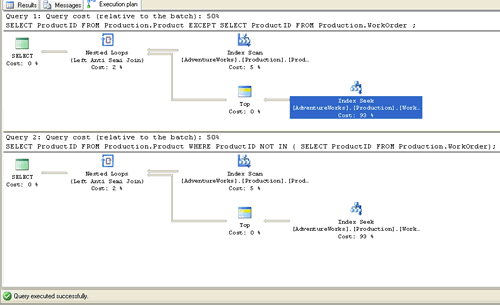
Following the execution plan which indicates EXCEPT and NOT IN uses same execution plan. Click on below image to see larger image.
Reference : Pinal Dave (http://blog.SQLAuthority.com)


Pinal,
I would suggest against a NOT IN clause as any time a NULL comes back in the NOT IN set, the query will bring back an empty set.
NOT EXISTS seems like a better option, as NULLs do not cause the same problems and runs with the same performance.
SELECT ProductID
FROM Production.Product P
WHERE NOT EXISTS (
SELECT ProductID
FROM Production.WorkOrder W
WHERE P.ProductID = W.ProductID);
My two cents.
Reeves
There are centain shortcomings while using EXCEPT with TOP expression
When you want to retrieve TOP 1 row from the query, you may get 0 rows, even though there might be many qualifed rows.
This will happen when the first row in the left query is present in the right query.
Example
SELECT TOP (1) ProductID
FROM Production.Product
EXCEPT
SELECT ProductID
FROM Production.WorkOrder ;
Again, when you try to retieve TOP 100, you may get less than 100 rows.
This will not happen when you use NOT IN.
Mahender Pabba
Mahender in above query there is no qualified rows. That is why it is not retrieving any rows for you.
Regards,
Pinal Dave(SQLAuthority.com)
Pinal,
Even if you have qualified rows still you wont get desired result
Example
create table t1 (Product_Id tinyint)
create table t2 (Product_Id tinyint)
insert into t1 values (1)
insert into t1 values (2)
insert into t1 values (3)
insert into t1 values (4)
insert into t2 values (1)
select * from t1
except
select * from t2
Result (3 rows)
2
3
4
select top 1 * from t1
except
select * from t2
Result (0 rows)
select top 2 * from t1
except
select * from t2
Result (1 rows)
2
Regards,
Mahender Pabba
Hi Mahender,
I think this is quite Interesting but could you may explain why with TOP 1 no rows are returned…
thanks in advance!
Hi Mahender,
Try the below one to get the top1 row
select top 1 * from
(
select * from t1
except
select * from t2) as t
Since in your earlier query top CLAUSE is applied on first select statement, so the resultant is what used for except operation.
Regards,
Thivya
The performance of EXCEPT is very bad compared with NOT IN.
Hi,
How can I use NOT IN clause if I have 2 different conditions to check on my query? Here, I can have valid repeating values for both EmpId and GlobalRoldId as in the example below. Right now, I am using an EXCEPT clause though its working fine right now.
For e.g:
SELECT EmpId, GlobalRoleId
FROM dbo.tbl_PTS_EmpEntityRoleMapping
EXCEPT
SELECT EmpId, GlobalRoleId
FROM EmpEntityRoles
Thanks in advance.
You can do it with Not exists in this way
SELECT EmpId, GlobalRoleId
FROM dbo.tbl_PTS_EmpEntityRoleMapping a
where Not Exists
( SELECT * FROM EmpEntityRoles b
where b.EmpId = a.EmpId
and b.GlobalRoleId = a.GlobalRoleId
)
Pötyös
Does anybody know how to compare columns of two records, and replace values in SQL server 2003.
For example, if I have:
Class ID TeacherID Start Date
100 105 9/5/05
100 105 12/5/05
Lets say I have several record sets like this. How do I compare values of similar record sets to get the earliest start date? Thanx!
You can use this :
select classID , TeacherID, max(startDate) from tablename group by classID , TeacherID
Hi.
I have two tables with Same no. of columns.
We can use joins.
How can i get the rows that are different?
Thanks in advance.
I get the results I want when I use Except but it returns no rows when I use NOT IN. Why is this?
SQL SERVER 2005
SELECT RIGHT(Username,6) From Table1
Where RIGHT(Username, 6) NOT IN (Select RIGHT(Username, 6) from Table2)
returns 0 rows
SELECT RIGHT(Username, 6) From Table1
Except (Select RIGHT(Username, 6) from Table2)
returns 3 rows like I expect.
Is it due to the RIGHT modification and its evaluation?
Hi
I got the result from this topics,
Thanks
Hi,
The following is a query which works with not in. How do I get the same output on sql server?
select col1
from table1
where (col2, col3) not in
(select colA, colB
from table 2)
[Here, colA ~ col2 and colB ~ col3, so the data types are same]
Any help will be appreciated!
Thanks,
Kalpa
Hi i have two tables
I have to compare this 2 tables…,
Now which dates are not in table1 that date and that ename have to come in select statement
Table1:
TSID TSdate EName
100 7-21-2008 Name1
101 7-21-2008 Name1
102 7-22-2008 Name1
103 7-26-2008 Name1
104 7-23-2008 Name2
105 7-25-2008 Name2
Table2:
Nodates
7-21-2008
7-22-2008
7-23-2008
7-24-2008
7-25-2008
7-26-2008
output:
Date Name
7-23-2008 Name1
7-24-2008 Name1
7-25-2008 Name1
7-21-2008 Name2
7-22-2008 Name2
7-24-2008 Name2
7-26-2008 Name2
how to do that
@compare 2 tables
I am sure there must be other ways to do this, I used a cursor and while loop,
This can also be done with one cursor with out using a while loop, since the third column in first table contains duplicate rows, the cursor will be executed many times ( how many duplicate rows you have in column 3 in first table, that many times) I thought that would unneccarily consume performance so I chose cursor and while loop to increase performance of the query.
In short, this is also performence consuming, but I could not think of anything else,.. this is atleast a better one in my view..
Here starts your code….
CREATE TABLE TABLE_1 (TSID INT, TSDATE VARCHAR(10), ENAME VARCHAR(10))
INSERT INTO TABLE_1 (TSID , TSDATE, ENAME )
SELECT 100, ’7-21-2008′ ,’NAME1′UNION ALL
SELECT 101, ’7-21-2008′, ‘NAME1′UNION ALL
SELECT 102, ’7-22-2008′, ‘NAME1′UNION ALL
SELECT 103, ’7-26-2008′, ‘NAME1′UNION ALL
SELECT 104, ’7-23-2008′, ‘NAME2′UNION ALL
SELECT 105,’7-25-2008′, ‘NAME2′
CREATE TABLE TABLE_2 (NODATES VARCHAR(10))
INSERT INTO TABLE_2 (NODATES)
SELECT ’7-21-2008′UNION ALL
SELECT ’7-22-2008′ UNION ALL
SELECT ’7-23-2008′UNION ALL
SELECT ’7-24-2008′UNION ALL
SELECT ’7-25-2008′UNION ALL
SELECT ’7-26-2008′
We created two tables, and inserted the sample data given by you,
I am creating two temporary tables, and then I dropped those two temporary tables at the end of the code.
SET NOCOUNT ON
DECLARE @ENAME VARCHAR(10)
DECLARE @DATE VARCHAR(10)
DECLARE @VAR INT
CREATE TABLE #RESULT ( DATE VARCHAR(10), NAME VARCHAR(10))
CREATE TABLE #TEMP1 (ID INT IDENTITY, ENAME VARCHAR(10))
INSERT INTO #TEMP1(ENAME) SELECT DISTINCT ENAME FROM TABLE_1
DECLARE @CUR CURSOR
SET @CUR = CURSOR FOR
SELECT DISTINCT NODATES FROM TABLE_2
OPEN @CUR
FETCH NEXT
FROM @CUR INTO @DATE
WHILE @@FETCH_STATUS = 0
BEGIN
SET @VAR = 1
WHILE @VAR < = (SELECT COUNT(1) FROM #TEMP1)
BEGIN
SELECT @ENAME = ENAME FROM #TEMP1 WHERE ID = @VAR
IF EXISTS ( SELECT TSDATE FROM TABLE_1 WHERE TSDATE = @DATE)
BEGIN
IF EXISTS (SELECT ENAME FROM TABLE_1 WHERE TSDATE = @DATE AND ENAME @ENAME )
BEGIN
INSERT INTO #RESULT (DATE , NAME ) SELECT @DATE ,@ENAME
END
END
ELSE INSERT INTO #RESULT (DATE , NAME) SELECT @DATE, @ENAME
SET @VAR = @VAR +1
END
FETCH NEXT
FROM @CUR INTO @DATE
END
CLOSE @CUR
DEALLOCATE @CUR
SELECT * FROM #RESULT ORDER BY NAME , DATE
DROP TABLE #TEMP1
DROP TABLE #RESULT
GO
Result :
7-23-2008 Name1
7-24-2008 Name1
7-25-2008 Name1
7-21-2008 Name2
7-22-2008 Name2
7-24-2008 Name2
7-26-2008 Name2
Hope this helps,
Thanks,
Imran.
Just wanna say thanks, found this useful. Cheers.
Hello Sir,
I used topic
“17 Responses to “SQL SERVER – 2005 Comparison EXCEPT operator vs. NOT IN””of( Reeves on July 19, 2007 at 9:57 am
)
It helped me lot in my problem.Thanks lot.
Thank you very much.
See you again.
Nandkishor
[...] SQL SERVER – 2005 Comparison EXCEPT operator vs. NOT IN [...]
Hi all,
I want to compare two tables from two databases,where one is original database and another one is local database table.
Now,how do i compare both the tables,such that.when compared with original database if any record or column is updated in the local database,it should return me updated records.
Using Java and SQL ,how can i do this.Please reply as earle as possible.
Thanks in Advance!!!
Hi Sudha
you can do this with a timestamp column, everytime record is created or update you need to update the timestamp and than to find updated rows you just need to check the timestamp in orginal and local db.
You can also use red-gate to compare data and sql it’s very good DB tool.
USE TDB;
GO
SELECT Sim_No
FROM Sim_Record
EXCEPT
SELECT Sim
FROM Test_in
I need Result Drop In To New Table
i am having to retrive multipul condition any one can help regading this problem.thanks for advance
how to retrive the result set i want to search
i want to search from the result table
Hey pinal i read your blog a lot but never commented or asked question . This is the first time .
What i came across is this
i have a table with around 90000 rows .
45000 where source_flag=1 and 45000 where target_flag=1
i was using a not in query like this
SELECT value FROM die_domain_log WHERE source_flag =1 AND log_id=103
NOT IN ( SELECT i.value FROM die_domain_log i WHERE i.target_flag =1 AND i.log_id=103 )
When executed it didnt returned any results for like 15-20 mins i stoped it .
Then i changed it to except it took less than a sec to return the result .
SELECT value FROM die_domain_log WHERE source_flag =1 AND log_id=103
EXCEPT
SELECT i.value FROM die_domain_log i WHERE i.target_flag =1 AND i.log_id=103
why is this happening ?
@Shrikanth Patil.
Your first select statement is not valid. I am not sure if it could ever execute, because you are not specific about what to be search for NOT IN.
Anyways below is a working example, consider this example and let us know if this is what you were expecting.
Example Script :
create table #die_domain_log ( Value int identity , source_flag int , target_flag int, log_id int )
insert into #die_domain_log values ( 1, NULL , 103)
insert into #die_domain_log values ( NULL , 1, 103)
Select * from #die_domain_log
– Here you need to be specific what to search for NOT IN, I have include Value as a search criteria for NOT IN.
SELECT value
FROM #die_domain_log
WHERE source_flag =1
AND log_id=103
AND value
NOT IN
(
SELECT i.value
FROM #die_domain_log i
WHERE i.target_flag =1
AND i.log_id=103
)
– OR ( below is same as you posted)
SELECT value FROM #die_domain_log WHERE source_flag =1 AND log_id=103
EXCEPT
SELECT i.value FROM #die_domain_log i WHERE i.target_flag =1 AND i.log_id=103
~ IM.
Sorry i forgot to add where value IN in the above post . In actual ‘m using the same query u have return it works for small number of rows also . but when i have 90000 rows as i said above it doesnt work the way it should .
Can any one help me with such a query below.
SELECT DISTINCT Building WHERE Building IS NOT NULL
AND Building NOT LIKE ‘%School%’
AND Building NOT LIKE ‘%Church%’
AND Building NOT LIKE ‘%Rectory%’
AND Building NOT LIKE ‘%Public House%’
AND Building NOT LIKE ‘%Retail Park%’
AND Building NOT LIKE ‘%Railway Station%’
AND Building NOT LIKE ‘%Post Office%’
AND Building NOT LIKE ‘%Court%’
AND Building NOT LIKE ‘%Floor%’
AND Building NOT LIKE ‘%Flat%’
AND Building NOT LIKE ‘%Former%’
AND Building NOT LIKE ‘%Lodge%’
basically as per my requirement, the list in the not like might increase daily, I dont find the query good with the whole list as above. Is there a way I can avoid it.
Please suggest.
@Sucharitha
Ideally there should be a type field instead of searching a name for the type.
If there is a list that will be managed daily, perhaps another TABLE would be best. Then the query could use a join and not have to change.
Hello Brian,
Thank you for the suggestion which was obviously in my mind. I am new into the team and company, and the application has been built and stabilised. I need to study it better before i make any changes to the DB.
But at this time, I have been asked to get a quick report where I need to filter on something like this. Is there any other quick solution running in your mind?
@Sucharitha
I don’t know of any. (Though i am not an expert.)
It seems that every field would need to be scanned, resulting in a full table scan. Indexing won’t even help because it would be indexing off the description and not the part that you want.
Thanks for sharing the needed information!
Thanks Brian,
Very good point!
Is there script in SQL SERVER to support multi fields like Oracle in “WHERE (col1,col2) NOT IN(…)” ?
Here is the script I want to run bot not support in SQL Server. It works in Oracle. [INSTITUTION],[CODE] ,[EFF_DATE] are composite primary key.
SELECT *
from DDEF_CRS_Stage
where ([INSTITUTION]
,[CODE]
,[EFF_DATE])
NOT IN
(
select [INSTITUTION]
,[CODE]
,[EFF_DATE] from DDEF_CRS_Stage
group by [INSTITUTION]
,[CODE]
,[EFF_DATE]
Having COUNT(*) > 1
)
Thank you.
@david
Like Pinal said, make it an EXISTS. I’d like to add, that the NOT IN (or NOT EXISTS) can be IN (or EXISTS) as it can be checked to = 1 instead of being NOT > 1.
However, the best of all is to use neither. Since the query limits the results to one record per group (as any groups with multiple records are excluded) using aggregates will have no effect on the results:
SELECT
[INSTITUTION],
[CODE],
[EFF_DATE],
MAX(Col1),
MAX(Col2),
MAX(Col3)
FROM
DDEF_CRS_Stage
GROUP BY
[INSTITUTION],
[CODE]
[EFF_DATE]
HAVING
COUNT(*) = 1;
Hello David,
Multiple columns in single where clause is not supported in SQL Server. You have to write a saperate NOT IN clause fora each column.
Another better way to perform the same thing is using NOT EXISTS clause where you would not have to write saperate subquery for each column.
Kind Regards,
Pinal Dave
Hi Sucharitha,
Eevery time your are checking with only one column, “building”. So create a separate table with a single column. ex tblBuildingList(strBuilding VARCHAR(100).
INSERT INTO tblBuildingList(strBuilding) VALUES(%School%)
INSERT INTO tblBuildingList(strBuilding) VALUES(%Church%)
…….
select Building from yourTableName tbl
INNER JOIN tblBuildingList bld ON
tbl.Building NOT LIKE bld.strBuilding
I think it ll solve your problem, bcz no need to change the query when ever adding new list. just insert the list value into the tblBuildingList.
Thanks
Hi Brian and Pinal
Your guys are rocks!
I like the solution such as
SELECT
[INSTITUTION],
[CODE],
[EFF_DATE],
MAX(Col1), –solve the problem with column not group by
MAX(Col2),
MAX(Col3)
FROM
DDEF_CRS_Stage
GROUP BY
[INSTITUTION],
[CODE]
[EFF_DATE]
HAVING
COUNT(*) = 1;
The following code, I have to use table variables to solve the same problem in SQL Server.
declare @tbl table([INSTITUTION] varchar(4)
,[CODE] varchar(20)
,[EFF_DATE] datetime);
Insert into @tbl
select [INSTITUTION]
,[CODE]
,[EFF_DATE] from DDEF_CRS_Stage
group by [INSTITUTION]
,[CODE]
,[EFF_DATE]
Having COUNT(*) > 1;
select * from DDEF_CRS_Stage
EXCEPT
(
select * from DDEF_CRS_Stage
where [INSTITUTION] IN
(select [INSTITUTION] from @tbl)
AND [CODE] IN
(select [Code] from @tbl)
AND [EFF_DATE] IN
(select [EFF_DATE] from @tbl)
)
Have a fun with your guys.
David
–following except is not working
select ad.code ,ad.description, count (di.cod_acct_no)as “No of Cards” from account_master d, accountinfo di, branch ad
where d.p_acct_no=di.cod_acct_no and ad.branchid=di.branchid
and di.dat_acct_open between ’2010-02-27 00:00:00′
and ’2010-03-11 00:00:00′
and d.iss_date between ’2010-02-27 00:00:00′
and ’2010-03-11 23:59:00′
and accounttypeid in (1,2,3,55)
group by ad.code, ad.description
order by ad.code, ad.description
EXCEPT
select ad.code ,ad.description, count (di.cod_acct_no)as “No of Cards” from account_master d, accountinfo di, branch ad
where d.p_acct_no=di.cod_acct_no and ad.branchid=di.branchid
and di.dat_acct_open between ’2010-02-20 00:00:00′
and ’2010-03-11 00:00:00′
and d.iss_date between ’2010-02-20 00:00:00′
and ’2010-03-11 23:59:00′
and accounttypeid in (1,2,3,55)
group by ad.code, ad.description
order by ad.code, ad.description
–
how to use IN Operater in sQl procedure
tel if u can………………..
this is query??????????
Hi;
any opinion about why the first query returns data but the second and third query not return data?
select 1 where 1 in (null, 1, 2, 3);
select 1 where 10 not in (null, 1, 2, 3);
select 1 where not 10 in (null, 1, 2, 3);
Hi,
This is due the Ansi_nulls property ON.
In the first statement
select 1 where 1 in (null, 1, 2, 3);
The compiler take the value 1 and compares whether it exists in the “in ” list(null,1,2,3) and outputs ’1′.
In 2nd stmt
select 1 where 10 not in (null, 1, 2, 3); the compiler takes the value 10 and tries to compare with null. sinc ethe Ansi_nulls is set On it will not equate to null and hence returns no result set.
In 3rd statement
Similar to the 2 nd statement.
When you turn off the set Ansi_nulls as ‘OFF’ all the 3 select staement will return 1 as value.
What should i do if i want to return only the columns that do not match for 2 tables ?
Any help is appreciated.
Hi all,
I want to compare two tables from one databases,
how do i compare both the tables,such that.when compared with table’s columns if any records of column is updated in the either of two table’ columns,it should return me updated records.
(hints Table1 is old and Table2 to is new updated one and columns are same name as well as data type)
please help me.
Hello Sir,
ALTER PROCEDURE [dbo].[Select_Data_zonetext]
@ZoneCode varchar(200),
@id bigint
AS
BEGIN
SET NOCOUNT ON;
select * from tb_xxx where ZoneCode IN(@ZoneCode) and id=@id
END
the above sample stored procedure not shows any error but not retrieve required information.. please help me about this . thanks in advance
The select statement should be
select * from tb_xxx where ‘,’+@ZoneCode+’,’ like ‘%,’+cast(ZoneCode as varchar(10))+’,%’ and id=@id
Thanks for this – I’ve spent ages working out why my NOT IN returns inconsistent results – there were NULLs in my list!
Nice share
I have a problem , i need to put multiple conditions added with OR operator inside a conditional statement like we do in the common programming language like
if( a==”2″ || b==”3″)
{
}
else
{
}
i want the same in T-SQL , can you help me !!
You can use IF-ELSE statement in T-sql too. Refer this post http://beyondrelational.com/blogs/madhivanan/archive/2010/08/11/various-usages-of-if-else-clause-in-sql-server.aspx
Also post some sample data with eected result
hello all,
the NOT IN is not working for me in the below script, but does work when i use EXCEPT. can you tell me why is this happening?
below are my script:
– this one returns an empty dataset
SELECT DISTINCT dbo.tblGrant.GrantID FROM dbo.tblGrant WHERE dbo.tblGrant.GrantID NOT IN
(SELECT distinct dbo.tblBeneficiaryServices.GrantID FROM dbo.tblBeneficiaryServices ) AND dbo.tblGrant.GrantID NOT IN
(SELECT DISTINCT dbo.tblBeneficiaryServiceLog.GrantID FROM dbo.tblBeneficiaryServiceLog )
– this one returns over 900 records
SELECT DISTINCT dbo.tblGrant.GrantID FROM dbo.tblGrant EXCEPT
(SELECT distinct dbo.tblBeneficiaryServices.GrantID FROM dbo.tblBeneficiaryServices union
SELECT DISTINCT dbo.tblBeneficiaryServiceLog.GrantID FROM dbo.tblBeneficiaryServiceLog )
I find in some cases a comparative join offers more flexibility and may perform better as well. A trivial example would read something like
select col1, col2, col3
from table1 t1
left outer join table2 t2 on t2.col1 = t1.col1
where t2.col1 is null
This assumes a grain match between the two related columns. To acount for grain mismatch where multiple rows exist in t2 for each row in t1 this can be tuned as
select col1, col2, col3
from table1 t1
left outer join (select distinct col1 from table2) t2 on t2.col1 = t1.col1
where t2.col1 is null
What I like about this approach is that the object we check against can include any number of checks and conditions within the inline view and the comparison list is whatever you want ti to be.
thank you sir
Hi , i am having one table in which i am having unique audit history id . i want to compare both the rows and get only those columns whose values are different and leave the remaining columns. is it possible?????
i want to know how the except operator perform in sql….. plz clear my confusion bcoz i already read about this by book or in net but my cinfusion is still same….
select * from table1
except
select * from table2
The result is all the rows from table1 which are not available in table2