
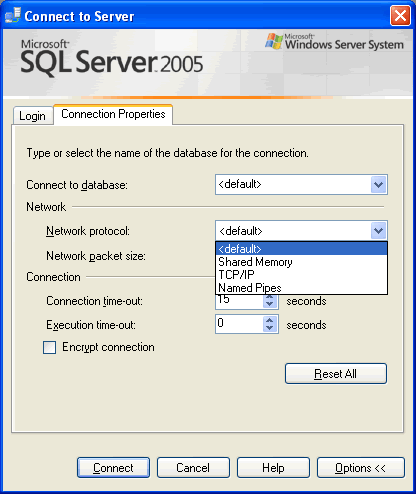
How to change connection properties in SSMS as you connect, like using named pipes instead of TCP/IP, as I do for one of our servers. Screenshots show each step.
SQL SERVER – 2005 – Open SSMS From Command Prompt – sqlwb.exe Example
Open SSMS from command prompt with the sqlwb command. I show its syntax and the switches I use, like -E and -nosplash, to start Management Studio.

SQL SERVER – 2005 – SSMS – Enable Autogrowth Database Property
How to enable Autogrowth for a database in SSMS: open the database Properties, go to Files and click the small button in the Autogrowth column.
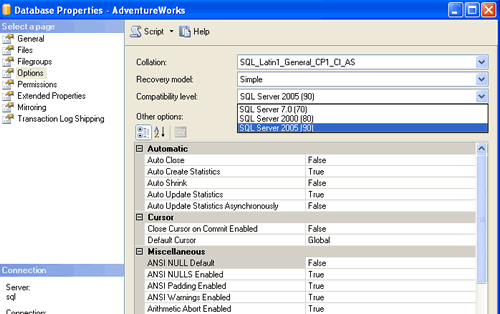
SQL SERVER – 2005 Change Database Compatible Level – Backward Compatibility – Part 2 – Management Studio
How to change database compatible level in SQL Server Management Studio: right click the database, open Properties, then Options, and pick the level you need.

SQL SERVER – 2005 – SSMS Change T-SQL Batch Separator
A big script used EndBatch instead of GO. Rather than a risky mass replace, I changed the Batch Separator in SSMS under Tools, Options, and it ran as is.

Last Line of a SQL Script: The Joke Every DBA Has Lived
The last line of a SQL script decides whether your work is saved, rolled back, or still holding locks. Here are the classic endings and how to check them.

SQL SERVER – Query Analyzer Short Cut to display the text of Stored Procedure
A quick Query Analyzer shortcut: map sp_helptext to a key, select any SP name and display the text of Stored Procedure right in the result window.