This month's discount Comprehensive Database Performance Health Check · Testimonials
SQLAuthority with Pinal Dave
Home
  • Consulting
    • Health Check
  • Free Videos
  • All Articles
    • AI
    • SQL Performance
    • SQL Tips and Tricks
    • Interview Questions and Answers
    • SQL Puzzle
    • SQL Video
    • SQLAuthority News
    • Personal
  • Books
  • Consulting
SQL SERVER - How to Recover Truncated or Deleted Data When a Database Backup is or is not Available

SQL SERVER – How to Recover Truncated or Deleted Data When a Database Backup is or is not Available

August 9, 2016
Pinal Dave
SQL Tips and Tricks
ApexSQL, SQL Backup and Restore, SQL Log, SQL Server

Accidentally deleted or truncated rows? I walk through three recovery scenarios for deleted data, with and without a usable database backup.

Read More
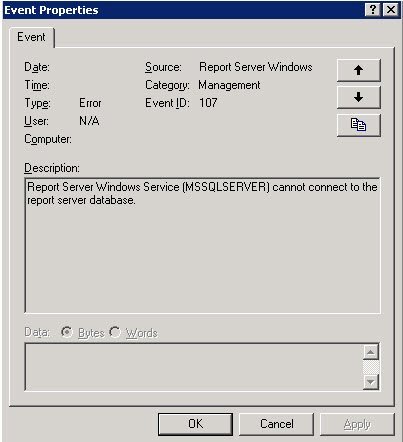
Event Properties window.

SQL SERVER – Event ID 107- Report Server Windows Service (MSSQLSERVER) cannot connect to the report server database.

June 4, 2016
Pinal Dave
SQL Tips and Tricks
Reporting Services, SQL Error Messages, SQL Log, SQL Server

Event ID 107 says the Report Server Windows service cannot connect to the report server database. Here is how I fixed it.

Read More
Repair dialog box.

SQL SERVER – Network Name resource fails to come online in a Windows Server 2008 R2 Failover Cluster

April 13, 2016
Pinal Dave
SQL Tips and Tricks
SQL Error Messages, SQL Log, SQL Server, SQL Server Cluster

After adding a new disk, a client’s cluster Network Name resource would not come online in a Windows Server 2008 R2 Failover Cluster. Here is what we found.

Read More
SQL Server Error Log Files.

SQL SERVER – Drive Space Full Due to MDMP Files

April 12, 2016
Pinal Dave
SQL Tips and Tricks
SQL Error Messages, SQL Log

A client’s C drive kept filling up, and the transaction log was not to blame. SQL dump files were. Here is what caused this Drive Space Full issue.

Read More
SQL SERVER - Identifying Database Default Locations for Data and Logs

SQL SERVER – Identifying Database Default Locations for Data and Logs

April 8, 2016
Pinal Dave
SQL Tips and Tricks
SQL Log, SQL Scripts, SQL Server

Going back to basics can still teach you something new. Here are ways to identify the Database Default Locations for data and log files in SQL Server.

Read More
SQL SERVER - What is DBCC TRACEON and DBCC TRACEOFF messages in ERRORLOG?

SQL SERVER – What is DBCC TRACEON and DBCC TRACEOFF messages in ERRORLOG?

April 6, 2016
Pinal Dave
SQL Tips and Tricks
SQL Log, SQL Server, SQL Server DBCC

A client asked about DBCC TRACEON and DBCC TRACEOFF messages in the ERRORLOG. Here is what they mean, using trace flag 1222 for deadlock logging as an example.

Read More
SQL SERVER - Finding If Status of Bulk Logging Enabled or Not From Logs

SQL SERVER – Finding If Status of Bulk Logging Enabled or Not From Logs

March 31, 2016
Pinal Dave
SQL Tips and Tricks
SQL Backup and Restore, SQL Log, SQL Scripts, SQL Server

A friend’s SSIS jobs switch a database to Bulk-Logged and back again. Here is how to find which of his log backups ran with Bulk Logging Enabled.

Read More
Previous 1 … 5 6 7 8 9 10 Next
  • Books
  • Testimonials
  • Privacy Policy

© 2006 – 2026 All rights reserved. pinal @ SQLAuthority.com