This month's discount Comprehensive Database Performance Health Check · Testimonials
SQLAuthority with Pinal Dave
Home
  • Consulting
    • Health Check
  • Free Videos
  • All Articles
    • AI
    • SQL Performance
    • SQL Tips and Tricks
    • Interview Questions and Answers
    • SQL Puzzle
    • SQL Video
    • SQLAuthority News
    • Personal
  • Books
  • Consulting
Title card: New Parallel Operation Cannot Be Started

SQL SERVER – New Parallel Operation Cannot be Started Due to Too Many Parallel Operations Executing at this Time

February 13, 2019
Pinal Dave
SQL Tips and Tricks
Parallel, Reporting Services, SQL Backup and Restore, SQL Error Messages, SQL Server

A client’s ERRORLOG said: New parallel operation cannot be started due to too many parallel operations executing at this time. Here is what I found behind it.

Read More
SQL SERVER - Reporting Services Not Starting After Maintenance Window

SQL SERVER – Reporting Services Not Starting After Maintenance Window

October 25, 2018
Pinal Dave
SQL Tips and Tricks
Reporting Services, SQL Error Messages, SQL Reports, SQL Server

Reporting Services not starting after maintenance? On my lab server every SQL service came back except SSRS. Here is what the log showed.

Read More
A hand fitting a new red lampshade onto an existing brass lamp base, a boxed new lamp pushed aside

SQL SERVER – Install Error – The Reporting Services Catalog Database File Exists. Select a Reporting Services files-only mode installation

August 9, 2018
Pinal Dave
SQL Tips and Tricks
Reporting Services, SQL Error Messages, SQL Server

A remote command-line install of SQL Server failed with: The Reporting Services catalog database file exists. Here is how I helped my client fix it.

Read More
Report Server Database Configuration Manager.

SQL SERVER – The Report Server Cannot Open a Connection to the Report Server Database. (rsReportServerDatabaseLogonFailed)

March 22, 2018
Pinal Dave
SQL Tips and Tricks
Reporting Services, SQL Connection, SQL Error Messages, SQL Reports, SQL Server

A report viewer failed with rsReportServerDatabaseLogonFailed: the report server cannot open a connection to the report server database. Here is the fix.
Read More
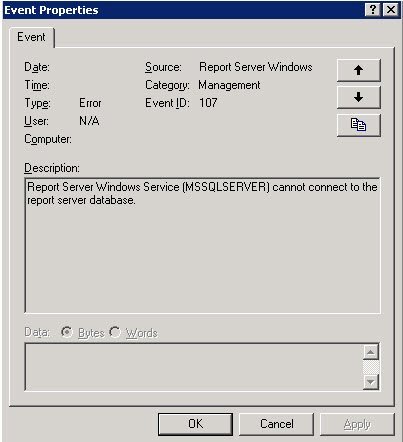
Event Properties window.

SQL SERVER – Event ID 107- Report Server Windows Service (MSSQLSERVER) cannot connect to the report server database.

June 4, 2016
Pinal Dave
SQL Tips and Tricks
Reporting Services, SQL Error Messages, SQL Log, SQL Server

Event ID 107 says the Report Server Windows service cannot connect to the report server database. Here is how I fixed it.

Read More
Two hands lifting an old wooden strongbox onto a moving trolley, its iron key tied to the handle with red string.

Moving SSRS Reports to a New Server

April 13, 2014
Pinal Dave
SQL Tips and Tricks
Reporting Services, SQL Backup and Restore, SQL Migration, SQL Reports, SQL Server

Moving SSRS reports to a new server requires the ReportServer databases, encryption key, data source checks, and subscription rehearsal.

Read More
A tall floodlight lighting an entire empty car park at night, one small bicycle standing in a far corner.

SSRS Parameters That Do Not Slow Reports

July 28, 2013
Pinal Dave
SQL Performance
Parameter Sniffing, Reporting Services, SQL Performance, SQL Reports, SQL Server

SSRS parameters work best with selective defaults, compact value lists, and SQL queries that preserve useful indexes under real filters.

Read More
1 2 Next
  • Books
  • Testimonials
  • Privacy Policy

© 2006 – 2026 All rights reserved. pinal @ SQLAuthority.com