SQL SERVER – FIX – Error 3201 – Cannot open backup device. Operating system error 3

This blog is in continuing to use the default values. Earlier this week I wrote a blog which talked about the failure of Create Database Command. Let see in this blog post how we can solve the error 3201.

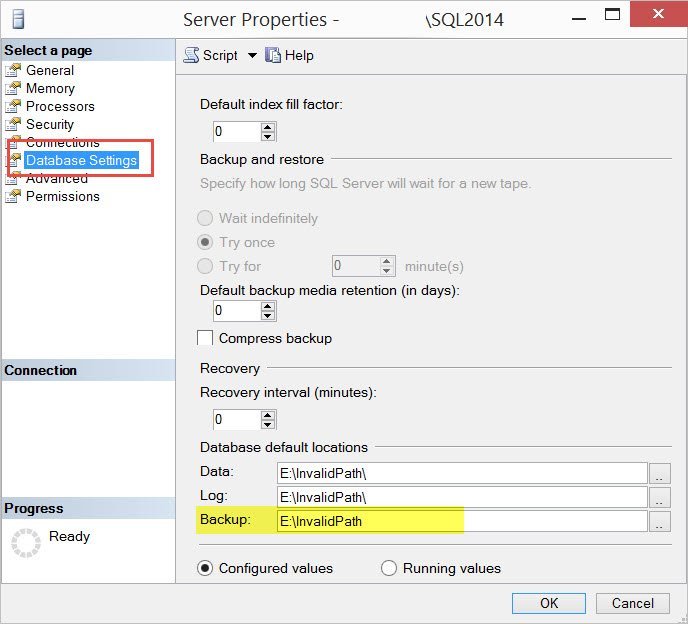
While working on the reproduction of the issue, I changed the parameters and later realized that the backup database command was also failing. If you rely on the default values for folders that don’t exist, this will raise an error message as shown below.

Read More

SQL SERVER – Error: Fix: Msg 5133, Level 16, State 1, Line 2 Directory lookup for the file failed with the operating system error 2(The system cannot find the file specified.) – Part 2

Errors are a great starting point for learning. Especially, my inbox is always flooded with atleast 2-3 error messages almost every other day. People keep asking me how to solve them, what to do when we encounter an error and so on. Long time back I wrote a simple blog…
Read More

SQL SERVER – Error: Msg 701, Level 17, State 103. There is insufficient system memory in resource

Talking and exploring In-Memory topics in SQL Server 2014 has been interesting to me. When I wrote the blog around table variable not being just an In-Memory structure, one of my course listener (SQL Server 2014 Administration New Features) pinged me on twitter to ask, if In-Memory OLTP was really In-Memory? Wouldn’t SQL Server like to swap the data or memory data to pagination file when there is memory pressure? I told them the concept of In-Memory is that data always resides in memory and the reason for a feature name “In-Memory OLTP”. Let us see how we can fix errors related to insufficient system memory.

Read More

SQL SERVER – Identify and Filter In-Memory Optimized Tables – SQL in Sixty Seconds #079

Earlier I had written a blog about SQL SERVER – Beginning In-Memory OLTP with Sample Example which covers the basics of working with In-Memory OLTP. Though that post gets you started, one of my colleague asked me if there was an easier way to identify In-Memory Tables when working with SQL Server Management Studio. As a follow up I wrote another blog post over here where I demonstrate the same with images and query over here: SQL SERVER – Filter In-Memory OLTP Tables in SSMS. In this blog post we will learn about – Identify and Filter In-Memory Optimized Tables.

Read More