

Many times I feel that I have so many blogs that I must have covered all common possible error related to usage of SQL Server. But there are few easy ones which I missed. And thanks to those who take time in sending them to me that it makes a great reminder to what I have missed till date. This blog is from one of such logon failure errors that came from a DBA from one of my consulting engagements. Since the error was simple enough, I thought to respond over mail to solve the problem.

SQL SERVER – Installation Error – The wrong diskette is in the drive. Insert (Volume Serial Number: ) into drive.
The world of working with errors always gets the better of me. It is a wonderful way to understand why SQL Server behaves in a certain way and most importantly, it helps me solve some of the problems people face on a day-to-day basis. As you might know that along with performance consultancy, I also reply to any personal email asking for help. This blog is a result of one such interaction where the client was facing an error while installing Service Pack 4 for SQL Server 2008 in a clustered environment. Let us learn about Installation Error.

SQL SERVER – Database Mail Breaks with TLS 1.0 Disabled Discovery – Notes from the Field #128
[Note from Pinal]: In this episode of the Notes from the Field series database expert Ryan Adams explains a very critical error related to Database Mail. Ryan is one guy who spends more time with real world issues with SQL Server than anything else. He has mastered the art of resolving complex errors and document them so easily that one can’t find anywhere else. In this blog post Ryan addresses a very interesting error related to Database Mail Breaks with TLS 1.0 Disabled Discovery. Read the experience of Ryan in his own words.

SQL SERVER – Unable to Start SQL Agent – SQL Server Agent Terminated (Normally)
Along with performance issues, I also provide consultancy in other break-fix issues like service not starting etc. These are not run of the mill, but on specific cases only. I always suggest my clients to search on my blog first and then contact me if needed. This is a great way to scale and make people empowered when it comes to solving some of the trivial issues that they might have encountered for SQL Server Agent.

SQL SERVER – FIX – Linked Server Error 7399 Invalid authorization specification
I have personally seen when people use Linked Server there are a number of issues from authentication to performance. These issues are part of working with something that has so many variations and permutations of actually going wrong. Many a times I suggest people to keep away from Linked Servers as much as possible. But it cannot happen all the times and there are code blocks in their application that relies on this as a requirement.
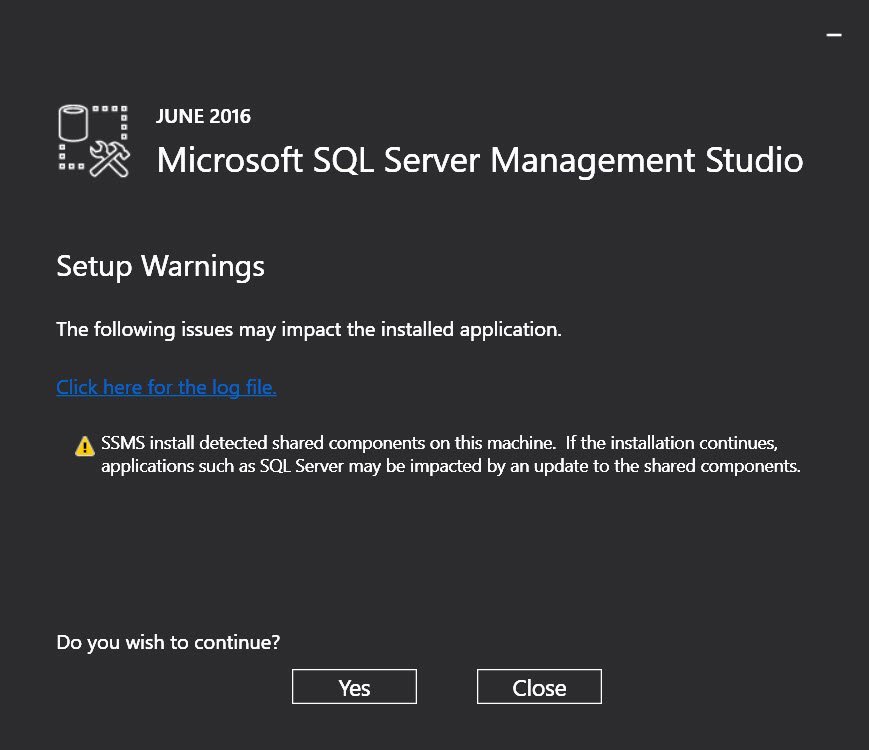
SQL Server 2016 Management Studio – Warning: SSMS install detected shared components on this machine
As soon as SQL Server 2016 Management Studio was released on 1st June 2016, I tried installing it. This is a great way to learn and I love to get going as soon as the new software gets released. I especially get excited when it is related to SQL Server. If you have not known new process to install SQL Server Management Studio, then you should read below the blog.
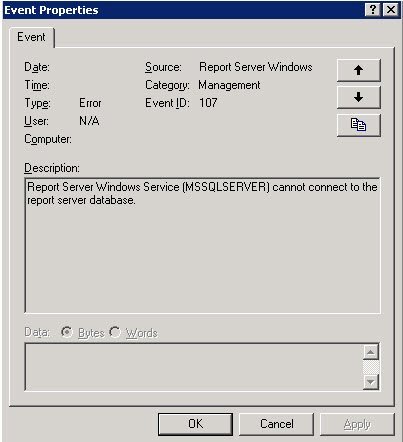
SQL SERVER – Event ID 107- Report Server Windows Service (MSSQLSERVER) cannot connect to the report server database.
Generally, I like to pick and choose the way various services are installed when working with SQL Server. I am careful not to have unnecessary services like “Reporting Services”, “Agent” etc running. I install them and keep them in a switched off state because I don’t like to keep eating away the resources on my PC during startup. But this is more of a best practice in general, I see not many doing.