
My Remote Desktop copy paste stopped working both ways while I worked on a remote SQL Server. Restarting did not help, but the fix at the end of the post did.

SQL SERVER – Fix : Error 15281 SQL Server blocked access to STATEMENT OpenRowset/OpenDatasource of
Error 15281: SQL Server blocked OpenRowset/OpenDatasource because Ad Hoc Distributed Queries is off. Turn it on in Surface Area Configuration or with sp_configure.
SQL SERVER – FIX : Error : 3702 Cannot drop database because it is currently in use.
Error 3702 says you cannot drop database because it is in use. Switch to master, find other connections and drop it safely with this fix.

SQL SERVER – DBCC CHECKDB Introduction and Explanation – DBCC CHECKDB Errors Solution
DBCC CHECKDB checks database consistency. If it reports corruption, I preserve the output and establish the recovery options.
SQL SERVER – FIX : ERROR Msg 1803 The CREATE DATABASE statement failed. The primary file must be at least 2 MB to accommodate a copy of the model database
Msg 1803: CREATE DATABASE failed because the primary file must be at least 2 MB to hold a copy of the model database. Make it larger than model and 512KB.
SQL SERVER – FIX : ERROR Msg 5174 Each file size must be greater than or equal to 512 KB
Msg 5174 says each file size must be greater than or equal to 512 KB, followed by error 1802. The fix is to create a database larger than 512KB.
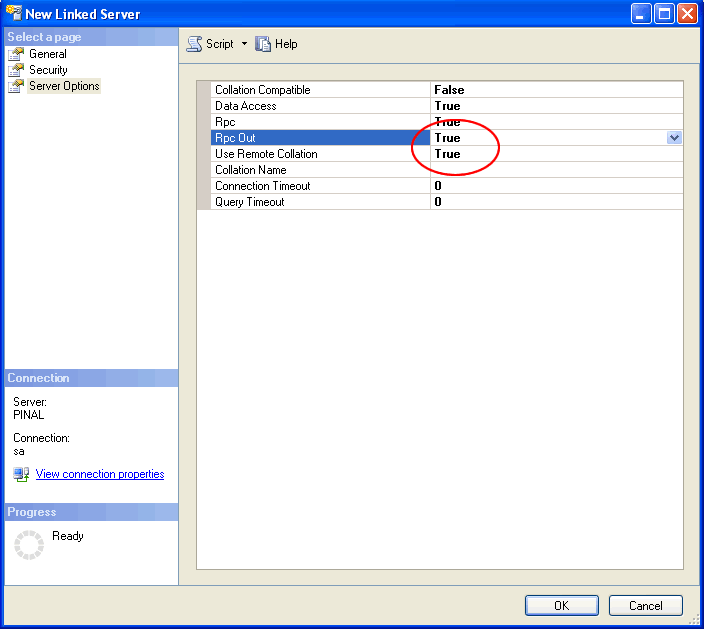
SQL SERVER – 2005 – Fix : Error : Msg 7411, Level 16, State 1 Server is not configured for RPC
Msg 7411 says the server is not configured for RPC. A Jr. DBA I am training found the fix on his own: turn the RPC option from False to True.