This month's discount Comprehensive Database Performance Health Check · Testimonials
SQLAuthority with Pinal Dave
Home
  • Consulting
    • Health Check
  • Free Videos
  • All Articles
    • AI
    • SQL Performance
    • SQL Tips and Tricks
    • Interview Questions and Answers
    • SQL Puzzle
    • SQL Video
    • SQLAuthority News
    • Personal
  • Books
  • Consulting
SQL SERVER - Fix : Error Msg 1813, Level 16, State 2, Line 1 Could not open new database 'yourdatabasename'. CREATE DATABASE is aborted.

SQL SERVER – Fix : Error Msg 1813, Level 16, State 2, Line 1 Could not open new database ‘yourdatabasename’. CREATE DATABASE is aborted.

July 21, 2007
Pinal Dave
SQL Tips and Tricks
SQL Backup and Restore, SQL Error Messages, SQL Scripts

Msg 1813 says CREATE DATABASE is aborted when you attach a database with a corrupt log. My step by step fix rebuilds the log and needs a server restart.

Read More
SQL SERVER - Fix : Error Msg 4214 - Error Msg 3013 - BACKUP LOG cannot be performed because there is no current database backup

SQL SERVER – Fix : Error Msg 4214 – Error Msg 3013 – BACKUP LOG cannot be performed because there is no current database backup

July 20, 2007
Pinal Dave
SQL Tips and Tricks
SQL Backup and Restore, SQL Error Messages, SQL Scripts, SQL Server

Fix the SQL Server error Msg 4214 and Msg 3013, where BACKUP LOG fails because no current database backup exists. Here is why it happens.
Read More
Convert Query Results.

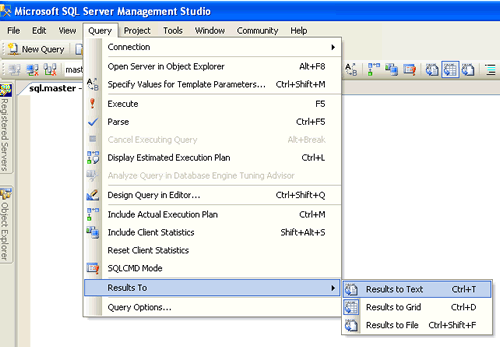
SQL SERVER – 2005 – SSMS – View/Send Query Results to Text/Grid/Files

July 19, 2007
Pinal Dave
SQL Performance
SQL Download, SQL Error Messages, SQL Joins, SQL Scripts, SQL Server DBCC, SQL Server Security

Three ways to send query results to text, grid or file in SSMS: the shortcuts CTRL+T, CTRL+D and CTRL+SHIFT+F, the toolbar, or the menu bar.
Read More
SQL SERVER - FIX : ERROR Msg 244, Level 16, State 1 - FIX : ERROR Msg 245, Level 16, State 1

SQL SERVER – FIX : ERROR Msg 244, Level 16, State 1 – FIX : ERROR Msg 245, Level 16, State 1

July 8, 2007
Pinal Dave
SQL Tips and Tricks
SQL Error Messages, SQL Function, SQL Scripts

Msg 244 and Msg 245 come from converting a value to an incompatible data type, often with CAST or ISNULL. Examples of both, and why ISNULL casts to the first type.
Read More
SQL SERVER - FIX : Error : msg 8115, Level 16, State 2, Line 2 - Arithmetic overflow error converting expression to data type

SQL SERVER – FIX : Error : msg 8115, Level 16, State 2, Line 2 – Arithmetic overflow error converting expression to data type

July 6, 2007
Pinal Dave
SQL Tips and Tricks
SQL Error Messages

Msg 8115, arithmetic overflow error, comes when a value is too big for its column, like 111111 in a TINYINT. Check the value or widen the column definition.
Read More
SQL SERVER - Fix : Error : Server: Msg 131, Level 15, State 3, Line 1 The size () given to the type 'varchar' exceeds the maximum allowed for any data type (8000)

SQL SERVER – Fix : Error : Server: Msg 131, Level 15, State 3, Line 1 The size () given to the type ‘varchar’ exceeds the maximum allowed for any data type (8000)

June 30, 2007
Pinal Dave
SQL Tips and Tricks
SQL Error Messages, SQL String

Msg 131 says the size given to varchar exceeds the maximum allowed (8000). Use VARCHAR(8000), or VARCHAR(MAX) in SQL Server 2005 as the TEXT replacement.
Read More
SQL SERVER - Fix : Error 8629 The query processor could not produce a query plan from the optimizer because a query cannot update a text, ntext, or image column and a clustering key at the same time.

SQL SERVER – Fix : Error 8629 The query processor could not produce a query plan from the optimizer because a query cannot update a text, ntext, or image column and a clustering key at the same time.

June 13, 2007
Pinal Dave
SQL Performance
SQL Error Messages, SQL Server

Error 8629 appears when one UPDATE changes a text or image column and a clustering key together. Here is why SQL Server blocks it and a fix.

Read More
Previous 1 … 106 107 108 109 110 111 112 … 114 Next
  • Books
  • Testimonials
  • Privacy Policy

© 2006 – 2026 All rights reserved. pinal @ SQLAuthority.com