This month's discount Comprehensive Database Performance Health Check · Testimonials
SQLAuthority with Pinal Dave
Home
  • Consulting
    • Health Check
  • Free Videos
  • All Articles
    • AI
    • SQL Performance
    • SQL Tips and Tricks
    • Interview Questions and Answers
    • SQL Puzzle
    • SQL Video
    • SQLAuthority News
    • Personal
  • Books
  • Consulting
A pan overflowing with fresh popcorn, a small red bowl of unpopped kernels beside it

Restoring a Backup From an Older SQL Server Version: What Changes

November 23, 2008
Pinal Dave
SQL Tips and Tricks
Compatibility Level, DBA, SQL Backup and Restore, SQL Upgrade

Restore a backup from an older SQL Server into a test database, read the upgrade messages, and check compatibility and integrity.

Read More
Gouache painting of a square bolt beside a round nut that does not fit, with the round nut painted red

Incorrect Syntax Near: When Compatibility Level Is the Cause

October 21, 2008
Pinal Dave
SQL Tips and Tricks
Compatibility Level, SQL Error Messages, SQL Scripts

Incorrect syntax near means the parser met a word it did not expect, and a low compatibility level is one cause. This post reproduces the error, shows how to read and raise the level, and covers the other common causes.

Read More
SQL SERVER - 2005 - Change Compatibility Level - T-SQL Procedure

SQL SERVER – 2005 – Change Compatibility Level – T-SQL Procedure

January 12, 2008
Pinal Dave
SQL Tips and Tricks
Compatibility Level, SQL Scripts

The safe way to change compatibility level in SQL Server 2005: single user mode, sp_dbcmptlevel, then multi user again, and how to check it.
Read More
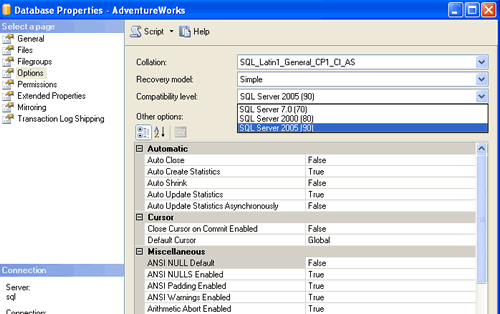
SQL Server compatible level settings.

SQL SERVER – 2005 Change Database Compatible Level – Backward Compatibility – Part 2 – Management Studio

May 31, 2007
Pinal Dave
SQL Tips and Tricks
Compatibility Level, SQL Server Management Studio

How to change database compatible level in SQL Server Management Studio: right click the database, open Properties, then Options, and pick the level you need.
Read More
SQL SERVER - 2005 Change Database Compatible Level - Backward Compatibility

SQL SERVER – 2005 Change Database Compatible Level – Backward Compatibility

May 29, 2007
Pinal Dave
SQL Tips and Tricks
Compatibility Level, SQL Scripts, SQL Stored Procedure

Use sp_dbcmptlevel to change the database compatible level, like 80 for SQL Server 2000 or 90 for 2005, plus the three step best practice to do it.

Read More
Previous 1 2 3 4 5
  • Books
  • Testimonials
  • Privacy Policy

© 2006 – 2026 All rights reserved. pinal @ SQLAuthority.com